

Servers are the quietest equipment a business owns, and that silence is exactly the problem. A laptop that fails generates an immediate complaint from the person using it. A server that is quietly running out of disk space, missing security patches, or failing its overnight backup generates nothing at all until the day it stops working entirely.
This guide covers what remote server management in fact involves, why servers get neglected in precisely the businesses that depend on them most, and how to judge whether an arrangement is really covering the work or just watching for outages.
What This Actually Includes
The term covers considerably more than someone connecting remotely when something breaks. Proper management means continuous monitoring of the conditions that predict failure, disk space, memory pressure, temperature, drive health, rather than only alerting once a service has already stopped.
It means applying security patches on a defined schedule with a tested rollback path. It means verifying that backups completed and are actually restorable, not merely that the backup job reported success. And it means capacity tracking, so a business learns it is approaching a limit months before hitting it.
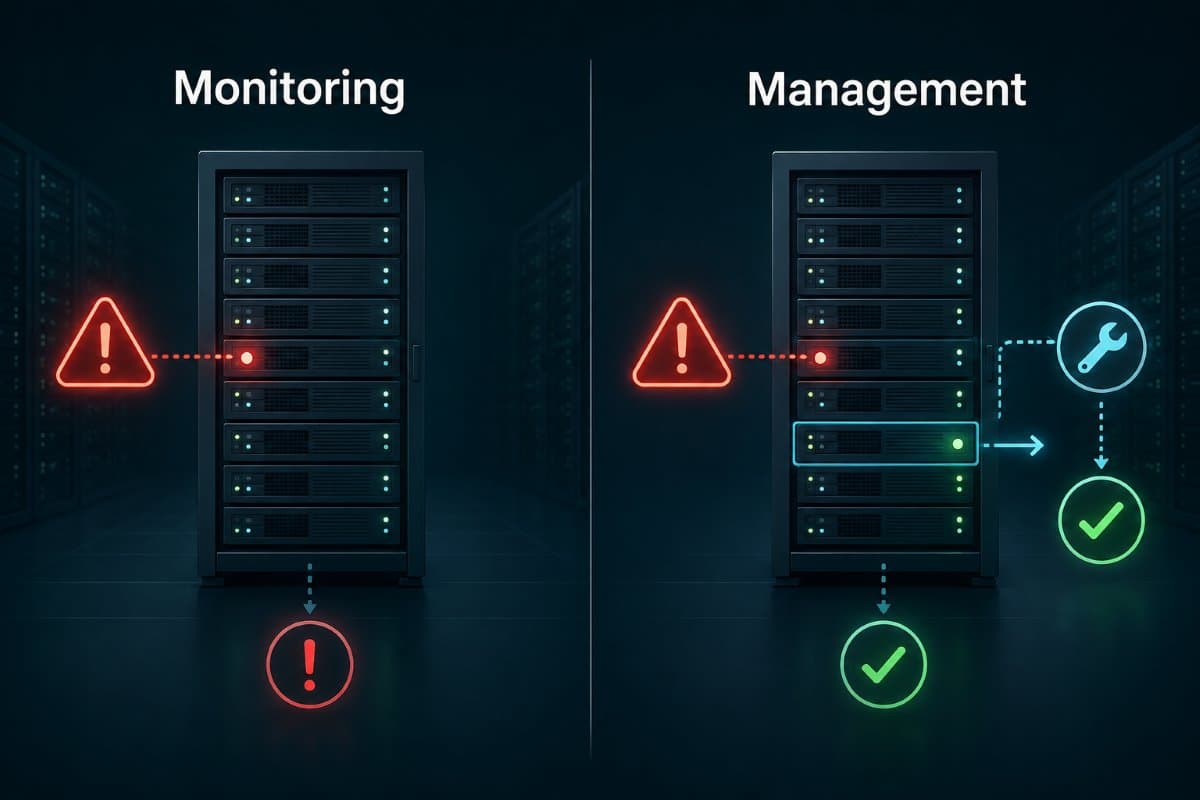
Monitoring and Management Are Not the Same Purchase
A common gap: a business buys monitoring, receives alerts, and assumes the work is covered. Monitoring tells you something is wrong; management means someone is responsible for fixing it.
Businesses should confirm explicitly which they are paying for, because an alert arriving at three in the morning with nobody obligated to act on it is a notification rather than a protection. This distinction sits at the centre of any real remote monitoring and management arrangement and is worth confirming in writing.
Why Servers Get Neglected Specifically
The neglect pattern is structural rather than careless. Servers usually sit in a closet nobody enters, run without visible symptoms, and have no user to complain on their behalf when something degrades.
They also carry a psychological deterrent: touching a working server feels risky, so patches get deferred, and deferred patches accumulate into an update that feels riskier still. This cycle is how a business ends up running a server several years behind on security updates while believing its technology is fine.
The Patch Deferral Cycle Is the Core Risk
Each individual deferral is reasonable in isolation, and the accumulation is not. A server running an operating system version past its support date is not merely outdated; it is receiving no security updates at all, which means every newly discovered vulnerability in it stays open permanently.
Breaking this cycle requires a scheduled maintenance window that exists on the calendar rather than being negotiated each time, since the version negotiated each time is always the one that gets postponed.
Aging Hardware Has a Predictable Failure Curve
Server hardware does not fail randomly. Drives, power supplies, and cooling fans are mechanical parts with expected service lives, and most report early warning through health data long before they stop working.
A managed environment tracks that data and replaces components on evidence rather than after failure. An unmanaged one discovers a drive was failing when a second one fails alongside it, which is how a redundant array becomes a data loss event.
Know the Age of What You Are Running
A simple inventory of when each server was purchased, when its warranty or support contract ends, and what it would cost to replace turns hardware planning into a budget line rather than an emergency. Businesses that skip this routinely replace equipment under the worst possible conditions, urgently and without time to compare options.
Remote Access Is Itself a Security Question
Managing a server remotely requires a pathway into it, and that pathway is exactly what an attacker wants. This is not an argument against remote management, which is genuinely the practical model for most small businesses, but it is an argument for asking specific questions about how that access is secured.
Remote administrative access should require multi-factor authentication without exception, should be limited to specific named accounts rather than shared credentials, and should generate a log of who connected and when. These are the same principles governing any other sensitive access control decision, applied to the most privileged access a business grants.
Ask Who Holds the Keys
A business should know which specific individuals at its provider can reach its servers, whether that access is revoked when someone leaves the provider, and whether the business can review the access log independently. A provider unable to answer these clearly is describing a looser arrangement than most businesses assume they are buying.
This Applies to Cloud Servers Too
Businesses running servers on a cloud platform rather than in a closet sometimes assume management is included. The platform manages the hardware underneath; the operating system, the applications, the patching, and the configuration remain the customer's responsibility on most standard arrangements.
A cloud server left unpatched is exposed in exactly the same way a physical one is, with the additional consideration that it is often more directly reachable from the internet. Confirming which layer your provider really manages, rather than assuming, is a short conversation worth having.
Comparing the Common Arrangements
What Still Needs Someone Physically Present
Remote management covers most of the work and not all of it, and being honest about the gap matters. Failed hardware needs hands: a drive replacement, a power supply, a device that will not respond to a remote restart.
A business relying entirely on remote management should know in advance who performs that physical work and how quickly they can arrive, since discovering there is no answer during an actual hardware failure is an expensive way to learn it. This is where a provider offering genuine helpdesk and IT support with a local presence differs meaningfully from a purely remote arrangement.
Environmental Conditions Need Watching Too
Server closets fail for unglamorous physical reasons: an air conditioning unit stops over a weekend, a space accumulates equipment beyond what its cooling was designed for, or a power event damages equipment that was not properly protected. Temperature and power monitoring in that space costs very little and catches a category of failure that no amount of software monitoring will see.
What Good Reporting Looks Like
A business paying for server management should receive something readable rather than a raw alert feed. Useful reporting answers a few plain questions: what was patched this month, did every backup complete and was any restore tested, how is capacity trending, and what problems were caught and resolved without anyone in the business noticing.
That last category is the one most worth seeing, because it is the entire value of the arrangement and the part that is otherwise completely invisible to the business paying for it.
What Happens During an Actual Server Failure
Businesses rarely ask what the recovery sequence looks like until they are inside it. A useful arrangement has an answer ready: who is notified, what is attempted remotely first, at what point hardware replacement is triggered, and what the realistic timeline is for each stage.
Asking a provider to walk through that sequence for your specific environment is one of the more revealing questions available during evaluation. A specific answer with named steps indicates real preparation; a general reassurance indicates the scenario has not been thought through for your particular setup.
Know Which Systems Cannot Wait
Not every server matters equally during a recovery. Identifying in advance which systems must come back first, and which can wait a day without meaningful harm, turns a chaotic recovery into a prioritized one and prevents effort going into the wrong system while the important one stays down.
Documentation Is Part of the Deliverable
A well-managed server environment comes with a current record of what exists: which servers run what, how they are configured, where credentials are held, and what depends on what. A business without that record is dependent on its provider's memory.
Requesting this documentation, and confirming the business holds its own copy, converts the arrangement from a dependency into a service. It also makes any future provider transition a straightforward project rather than an archaeology exercise.
Quiet Equipment Deserves Deliberate Attention
The businesses that experience server failures as sudden catastrophes are almost always the ones where nothing was watching the slow signals that preceded them. Remote server management done properly is unglamorous by design: patches applied on schedule, backups in fact verified, capacity tracked before it becomes urgent, and someone specifically responsible when an alert fires at an inconvenient hour.
For businesses in the region, a partner providing IT support in Thousand Oaks can review what your servers are actually running and how far behind they have fallen.
Companies across the Valley can get the same locally through IT services in the San Fernando Valley, from a first patch-status review to reporting you can read.
Frequently Asked Questions
Monitoring tells you something is wrong; management means someone is responsible for fixing it. Many businesses buy monitoring, receive alerts, and assume the work is covered, which leaves an alert arriving at three in the morning with nobody obligated to act on it. Confirming in writing which one you are paying for prevents an expensive misunderstanding.
Yes. The cloud platform manages the hardware underneath, but the operating system, applications, patching, and configuration remain the customer's responsibility on most standard arrangements. A cloud server left unpatched carries the same exposure as a physical one, with the added consideration that it is often more directly reachable from the internet.
Anything requiring physical hands: replacing a failed drive or power supply, or restarting a device that will not respond remotely. A business relying entirely on remote management should know in advance who performs that physical work and how quickly they can arrive, rather than discovering there is no answer during an actual hardware failure.
If nobody at your business can say when your servers were last patched or whether a backup restore has ever been tested, GlobeVM can answer both questions and put real remote server management in place.
Comments
0 Comments