
Imagine your office on a Monday morning when suddenly the main file server refuses to boot. Your entire team sits idle, unable to access the documents required to serve your clients. When you call your IT provider, you expect a fast response that matches the severity of the situation. If you were calling for a simple password reset, you would want a quick answer from a friendly technician. However, for a server failure, you need a senior engineer with years of specialized experience. This organized distribution of technical labor is known as the IT help desk structure.
GlobeVM provides IT helpdesk and support for Los Angeles businesses, answered by people who know your setup.
When you call IT support and the first person can solve your password reset in two minutes, that is Tier 1. When your server won't boot and they bring in a specialist with deep expertise, that is Tier 3. Everything in between is Tier 2. This three tier model is how most professional IT support organizations structure their work. While it is sometimes called different names, such as L1/L2/L3, Tier I/II/III, or Level 1/2/3, the fundamental strategy remains the same across the technology industry.
Structuring technical support this way ensures efficiency, controls operational costs, and minimizes business downtime. It allows a business to allocate the right resources to the right problems without wasting the time of senior specialists on routine tasks. By the end of this guide, you will understand exactly how IT help desk tiers work and how to evaluate or build effective IT support for your business.
What Is IT Help Desk Tier Structure?
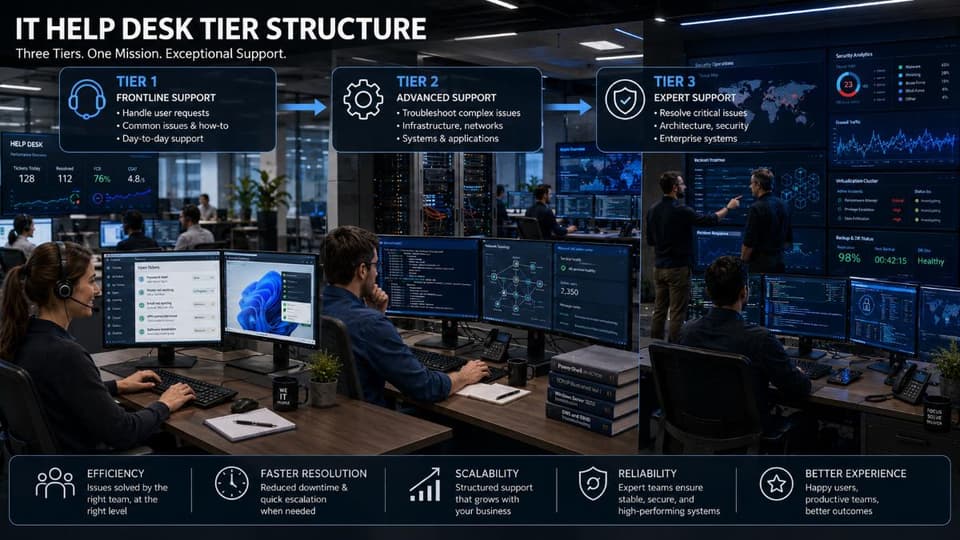
IT help desk tier structure is a layered support model that routes technical issues based on complexity. Tier 1 handles basic, common issues. Tier 2 addresses moderately complex problems requiring deeper technical knowledge. Tier 3 solves the most complex issues, often involving specialized expertise or systems level work.
Why Tiered Support Exists
A tiered model is not just about organization; it is about survival in a complex technical world. Without a clear hierarchy, your most expensive and experienced engineers would spend their entire day answering "how to" questions about Microsoft Word instead of securing your network or optimizing your cloud infrastructure.
- Efficiency: Most technical issues are common and repetitive. A tiered system ensures these do not clog the pipeline for high priority projects.
- Cost optimization: Businesses can hire entry level staff for basic support while reserving high salary specialists for critical architecture work.
- Specialization: Tech is too broad for one person to know everything. Tiers allow staff to specialize in specific depths of the stack.
- Scalability: As your company grows from 50 to 500 employees, the tier model provides a blueprint for expanding your IT department without chaos.
Different Naming Conventions
You might encounter different labels for these support levels depending on the service provider or the internal department culture. Tier 1, 2, and 3 are the industry standards for Managed Service Providers (MSPs). Internal corporate departments often prefer Level 1, 2, 3. Technical documentation often uses the shorthand L1, L2, and L3. In some European markets, you may even hear the terms First Line, Second Line, and Third Line support. Regardless of the label, the function remains consistent.
Where the Model Comes From
This model originated in the massive corporate IT departments of the late 20th century. It was eventually codified through the ITIL framework. Today, it is the standard operating procedure for global IT service management (ITSM). For businesses looking for this level of organization, exploring Managed IT Services is the most common path to implementation.
What Is Tier 1 IT Support?
Tier 1 IT support serves as the initial point of contact for all technical service requests and incidents. It is designed to handle high volume, low complexity issues through documented fixes and standard operating procedures.
What Tier 1 Handles
The primary goal of Tier 1 is to resolve as many tickets as possible on the very first contact. These technicians are the front lines of the IT department. They handle tasks that have clear, documented solutions. Common examples include:
- Password resets and user account lockouts in Active Directory.
- Basic software usage questions and Microsoft 365 configuration.
- Local printer connectivity and basic hardware peripheral troubleshooting.
- Email setup on mobile devices and workstations.
- Initial ticket triage, ensuring every request has a priority level and a category.
- Simple service requests, such as granting a user access to a specific folder.
- User access requests for standard business applications.
- Basic hardware problems like malfunctioning keyboards or mouse issues.
- Software installations that follow a standard setup guide.
Tier 1 Technician Skills
A great Tier 1 technician prioritizes customer service above all else. They must communicate clearly with non technical users who might be frustrated by a tech glitch. Technically, they should be proficient with Windows and macOS, understand the basics of office productivity software, and have the discipline to follow a run book or standard operating procedure (SOP) without deviation. Ticket documentation is a critical skill here as well.
Tier 1 Tools and Performance Metrics
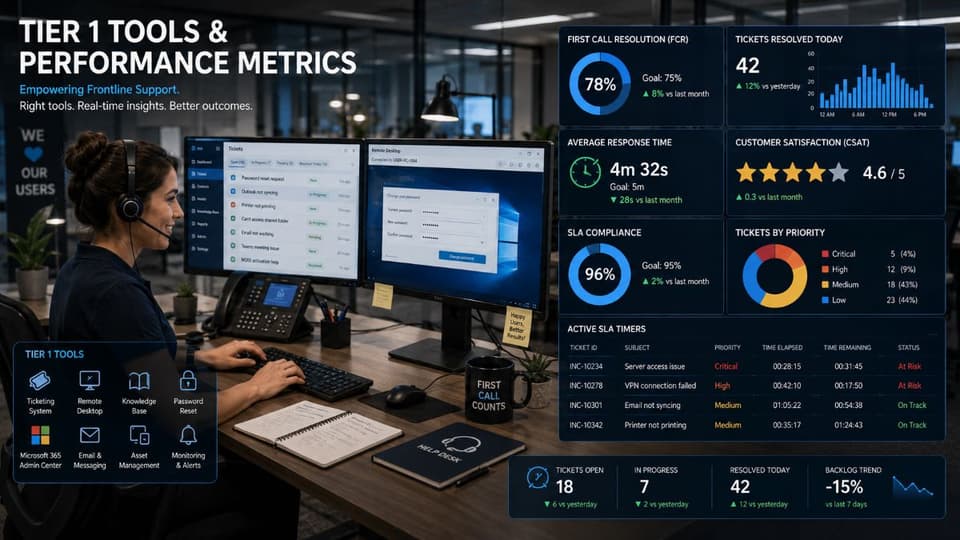
Tier 1 staff live in the ticketing system or PSA. They use remote desktop tools to view user screens and resolve issues in real time. Their performance is measured by First Call Resolution (FCR), aiming for a 70% to 80% success rate. If they cannot solve the problem within 15 minutes, they move the ticket to the next level. Average handle time and customer satisfaction scores are also vital KPIs.
Tier 1 Pay and Cost
In the 2026 market, Tier 1 salaries typically range from $35,000 to $55,000 per year. For businesses, this is often the entry point for hiring internal IT staff. When you use an MSP, the cost of these technicians is bundled into your monthly service fee.
What Is Tier 2 IT Support?
Tier 2 IT support addresses moderately complex technical issues that require deeper system knowledge, manual troubleshooting, or administrative access. This level steps in when a problem cannot be solved via a standard run book.
What Tier 2 Handles
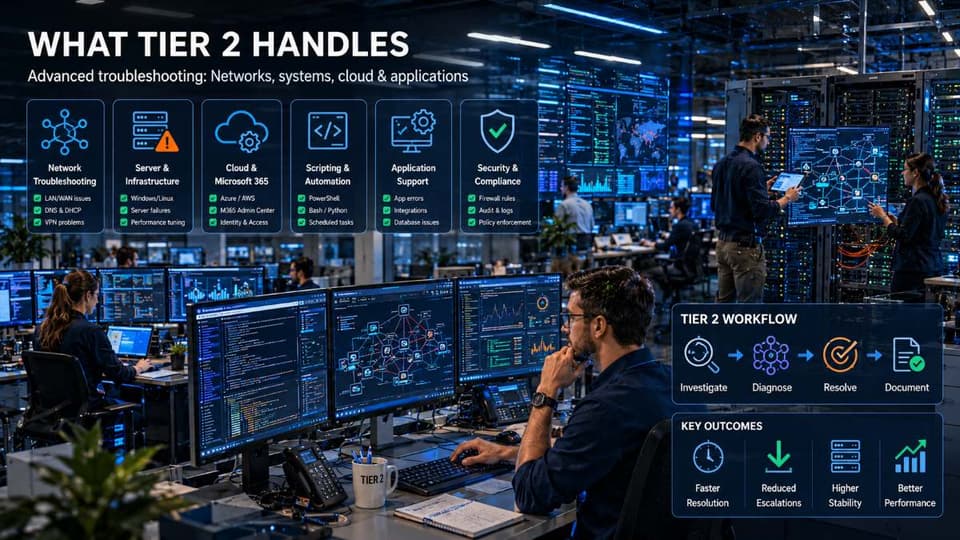
Tier 2 technicians deal with break fix scenarios that are not routine. They have more experience and greater administrative permissions than Tier 1. Their work often includes:
- Complex software malfunctions that require advanced troubleshooting techniques.
- Server level user issues, including managing group policies or complex permissions.
- Local network connectivity issues, such as troubleshooting a specific Wi-Fi access point or switch port.
- Recovering individual files from backups when the primary storage fails.
- Managing mobile devices through MDM platforms.
- Troubleshooting email delivery issues or Microsoft 365 tenant level configuration errors.
- Multi system issues that involve interactions between different software packages.
- Advanced application configuration and database connection troubleshooting.
Tier 2 Technician Skills
Tier 2 staff must possess a deep understanding of network fundamentals, including TCP/IP, DNS, and DHCP. They are often proficient in scripting languages like PowerShell to automate tasks. They also need strong analytical skills to diagnose issues that do not have a pre written solution in the knowledge base. Deeper knowledge of cloud platforms like Azure or AWS is becoming standard for this role.
Tier 2 Performance Metrics
The success of Tier 2 is measured by their resolution rate for escalated tickets, usually targeting 80% to 90%. Their resolution time target is between 1 and 8 hours. If they cannot resolve it within this window, it is time for Tier 3 intervention.
Tier 2 Pay and Cost
Salaries for Tier 2 technicians range from $55,000 to $80,000 per year. This role typically requires two to five years of experience and is a common career path for those graduating from Tier 1 roles.
What Is Tier 3 IT Support?
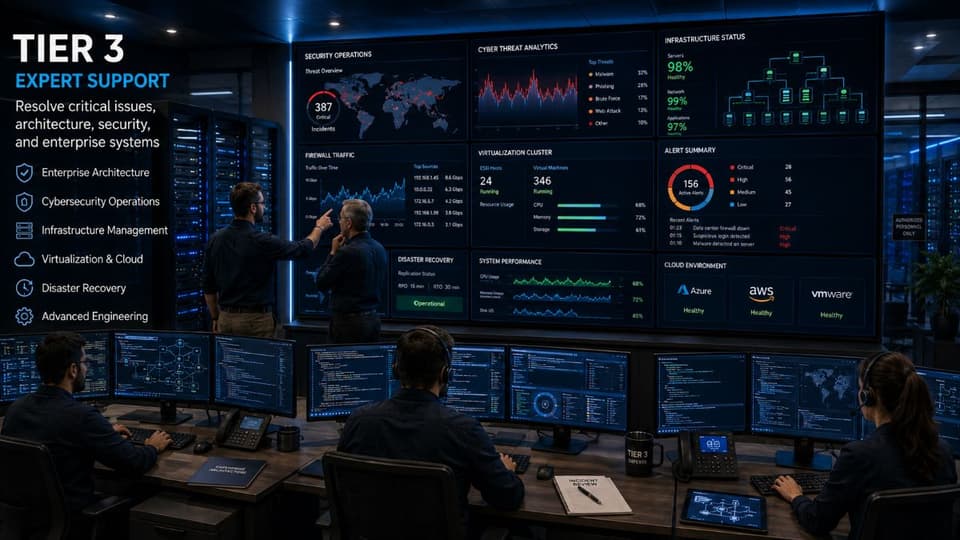
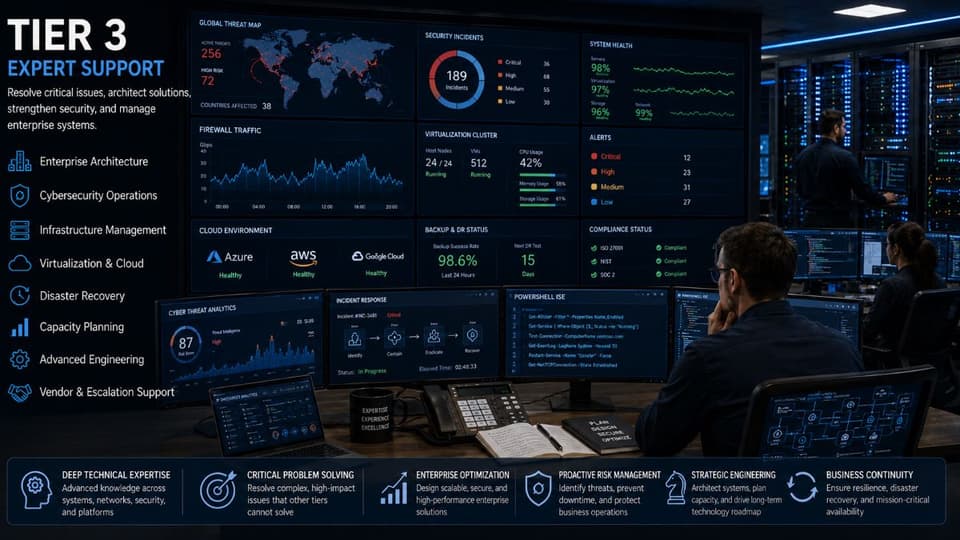
Tier 3 IT support represents the highest level of internal technical expertise. This tier consists of specialized engineers who handle critical infrastructure, advanced system architecture, major outages, and security incidents.
What Tier 3 Handles
Tier 3 is the last stop for technical problems. These engineers often build the systems that the lower tiers maintain. They are responsible for:
- Resolving system architecture flaws and core server failures.
- Managing virtualization environments, including hypervisors and storage area networks (SAN).
- Design and implementation of complex enterprise networks and firewalls.
- Handling database administration and deep security forensics after a breach.
- Managing disaster recovery activations and testing.
- Acting as the primary liaison with third party vendors for proprietary bugs.
- Root cause analysis to ensure recurring problems are eliminated permanently.
Tier 3 Engineer Skills
Tier 3 engineers are specialists. They often hold senior certifications like Cisco CCNP, Microsoft Azure Solutions Architect, or CISSP for security. They possess years of experience and are experts at complex problem solving. They also serve as mentors to the Tier 1 and Tier 2 teams, contributing regularly to the internal knowledge base.
Tier 3 Pay and Cost
Salaries for Tier 3 engineers in 2026 range from $90,000 to $150,000 or more. Because of this high cost, most small and mid sized businesses cannot justify hiring them full time. Instead, they access these experts through a Managed Service Provider like GlobeVM.
How IT Help Desk Escalation Works
Escalation ensures a ticket moves to the right person at the right time. Without a clear escalation policy, tickets sit in a queue while users get frustrated and productivity drops.
The Escalation Process
The lifecycle of a ticket usually follows a specific path. First, the user submits a request via email, phone, portal, or chat. Tier 1 receives the ticket and attempts to resolve it immediately. If they cannot find a solution within 15 minutes, the ticket is functionally escalated to Tier 2. Tier 2 performs a deeper dive. If the issue is identified as a systemic failure or requires architecture changes, it moves to Tier 3. Once resolved, the solution is documented to help lower tiers in the future.
Service Level Agreements (SLA) Explained
Service Level Agreements vary based on the priority of the issue. In a standard model, a Critical priority issue involving a system down situation requires a Tier 1 response within 15 minutes and a resolution target of 4 hours. A High priority issue where work is blocked requires a 30 minute response and an 8 hour resolution target. Medium priority issues for degraded performance have a 2 hour response window and a 24 hour resolution target. Finally, Low priority requests allow for an 8 hour response and up to 5 days for resolution.
Types and Triggers of Escalation
There are three main types of escalation. Functional escalation moves the ticket to a higher tier for more technical skill. Hierarchical escalation involves management when an SLA is about to be breached. Vendor escalation sends the issue to the product manufacturer. Triggers can be time based, complexity based, or priority based, such as when a VIP user submits a request.
Industry benchmark: well run help desks resolve 70-80% of tickets at Tier 1, 15-20% at Tier 2, and only 5-10% reach Tier 3. If your numbers look very different, something needs adjustment.
Help Desk Tier Structure by Business Size
Small Business (5-50 employees)
Small businesses rarely have a formal internal tier structure. It is usually more efficient to rely on an MSP for all support. The MSP acts as your entire IT department for a flat monthly fee, providing access to all three tiers without multiple salaries.
Mid-Sized Business (50-250 employees)
These companies often have 1 or 2 internal IT staff who handle Tier 1 and Tier 2 tasks. They typically use a co-managed IT model where an MSP handles the Tier 3 engineering and security architecture.
Enterprise (1,000+ employees)
Large corporations have full internal structures for every tier, often introducing Tier 0 self service. They also have specialized Tier 3 teams for specific areas like network infrastructure or cybersecurity operations center management.
Beyond Tier 1, 2, and 3: Other Support Levels
Tier 0 is all about self service, using knowledge bases and AI chatbots to allow employees to solve their own problems instantly. Tier 4 represents support provided directly by hardware or software vendors like Microsoft or Dell. In modern IT, we also see specialized structures like the SOC and NOC which focus specifically on security monitoring and network uptime.
How to Build or Evaluate a Help Desk Tier Structure
For Building an Internal Help Desk
- Analyze ticket volume and types to determine staffing needs.
- Calculate required staffing for each tier based on historical data.
- Set clear tier responsibilities and escalation procedures.
- Build a searchable knowledge base for Tier 1 growth.
- Choose a ticketing platform that supports SLAs and reporting.
- Train staff and measure performance regularly against KPIs.
For Evaluating an MSP's Help Desk
Ask about their First Call Resolution target and how many Tier 3 engineers they have on staff locally. Request their documentation on escalation procedures and check their average resolution times. Ensure they provide 24/7 coverage for critical Tier 3 issues and ask how they measure customer satisfaction.
7 Common Mistakes in IT Help Desk Tier Structure
- Treating all tickets as equal priority, which destroys overall efficiency.
- Tier 1 escalating too quickly, which wastes the time of expensive Tier 3 engineers.
- Tier 1 holding tickets too long, leading to SLA breaches and user frustration.
- Operating without a knowledge base, forcing technicians to reinvent the wheel for every ticket.
- Skipping tiers regularly, which allows users to bypass the model and kill productivity.
- Failing to measure FCR or escalation rates, making it impossible to improve service.
- Putting senior engineers on Tier 1 work, which is a massive waste of budget and talent.
Choosing an MSP with Strong Tier Structure
GlobeVM provides a matured, battle tested tiered support model designed for modern Southern California businesses. We offer documented tier structures, clear escalation procedures, and certified staff at every level. Our local presence ensures we can provide on site support for those issues that cannot be solved remotely.
To experience how a structured help desk can transform your business productivity, Schedule a free consultation with our team today. We specialize in providing HIPAA compliant and high performance IT support for professional offices in the Los Angeles area.
In conclusion, a structured IT help desk is the backbone of any productive business. By clearly defining the roles of Tier 1, Tier 2, and Tier 3 support, you create an environment where technical issues are resolved quickly and senior experts are free to focus on strategic growth. Whether you are building an internal team or looking for a Managed IT partner in Los Angeles, prioritize structure above all else. The right framework keeps your team working without technical interruption.