


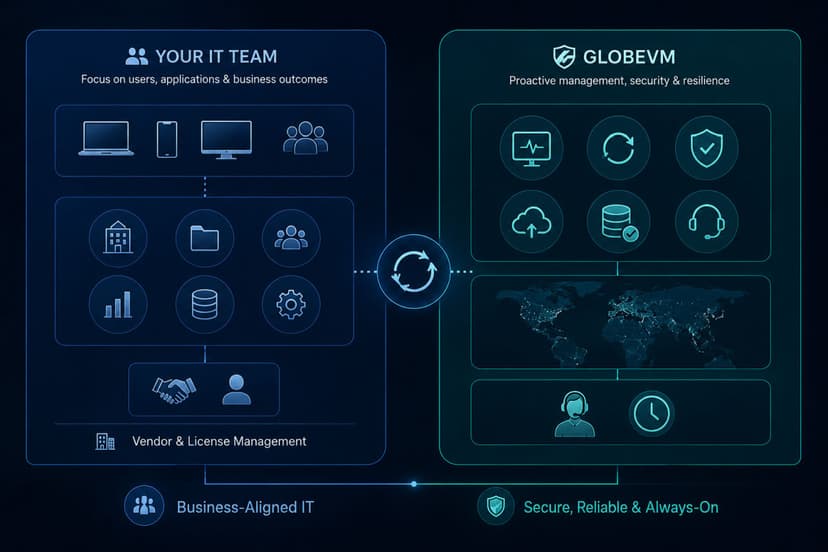



Managed IT services means an outside team takes over the day to day running of your technology for a fixed monthly fee. Instead of calling someone only when a problem appears, you get continuous monitoring, support, maintenance, and core security as a single ongoing service. For a small or mid sized business, that usually replaces the scramble of a part time technician, or one overloaded internal person, with a structured team that watches your systems, answers your staff, and plans ahead. The goal is simple: technology that works in the background so the business can run in the foreground.
In practice, a managed IT relationship covers the support your staff call when something stops working, the monitoring that flags a failing drive or a security alert before it spreads, the routine maintenance and updates that keep machines healthy, and the planning that decides what to replace and when. It is the difference between paying for repairs and paying for things to keep running.
Managed IT Services Compared to Break-Fix Support
The older model, often called break-fix, means you pay an hourly rate each time something goes wrong. On the surface it looks cheaper, because you only pay when you need help. The hidden cost is that no one is preventing the next problem, and the provider earns more when more things break. There is no real incentive to make your systems stable.
Managed IT reverses that. Because the fee is fixed each month, the provider has the same interest you do: fewer problems, less downtime, systems that stay up. Monitoring and maintenance happen whether or not anything is visibly wrong, which is what stops small faults from becoming outages. For most businesses past a handful of employees, the predictable cost and the prevention are worth more than the lower sticker price of paying by the hour.
What a Managed IT Plan Includes
Help Desk and IT Support
This is the part your team feels every day. When an account locks, email stops sending, a file will not open, or a device will not connect, your staff need a fast, clear answer rather than a queue. A managed help desk takes those requests by phone, email, and chat, resolves the common ones quickly, and moves the harder problems up to a more senior engineer instead of leaving them stuck. Good support is measured less by how clever the fix is and more by how little time your people lose waiting.
Network Management
Your network is everything that connects your computers, servers, internet, and cloud tools to one another. When it slows down or drops, the whole office feels it at once. Network management means designing that connection properly, watching it continuously, and maintaining the pieces that hold it together, including firewalls, switches, and Wi Fi. The aim is a network that stays fast and stable, and that keeps outside access where it belongs.
Co-Managed IT Services
Not every business wants to hand over all of its IT. Many already have an internal person or a small team who knows the business well. Co-managed IT supports those people rather than replacing them. It adds capacity for the work piling up, specialized skills the internal team may not have, and coverage for nights, weekends, and time off. The internal staff keep ownership of what they do best and gain backup for everything else.
IT Consulting and a Virtual CIO
Technology gets expensive when no one is planning ahead, and equipment tends to fail at the worst possible time. A virtual CIO, or vCIO, gives a business senior IT strategy without the salary of a full time executive. That means setting a budget you can predict, planning upgrades before hardware dies, and making sure each technology decision supports where the business is actually going rather than reacting after the fact.
Fully Outsourced or Co-Managed IT
There are two common ways to work with a managed IT provider. Fully outsourced means the provider runs your technology end to end, which suits businesses with no internal IT, or an owner who has been handling it on the side. Co-managed means the provider works alongside an existing IT person or team, sharing the load. Neither is better in the abstract; the right choice depends on whether you have internal staff and how much you want to keep in house. A provider worth hiring will tell you honestly which one fits, rather than pushing the larger contract.
How Managed IT Services Are Priced
There is no single price that fits every business, because cost depends on how many people and devices you support and what those systems need. Most managed IT is billed as a predictable monthly fee, often calculated per user or per device, which makes budgeting straightforward and removes the surprise of an hourly invoice after every incident. A trustworthy quote starts by looking at your actual environment, not by naming a number before anyone has seen your setup. If a provider gives you a flat price sight unseen, it is fair to ask what assumptions are behind it.
Local Managed IT Support Across Los Angeles
Most IT issues are solved remotely, and quickly. But when a problem needs hands on the equipment, a server that will not boot or a network device that needs replacing, having a provider nearby matters. As a managed IT provider based in the Los Angeles area, GlobeVM supports businesses across Woodland Hills, Encino, Sherman Oaks, the wider San Fernando Valley, Santa Clarita, the Conejo Valley, and Ventura County, with on site help when remote tools are not enough. Local also means understanding the businesses here, from medical and dental practices to law firms, financial offices, construction, nonprofits, and manufacturers, each with its own demands around keeping data secure and available. Advanced cybersecurity is handled as its own dedicated service; managed IT includes the foundational security that belongs in everyday IT management.