
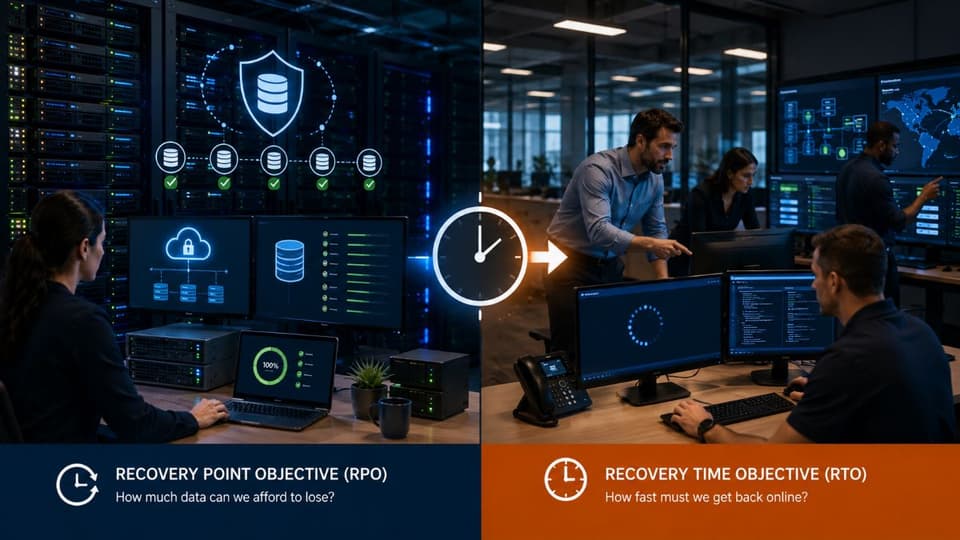
A recovery point objective (RPO) is the oldest point in time you are willing to restore your data to after an outage. In plain terms, it is how much recent work your business can afford to lose. An RPO of one hour means a backup, snapshot or replica must exist that is never more than an hour old, so a failure costs at most an hour of data.
This guide explains the definition, how to pick an RPO for each system, which backup methods can meet which targets, what tighter targets cost, and how to prove you actually meet the number. It also covers two places where RPO quietly fails: cloud apps like Microsoft 365, and ransomware.
What a recovery point objective means
The NIST glossary defines RPO as "the point in time to which data must be recovered after an outage." NIST's Contingency Planning Guide, SP 800-34 Rev. 1, adds the practical part: the recovery point is set by the most recent backup copy of the data, and RPO is a factor of how much data loss a business process can tolerate.
RPO is measured backward from the moment of failure. Say your RPO is one hour and your server dies at 2:55 in the afternoon. If the last good backup ran at 2:00, you lose 55 minutes of work and you are inside your target. If the last good copy is from 8:00 that morning, you lose nearly seven hours, far more than you decided you could live with. The objective is a promise about acceptable loss. Your backup setup decides whether you keep it.

How RPO differs from RTO and maximum tolerable downtime
RPO is about lost data, RTO is about lost time. NIST SP 800-34 describes the recovery time objective as the maximum time a system can stay unavailable before the impact becomes unacceptable, and maximum tolerable downtime (MTD) as the total outage the business owner will accept. NIST notes that RPO is not part of MTD. It stands on its own.
| Term | Question it answers | What it drives |
|---|---|---|
| Recovery point objective (RPO) | How much recent data can we lose? | Backup and replication frequency |
| Recovery time objective (RTO) | How long can this system be down? | Restore speed, standby hardware, failover |
| Maximum tolerable downtime (MTD) | How long can the business process be disrupted overall? | The ceiling the RTO must fit under |
A firm might accept losing 15 minutes of data but need to be back online within four hours. Those are two separate promises with separate costs. For a worked example of setting both numbers together, see our RTO and RPO comparison guide.
How to set RPO for each system
Set RPO per system, not one number for the whole company. NIST advises that backup frequency and scope should follow data criticality and how often new information is introduced. A database that takes orders all day needs a much shorter RPO than a folder of archived contracts.
For each system, ask the person who owns it three questions. How often does this data change? What would it cost to recreate a day, an hour or 15 minutes of it? Does any rule, client contract or insurer require a certain level of protection? The table below shows example starting points for a small business. They are illustrations, not standards; your answers to those questions set the real numbers.
| System | How it changes | Example RPO | Typical way to meet it |
|---|---|---|---|
| Email and Microsoft 365 files | Constantly, all day | 1 hour or less | Third-party or Microsoft 365 backup with frequent recovery points |
| Accounting system | Many entries daily, heavy at month end | 1 to 4 hours | Hourly snapshots or the vendor's cloud backup, plus a daily offsite copy |
| File shares | Steady edits during business hours | 1 to 4 hours | Hourly snapshots and a nightly copy to separate storage |
| Line of business database (practice management, ERP, CRM) | Every transaction | 15 minutes or less | Frequent transaction log backups, or replication with journaling |
| Company website | Rarely, unless it takes orders | 24 hours | Nightly backup and a copy before every update |
Put a dollar figure on each answer where you can. Lost hours of billing entries, orders or patient notes have a real cost, and so does the staff time to rebuild them. Our downtime cost calculator helps you estimate what an hour of disruption costs before you choose how much to spend avoiding it.
Do not forget laptops. Staff often keep working files on the desktop or in a local folder that never reaches the file server. If a laptop is lost or its drive fails, its RPO is the date of the last copy that left the device. Redirecting desktop and documents folders to a backed up cloud location gives those files the same RPO as the rest of Microsoft 365.

Which backup methods can meet which RPO
Your worst case data loss equals the gap between recovery points. A nightly backup can leave you almost a full day behind. Snapshots, replication and journaling shrink that gap, each with a catch. NIST's own example table pairs low priority systems with tape backup, moderate ones with replication, and high priority systems with mirrored systems and disk replication.
| Method | Worst case data loss | Watch out for |
|---|---|---|
| Nightly backup | Up to about 24 hours | Failed or skipped jobs; long job times |
| Scheduled snapshots | Up to the snapshot interval (for example, one hour) | Snapshots on the same system die with it unless copied elsewhere |
| Asynchronous replication | Seconds to minutes | Deletions and ransomware encryption replicate too |
| Synchronous mirroring | Close to zero | Cost, distance limits, and it copies corruption instantly |
| Journaling or continuous data protection | Any point inside the journal window | The journal length limits how far back you can rewind |
Replication is often mistaken for backup. It gives you a very short RPO against hardware failure, but if someone deletes a folder or malware encrypts a server, the replica faithfully copies the damage. That is why replication should sit alongside versioned backups, not replace them. The 3-2-1 backup rule is a simple way to make sure at least one copy lives somewhere the original failure cannot reach.
For databases, how a copy is taken matters as much as how often. A snapshot grabbed in the middle of a write can restore as a damaged file. Application aware backups pause or coordinate with the database so each recovery point opens cleanly, and transaction log backups let you replay changes up to a chosen moment. Ask your backup tool vendor which mode it uses for SQL Server, accounting files and other live data.

The cost tradeoff behind a shorter RPO
Every step toward zero data loss costs more. Moving from a nightly backup to hourly snapshots needs more storage and better software. Moving to minutes needs replication, more bandwidth and often a second site or cloud target. Near zero needs mirrored systems, which means paying for a second, always running copy of that workload.
The goal is not the shortest RPO money can buy. It is matching each system's RPO to what losing that data would really cost. A practical pattern for a small business is two or three tiers: a short RPO for the line of business database and email, a few hours for file shares and accounting, and a day for everything else. Building those tiers, and keeping them running, is the core of our data backup and disaster recovery service.
How to test that you actually meet your RPO
You prove an RPO by restoring data and checking how old it is. A green checkmark on a backup dashboard tells you a job ran; it does not tell you the data comes back. CISA's #StopRansomware Guide tells organizations to regularly test the availability and integrity of backups in a disaster recovery scenario.
Start with the schedule. Compare backup job start and finish times against the target. A common trap is a 15 minute RPO with a backup job that takes 25 minutes to finish; the target can never be met. Next, check the job history for gaps, such as a laptop that has been offline for two weeks or a server whose job has failed every night since a password change.
Then restore. Pick a system, restore it to a test location, and find the newest file or database record in the restored copy. The gap between that timestamp and the moment you started the test is your achieved RPO. Write it down next to the target, and repeat on a schedule. Our guide to backup testing best practices covers how often to test and what to record.

Why Microsoft 365 and other SaaS apps need their own RPO
Cloud apps keep your data available, but your data is still your responsibility. Microsoft's shared responsibility model lists customer data as the customer's job in every deployment type, including SaaS such as Microsoft 365. Microsoft runs the datacenters and the platform. Protecting what you store there is on you.
Built-in retention features help, but they are not a recovery point plan. SharePoint, for example, keeps deleted items for 93 days, then deletes them permanently. A recycle bin will not roll back a whole site after ransomware encrypts thousands of synced files, and sync tools copy that damage to the cloud.
Microsoft itself sells a separate, paid product for this. Microsoft 365 Backup offers recovery points every 10 minutes for the prior two weeks on OneDrive and SharePoint, with weekly snapshots after that, and 10 minute recovery points for Exchange. It is billed at $0.15 per GB per month. Whether you use it or a third-party tool, give Microsoft 365 its own RPO. Our SaaS backup guide compares the options.

Ransomware: a recovery point only counts if it is clean
A recovery point that is encrypted, deleted or infected is not a recovery point. CISA warns that many ransomware variants try to find and delete or encrypt accessible backups, which can leave a victim with no way to restore. Its guide recommends offline, encrypted backups of critical data, delete protection or object lock on storage that attackers target, and regularly updated golden images of critical systems.
Ransomware also changes which recovery point you use. Attackers can sit inside a network for some time before they encrypt anything. If your newest backup already contains their tools or tampered files, you may need to go back days or weeks to a clean copy. So RPO has a partner: retention. A 15 minute RPO with only 48 hours of history may not reach back far enough. Copies that cannot be changed or deleted for a set period, known as immutable backups, are the strongest answer.

Keeping your RPO current
An RPO set once drifts out of date. New clients, new software and new ways of working change how fast data piles up and how much a lost hour costs. Review each system's RPO at least once a year and whenever you add a major system or move one to the cloud. Record the targets, the methods that meet them and your latest test results in your disaster recovery plan, so the whole team works from the same numbers.
GlobeVM is a managed IT provider in Los Angeles, CA, supporting more than 75 organizations. We can set RPO and RTO targets with you, monitor the backups behind them and run restore tests to check the numbers on paper. Our team responds within 15 minutes, around the clock, in English or Farsi.
Key sources for this guide: NIST SP 800-34 Rev. 1 and the NIST glossary for the RPO, RTO and MTD definitions, CISA's #StopRansomware Guide for backup practice, and Microsoft's own documentation for Microsoft 365. If you are not sure what your RPO should be, or whether your backups meet it, call GlobeVM at (818) 405-9930 and we will check.