

According to Gartner research, the average cost of IT downtime is $5,600 per minute. For a typical mid-sized business, that equals a staggering $336,000 per hour. Yet, when asked, most business owners cannot tell you what an hour of server failure actually costs their own company.
There is a massive gap between perceived costs and reality. Many owners only calculate the direct loss of sales during an outage. They miss the compounding financial damage of idle employees, emergency recovery fees, and long term reputational harm. Understanding your true business downtime cost is the only way to make informed decisions about your technology investments.
This comprehensive guide breaks down the exact formula used by industry experts to calculate these numbers. You will see realistic cost examples for different industries, discover the hidden expenses most companies ignore, and learn actionable strategies to keep your systems running. By the end of this guide, you will be able to calculate your specific IT downtime cost and decide whether your current technology setup is worth the financial risk.
What Is IT Downtime?
IT downtime is any period during which a business cannot use its technology systems, including servers, networks, applications, or devices. Downtime can be planned for scheduled maintenance or unplanned due to hardware failure, cyberattacks, or natural disasters. Unplanned downtime always carries the highest financial and operational business impact.

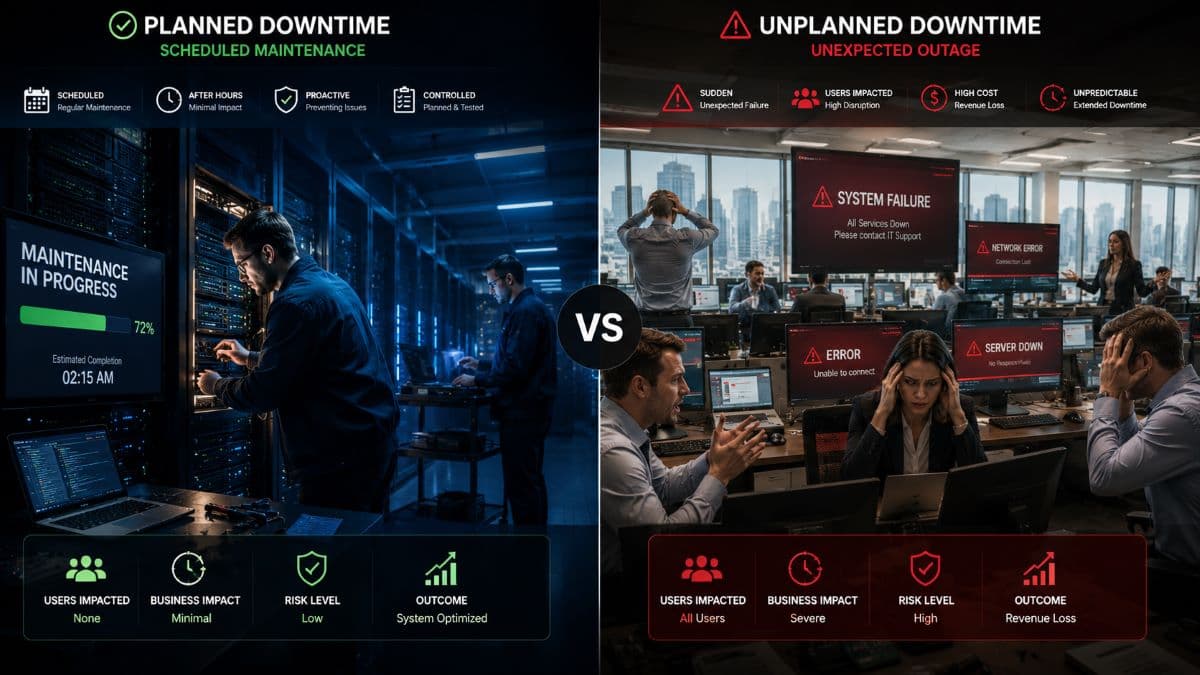
Planned vs Unplanned Downtime
Not all outages are created equal. Planned downtime is scheduled in advance. You communicate it to your team, schedule it during off hours, and prepare workarounds. The impact is minimal. Unplanned downtime is completely unexpected. It halts operations immediately, damages client trust, and generates massive unexpected expenses.
Common Causes of Unplanned Downtime
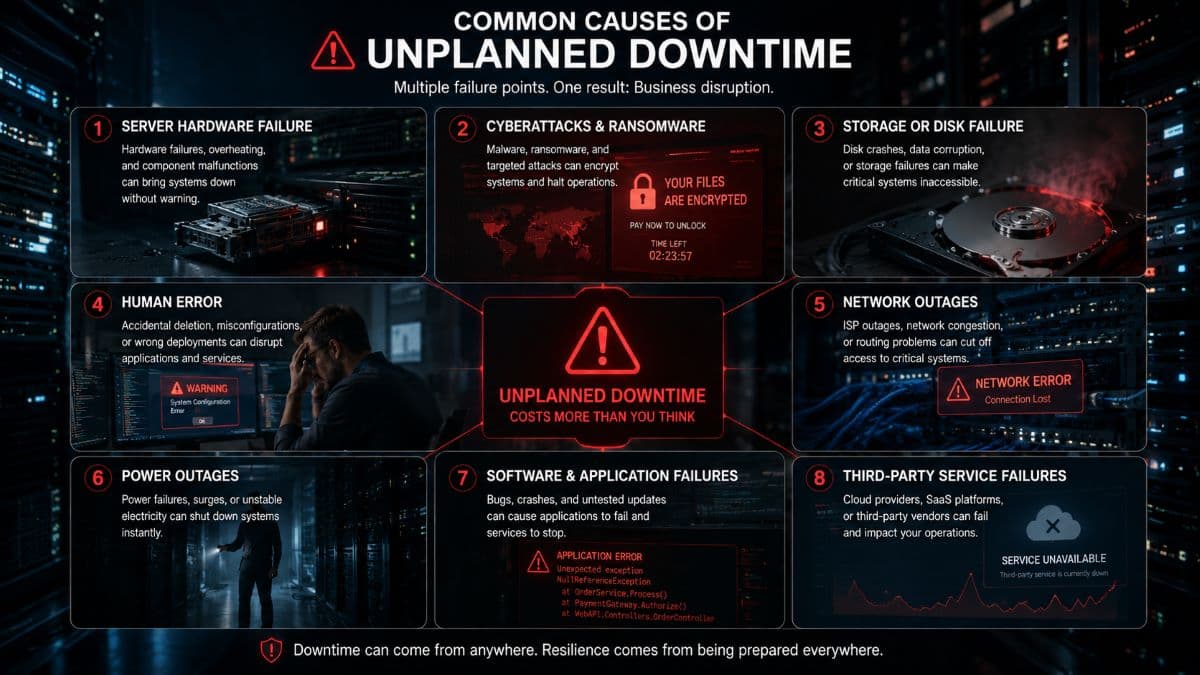
Understanding what takes systems offline is the first step in prevention. According to Information Technology Intelligence Consulting (ITIC), the most frequent culprits include several predictable factors. Hardware failure accounts for roughly 45 percent of all incidents. Aging servers and failing hard drives simply stop working. Human error causes another 22 percent of outages. Employees might accidentally delete critical files or click on malicious links.
Cyberattacks are the fastest growing cause of system failures. Ransomware can lock an entire company network in minutes. Other causes include software bugs, failed system updates, local power outages, and internet service provider failures.
Why Downtime Hurts More Than You Think
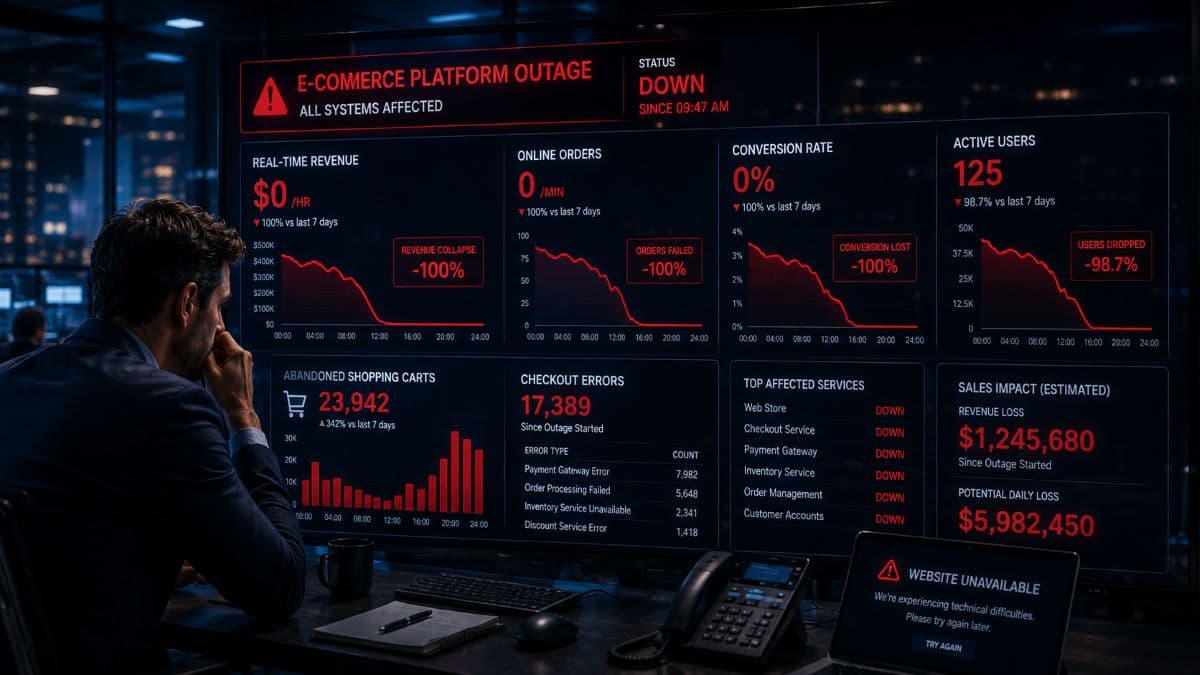
Most executives severely underestimate the financial blow of a crashed server. They look at the immediate hour of lost work and assume the bleeding stops when the systems come back online. The reality is much harsher. The true cost of IT downtime extends far beyond the outage window. Catching up on missed work requires overtime pay. Rebuilding lost data takes days. Rebuilding client trust takes years. If you want to protect your bottom line, you need to look at the complete mathematical picture. You can learn more about protecting your systems on our Managed IT Services page.
How to Calculate the True Cost of IT Downtime
To get an accurate number, you must look beyond basic revenue loss. Industry experts use a specific formula to calculate the real impact.
Total Downtime Cost per Hour = Lost Productivity Cost + Lost Revenue Cost + Recovery Cost + Reputational Cost.
Here is exactly how to calculate each component for your organization.

Component 1: Lost Productivity Cost
When systems go down, you are still paying your employees to sit idle. To calculate this, you need to know your fully loaded employee cost. Fully loaded means their hourly wage plus benefits, taxes, and overhead. This is usually 1.25 to 1.4 times their base hourly rate.
Formula: (Number of affected employees) × (Average fully loaded hourly cost) × (Percentage of work affected).
Example: You have 25 employees. Their average fully loaded cost is $45 per hour. The outage stops 80 percent of their ability to work. 25 employees × $45 per hour × 80 percent = $900 per hour in lost productivity.
Component 2: Lost Revenue Cost
This measures the actual money that did not come in the door because your systems were offline.
Formula: (Annual revenue ÷ Annual working hours) × (Percentage of revenue dependent on systems).
Example: Your business generates $5,000,000 annually. You operate 2,000 hours a year. That means you generate $2,500 per hour. If 60 percent of your revenue generation requires IT systems, your lost revenue is $1,500 per hour.
For e-commerce companies, system dependency is 100 percent. For professional services, it varies based on the specific roles affected.
Component 3: Recovery Cost
Getting your systems back online is rarely free. You must factor in the direct costs of the emergency response. Emergency IT support often bills between $200 and $500 per hour. Professional data recovery services can charge anywhere from $500 to over $10,000 per incident. You may also need to purchase replacement equipment at premium overnight shipping rates. Do not forget to include the employee overtime pay required to catch up on the backlog of work once systems are restored.
Component 4: Reputational and Long Term Costs
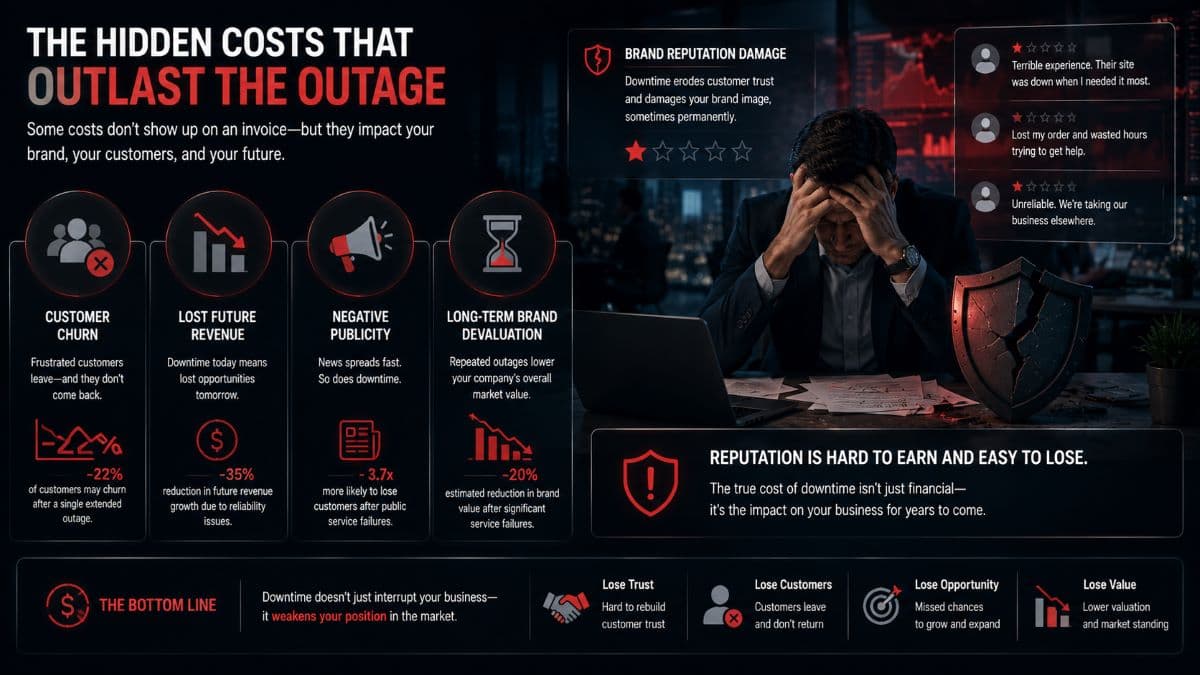
This is the hardest metric to calculate but often the most expensive. When clients cannot reach you, they look elsewhere. Reputational costs include customer churn, brand damage, and lost opportunities. If a major client leaves because you missed a critical deadline during an outage, the lifetime value of that client must be factored into your IT downtime cost.
Industry benchmarks show a clear picture. The average cost of IT downtime for a small business ranges from $137 to $427 per minute. Mid-size companies lose between $1,000 and $5,000 per minute. Enterprise organizations can lose upwards of $100,000 per minute.
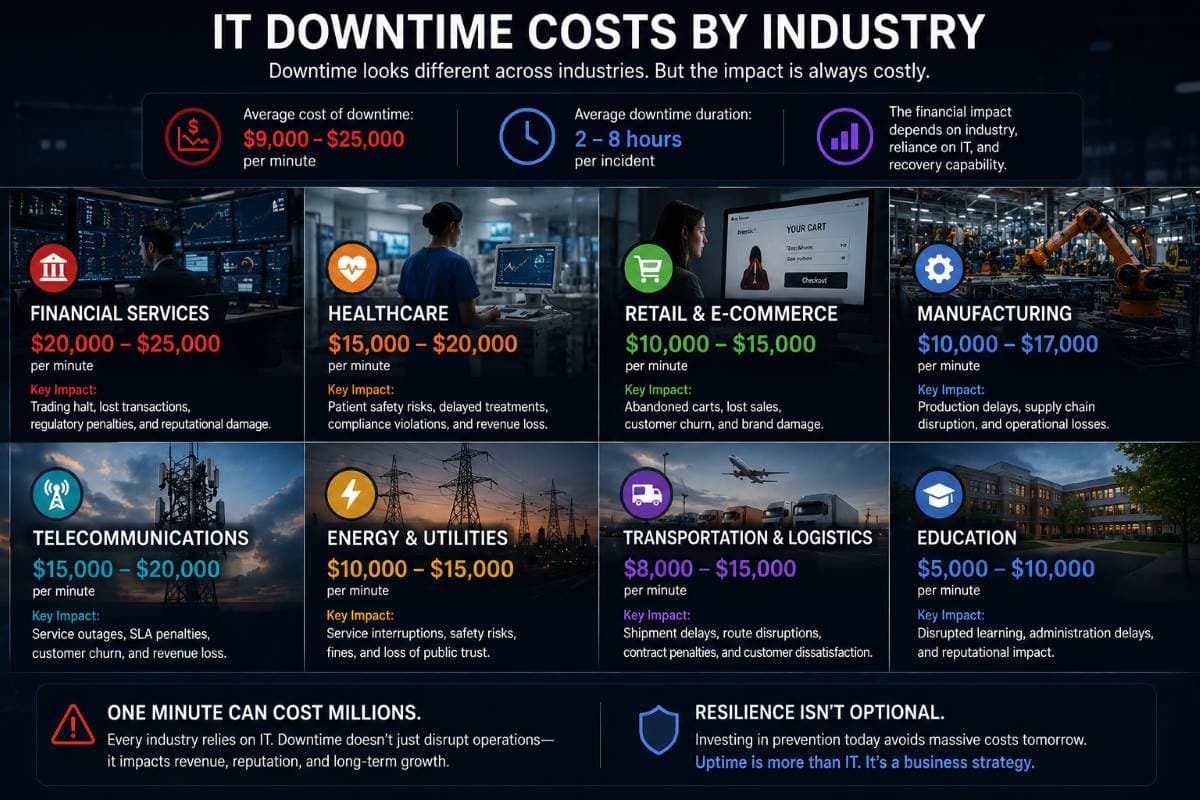
IT Downtime Costs by Industry
The cost of a server failure varies wildly depending on what your company actually does. A retail store losing its point of sale system faces different challenges than a hospital losing access to patient records. Below is a breakdown of how different sectors experience the financial impact of outages.
Healthcare Downtime Costs
For medical practices and healthcare providers, the average downtime cost ranges from $7,900 to $11,000 per hour. In this industry, downtime is not just a financial issue. It is a patient safety issue. When Electronic Health Records become inaccessible, doctors cannot view medical histories or prescribe medications accurately. Patient appointments must be canceled and rescheduled. This creates a scheduling cascade that disrupts operations for weeks. Furthermore, if the downtime is caused by a cyberattack, clinics face massive regulatory fines and HIPAA penalties. You can explore how we protect patient data on our medical office IT solutions page.
Financial Services Downtime Costs
The financial sector faces some of the highest penalties for system failures. The average cost per hour sits between $9,000 and $17,000. These extreme costs stem directly from transaction failures and severe regulatory exposure. When banking systems or trading platforms go offline, the immediate loss of capital movement is massive, and client trust evaporates almost instantly.
E-commerce Downtime Costs
For online retail and e-commerce businesses, the hourly cost of downtime typically lands between $5,000 and $10,000, and often scales much higher during peak shopping seasons. The math here is simple. If the website is down, the revenue generation is zero. Beyond direct revenue loss, these businesses suffer instant customer abandonment, as shoppers will simply click over to a competitor to complete their purchase.
Legal Downtime Costs
In the legal sector, time literally equals money. The hourly cost of a network outage for a law firm ranges from $4,000 to $8,000. Every minute a lawyer cannot access their case files is a billable minute lost permanently. Law firms also deal with strict court deadlines. Missing a filing deadline because a server crashed can result in severe penalties, immediate financial sanctions, and even malpractice claims. Learn more about our specialized support on our IT for law firms page.
Professional Services Downtime Costs
General professional services, including accounting, consulting, and engineering firms, typically lose between $2,500 and $5,000 per hour during an outage. The primary drivers of this cost are sheer productivity loss and halted client communication. When teams cannot access shared files or communicate effectively, projects stall entirely, while the firm continues to pay full payroll costs.
Construction Downtime Costs
Even industries not traditionally viewed as heavily reliant on technology face steep costs. Construction firms lose an average of $1,500 to $4,000 per hour when critical systems fail. Outages prevent project managers from accessing blueprints or coordinating with subcontractors. This leads to immediate project delays and idle crews who are waiting on site without direction.
Small Business vs Enterprise Impact
Large enterprises lose more total dollars during an outage, but small businesses suffer a much harder proportional impact. A Fortune 500 company can absorb a $100,000 loss. A local 20 person accounting firm might not survive a week long ransomware lockout. Small businesses often lack redundant systems, meaning a single hardware failure can bring the entire operation to a complete halt.
Why Industry Averages Are Underestimates
When you look at the figures above, remember that survey data typically only captures direct, easily measurable expenses. Most companies reporting these numbers fail to track the lingering effects of an outage. The true business downtime cost is almost always higher than the initial estimates suggest.
7 Hidden Costs of IT Downtime Most Businesses Ignore
The most dangerous expenses are the ones you do not see coming. When calculating your business downtime cost, you must account for these seven hidden factors.
- Customer Trust Erosion: Customers who experience your outage may not return. Industry research suggests up to 32 percent of customers will leave a brand they love after just one bad experience.
- Employee Disengagement: Repeated downtime kills team morale. Employees stop trusting their tools. They start creating unsafe workarounds or saving company data to personal devices just to get their jobs done.
- Cybersecurity Vulnerability Windows: During a chaotic recovery process, standard security protocols are often bypassed for the sake of speed. Attackers know this and frequently strike again while your defenses are lowered.
- Compliance and Regulatory Penalties: Industries like healthcare and finance have strict data availability requirements. An outage can trigger immediate compliance audits and steep fines.
- Insurance Premium Increases: If your downtime involves a data breach, your cyber insurance carrier will likely raise your rates significantly upon renewal.
- Recovery Debt: Work that should have happened during the outage stacks up rapidly. Your team will spend the next two weeks working inefficiently just to clear the backlog.
- Lost Competitive Position: During your outage, your competitors keep operating normally. Frustrated prospects trying to reach your sales team will simply call the next company on their Google search list.
Real-World Downtime Cost Examples by Business Size
To truly grasp the impact, let us look at the mathematics behind three realistic scenarios. These examples demonstrate how quickly the numbers escalate.
Scenario 1: 15 Person Medical Practice Facing a 3 Hour Outage
A local clinic loses access to its scheduling and records system for three hours on a Tuesday morning.
- Lost Productivity: 15 staff members × $35 per hour × 3 hours × 90 percent impact = $1,418.
- Lost Revenue: 20 patients must be rescheduled. At an average of $200 per visit, that is $4,000 delayed or lost.
- Recovery Cost: Emergency IT call out fee and hourly rate = $1,200.
- Hidden Costs: 8 frustrated patients permanently switch to a competitor. Estimated lifetime value loss = $4,800.
- Total Estimated Cost: $11,418 for a brief three hour event.
Scenario 2: 50 Person Law Firm Facing a Full Day Outage
A server failure locks a firm out of their document management system for an entire eight hour workday.
- Lost Productivity: 50 staff × $85 fully loaded hourly cost × 8 hours × 85 percent impact = $28,900.
- Lost Billable Time: Unrecoverable attorney billing hours = $35,000.
- Recovery Cost: IT emergency services and weekend overtime to fix the server = $5,500.
- Hidden Costs: Missed court filing penalties = $8,000.
- Total Estimated Cost: $77,400 for a single day of server downtime.
Scenario 3: E-commerce Business During Peak Season 4 Hour Outage
A website database crashes during a major holiday sale event.
- Lost Direct Sales: Based on historical hourly averages for this date = $45,000.
- Lost Productivity: Warehouse and support staff idle time = $1,500.
- Recovery Cost: Emergency database administrator fees = $3,000.
- Hidden Costs: Wasted ad spend and permanent customer trust damage = $15,000.
- Total Estimated Cost: $64,500 for four hours of network downtime.
The math is brutal. A 15 employee medical practice losing access to their records for just three hours typically costs more money than an entire year of proactive managed IT services.
How Often Does IT Downtime Actually Happen?
It is easy to think major outages only happen to other companies. The data tells a different story. The average mid-size business experiences between 14 and 30 hours of unplanned downtime every single year. Businesses that rely on reactive IT support often suffer 87 or more hours of downtime annually.
Uptime Percentages Explained
Technology providers use percentages to measure reliability. Understanding these numbers is crucial for calculating risk.
- 99 Percent Uptime: This sounds excellent, but it equals 87.6 hours of downtime per year.
- 99.9 Percent Uptime: This equals 8.76 hours of downtime per year.
- 99.99 Percent Uptime: This equals 52.6 minutes of downtime per year.
- 99.999 Percent Uptime: Known as five nines, this allows only 5.26 minutes of downtime annually.
What Causes Most Outages in Small Businesses?
In the small to medium business sector, outages rarely stem from sophisticated nation state hackers. The causes are usually much more mundane. Hardware ages out and fails because no one tracks its lifecycle. Critical security patches are ignored for months. Businesses operate without any system monitoring, meaning they only discover a failing hard drive after it completely crashes. Finally, a severe lack of data redundancy means a single minor issue can take the whole company offline.
One major incident can wipe out years of perceived cost savings from skimping on technology investments. Cheap IT usually guarantees more frequent and much longer business interruptions.
How to Reduce IT Downtime Risk
Knowing your IT downtime cost is only the first step. The goal is to prevent these outages from happening in the first place. Follow these proven steps to secure your operations.
Step 1: Audit Your Current Risk
You cannot fix what you do not understand. Start by identifying all single points of failure in your network. Document your current historical uptime. Make a list of your most critical software applications and note exactly what hardware they run on.
Step 2: Implement Proactive Monitoring
Waiting for a server to crash before fixing it is a recipe for disaster. Implement 24/7 system monitoring. Professional monitoring tools track hard drive health, processor temperatures, and network traffic anomalies. This allows technicians to spot a failing component and replace it days before it actually breaks.
Step 3: Establish True Redundancy
Never rely on a single connection or device. Implement a backup internet connection from a different provider. Set up server failover protocols. Most importantly, maintain secure cloud backups that allow for rapid system restoration. Discover how we handle this on our Data Backup & Disaster Recovery page.
Step 4: Document Recovery Procedures
Every business needs two defined metrics. Your Recovery Time Objective dictates exactly how fast you need to be back online after a crash. Your Recovery Point Objective dictates how much data you can afford to lose. You must define both metrics for every critical system in your office.
Step 5: Test Your Backups Regularly
An untested backup is not a backup at all. It is just a hope. Hardware fails and software corrupts. You must perform full recovery tests at least quarterly to ensure your data is actually usable when an emergency strikes.
Step 6: Patch and Update Consistently
Unpatched software vulnerabilities are the number one entry point for ransomware. Implement an automated patching schedule for all operating systems, applications, and network firewalls. Read more about protecting your perimeter on our Cybersecurity Solutions page.
Step 7: Train Your Team
Since human error causes 22 percent of outages, your employees are your first line of defense. Regular phishing simulation and security awareness training dramatically reduce the risk of an employee triggering a company wide malware infection.
Businesses using proactive IT support typically reduce unplanned downtime by 65 to 85 percent compared to companies using traditional in house or reactive support models.
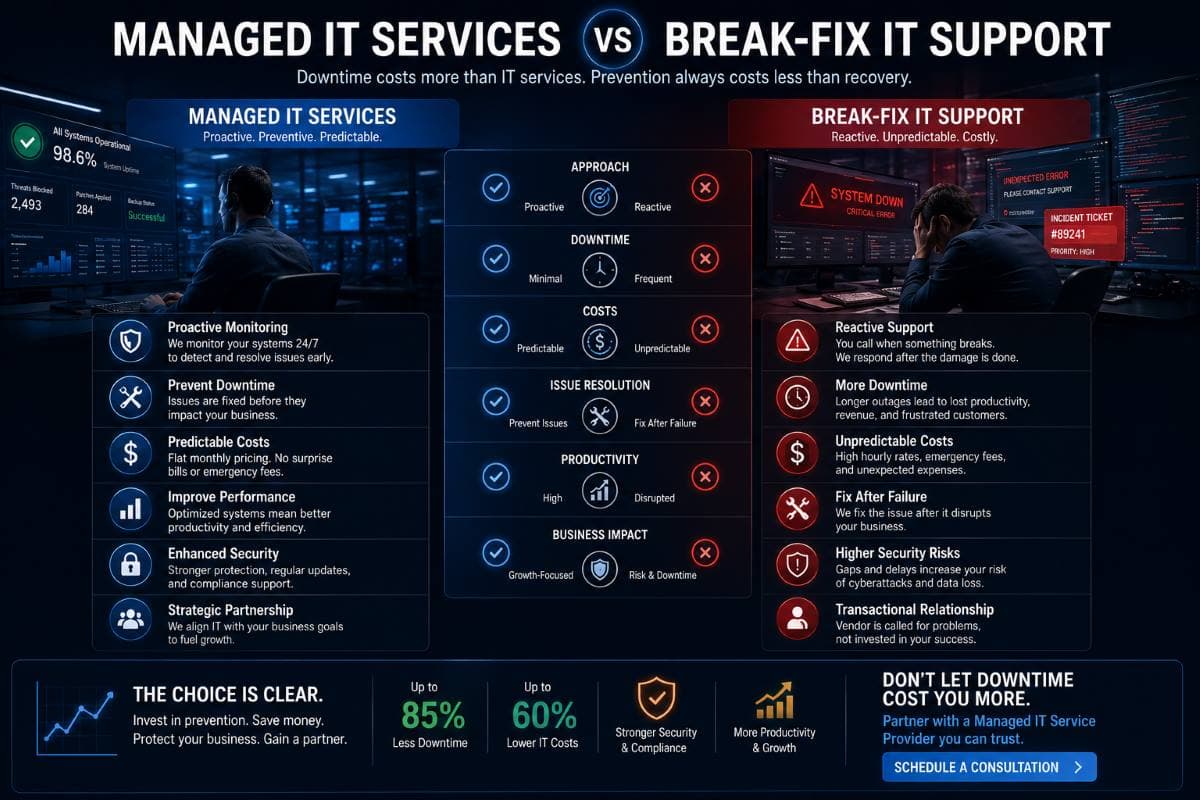
Managed IT Services vs Break-Fix: Which Is Actually Cheaper?
When executives finally calculate their true cost of IT downtime, they immediately rethink how they purchase technology support. There are two primary models in the industry.
The Break-Fix Model
In the break-fix model, you only pay an IT person when something is broken. The hourly rate is often high, but you have no recurring monthly fee. The massive flaw in this model is that the IT provider has zero financial incentive to prevent problems. They make money when you suffer downtime. A typical small business using break-fix support experiences 30 to 87 hours of downtime a year.
The Managed Services Model
In the managed IT model, you pay a flat monthly fee. The IT provider assumes responsibility for keeping your systems running perfectly. Because they do not charge hourly for repairs, their entire business model relies on proactive maintenance. They lose money if your systems break. Therefore, they monitor everything 24/7 for business continuity to prevent outages.
Real Cost Comparison
Let us look at a typical 25 employee business over a full year.
Break-fix approach: You might spend $10,000 in hourly support fees. However, you experience 40 hours of downtime, costing you $35,000 in lost productivity and revenue. Your total actual cost is $45,000.
Managed IT approach: You pay a flat fee of $36,000 annually. Thanks to proactive monitoring, you experience only 4 hours of downtime, costing $3,500. Your total actual cost is $39,500.
The numbers clearly show that proactive managed IT is more predictable, includes heavy security prevention, and ultimately costs less when factoring in the devastating business downtime cost.
Calculate Your Specific IT Downtime Cost
Stop guessing how much risk your business is carrying. Every company has a unique footprint based on payroll, revenue, and technology dependency. We have built tools to help Los Angeles business owners find their exact numbers.
Use our IT downtime calculator to estimate your specific financial exposure. You will simply need to input your total number of employees, average hourly wage, estimated annual revenue, and your standard operating hours.
The output will give you a clear, honest assessment of what a single hour of server downtime will cost your specific organization. Armed with this data, you can make logical decisions about your technology budget.
Signs You Need to Partner with an LA Managed IT Provider
If you are reading this guide and feeling uneasy about your current setup, it is time to evaluate your technology strategy. Look for these clear warning signs in your business.
- You have experienced two or more significant network outages in the past twelve months.
- You do not know your current uptime percentage or backup status.
- Your current IT strategy is simply fixing things after they break.
- You handle strict compliance regulations without dedicated security oversight.
- Your employees frequently complain about slow systems and repeated computer issues.
If you recognize these symptoms, GlobeVM Digital Services can help. Guided by experts like George Mansoor, we provide comprehensive Managed IT Services in Woodland Hills and across the greater Los Angeles area. We focus on proactive monitoring, strict cybersecurity, and true business continuity so you never have to worry about the cost of IT downtime again.
Take the first step toward a stable network today. We invite you to complete our Free Network Assessment Test to uncover your hidden vulnerabilities before they cause an expensive outage.
Frequently Asked Questions
The exact number varies heavily by company size. Small businesses typically lose between $8,000 and $25,000 per hour. Mid-size companies lose $60,000 to $300,000 per hour. Enterprises can lose millions. The cost includes lost revenue, idle employee wages, and IT recovery fees.
You add four specific metrics together. Combine your lost employee productivity cost, your lost gross revenue during the outage window, your direct IT recovery expenses, and an estimate of your long term reputational damage or lost clients.
Hardware failure is the leading cause of system outages, accounting for roughly 45 percent of incidents. Human error causes about 22 percent. Cyberattacks, particularly ransomware, are the fastest growing cause and typically result in the longest recovery times.
Yes. Managed IT providers use advanced remote monitoring tools to watch server health 24/7. They identify failing hard drives and software conflicts days before a crash occurs. This proactive approach reduces unplanned downtime by 65 to 85 percent for most small businesses.
Conclusion
Calculating the cost of IT downtime is a mandatory exercise for any serious business owner. Whether you run a medical clinic in Woodland Hills or a law firm in Los Angeles, every minute your network is offline burns through your profits and damages your hard earned reputation. By understanding the true math behind lost productivity, lost revenue, and recovery fees, you can clearly see that proactive technology support is an investment rather than an expense.
Do not wait for a catastrophic server failure to find out what your business downtime cost actually is. Protect your operations, secure your data, and keep your employees productive. Complete our comprehensive network assessment today to identify your risks and secure your future.
Comments
0 Comments