

Businesses spend real effort protecting data while it is in use and remarkably little deciding what happens to it at the end. Old laptops accumulate in a closet, a retired printer goes out with the furniture, and a box of files sits in storage because nobody was sure whether it could be thrown away.
Each of those is a data protection decision made by default. This guide covers secure disposal of both devices and documents: what deletion in fact does, which equipment businesses forget entirely, and what to require from anyone handling this on your behalf.
Deleting Is Not Disposal
Deleting a file marks the space it occupied as available rather than removing the contents. Until something else overwrites that space, the data is frequently recoverable with tools that are neither expensive nor difficult to obtain.
Emptying the recycle bin does not change this materially. Neither does a quick format, which prepares a drive for reuse without necessarily clearing what was there.
Factory Reset Is Better and Still Not Always Enough
Modern devices generally do better than older ones, particularly where the storage was encrypted, because a reset that discards the encryption key makes the remaining data effectively unreadable. This is really sound on current phones and recent computers.
It is less reliable on older equipment, on devices where encryption was never enabled, and on storage that has been through unusual conditions. For anything holding regulated or sensitive information, verified sanitization or physical destruction is the defensible answer rather than a reset nobody confirmed.
The Equipment Businesses Consistently Forget
Laptops and phones get attention because people think of them as holding data. Several other categories hold just as much and leave the building unexamined.
Office printers and multifunction devices store scanned and printed documents on internal drives, sometimes for years. Network equipment holds configurations and credentials. External drives and old backup media are frequently the most sensitive items in the room precisely because they held copies of everything. And devices that failed, the ones set aside because they stopped working, still hold their data and often skip the disposal process entirely because nobody thinks of a dead machine as a live risk.
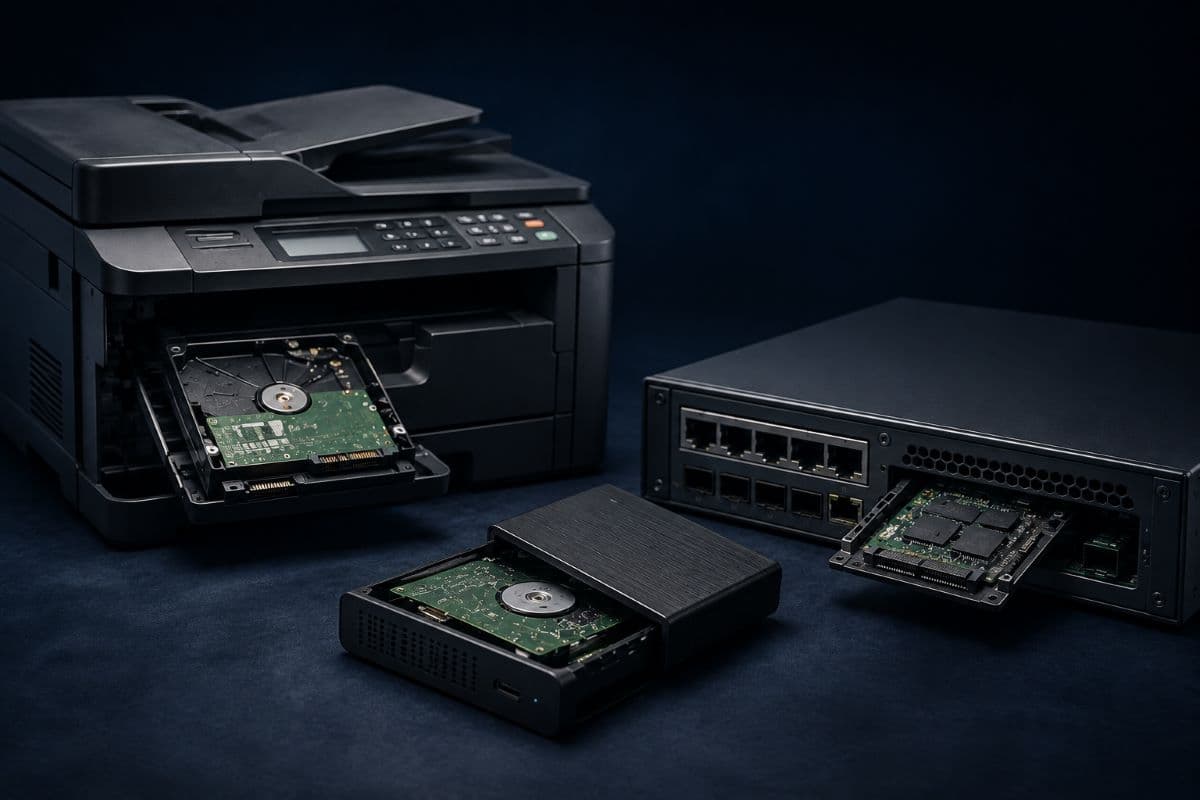
Failed Devices Deserve a Named Process
A drive that will not power on cannot be wiped, which means the only options are destruction or leaving it intact somewhere. Businesses without a stated process for this accumulate a drawer of broken equipment holding readable data, which is the outcome nobody chose and everybody has. The same discipline that governs live endpoint security should extend to what happens when an endpoint stops working.
Paper Has Not Gone Away
Practices and firms still generate paper, and the disposal question is simpler but not automatic. Cross-cut shredding is the baseline for anything with client, patient, or financial information, and a general recycling bin is not a disposal method for those documents.
The common failure is not the shredder; it is the interval before shredding. A bin of sensitive documents sitting unsecured in a shared area for a week is exposed for that week, regardless of what happens to it afterward.
Certificates of Destruction and Why They Matter
When a vendor handles disposal, ask for a certificate of destruction listing the specific items by serial number, the method used, and the date. This is standard practice for serious vendors and often absent from cheaper ones.
The certificate matters because it converts a claim into a record. In a regulated business, being able to demonstrate that a specific device was destroyed on a specific date, rather than asserting that old equipment is generally handled properly, is exactly the difference an auditor is looking for. Retaining these certificates alongside other compliance and risk management documentation makes them findable when someone asks.
Chain of Custody Between Your Door and Theirs
Equipment is most exposed while in transit. Ask how devices are transported, whether they are secured in the interim, and how the vendor accounts for items between collection and destruction. A vendor unable to describe this has a gap in exactly the phase where the business has least visibility.
Regulated Businesses Have Specific Obligations
Healthcare, financial, and legal businesses generally face explicit requirements around the disposal of records containing protected information, and those requirements typically extend to demonstrating that disposal happened appropriately rather than simply asserting it.
Because the specifics differ by sector and change over time, a regulated business should confirm its own retention and disposal obligations rather than applying a general standard. The practical implication is the same in every case: keep the record of disposal, not just the intention.
What to Ask a Disposal Vendor
Four questions separate a serious vendor from a scrap collector. What method is used for each device type, and is it verified rather than assumed. Do you provide a certificate of destruction listing serial numbers. How is equipment secured between collection and destruction. And what happens to devices you determine are resaleable rather than destroyed.
That last one matters more than it sounds, because resale is a legitimate part of many disposal businesses and the sanitization standard applied to a resold device is the thing the business is relying on.
What Disposal Actually Costs
Vendor pricing generally follows one of two shapes: per item for device destruction, or by weight and collection for bulk. Small businesses disposing of a handful of devices are usually in per-item territory, and the amounts are modest relative to what the equipment originally cost.
Where the number rises is with a certificate of destruction, secured transport, and on-site destruction if you want to watch it happen. Those are the elements worth paying for in a regulated business and reasonable to skip for a laptop holding nothing sensitive, which is why sorting equipment by sensitivity before requesting a quote produces a more honest price.
Resale Can Offset the Cost, With a Caveat
Some vendors credit resaleable equipment against the disposal fee, which is legitimate and can make the exercise close to cost-neutral. The caveat is that a resold device was sanitised rather than destroyed, so the standard applied to that sanitisation is what your data is relying on. Ask what it is, and keep the destruction option for anything you would not want to depend on that answer for.
Build the Habit Into the Replacement Cycle
Disposal works best as the final step of equipment replacement rather than a separate project that happens when the closet fills. When a device is replaced, the disposal decision is made then, recorded then, and executed on a defined schedule rather than deferred indefinitely.
Businesses that handle it this way never accumulate the pile in the first place, which is easier than clearing one and considerably easier than reconstructing what was on equipment nobody logged. Folding this into ongoing managed IT services keeps it from becoming another task waiting for spare time.
End of Life Is Still Part of the Lifecycle
Data does not stop being sensitive when the device holding it stops being useful. Secure disposal handled properly means knowing which equipment holds data including the categories nobody thinks of, using a method appropriate to the sensitivity rather than assuming deletion suffices, keeping the record that proves it happened, and making the whole thing the last step of replacement rather than a project nobody schedules.
For businesses in the region, a partner providing IT support in Santa Clarita can inventory what is sitting in your storage room and handle it properly.
Frequently Asked Questions
No. Deleting marks space as available rather than removing contents, and data is frequently recoverable until something overwrites it, using tools that are neither expensive nor hard to obtain. A quick format prepares a drive for reuse without necessarily clearing what was there. For sensitive information, verified sanitization or physical destruction is the defensible answer.
Usually on modern encrypted devices, because a reset that discards the encryption key leaves the remaining data effectively unreadable. It is less reliable on older equipment and on devices where encryption was never enabled. For regulated or genuinely sensitive information, verification or destruction is safer than assuming the reset was sufficient.
Printers and multifunction devices, which store scanned and printed documents on internal drives sometimes for years; network equipment holding configurations and credentials; external drives and old backup media, which are often the most sensitive items in the room; and failed devices set aside because they stopped working, which still hold their data and frequently skip disposal entirely.
Because it converts a claim into a record. Being able to demonstrate that a specific device, identified by serial number, was destroyed by a stated method on a stated date is what an auditor or regulator is looking for, as opposed to a general assertion that old equipment is handled properly. Serious vendors provide these as standard; cheaper ones often do not.
If your business has a closet of retired equipment nobody has logged, GlobeVM can inventory it, handle secure disposal properly, and keep the records that prove it.
Comments
0 Comments