
Your server crashed at 4:47 PM on a Friday. By the time the IT guy answered his phone, drove over, and got things running again, you had lost three hours of work, paid $850 in emergency fees, and three of your employees stayed late.
What should it cost? Our managed IT services pricing guide lists published 2026 price ranges, what is usually included and a free cost estimator.
This is the break-fix model in action. It is how most small businesses still buy IT support. And it is costing more than they realize.
Choosing between break-fix vs managed IT is one of the most critical operational decisions you will make as your company grows. While the traditional model of calling a technician only when something breaks seems cost-effective on paper, the hidden costs of downtime often tell a different story. However, reactive support is not inherently bad. For certain very small operations, it remains a valid choice.
In this comprehensive guide, we will explore the real definitions, compare the actual financial impact, and look at the exact scenarios where each support model makes sense. By the end of this guide, you will know exactly which model fits your business today and which will fit tomorrow.
What Is Break-Fix IT Support?
Break-Fix IT support is a service model where businesses pay an IT provider only when something breaks. The provider responds to issues on demand, typically charging hourly rates plus parts. There is no monthly fee, no ongoing monitoring, and no preventive maintenance. Service is reactive rather than proactive.

How Break-Fix Pricing Works
The financial structure of break-fix IT services is entirely transactional. You receive an invoice only after a service is rendered. The typical costs include:
- Hourly rates: Most providers charge between $125 and $250 per hour depending on their expertise and your location.
- On-site minimums: If a technician visits your office, you will usually pay for a minimum of one to two hours regardless of how quickly the issue is resolved.
- Emergency rates: Nights, weekends, and urgent priority requests often incur a multiplier of 1.5x to 2x the standard hourly rate.
- Travel time: Many providers bill for the time spent driving to your office.
- Parts and software: Hardware replacements and software purchases are billed at cost plus a markup.
- No monthly commitment: You retain complete control over when you spend money on IT.
Typical Break-Fix Scenarios
Companies relying on this model typically call their provider for specific, isolated incidents. These commonly include situations where a server or computer will not boot up correctly. Network outages that halt productivity are another frequent trigger. Businesses also request help when email stops working, printer issues arise, or a new employee needs software installed and a user account created.
What Break-Fix Providers Usually Don't Do
Understanding what you do not get is just as important as knowing what you pay for. A break-fix IT support provider does not offer continuous monitoring of your network. They do not handle regular patch management or verify that your backups are actually functioning. You will not receive automatic security updates, strategic IT planning, or maintenance of your network documentation. Furthermore, compliance support and employee security training are rarely part of a traditional hourly relationship.
Where Break-Fix Came From
This was the original IT support model. It made perfect sense in the 1990s and early 2000s before the internet became fast enough to support remote management. Technology was simpler and businesses were not targeted by complex cyber threats. While the industry has largely moved toward managed IT services, the reactive approach remains common for very small businesses or sole proprietorships.
What Are Managed IT Services?
Managed IT Services is a model where a business outsources its IT operations to a provider for a flat monthly fee. The provider takes proactive responsibility for 24/7 monitoring, security, updates, and strategic planning. The goal is to prevent issues before they cause downtime. This is the core idea behind managed IT services as a complete support model.

How Managed IT Works
Instead of waiting for a disaster, a Managed Service Provider (MSP) assumes ongoing responsibility for your entire technology environment. You pay a predictable flat monthly fee, which is typically calculated on a per-user or per-device basis. The provider installs software agents on your equipment that provide 24/7 monitoring. Because routine maintenance is performed continuously in the background, catastrophic failures become rare. When users do need help, unlimited remote support hours are usually included in the monthly agreement.
What Managed IT Typically Includes
A comprehensive managed IT agreement acts as an entire outsourced IT department. Services generally encompass:
- 24/7 monitoring: A Network Operations Center watches your systems around the clock through remote IT monitoring and management.
- Help desk support: Employees can access help desk and IT support for daily technical assistance.
- Patch management: Operating systems and third-party applications are updated securely.
- Antivirus and EDR: Advanced endpoint detection and response tools are deployed and monitored.
- Backup management: Data backups are not just configured, but actively tested for recoverability.
- Email security: Spam filtering and phishing protection are standardized.
- Asset management: The lifecycle of your hardware is tracked for replacement planning.
- Strategic planning: You receive guidance from a virtual Chief Information Officer (vCIO) to align technology with business goals.
Managed IT Pricing Models
Pricing structures vary based on the specific needs of the client, but they generally fall into three categories.
- Per-user: Businesses pay $100 to $250 per user per month. This covers all devices associated with that user (laptop, phone, tablet).
- Per-device: The fee is $75 to $200 per device per month. This works well for environments like manufacturing floors where multiple people share a single workstation.
- All-inclusive flat fee: Larger organizations might pay a single monthly invoice of $2,500 to $15,000 or more covering the entire infrastructure.
What Is Usually Extra
Even comprehensive agreements have limits. Major projects like migrating servers to the cloud or deploying an entirely new network for a new office are billed separately. You are still responsible for hardware costs and software licensing fees (unless specifically bundled). Highly specialized compliance audits or custom application development also fall outside standard support agreements.
Why Managed IT Emerged
The shift away from reactive support happened for several reasons. The development of Remote Monitoring and Management (RMM) tools allowed technicians to fix problems without driving to a client site. At the same time, sophisticated cyber threats made it impossible to secure a network without constant vigilance. Regulatory compliance requirements demanded proactive controls that hourly support could not provide. Most importantly, business owners demanded predictable IT budgeting instead of wildly fluctuating emergency repair bills.
Break-Fix vs Managed IT: Detailed Comparison
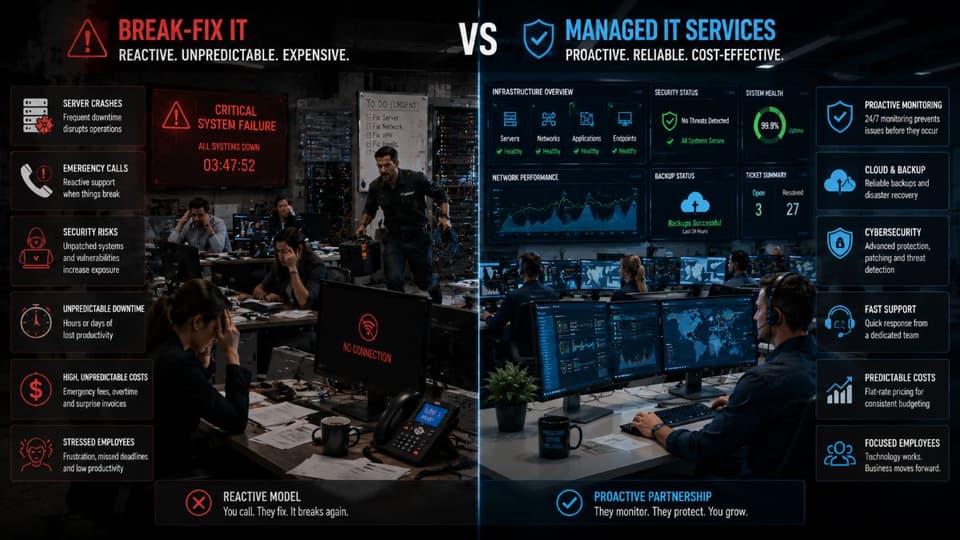
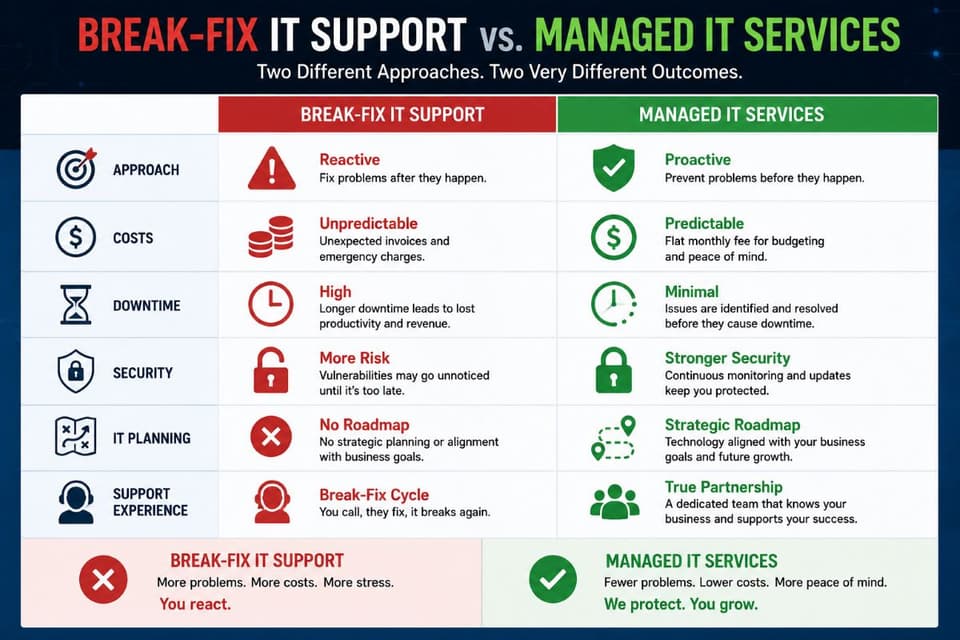
When evaluating break-fix vs managed IT, comparing the two approaches side by side reveals fundamental differences in how your technology is handled. The core distinction lies in how services are priced and delivered. The break-fix model relies on unpredictable hourly billing plus the cost of parts, making IT budgeting difficult. In contrast, managed IT operates on a highly predictable flat monthly fee.
This pricing difference directly impacts the response model. Break-fix is entirely reactive; action is only taken after a failure occurs. Managed IT, however, is proactive. It includes 24/7 monitoring and continuous preventive maintenance, whereas the hourly approach provides absolutely no oversight or maintenance between service calls.
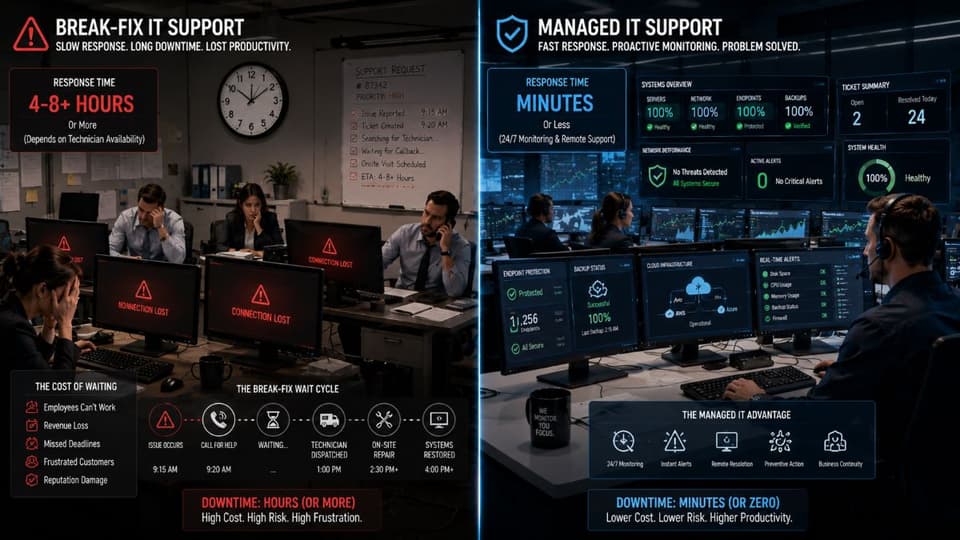
When an issue does arise, average response times vary drastically. An hourly technician's response is dictated by their availability, meaning you might wait hours or even days. Managed agreements typically guarantee response times measured in minutes to hours. Furthermore, if you need help after regular business hours, the break-fix approach incurs premium emergency rates, while managed contracts usually include after-hours support in the base monthly fee.
Security and maintenance practices also differ significantly. Patch management and security updates in a reactive model only happen when you specifically request and pay for them. Under a managed contract, these updates are continuous and automatic. Similarly, while a break-fix technician might initially set up your data backups, they do not monitor them. Managed services ensure backups are continually managed and regularly tested for recoverability, which is the backbone of dependable data backup and disaster recovery.
Finally, the scope of the relationship changes. Strategic IT planning and network documentation are virtually non-existent in the break-fix world. Managed services include regular strategy sessions (often with a vCIO) and maintain thorough documentation. Due to these comprehensive features and robust compliance support, managed IT is generally best for companies with 10 or more employees, while the reactive model is best suited for organizations with fewer than 10 employees.
Cost Comparison Reality
On paper, the reactive model often appears cheaper to an optimistic business owner. If nothing breaks, you pay nothing. However, this is an illusion. Real costs multiply rapidly when major incidents occur. The flat monthly fee of a managed contract looks expensive initially, but it almost always proves more economical annually when you factor in the elimination of emergency billing and the reduction of employee downtime.
Incentive Alignment
This is the most critical distinction between the two models. Under the break-fix IT services model, the provider earns more money when your business experiences problems. Their revenue depends on your pain. Conversely, an MSP earns a fixed fee regardless of how many times you call. Their profit margin increases only when your network is stable and quiet. This single difference shifts the entire relationship from adversarial to collaborative.
Response Time Differences
When you call an hourly technician, your place in line depends entirely on their current workload and availability. It might take hours or days to see someone. Managed agreements include a Service Level Agreement (SLA). This contract legally guarantees response times, which typically range from 15 minutes for critical issues to four hours for minor requests.
Coverage Differences
Hourly support providers generally operate during standard business hours. If your network fails on a Saturday or during a holiday, you must pay premium emergency rates, assuming they answer the phone at all. Managed agreements recognize that modern businesses operate outside of a strict nine-to-five schedule and usually include 24/7 monitoring and emergency response in the base price.
Risk Profile
Under a reactive model, your business absorbs 100 percent of the risk of technology failure. You pay the financial penalty of downtime and the full cost of the eventual repair. With proactive services, the IT provider absorbs a significant portion of that risk. Because they are financially motivated to prevent problems, they invest their own resources into keeping your systems secure and operational.
Real Cost Comparison: Break-Fix vs Managed IT
Business owners need to see real numbers to make informed decisions. Let us look at three realistic scenarios comparing the true annual costs of break-fix vs managed IT.

Scenario 1: 15-Employee Medical Practice
Break-fix annual cost:
- 4 emergency incidents at an average of 4 hours each: $4,000 to $6,000
- 12 routine support visits at an average of 2 hours: $3,000 to $6,000
- 2 after-hours emergencies: $2,000 to $4,000
- Parts and replacement hardware: $3,000 to $5,000
- Subtotal: $12,000 to $21,000
- Lost productivity during 4 outages (average 6 hours each, 12 affected staff at $40/hour): $11,520
- Total real cost: $23,520 to $32,520 per year
Managed IT annual cost:
- 15 users at $150 per month: $27,000
- Significantly reduced downtime (managed proactively)
- Total: $27,000 per year
Verdict: The direct invoice costs are roughly equivalent. However, for a medical practice, the managed approach delivers vastly superior service, drastically fewer work disruptions, and provides the ongoing compliance and risk management services critical for HIPAA compliance.
Scenario 2: 40-Employee Law Firm
Break-fix annual cost:
- 8 critical incidents at an average of 5 hours: $10,000 to $15,000
- Monthly routine user support: $8,000 to $12,000
- After-hours emergencies for trial prep: $4,000 to $6,000
- Hardware and parts markup: $5,000 to $8,000
- Subtotal: $27,000 to $41,000
- Downtime costs (estimated 30 hours/year at $4,000/hour billable rate for the firm): $120,000
- Total real cost: $147,000 to $161,000 per year
Managed IT annual cost:
- 40 users at $175 per month: $84,000
- Downtime reduced to approximately 8 hours per year: $32,000
- Total: $116,000 per year
Verdict: For highly billable environments like law firms, proactive managed IT saves between $30,000 and $45,000 annually. The prevention of billable hour loss far outweighs the monthly subscription cost.
Scenario 3: 8-Employee Startup
Break-fix annual cost:
- Minimal incidents: $2,000 to $4,000
- Occasional user support: $1,500 to $2,500
- Total: $3,500 to $6,500 per year
Managed IT annual cost:
- 8 users at $125 per month: $12,000
- Total: $12,000 per year
Verdict: For very small, low-complexity businesses without regulatory compliance needs, the reactive hourly model can be genuinely cheaper and entirely appropriate.
When Break-Fix IT Is the Right Choice
It is important to be honest. The break-fix IT support model is not always wrong. For specific types of organizations, paying a flat monthly fee for IT oversight is an unnecessary expense.
Good Fits for Break-Fix
Very small businesses with under 10 employees often function perfectly well with hourly support. Sole proprietors and freelancers rarely need 24/7 network monitoring. Additionally, cloud-native businesses with minimal hardware requirements or highly seasonal operations that close for months at a time are excellent candidates for paying only when they need help.
When IT Complexity Is Low
If your business has no on-premise servers and all major applications run purely as Software as a Service (SaaS) in the browser, your risk profile is low. A business with basic laptops, consumer-grade internet, few collaboration needs, and absolutely no industry compliance requirements can safely utilize the reactive model.
When You Have In-House Capability
Some small companies are lucky enough to have a tech-savvy team member or owner who is comfortable troubleshooting basic problems. If your internal resources can handle password resets, basic printer jams, and new computer setups, you might only need an outside vendor for genuine emergencies or complex network issues.
Honest Tradeoffs
Choosing this path requires accepting specific risks. You must be willing to absorb the full financial impact of downtime. You will not receive proactive security improvements, meaning your defenses may slowly become obsolete. You sacrifice strategic IT planning and must accept slower response times during emergencies. You will also face higher localized costs when major hardware incidents eventually happen.
Signs You've Outgrown Break-Fix IT
Many businesses start with hourly support but fail to realize when they have outgrown it. Knowing when to switch from break-fix to managed IT is vital for protecting your operations. If any of the following indicators apply to your organization, it is time to reevaluate your technology strategy.

Business Growth Indicators
Hitting an employee count above 10 to 15 people is the most common trigger. At this size, managing user accounts, permissions, and hardware becomes a continuous burden. Opening multiple office locations or transitioning to a permanent remote workforce introduces severe security complexities that hourly support cannot manage safely. If your company is growing faster than your technology infrastructure can support, you need proactive planning.
Operational Indicators
Frequent IT problems that disrupt daily work are a massive red flag. If your employees spend time commiserating about slow computers or broken printers, you are losing money. Aging equipment that causes repeated issues usually indicates a lack of lifecycle management. Finally, if frustrated employees are waiting days for an hourly technician to arrive, morale and productivity will suffer.
Compliance Indicators
Regulatory requirements absolutely demand continuous monitoring and proof of security. Healthcare practices handling patient data must adhere strictly to HIPAA guidelines. Any business processing significant credit card volumes must maintain PCI DSS compliance. Furthermore, if you are applying for cyber liability insurance, carriers now mandate proactive security measures, multi-factor authentication, and tested backups that hourly vendors simply do not provide.
Financial Indicators
If your IT bills surprise you every single month, budgeting becomes impossible. Experiencing major hardware failures that require sudden, massive emergency expenditures is a clear sign that proactive lifecycle management is missing. When IT feels like an unpredictable financial drain rather than a strategic investment, the billing model is broken.
Strategic Indicators
You have outgrown hourly support when technology becomes critical to delivering your product or service. If you are planning a digital transformation or anticipating rapid growth, you need a solid foundation. Recognizing that reliable technology is a competitive advantage rather than just an unavoidable operational cost is the final sign you are ready for a managed relationship.
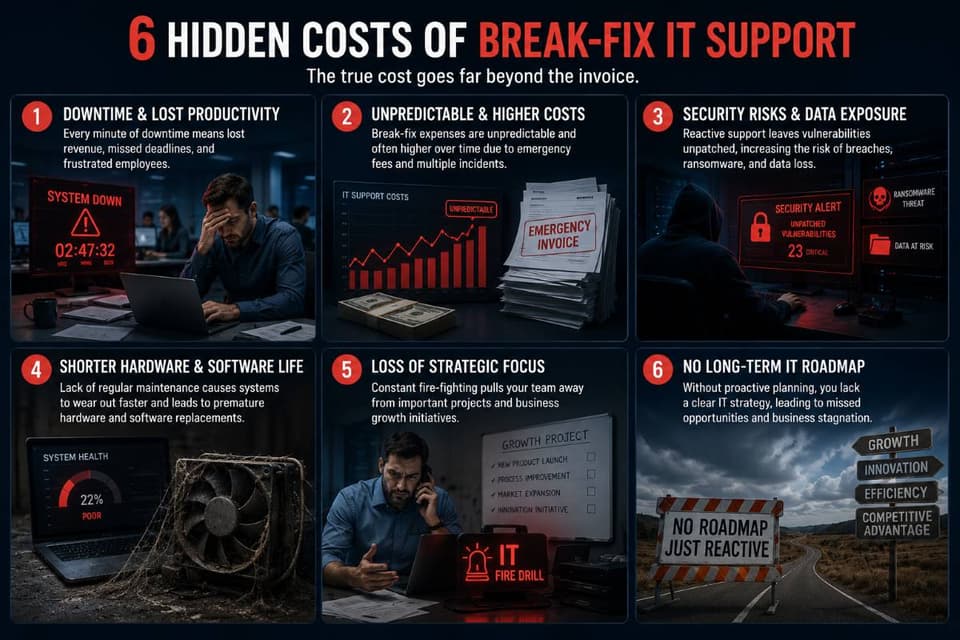
6 Hidden Costs of Break-Fix IT Support
When comparing break-fix vs managed IT, business owners often focus only on the invoice amounts. However, the reactive model carries severe hidden costs that rarely show up on a direct bill but deeply impact profitability.
- Downtime cost is rarely calculated. When systems fail, you lose productivity, revenue, and sometimes customers. A 4-hour outage at a 20-person company can easily cost $5,000 to $15,000 in lost payroll alone, completely separate from whatever the IT technician charges to fix the problem.
- Security incidents become catastrophic. Without continuous monitoring, cybersecurity breaches go undetected for weeks. The average data breach cost for small businesses is staggering. Many companies using hourly support do not discover ransomware infections until customer data is already encrypted or stolen, which is why layered cybersecurity solutions matter so much.
- Aging equipment creates compounding problems. Without proactive lifecycle management, hardware fails at the worst possible times. Emergency hardware replacements cost 30 to 50 percent more than planned upgrades because you are forced to pay expedited shipping and emergency labor rates.
- Compliance failures result in heavy fines. HIPAA violations can cost thousands of dollars per incident. PCI DSS violations carry their own severe penalties. An hourly technician does not provide the ongoing logging, reporting, and documentation that auditors require to prove you were protecting data.
- Knowledge loss between visits. Every time an hourly technician arrives at your office, they have to relearn your environment. The time they spend figuring out how your network is configured is time you are paying for repeatedly.
- Strategic decisions get delayed or wrong. Without ongoing technical planning, decisions about cloud migrations, new software tools, and business growth get made reactively. Making the wrong technology decision can cost a business tens of thousands of dollars in wasted implementation time.
How to Transition from Break-Fix to Managed IT Services
Moving from an ad-hoc vendor relationship to a comprehensive managed IT partnership might seem intimidating, but the process is highly structured. Here is how to execute a successful break-fix to managed IT transition.
- Inventory Your Current Setup Begin by documenting what you currently own. Note all recurring technical issues your staff complains about. Identify your major operational pain points and outline exactly what you want the new provider to solve.
- Calculate Your True Current IT Cost Gather the past 12 months of your IT bills. Next, conservatively estimate your annual downtime cost and lost productivity. Add the hidden costs discussed earlier to establish your true baseline technology expense.
- Define Your Requirements Determine the coverage hours your business actually needs. Document your expected response times for emergencies. List any regulatory compliance standards you must meet, and outline your strategic goals for the next three years.
- Get Quotes from Managed IT Providers Request proposals from at least three different vendors. Ensure you present the exact same scope of work to each one so you can compare apples to apples. Carefully verify what is included in their flat fee and what is considered an extra project.
- Verify Provider Capabilities Ask for references from businesses similar to yours in size and industry. Check their vendor certifications and partnerships. If your business requires on-site visits, ensure they have a strong local presence and adequate staffing levels.
- Review the Contract Read the Service Level Agreement (SLA) terms carefully. Understand exactly what constitutes an extra charge. Check for standard exit clauses and review how they handle annual pricing escalations.
- Plan the Transition A typical onboarding period takes two to six weeks. The new provider will handle knowledge transfer from your old vendor, capture all network documentation, and begin deploying their monitoring agents and security software across your devices.
- Run Both Briefly if Needed Some highly complex businesses choose to overlap their old vendor and their new provider by 30 days. This ensures a perfectly smooth transition, prevents data loss, and provides a safety net while the new team learns your environment.
Common Misconceptions About Break-Fix and Managed IT
Business leaders often base their IT strategy on outdated assumptions. Let us clear up the most common misconceptions regarding IT support models.
- "Break-fix is always cheaper." False. The true cost includes employee downtime, security incident recovery, and lost productivity. When you add these hidden expenses, reactive support is usually the most expensive way to manage business technology.
- "Managed IT is only for big companies." False. Many modern providers successfully serve businesses with as few as five employees, providing enterprise-grade security and support scaled down to an affordable small business price point.
- "My business is too simple for managed IT." False. If you have employees, process payments, or store customer data, you have IT needs that benefit greatly from professional oversight, proactive security, and reliable backups.
- "Switching providers is too disruptive." False. Professional IT providers follow strict, proven onboarding processes. They handle the transition quietly in the background, ensuring your daily operations experience zero interruption during the switch.
- "All MSPs are the exact same." False. Provider quality, industry specialization, security stacks, and pricing vary wildly. A firm specializing in medical compliance operates very differently from one serving industrial manufacturing.
- "I have to commit to long multi-year contracts." False. While some vendors require three-year commitments, many modern providers offer flexible annual or even month-to-month agreements to earn your business continuously.
- "I will lose control of my IT environment." False. You actually gain far more visibility. Through regular reporting, strategic meetings, and transparent ticketing systems, you will have more control over your technology than ever before.
Making the Switch from Break-Fix to Managed IT
Deciding between break-fix vs managed IT ultimately comes down to how much you value your time, your security, and your peace of mind. If you are tired of unpredictable invoices and frustrating downtime, it is time to evaluate a proactive approach.
What GlobeVM Offers
GlobeVM provides comprehensive managed IT services in the Los Angeles area specifically tailored for small to mid-sized businesses. We specialize in highly regulated industries, offering strict compliance support for medical and dental offices, law firms, and financial services. We believe in transparent, flat-fee pricing and guarantee our performance through SLA-backed response times. With GlobeVM, you gain a local partner dedicated to keeping your operations running smoothly.
Our Onboarding Process
We make the transition seamless. It begins with a comprehensive, no-obligation IT infrastructure assessment to locate vulnerabilities and performance bottlenecks. We then build a custom support scope based entirely on your unique business needs. Our 30-day transition plan ensures thorough knowledge capture and documentation, so we fully understand your environment before we take over. Our goal is to become your long-term strategic partner, not just a vendor you call when things go wrong.
Ready to stop paying for downtime? Schedule a free IT assessment and cost comparison today, and let us show you exactly how much time and money a proactive IT strategy can save your business.
Selecting the right technology support model is foundational to your company's success. Whether you rely on reactive support or choose to invest in proactive oversight, understanding the true financial and operational impacts ensures your business remains secure, productive, and ready for growth.