
Your business has grown, your IT needs have grown with it, and your current setup isn't working. Maybe your one-person IT team is drowning in help desk tickets. Maybe your break-fix vendor only shows up when something's already broken. You've heard about managed IT services, but the options are confusing. Should you fully outsource your IT operations, or have an external provider work alongside your existing team?
There is no single "best practice" when it comes to managing your IT infrastructure. The right answer depends entirely on your specific business context, your current staff, your compliance requirements, and your goals for growth. In the debate of co-managed IT vs managed IT, making the wrong choice can lead to wasted budget, frustrated employees, or critical security vulnerabilities.
By the end of this guide, you'll know exactly which model fits your business and why.
What Is Managed IT Services?
Managed IT services is a business model where an external provider (called a Managed Service Provider or MSP) takes responsibility for monitoring, maintaining, and supporting a company's IT infrastructure. The MSP provides services for a predictable monthly fee, replacing or supplementing in-house IT staff.
What an MSP Typically Handles
A comprehensive managed IT services package covers the full spectrum of a business's technological needs. This typically includes:
- 24/7 proactive monitoring of networks and systems
- Help desk support for end-users
- Patch management and system updates
- Security management (often integrating a SOC - Security Operations Center)
- Backup and disaster recovery solutions
- Strategic IT planning and consulting
- Hardware and software asset management
How Managed IT Differs from Break-Fix
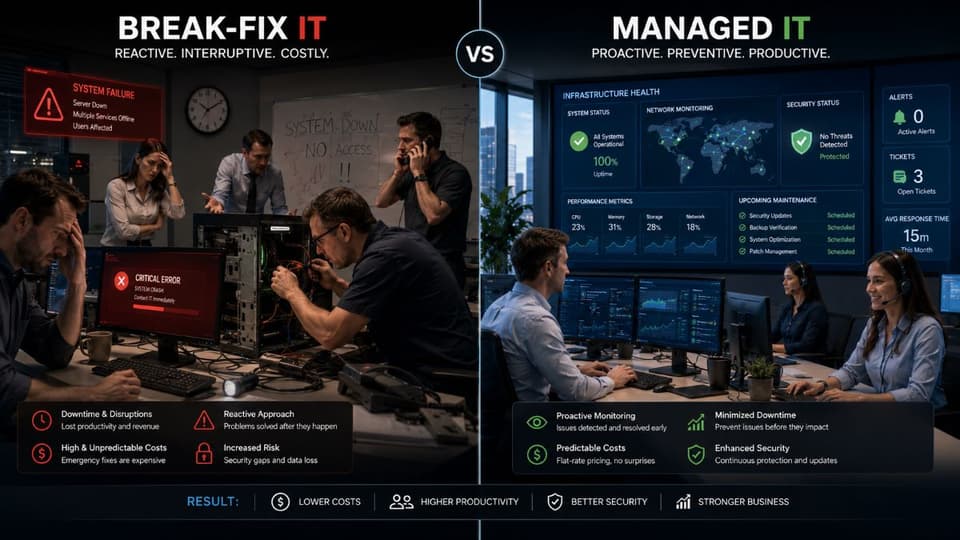
Historically, businesses relied on the "break-fix" model: you pay an IT guy an hourly rate only when something breaks. This model is inherently reactive. The technician's incentive is tied to things going wrong.
Managed IT operates on a proactive, subscription-based model. For a predictable monthly fee, the MSP is incentivized to keep your systems running smoothly. If your network goes down, the MSP loses money trying to fix it, creating a shared goal of maximum uptime and reliability.
Why Businesses Move to Managed IT
Companies transition to managed IT services to gain control over their technology. The primary drivers include achieving predictable IT costs, shifting from reactive putting-out-fires to proactive maintenance, and gaining access to specialized expertise (like cybersecurity or cloud architecture) that would be prohibitively expensive to hire internally. It also ensures 24/7 coverage without the burden of hiring, managing, and retaining an entire internal IT department.
Learn more about our comprehensive Managed IT Services.
What Is Fully Managed IT Services?
Fully Managed IT Definition
Fully managed IT services is a comprehensive outsourced solution where an MSP assumes 100% responsibility for a company's IT operations. The MSP effectively acts as the organization's entire IT department, managing everything from strategic planning to daily help desk support. This model is best suited for companies with no internal IT staff.
What Fully Managed IT Includes
When an MSP takes full ownership of your IT, they provide a complete, end-to-end solution. This encompasses:
- All Tier 1, Tier 2, and Tier 3 technical support
- End-user help desk accessible via phone, email, or ticketing system
- Continuous infrastructure monitoring and preventative maintenance
- Strategic IT planning, typically delivered through virtual CIO (vCIO) services
- Vendor management (acting as the liaison for your internet, software, and hardware providers)
- Procurement of necessary hardware and software
- Comprehensive security operations
- Managed backup and disaster recovery
- Compliance support and reporting
Who Fully Managed IT Is Best For
Fully managed IT services are typically the ideal choice for:
- Businesses with 5 to 75 employees.
- Companies that currently have no internal IT staff.
- Organizations where technology is a necessary tool, but not a core competency.
- Medical, dental, legal, and professional services firms that need reliable systems but shouldn't be managing servers.
- Businesses prioritizing highly predictable, flat-rate IT budgets.
Typical Fully Managed IT Pricing
Pricing for fully managed IT depends on the complexity of your environment and the level of service required. Common models include:
- Per-user model: $100 to $250 per user, per month.
- Per-device model: $75 to $200 per device, per month.
- All-inclusive flat fee: Ranging from $2,500 to $15,000+ per month, heavily dependent on the size of the organization and specific compliance needs.
What's Usually NOT Included
It is important to understand that a fully managed IT contract is generally an operational expense. It typically does not cover capital expenditures or out-of-scope work, such as:
- The cost of new hardware (computers, servers, network switches).
- Software licensing fees (e.g., Microsoft 365 or specific line-of-business applications).
- Major projects like office relocations, large-scale cloud migrations, or entire network replacements.
- Physical cabling or wiring work.
- Specialized, independent compliance audits.
What Is Co-Managed IT Services?
Co-Managed IT Definition
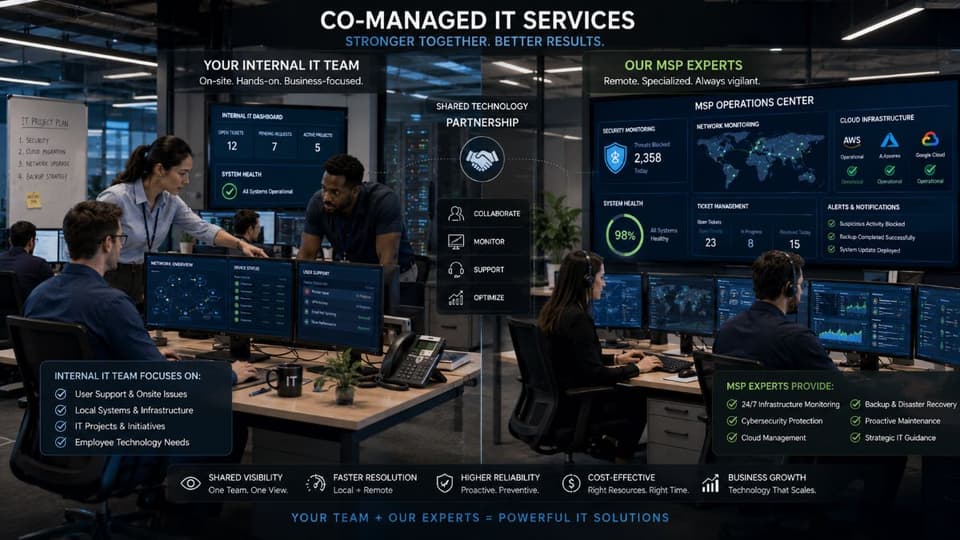
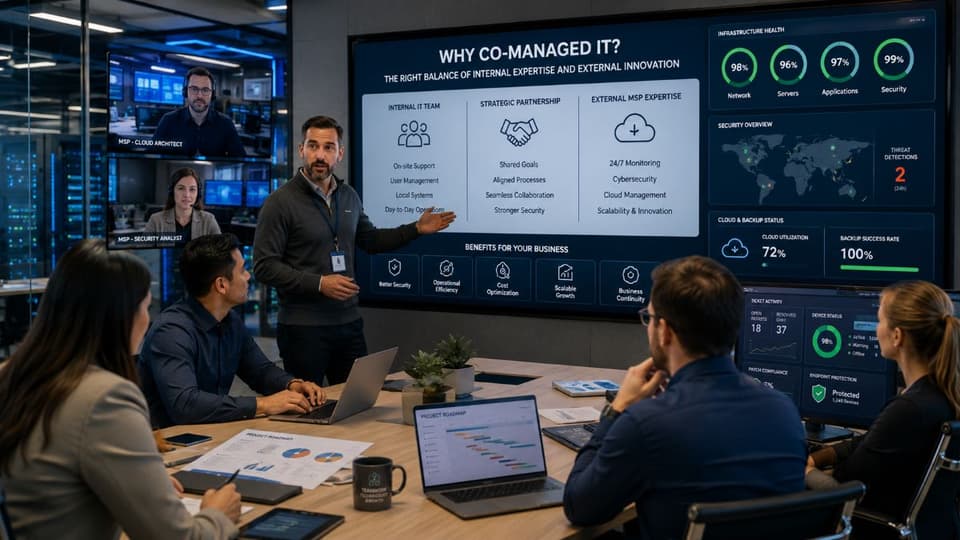
Co-managed IT services is a hybrid model where a Managed Service Provider works collaboratively alongside a company's existing internal IT team. While the internal team typically manages day-to-day operations and user support, the MSP fills specific gaps in expertise, capacity, or tools. It is a partnership, not a replacement.
How Co-Managed IT Works
In a successful co-managed relationship, there is a clear delineation of responsibilities. Typically, the internal IT staff handles user-facing support, onboarding new employees, and routine administrative tasks.
The MSP steps in to provide the resources the internal team lacks. This often includes providing Tier 3 escalation for complex server or network issues, ensuring after-hours and weekend monitoring coverage, and bringing specialized expertise in areas like advanced cybersecurity or compliance. The MSP also provides enterprise-grade tools—such as Remote Monitoring and Management (RMM) and Professional Services Automation (PSA) platforms—that the internal team can use to work more efficiently. Additionally, the MSP can offer strategic guidance (vCIO) and extra project capacity for major initiatives.
Common Co-Managed IT Arrangements
Co-managed IT is highly flexible. Common partnership structures include:
- Tools-only: The MSP provides access to advanced RMM/PSA platforms, and the internal team uses them to manage the environment.
- Tier 3 escalation: The internal team resolves all Tier 1 and Tier 2 tickets, but escalates complex infrastructure issues to the MSP.
- After-hours coverage: The internal team works standard business hours; the MSP monitors systems and handles critical alerts on nights and weekends.
- Project augmentation: The internal team handles all "business as usual" (BAU) tasks, while the MSP executes major projects like cloud migrations.
- Hybrid expertise: The internal team acts as generalists, while the MSP provides deep specialists in areas like cybersecurity solutions or Azure infrastructure.
- Strategic partnership: The internal team runs daily operations, but the MSP provides vCIO-level strategy and IT roadmapping.
Who Co-Managed IT Is Best For
Co-managed IT services are specifically designed for:
- Businesses with 50 to 500 employees.
- Companies that already employ 1 to 5 internal IT staff members.
- Organizations needing specialized expertise (like security or advanced cloud architecture) but cannot justify a full-time hire.
- Businesses with strict compliance requirements that need outside validation or specialized tools.
- Growing companies whose IT demands are increasing faster than their internal team can scale.
Typical Co-Managed IT Pricing
Because the scope varies wildly based on what the internal team handles, co-managed pricing is highly customized:
- Hourly: $125 to $250 per hour for specialized escalation work.
- Hybrid model: A lower base monthly fee for tools and monitoring, plus per-incident or hourly charges for escalations.
- Per-device monitoring: $20 to $75 per device, per month, primarily for tool access and automated patching.
- Project-based: Scoped and priced individually based on the initiative.
Generally, the monthly MSP fee for co-managed services is lower than fully managed, but the total cost to the business includes internal salaries.
Explore our Co-Managed IT Services.
Co-Managed IT vs Fully Managed IT: Head-to-Head Comparison
When evaluating co-managed IT vs managed IT, making the best choice requires understanding exactly who is responsible for what, how costs are structured, and how each model supports your business strategy. Below is a breakdown of the core differences:
- Internal IT Staffing Requirements: Fully managed IT requires minimal to no internal IT staff. In contrast, co-managed IT requires an existing baseline of at least 1 to 5+ internal IT employees to function as the primary on-site team.
- Ideal Company Size: Fully managed IT is generally best for smaller to mid-sized businesses with 5 to 75 employees. Co-managed IT is tailored for larger organizations, typically ranging from 50 to 500 employees.
- Scope of MSP Responsibility: Under a fully managed contract, the MSP assumes 100% responsibility for your IT operations. In a co-managed setup, the MSP is only responsible for specific functions, support tiers, or defined projects.
- User-Facing Help Desk Support: Fully managed IT routes all end-user requests directly to the MSP. With co-managed IT, your internal team handles daily user requests, only passing complex escalations to the MSP.
- After-Hours Coverage: 24/7 and after-hours coverage is fundamentally included in a fully managed contract. For co-managed environments, it is often added specifically to supplement the internal team during nights, weekends, and holidays.
- Strategic Planning: Fully managed providers act as your complete vCIO, handling all technology roadmapping. Co-managed providers engage in joint strategic planning alongside your internal IT leadership.
- Pricing Structure and Predictability: Fully managed IT operates on a highly predictable per-user or flat-fee model, typically costing between $2,500 and $15,000+ per month based on size. Co-managed IT utilizes a moderately predictable hybrid, hourly, or project-based model, generally costing between $1,500 and $8,000+ per month for the MSP portion.
- Internal IT Growth and Expertise: Fully managed IT offers a limited growth path for internal staff since the department is outsourced, though specialized expertise is fully included. Co-managed IT enables strong internal growth by freeing up your staff to focus on high-level tasks, with advanced expertise accessed through the MSP on demand.
- Compliance Support: Both models support compliance. Fully managed is highly effective for SMBs needing a complete compliant environment, while co-managed is essential for larger organizations requiring external validation and specialized security tools to augment their own team.
Cost Comparison
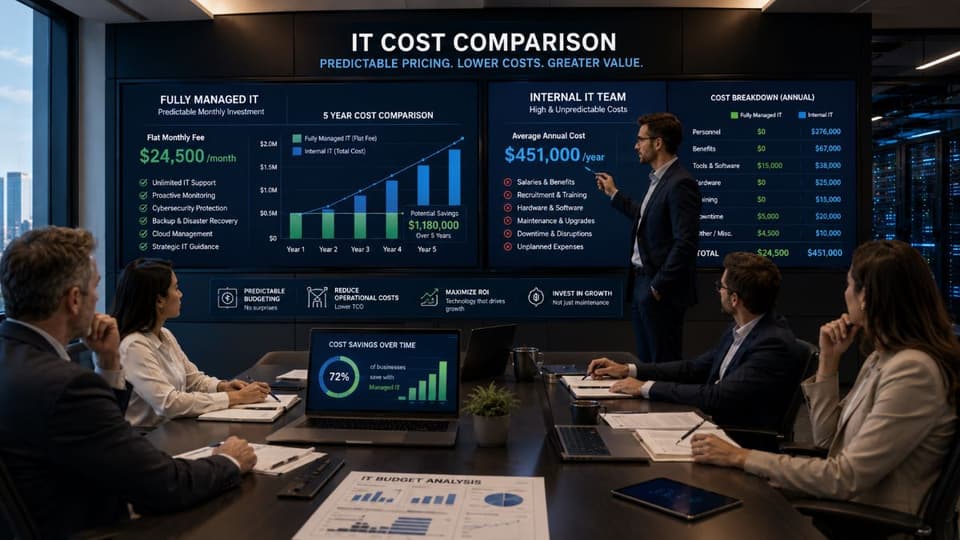
Fully managed IT services carry a higher monthly fee paid to the MSP, but offer fewer financial surprises. Co-managed IT often features a lower monthly MSP invoice, but the total cost can be variable based on how much escalation support is used, plus the significant fixed cost of internal IT salaries.
Consider real numbers: A 100-employee company with 2 internal IT staff members might pay $4,000 to $7,000 per month for a co-managed contract to provide tools, security, and backup support. The same company moving to a fully managed model might pay $12,000 to $18,000 per month, but this would theoretically allow them to reallocate or eliminate those internal IT salaries.
Control and Visibility Comparison
In a fully managed arrangement, the MSP runs your IT department; you receive regular reports and strategic updates, but you surrender day-to-day control. In a co-managed environment, control is shared. The internal team retains hands-on administrative access and dictates internal policies. For businesses in regulated industries or those dealing with sensitive intellectual property, maintaining internal control is often a critical requirement.
Speed of Response Comparison
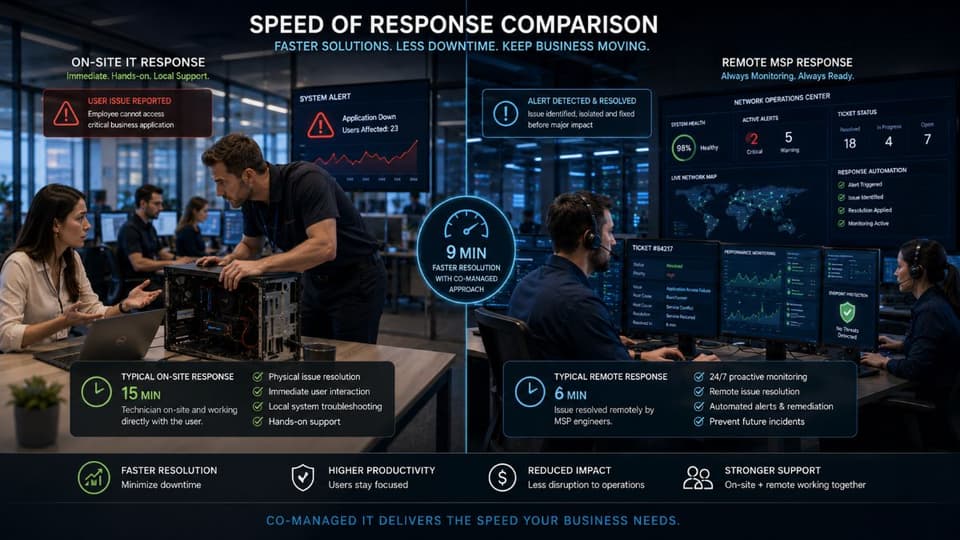
Fully managed response times are dictated by your Service Level Agreement (SLA), typically ranging from 15 to 60 minutes for critical issues. In a co-managed setup, your internal team can respond immediately to an end-user walking up to their desk, while the MSP is reserved for complex backend issues that might take longer to resolve but require specialized knowledge.
Scalability Comparison
Fully managed IT scales easily, usually driven by a simple per-seat or per-device pricing model as you add employees. Co-managed IT offers a different type of scalability; your internal team can often absorb basic growth (like adding a few new laptops) without significantly increasing the monthly MSP fee, using the MSP only when the overall infrastructure needs to expand.
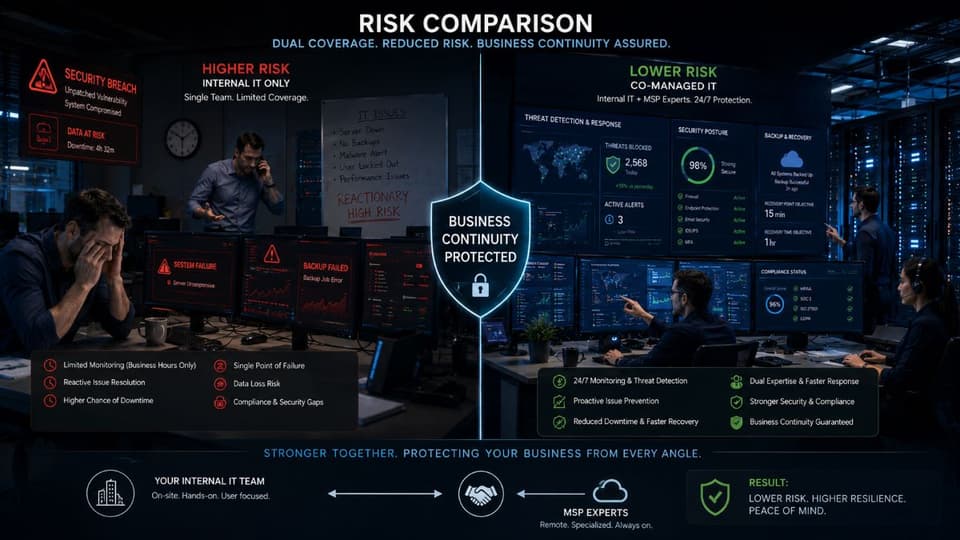
Risk Comparison
Using fully managed IT creates a single point of dependency on your MSP; if they fail to deliver, your entire operation suffers. Co-managed IT reduces this risk through dual coverage. If your internal IT manager leaves unexpectedly, the MSP is already familiar with your environment and can step in. Conversely, the internal team provides oversight to ensure the MSP is meeting expectations.
When to Choose Fully Managed IT
Business Size Indicators
Fully managed IT is typically the strongest choice for businesses with under 50 employees. Even if a company is growing rapidly, they often cannot justify the salary, benefits, and management overhead of hiring a full-time, experienced IT professional. It is also the right model when technology is essential for daily work, but managing that technology is not a core part of the business operations.
Industry Indicators
Certain industries thrive on the fully managed model, particularly those that require robust, reliable systems but focus entirely on client service. This includes:
- Medical and dental practices
- Law firms (typically under 30 attorneys)
- Accounting and financial firms
- Real estate offices
- Construction firms (specifically the back-office operations)
- Small professional services organizations
These are industries where downtime directly impacts revenue and compliance matters, but those requirements shouldn't be handled by an office manager.
Operational Indicators
You should strongly consider fully managed IT if you currently have no dedicated internal IT staff. Often, businesses rely on an overwhelmed "accidental IT person"—usually an office manager or tech-savvy employee whose actual job suffers because they are constantly fixing printers.
Other strong indicators include relying heavily on frequent, unpredictable break-fix calls, facing looming compliance audits without the knowledge to pass them, or having experienced a recent security incident that highlighted the inadequacy of your current defenses. Furthermore, if you cannot afford the $75,000 to $150,000+ salary required for a competent internal IT manager, outsourcing fully is the logical path.
Strategic Indicators
Choose fully managed IT when technology is viewed primarily as an operational necessity rather than a unique competitive differentiator. If your primary goals are securing a highly predictable IT budget, achieving reliable 24/7 coverage without managing a team, and gaining strategic guidance without hiring a Chief Information Officer, a fully managed contract delivers exactly that.
When to Choose Co-Managed IT
Business Size Indicators
Co-managed IT becomes the preferred model for organizations with 50 to 500 employees. Typically, businesses in this tier already have an established internal team of 1 to 5 IT professionals and plan to grow their IT capabilities slowly, rather than outsourcing entirely.
Operational Indicators
The most common operational indicator for co-managed services is an internal IT team that is doing good work but is simply overwhelmed by volume.
Co-managed is the right choice when you need specialized expertise—such as deep compliance and risk management services or advanced cloud engineering—that you cannot justify hiring full-time. It's also ideal for covering 24/7 monitoring gaps (nights, weekends, and staff vacations) or providing temporary high-level project capacity for major initiatives like server migrations or comprehensive security audits.
Strategic Indicators
Organizations choose co-managed IT when they want to keep IT in-house culturally. If your business holds highly regulated or sensitive data requiring strict internal administrative control, a hybrid model maintains that boundary. It is also the right choice for companies actively building their IT operations as a competitive advantage in their market, or those needing vCIO-level strategic planning without the expense of a full-time CIO.
Common Co-Managed Triggers
Several specific events often trigger the need for a co-managed arrangement:
- Your lead IT person is leaving or retiring, and you need immediate bench strength and documentation.
- An upcoming compliance audit requires outside, independent validation of your systems.
- Your cyber insurance provider mandates specific security controls (like a 24/7 SOC) that your internal team cannot provide.
- A major cloud migration requires execution expertise your team lacks.
- A recent security incident necessitates specialized, rapid response and remediation.
- Geographic expansion requires IT support in a new timezone or location.
When Co-Managed Doesn't Work
Co-managed IT is a partnership, and it fails if the internal team is hostile to outside help or views the MSP as a threat to their jobs. It also struggles if there is an unclear delineation of responsibilities, leading to dropped tasks and finger-pointing. Finally, if the internal team lacks any foundational IT expertise, a co-managed model won't work; the business needs a fully managed solution to establish a baseline.
How to Decide Between Co-Managed and Fully Managed IT
If you are still weighing co-managed vs fully managed IT services, use this decision framework to evaluate your specific situation.
Step 1: Honest Assessment of Internal Capability
Evaluate your current IT setup. Do you have dedicated IT staff currently? If yes, are they performing well and meeting the business's needs? Assess whether your team consists of generalists who handle a little bit of everything, or specialists. Finally, look at their workload—are they proactive, or merely surviving a constant barrage of support tickets?
Step 2: Identify Your IT Gaps
Where is your current IT strategy failing?
- Coverage gaps: Who is watching the network at 2:00 AM or over long weekends?
- Expertise gaps: Do you have the skills in-house to configure advanced cybersecurity defenses or manage cloud infrastructure?
- Capacity gaps: Is important maintenance being ignored because there is simply too much day-to-day user support?
- Strategic gaps: Is anyone planning your technology roadmap for the next three years, or are you just buying laptops as they break?
Step 3: Calculate the Real Cost of Each Model
Do not simply compare an MSP proposal against another MSP proposal. You must calculate the Total Cost of Ownership. For fully managed IT, the cost is the clear monthly fee from the MSP. For co-managed IT, the cost is the MSP fee plus the fully burdened cost of your existing IT staff (salaries, benefits, training, tools). Compare these totals against your budget and risk tolerance.
Step 4: Consider Cultural Fit
Culture dictates the success of an IT partnership. Does your internal team welcome outside help to relieve their burden, or will they resist it? Does your executive team demand total internal control over systems, or are they comfortable outsourcing operations to experts?
Step 5: Plan for the Future
Consider your growth trajectory. If you plan to double in size, will your IT needs scale linearly, or exponentially? Are your industry's compliance requirements increasing rapidly?
Quick Decision Guide
- Under 50 employees, no IT staff: Fully managed IT.
- 50-100 employees, 1 IT staff member: Co-managed IT (to support the solo worker).
- 100-300 employees, 2-5 IT staff members: Co-managed IT strongly recommended.
- 300+ employees, established IT department: Co-managed IT or selective, highly specialized MSP engagements.
- Any size, heavy compliance focus: Depends entirely on the depth of your internal expertise.
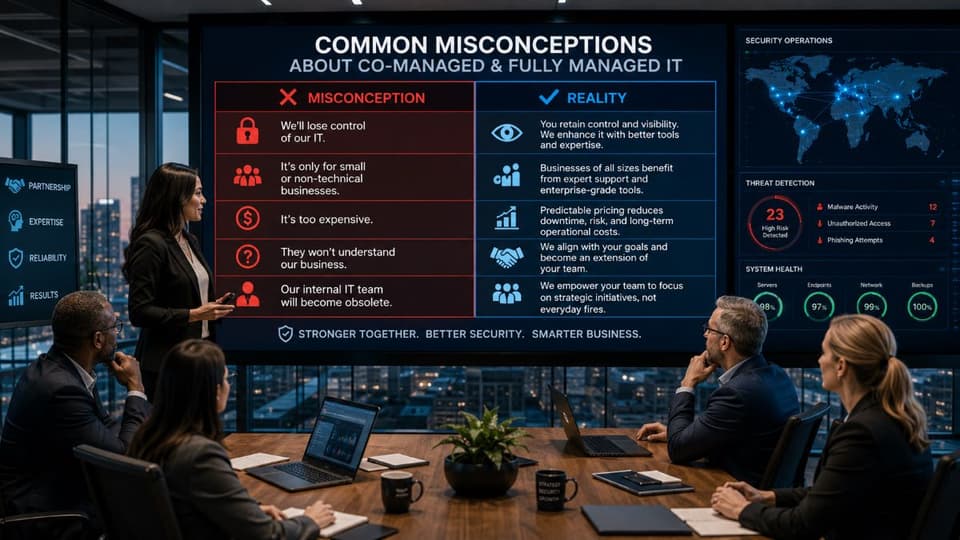
Common Misconceptions About Co-Managed and Fully Managed IT
- "Co-managed means you don't trust your internal team." False. A successful co-managed relationship is about enabling your internal team. It provides them with enterprise-grade tools and specialized backup so they can perform at a higher level, rather than getting bogged down in tasks outside their expertise.
- "Fully managed means losing control of your IT." False. While the MSP handles daily operations, reputable providers offer complete transparency through regular reporting, strategic vCIO meetings, and clear documentation. You retain control over the strategy and the budget.
- "Co-managed is always cheaper than fully managed." False. While the monthly MSP invoice might be lower, the total organizational cost of co-managed IT is often higher because you are still paying salaries, benefits, and taxes for your internal IT staff alongside the MSP fee.
- "Fully managed is only for small businesses." False. While popular with SMBs, many mid-market companies (with 200+ employees) utilize fully managed IT. They choose to focus their capital entirely on their core business rather than building and managing an internal IT department.
- "You can't switch between models." False. Many businesses evolve. A company might start with fully managed IT, hire an internal IT director as they grow, and transition the MSP contract to a co-managed model to support the new hire.
- "All MSPs offer both models." False. Delivering excellent fully managed services requires a different operational structure than integrating smoothly with an existing internal IT team. Many MSPs only execute one model effectively.
How to Evaluate an MSP for Your Chosen Model
Questions for Fully Managed Providers
If you are leaning toward fully outsourcing, ask potential partners:
- What is your average response time, and is it guaranteed by a clear Service Level Agreement (SLA)?
- What exactly is included in the flat fee, and what triggers an out-of-scope, billable project?
- Are strategic vCIO services included, and how often will we meet to discuss our roadmap?
- Do you have proven compliance experience within our specific industry?
- Can you provide references from businesses of similar size and complexity?
Questions for Co-Managed Providers
If you are looking for a partner for your internal team, ask:
- What is your specific experience integrating with established internal IT departments?
- How exactly do you handle escalations from our team? What is the technical handoff process?
- What toolsets (RMM, PSA, documentation) do you provide, and will our team use them, or do we use our own?
- What specialized expertise do you bring that we likely lack (e.g., dedicated SOC, Azure architects)?
- How will we jointly measure the success of this partnership?
Red Flags for Both Models
Walk away from an MSP if you encounter these warning signs:
- They are unwilling or unable to share relevant client references.
- They have no clear SLA, or use vague terms like "best effort" support.
- They force a one-size-fits-all pricing model without assessing your environment.
- They lack documented, standardized procedures for escalations and onboarding.
- They require long-term, multi-year contracts with no performance-based exit clauses.
Choosing the Right IT Partner for Your Business
Whether your business requires a complete outsourced IT department or a powerful partner to elevate your existing team, finding a provider that understands your specific operational needs is critical.

What GlobeVM Offers
GlobeVM provides flexible, tailored solutions for businesses across Southern California.
- We deliver comprehensive fully managed IT services designed to act as the complete IT department for small-to-mid-sized businesses.
- We offer robust co-managed services that seamlessly integrate with and empower your existing internal IT staff.
- We specialize in strict compliance environments, including HIPAA-compliant solutions for healthcare practices and secure infrastructure for legal and financial firms.
- Based in Los Angeles, we provide rapid remote support backed by reliable on-site availability when you need hands-on assistance.
Our Approach
We do not push one model over the other. Our approach begins with an honest, technical assessment of your current infrastructure, your internal capabilities, and your business goals. We provide clear, documented scopes of work, defined SLAs, and completely transparent pricing so you know exactly what to expect.
Ready to find out which model makes the most sense for your operations and budget? Schedule an initial consultation with our local LA team today to discuss your IT strategy.
Conclusion
Deciding between co-managed IT vs managed IT isn't about finding the objectively "better" service; it is about finding the right fit for your organization's current maturity, internal resources, and long-term goals.
Fully managed IT provides peace of mind, predictable budgets, and complete coverage for businesses without internal technical staff. Co-managed IT delivers powerful leverage, specialized expertise, and strategic partnership for companies looking to empower their existing IT teams.
The critical first step is conducting an honest, thorough assessment of what your business actually needs to operate securely and efficiently.
If you are evaluating your IT support options, GlobeVM can help you determine the most effective path forward. Contact our Los Angeles team for a consultation, and we will help you design an IT model that drives your business forward.