MSP vs MSSP comes down to two different jobs. A managed service provider (MSP) keeps your technology running, from laptops and email to backups and the network. A managed security service provider (MSSP) watches that technology for attacks and escalates or responds when something suspicious happens. The names differ by one letter, but the difference in what you are buying is much larger.
Moving From Google Workspace to Microsoft 365: A Plan That Holds Up

By George
8 October 2026

For a small or mid-sized business, the real question is not which label sounds better. It is who notices a compromised account in the middle of the night and who is allowed to act on it. It is also whether two providers you might hire would even talk to each other. This guide explains what each one does, where the duties split, and how to decide what your business needs.
One note for healthcare readers: in medicine, MSSP usually means the Medicare Shared Savings Program, a CMS accountable care program. This article is about the cybersecurity meaning, a provider that delivers security monitoring and response as an ongoing service.
What Is an MSP?
A managed service provider runs the day-to-day operation of your IT for a monthly fee. That typically includes the help desk, patching, device management, backups, network and firewall administration, and Microsoft 365 administration. It also covers vendor coordination and planning for replacements and budgets. The work centers on uptime and productivity: when something breaks, the MSP fixes it, and the rest of the time it keeps things from breaking.
Many MSPs run a network operations center (NOC) or a small-business version of one, with tools that watch for failed backups, full disks, offline devices, and missed updates. Their contracts measure response time, resolution time, and system availability. A good MSP also handles foundational security, since patching, multifactor authentication, and backups are security controls too. That is why GlobeVM builds baseline protection into every plan of its managed IT services.
What Is an MSSP?
An MSSP focuses on a different question: is anyone attacking you, and what should happen next? Its core service is continuous monitoring, with analysts reviewing alerts from firewalls, servers, endpoints, and cloud accounts around the clock. Depending on the contract, it may also manage security tools, run vulnerability scans, retain logs for compliance, and produce the reports auditors and insurers request.
That monitoring usually runs out of a security operations center. Many SOCs rely on a SIEM, a platform that collects events from across your systems and correlates them so analysts can spot patterns a single device would miss. What an MSSP usually does not do is run your IT. It will not reset a password for the front desk or fix a printer, and it needs well-maintained systems to see anything useful.

Monitoring and Response Are Not the Same Service
Traditional MSSP contracts center on detection and notification. The SOC sees something, confirms it is real, and alerts you. Whether anyone then isolates the laptop, disables the account, or blocks the connection depends on the contract. Under some agreements, your own team or your MSP has to take that step.
Services sold as managed detection and response were built to close that gap. They give the provider the authority and the tools to contain a threat directly. When you compare proposals, ask for the exact wording on response. A promise to notify you and a commitment to contain the threat lead to very different outcomes at two in the morning on a holiday weekend.
MSP vs MSSP: The Differences That Matter to a Business Owner
Side by side, the two providers differ in almost every operational detail. These are the differences that change what you get for your money:
- Primary goal: an MSP keeps systems available and users productive, while an MSSP finds and stops attacks.
- Team: an MSP staffs technicians and a NOC; an MSSP staffs security analysts in a SOC, often on a 24/7 rotation.
- Tools: an MSP relies on remote monitoring, ticketing, patching, and backup platforms, while an MSSP relies on SIEM, endpoint detection, and threat intelligence.
- What the contract measures: an MSP commits to response times, resolution times, and uptime, whereas an MSSP commits to monitoring coverage, alert triage times, and escalation steps.
- Access: an MSP administers your systems, but an MSSP often has only read access to logs and limited authority to change anything.
- Pricing: MSPs usually charge per user or per device, while MSSPs price per device, per user, or by the volume of log data they monitor.
The access difference deserves the most attention. A provider that can see a problem but cannot touch your systems must hand the fix to someone who can. Every handoff adds time while an attacker is still inside.
One Incident, Three Ways It Can Play Out
Picture an employee's Microsoft 365 password stolen on a Friday night. A sign-in follows from another country, and a new inbox rule quietly forwards invoices to an outside address. How that weekend goes depends almost entirely on how your providers are set up.
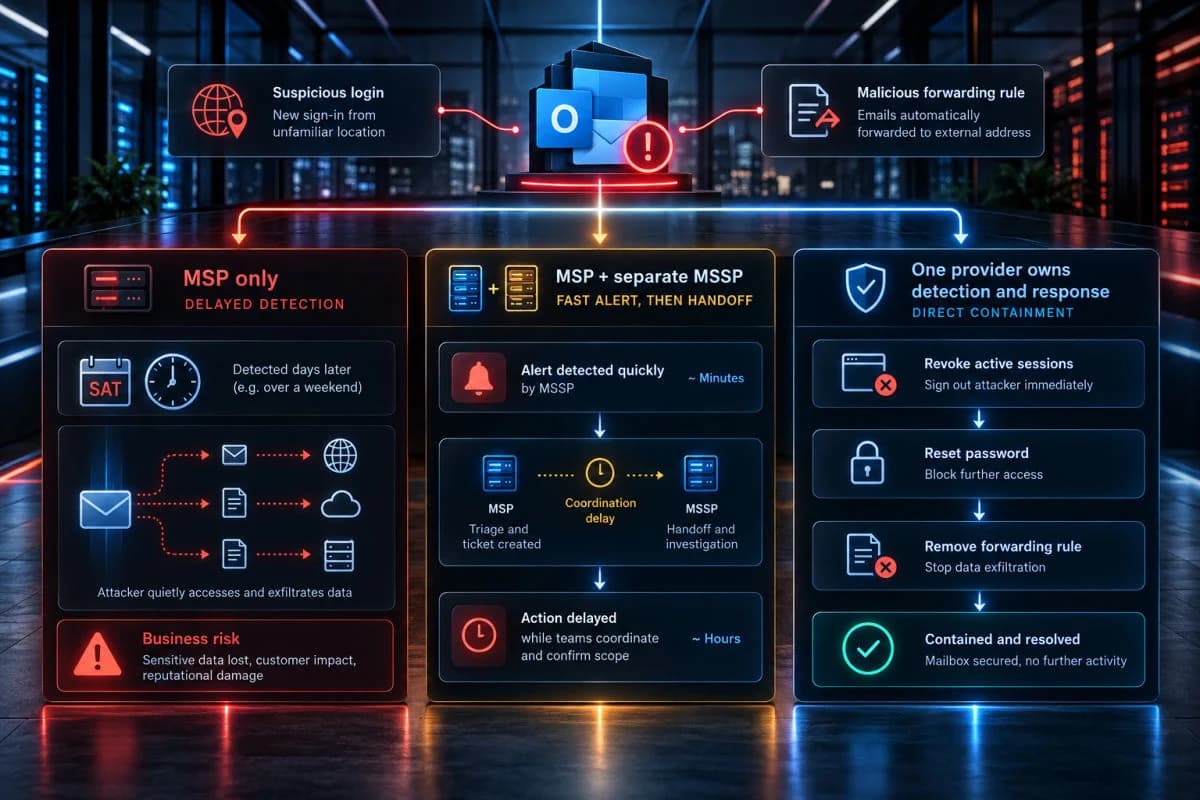
With an MSP Alone
An MSP without after-hours security monitoring may see nothing until Monday. By then, a vendor may be calling about a changed bank account, or a user may notice missing mail. The attacker has had the whole weekend inside the mailbox, reading threads and learning who pays whom.
With an MSP and a Separate MSSP
The MSSP's analysts spot the risky sign-in within minutes and send an alert. If that alert reaches someone who can act, the account gets locked quickly. If it lands in a queue the MSP reviews on Monday morning, the outcome looks much like the first case.
With One Provider That Owns Detection and Response
The same alert goes to a team with standing authority to act. It can revoke the session, reset the password, remove the forwarding rule, and brief you in the morning with a timeline. The difference is not the quality of the tools but the absence of a handoff.
Where Two Providers Leave a Gap
The MSSP vs MSP question usually comes up when an insurer, a client, or a regulator asks for round-the-clock monitoring. Plenty of businesses respond by keeping their MSP for daily IT and adding a separate MSSP. The arrangement can work, but it creates seams. The MSSP raises an alert, the MSP has to act on it, and each side assumes the other owns the next step.
The failure points are predictable. Alerts go to a shared mailbox nobody watches on weekends, and the MSSP's tools miss servers the MSP added later. After an incident, each provider's report points at the other. Tool overlap adds cost too, since both providers may license separate agents for the same laptops.
Questions That Close the Gap
If you keep two providers, the gap closes with written agreements, not goodwill. Get these answers on paper before you need them:
- Who receives an alert, through which channel, and within how many minutes, including nights and weekends?
- Who has the authority to isolate a device or disable an account without calling you first?
- How are new devices and servers added to the MSSP's monitoring when the MSP deploys them?
- Who leads an incident, and who calls your cyber insurer's breach hotline?
- How do the two providers share tickets, logs, and documentation?
If the answers come back vague, the gap is real. Some duties also never transfer to either provider. It helps to know what stays your responsibility after you hire a provider before anyone signs.
Why Should a Business Use an MSSP?
The plain answer is that attacks do not keep office hours. Very few small businesses can staff security monitoring at all hours on their own, because continuous coverage takes several trained people on rotation plus the tools to feed them useful alerts. An MSSP spreads that cost across many clients, which is how many small and mid-sized businesses can afford that coverage at all.
Regulation adds weight to the case. The HIPAA Security Rule requires practices to regularly review information system activity, such as audit logs and access reports. The FTC Safeguards Rule requires covered financial businesses to run continuous monitoring, or annual penetration testing plus vulnerability assessments every six months. PCI DSS 4.0.1 requires security event logs to be reviewed at least daily, which few small teams can do consistently without help.
When an MSSP Is More Than You Need
A five-person office with a solid MSP, modern endpoint protection, multifactor authentication everywhere, and tested backups may not need a separate MSSP contract. What it needs is someone accountable for acting on the alerts those tools already produce. For many small businesses, an MSP that includes managed detection and response covers that need without a second vendor.
How to Decide What Your Business Needs
Match the provider model to your size, your obligations, and the people you already have. Three situations cover most businesses.

You Have No IT Staff
Start with an MSP that treats security as part of the job, not an upsell. Ask specifically who watches alerts outside business hours. If the answer is a 24/7 detection and response service under the same agreement, one accountable provider tends to be the simplest and safest arrangement. GlobeVM works this way: its managed IT plans include foundational security, and its MDR service adds a team that monitors, investigates, and stops threats around the clock.
You Have an Internal IT Person or Team
Your IT staff can keep running daily operations while an outside provider covers what one or two people cannot. In most cases, that means after-hours monitoring and incident response. This is the model co-managed IT was built for, with the provider filling specific gaps rather than replacing the team.
The key is a written split of duties. Your staff should know which alerts are theirs and which belong to the provider, so nobody assumes the other side has it covered.
You Are Regulated or Hold High-Value Data
Medical and dental practices, law firms, accounting firms, and financial advisors hold data that attackers target and regulators audit. These businesses benefit most from continuous monitoring with documented response and reporting that maps to their compliance obligations. They also need someone who owns security strategy, a role often filled by a virtual CISO who sets priorities and answers to the owners while the SOC handles the watching.
What to Ask Any Provider Before You Sign
Labels are cheap, and plenty of providers now describe themselves as both. A few questions separate real coverage from a brochure:
- Is the SOC staffed by people around the clock, or do overnight alerts wait for the morning shift?
- Is it your own SOC or a partner's, and who is accountable if the partner misses something?
- What will you contain on your own authority, and what requires a phone call first?
- How quickly are critical alerts escalated, and how does the contract measure it?
- Which of our systems will you monitor on day one, and which are out of scope?
- Which reports will we receive, and do they match what our auditor, client, or insurer asks for?
The answers tell you more than the service names do. For a fuller picture of what a managed security service should include, compare every proposal against the same checklist rather than against each other's marketing.
The Bottom Line on MSP vs MSSP
An MSP keeps the business running, an MSSP keeps watch for attackers, and the risk sits in whatever falls between them. For most small and mid-sized businesses, the best arrangement has the fewest handoffs. That means a single accountable provider that runs IT and covers monitoring and response, or two providers whose duties are written down line by line. The MSP vs MSSP decision is really a decision about who acts first when something goes wrong.
Local support matters too, because some incidents need hands on a machine, not only eyes on a dashboard. For businesses across the San Fernando Valley, a provider that can reach the office the same day closes one more gap.
If you are not sure whether your provider covers monitoring and response or leaves a gap, GlobeVM can review your setup and show you where the MSP vs MSSP line falls in your business.
Frequently Asked Questions
An MSP manages your day-to-day IT, including devices, users, backups, networks, and support. An MSSP focuses on security, monitoring your systems for threats through a security operations center and escalating or responding to incidents. Many providers now offer parts of both, so compare the services written into the contract rather than the label.
MSSP stands for managed security service provider, a company that delivers security monitoring and management as an ongoing service. In healthcare, the same letters also refer to the Medicare Shared Savings Program, which is unrelated to IT security.
Yes. Many MSPs now include security monitoring and response through their own security operations center or through a partner. Ask whether that SOC is staffed around the clock, whose SOC it is, and what the provider is authorized to do once it confirms a threat.
Not exactly. A traditional MSSP monitors and manages security tools and alerts you to threats. Managed detection and response adds active investigation and containment, such as isolating a device or disabling an account. Some MSSPs include MDR, so the contract wording on response matters more than the name.
Not always as a separate vendor. A small business needs someone accountable for security monitoring and response around the clock, and an MSP with managed detection and response can cover that. Regulated businesses, and those whose clients or insurers require continuous monitoring, should confirm the coverage in writing either way.
Pricing depends on scope and is usually set per device, per user, or by the volume of log data monitored. Compare proposals by what is monitored, the hours covered, and who contains threats. A lower price often reflects a narrower service rather than a better deal.
Comments
0 Comments