

A security camera system sounds like the most straightforward technology purchase a business makes: point cameras at the doors, record footage, feel safer. Modern IP video surveillance is not that simple, because every camera in a modern system is a networked computer with its own operating system, its own storage, and its own connection to the internet.
This guide covers what businesses consistently get wrong about IP video surveillance and cybersecurity: the default-credential risk that turns a safety investment into an open door, the footage storage question few businesses think through, and how to place a camera system on the network without creating a new vulnerability in the process.
A Camera Is a Computer That Happens to Watch
The mental model most businesses carry, that a camera is a passive recording device, is years out of date. An IP camera runs an operating system, hosts a web-based administration interface, connects to your network and often directly to the internet, and receives software updates exactly like any other computer on your network.
That means it has every property that makes a device worth attacking: network access, processing power, and, if left unmanaged, the same weak points as any other unpatched device. It also has one property attackers particularly value: it is rarely watched by anyone the way a laptop or server is, which makes it an ideal quiet foothold into the rest of the network and a genuine gap in most cybersecurity solutions that were scoped around computers alone.
Default Passwords Are the Single Biggest Risk
Every networked camera and recording system ships with an administration login, and a significant share of installed systems are still running the factory default password, never changed during installation. An open admin interface hands over far more than the video feed; it can expose the entire camera network's configuration and, depending on setup, a path toward other systems sharing the same network.
This is not a sophisticated attack vector. Automated tools scan the internet specifically for cameras and recorders still running default credentials, precisely because they are so common and so easy to find.
Checking this on your own system takes minutes rather than expertise: reach the camera or recorder's administration page from inside your network, and see whether the credentials in the installer's paperwork still work. If they do, that is the finding, and changing them is the same afternoon's work.
Where Footage Actually Lives Is a Data Question
Video footage is data, and it deserves the same deliberate thinking as any other sensitive data a business holds. Footage can capture employees, customers, and, depending on camera placement, sensitive activity like payment transactions or confidential conversations near a camera's microphone.
Businesses need clear answers to basic questions: where footage is actually stored, whether it lives on-site, in the cloud, or both, who can access recorded footage and under what circumstances, and how long footage is retained before it is automatically deleted. A system with no defined retention policy accumulates footage indefinitely, which is both a storage cost and a growing liability if that footage is ever compromised.
Cloud-Connected Systems Add a Vendor Into the Chain
Many modern camera systems route footage through a cloud vendor's own infrastructure, which means that vendor's security posture becomes part of your own. A business adopting a cloud-connected camera system should ask the same questions it would ask of any vendor handling sensitive data: how is footage encrypted, who at the vendor can access it, and what happens to footage if the business ever switches providers.
Network Placement Determines How Much Damage a Compromise Can Do
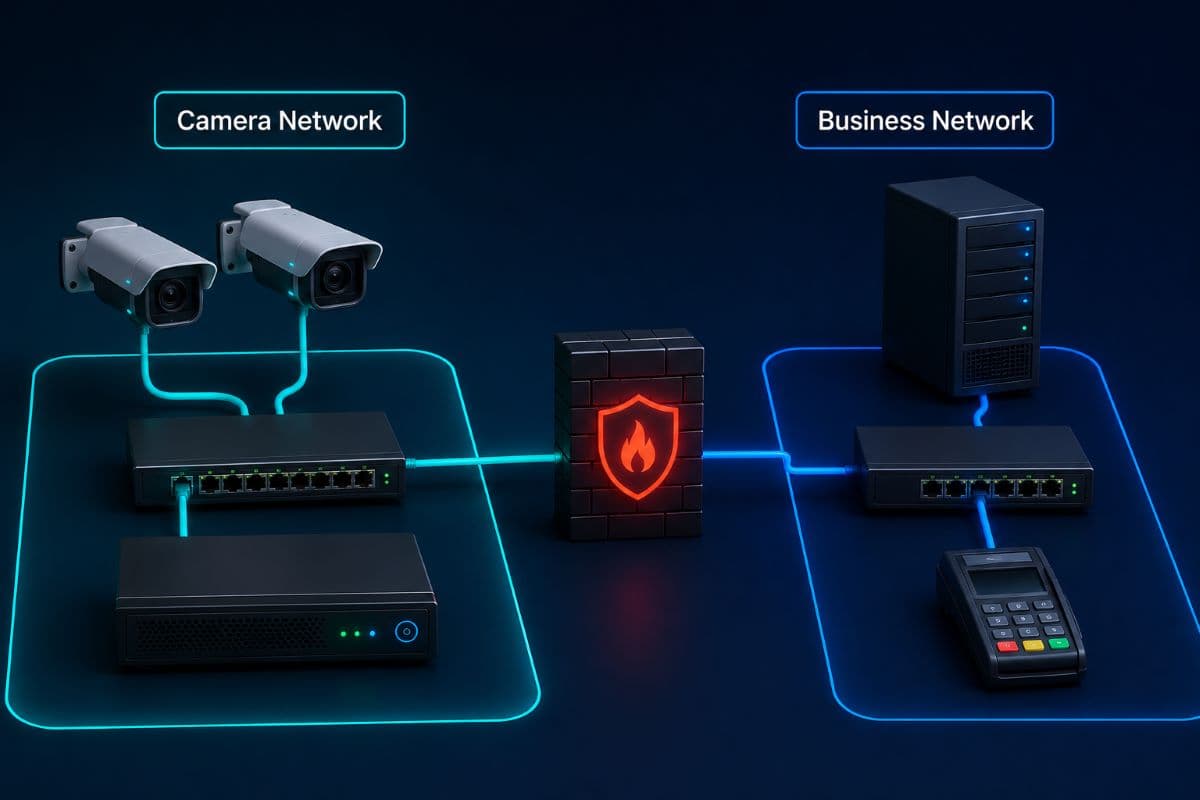
Where a camera system sits on your network is one of the most consequential and most commonly overlooked security decisions in the whole setup. A camera system placed on the same flat network as computers handling payment data or client records means a compromised camera has a direct path toward those systems.
The fix is the same principle that protects guest WiFi in other contexts: genuine network segmentation, keeping the camera system on its own separated network segment rather than merely password-protecting it on the main network. This single architectural decision does more to limit the damage of a camera compromise than almost any other step available, and it pairs naturally with the access control decisions governing who can reach the system at all.
Integration With Other Business Systems Deserves a Second Look
Camera systems increasingly integrate with access control, alarm systems, and even point-of-sale platforms, triggering recordings based on door events or transaction activity. Each integration point is a data connection between two systems, and a security review of the camera system alone misses the risk sitting at these connection points.
Remote Access Is Convenient and Genuinely Risky
The ability to check camera feeds from a phone anywhere in the world is one of the most popular features of modern systems, and it is also where a meaningful share of real-world camera compromises originate. Remote access requires exposing at least part of the system to the internet, and how that exposure is configured matters enormously.
The safer pattern routes remote access through the manufacturer's own secure cloud relay rather than opening a direct port on your business's network, called port forwarding, which is a considerably riskier configuration that many installers still default to because it is simpler to set up. Businesses should ask specifically which approach their system uses rather than assuming remote access was configured safely by default.
Footage as Evidence Needs a Real Chain of Custody
When footage actually matters, after an incident, a dispute, or a request from law enforcement, its value depends on being able to show the recording has not been altered and was handled properly from capture to review. Businesses that have never thought through how they would actually export and hand over footage often discover the process is clumsy or incomplete exactly when they need it to work smoothly.
Testing the export and retrieval process before an actual incident, not during one, is a small investment that pays off precisely when the footage matters most.
Audio Recording Raises Its Own Legal Question
Many modern cameras include microphones capable of recording audio alongside video, and audio recording law is considerably stricter than video recording law in many states. A camera system quietly capturing conversations near an entrance or a break room can create legal exposure entirely separate from any cybersecurity concern.
Businesses should confirm whether their cameras record audio by default, and if so, whether that setting is actually appropriate for every location a camera covers, rather than assuming a factory default was configured with local law in mind.
Multi-Location Businesses Need One Standard, Not Several
A business with more than one location often ends up with camera systems installed at different times by different installers, each with its own login, its own settings, and its own gaps. Standardizing on one system and one configuration standard across every location closes the inconsistency that makes multi-site camera security so much harder to actually manage.
A Practical Checklist for Camera System Security
For a business reviewing its current or planned camera system:
- Change every default password on cameras and recording systems, stored in a company-controlled password manager.
- Keep camera firmware updated on a real schedule, the same discipline applied to any other networked device.
- Segment the camera network from systems handling payment or client data, not merely password-separate it.
- Define a footage retention policy explicitly, rather than letting storage accumulate indefinitely by default.
- Verify remote access uses a secure relay rather than direct port forwarding into your network.
Old Recorders Are a Common Blind Spot
A camera system installed years ago on a recorder that has never received a firmware update is a common finding whenever anyone actually looks closely, and older recorders sometimes cannot receive updates at all because manufacturer support has ended. A business relying on end-of-support recording hardware should treat replacement as a genuine security priority, not merely an equipment-age question.
Choosing and Managing a System Properly
A business installing or reviewing a camera system should treat it as network infrastructure requiring the same ongoing management as any other business-critical system, not a one-time installation project. This is exactly the kind of device that belongs inside routine remote monitoring and management, where updates, access reviews, and network placement get maintained continuously rather than set once at installation and forgotten.
Retention Requirements Sometimes Come From Outside the Business
Some industries and some incident types carry specific footage retention expectations that come from insurance requirements, landlord agreements, or past legal proceedings rather than from the business's own preference. A retention policy set purely on storage cost grounds, without checking these outside obligations, can accidentally delete footage a business was actually required to keep.
The Installer Relationship Continues Past Installation Day
A camera system installer's job does not truly end once the cameras are physically mounted and working correctly on day one; ongoing firmware updates, password management, and network configuration are all a continuing responsibility that persists for years, not a one-time deliverable finished at handoff. Businesses should confirm during the sales conversation, not after, whether their installer offers this ongoing management or whether it falls to someone else entirely once the install truck leaves.
Employee Awareness of Camera Systems Matters Too
Staff should understand, at a basic level, that the camera system on their network is a real piece of infrastructure with real security implications, not simply a fixture on the wall that someone else handles entirely. An employee who happens to notice a camera behaving strangely, going offline unexpectedly, or displaying an unfamiliar login screen should know to report it promptly, the exact same way they would already report any other unusual technology behavior they encountered during a normal workday.
This truly does not require turning every single employee into a trained camera technician overnight; it requires the same basic awareness this guide has argued for throughout, treating the camera system as the real, networked, actively-managed infrastructure it actually is rather than a passive fixture nobody thinks about after installation day.
A Safety Investment Should Not Become a Security Gap
Video surveillance exists to make a business safer, and a poorly secured camera system quietly works against that goal by adding an unmanaged, internet-connected device to the network. IP video surveillance and cybersecurity handled properly means default credentials changed, footage storage deliberately decided rather than defaulted, the camera network genuinely segmented, and remote access configured through the safer path rather than the easier one.
For businesses in the region, a partner providing IT support in Simi Valley can review your camera system's network placement and close the default-credential gap that most installations never address.
Companies across the Valley can get the same locally through IT services in the San Fernando Valley, from a first security review to ongoing management of every camera on your network.
Frequently Asked Questions
Yes. A modern IP camera is a networked computer running its own operating system, with its own storage and internet connection, which gives it every property that makes a device worth attacking. A significant share of installed camera systems still run factory default passwords, and automated tools specifically scan the internet looking for exactly this vulnerability, since it is common and easy to find.
The answer should be a deliberate business decision, not a default setting: on-site, in the cloud, or a combination, chosen with clear rules about who can access footage and how long it is retained before automatic deletion. A system with no defined retention policy accumulates footage indefinitely, which becomes both a storage cost and a growing liability if that footage is ever compromised.
Because a camera system on the same flat network as computers handling payment data or client records gives a compromised camera a direct path toward those systems. Genuine network segmentation, keeping cameras on their own separated network segment rather than merely password-protecting them on the main network, limits the damage a camera compromise can do far more effectively than almost any other single security step.
It can be, depending on how it is configured. The safer approach routes remote access through the manufacturer's secure cloud relay rather than opening a direct port into your business network, a riskier configuration called port forwarding that many installers still default to for simplicity. Businesses should confirm specifically which method their system uses rather than assuming remote access was set up safely by default.
Businesses weighing options can also review a package that folds camera network security into the same coverage as every other connected device.
Extending that same thinking to any integrated door or alarm system closes the loop between physical and network security.
If your business has never checked whether its IP video surveillance and cybersecurity setup is still running default passwords or sitting on the same network as your payment systems, GlobeVM can close both gaps as part of routine network management.
Comments
0 Comments