Most small businesses have no idea how many devices they own, what software licenses they pay for, or where their company laptops are currently located. According to Gartner, organizations without formal IT asset management waste 30% of their software spend and lose 5% to 15% of devices each year.
IT Support
The Complete Lifecycle Guide to IT Asset Management for Small Businesses

By nazy rafaeil
20 May 2026

You might think IT Asset Management sounds like an enterprise-level concept reserved for massive corporations. However, it directly impacts the daily operations, security, and profitability of small and mid-sized businesses. Whether you run a dental practice, a law firm, or a growing manufacturing company, tracking your technology is no longer optional.
By the end of this guide, you will know exactly how to manage your IT assets, where you are likely losing money, and what compliance requirements apply to your specific business.
What Is IT Asset Management (ITAM)?
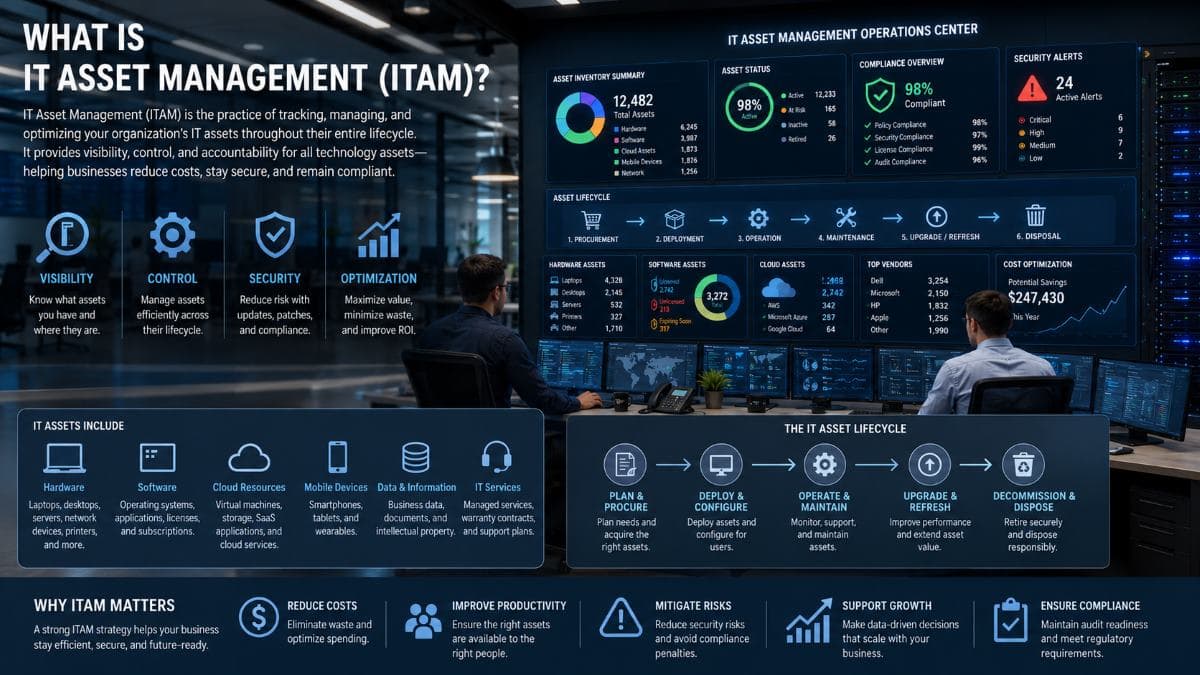
IT Asset Management (ITAM) is the practice of tracking, maintaining, and optimizing the technology assets a business owns or uses throughout their entire lifecycle. This includes hardware like computers and servers, software licenses, cloud subscriptions, and the data on those assets, from procurement through disposal.
What Counts as an IT Asset?
An IT asset is any piece of technology or data that holds value for your organization. This generally falls into four main categories:
- Hardware: Computers, laptops, servers, printers, network switches, routers, and mobile devices. Often overlooked items like monitors, keyboards, and specialized peripherals also count.
- Software: Licensed applications, operating systems, and Software-as-a-Service (SaaS) subscriptions.
- Cloud Resources: Hosted servers, cloud storage environments, and third-party backup services.
- Data: Customer records, patient health information, intellectual property, and system configurations.
Hardware Asset Management (HAM) vs Software Asset Management (SAM)
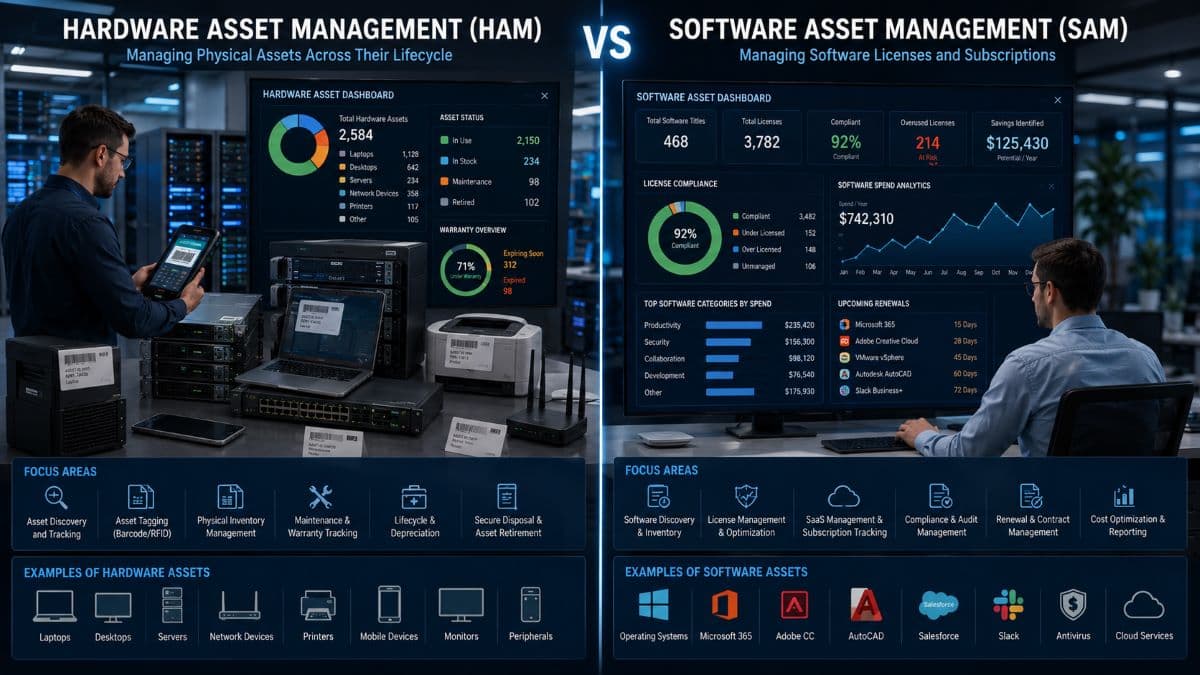
ITAM is a broad category that contains specialized sub-disciplines. Hardware Asset Management (HAM) focuses entirely on physical devices and tangible equipment. It tracks the physical location, condition, and depreciation of machinery. Software Asset Management (SAM) involves managing digital software licenses and subscriptions. It ensures you are legally compliant with vendor contracts while preventing overspending on unused software. Both are critical subsets of a complete IT Asset Management strategy. Modern ITAM also extends into tracking cloud assets and virtual machines.
ITAM vs Inventory Management
Many business owners confuse IT Asset Management with simple inventory management. Inventory management is simply a list of what you have right now. ITAM covers the full lifecycle, financial costs, compliance status, and operational optimization of those items. While ITAM absolutely includes taking inventory, it goes much deeper to help you make strategic business decisions.
To see how asset tracking fits into a broader technology strategy, explore our Managed IT Services.
Why IT Asset Management Matters for Small and Mid-Sized Businesses
Enterprise companies use ITAM to manage thousands of devices across global offices. Small and mid-sized businesses need IT Asset Management for entirely different reasons: cash flow protection, operational efficiency, and strict regulatory compliance.
The Hidden Costs of No ITAM
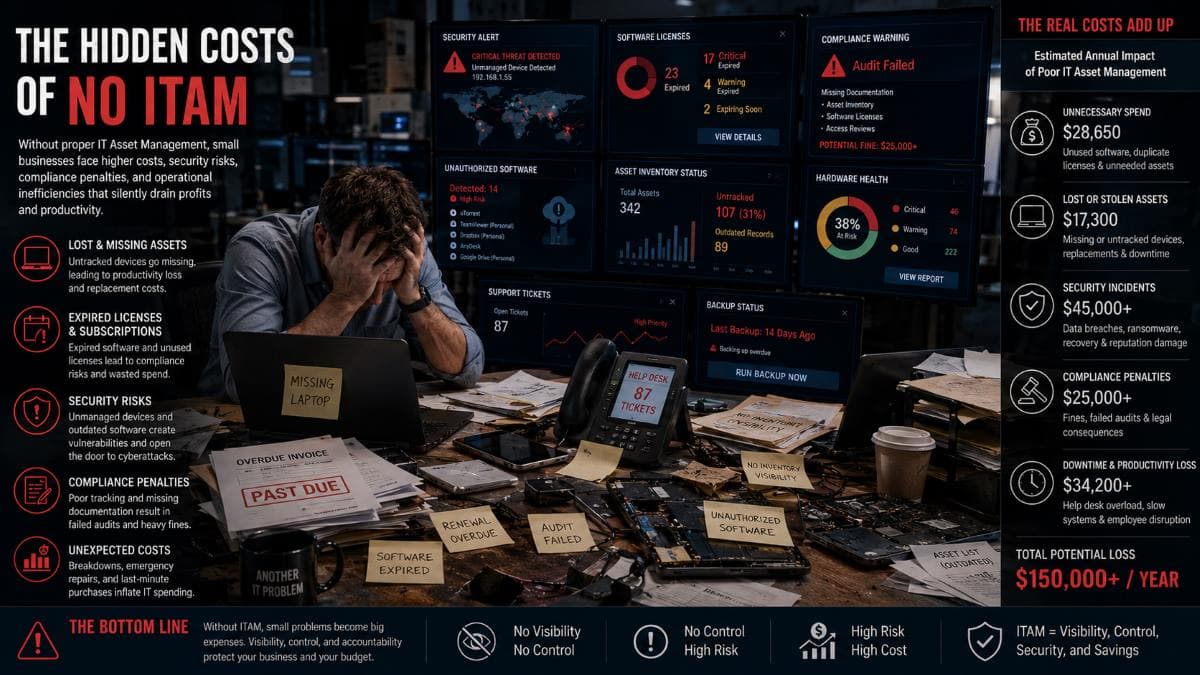
Without clear visibility into your technology, your business leaks money in ways you cannot easily see on a balance sheet. Organizations frequently pay for unused software licenses, with typical waste accounting for 20% to 30% of an annual software budget. This financial drain is compounded by hardware issues. Companies often replace equipment that only needed a minor repair or a RAM upgrade, missing out on valid warranty claims because the documentation was lost. Furthermore, keeping aging equipment far past its useful life leads to lost employee productivity and increased IT support costs. Finally, failing to track assets can result in devastating compliance penalties.
Real Cost Examples
The financial impact of ignoring IT asset management scales rapidly. A 25-person company with no Software Asset Management typically wastes $15,000 to $30,000 per year on unused SaaS subscriptions and duplicate licenses. When an employee leaves and an undocumented laptop is not recovered, the business faces a direct $1,200 to $2,500 hardware replacement cost. Even worse, if that lost device is unencrypted and contains patient data, a HIPAA violation penalty can range from $1,000 to over $50,000 per incident.
Compliance Drives ITAM Need
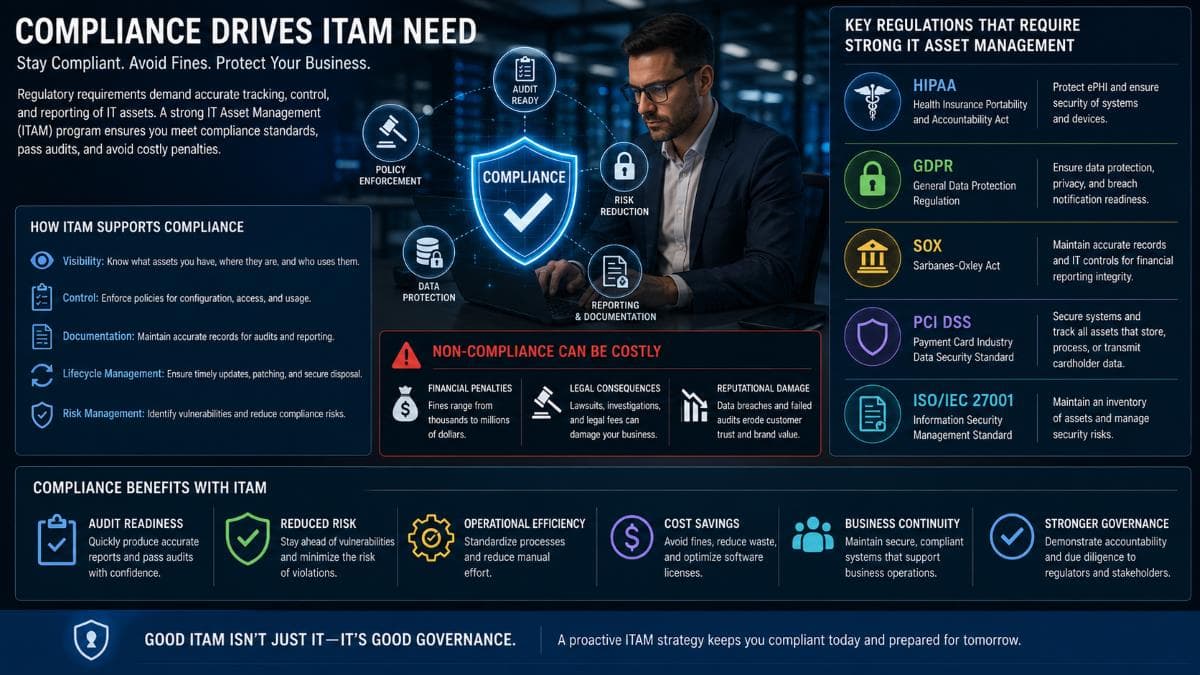
For many industries, managing assets is a strict legal requirement. The HIPAA Security Rule explicitly requires covered entities to maintain device inventory and formal disposal procedures. PCI DSS requires a strict hardware inventory for any systems touching credit card data. Achieving SOC 2 certification demands proven asset management controls. Additionally, state laws like the California Privacy Rights Act (CPRA) require data mapping, which is impossible without first knowing exactly which physical assets hold that data.
Operational Benefits
Beyond saving money and avoiding fines, formal IT asset lifecycle management makes your business run smoother. Employee onboarding happens faster because devices are tracked, prepared, and ready on day one. You can forecast your IT budgeting accurately instead of facing surprise expenses. Replacing aging assets before they fail drastically reduces IT downtime. Most importantly, knowing exactly what connects to your network provides a much stronger security posture.
Learn more about protecting your tracked assets through our Cybersecurity Solutions.
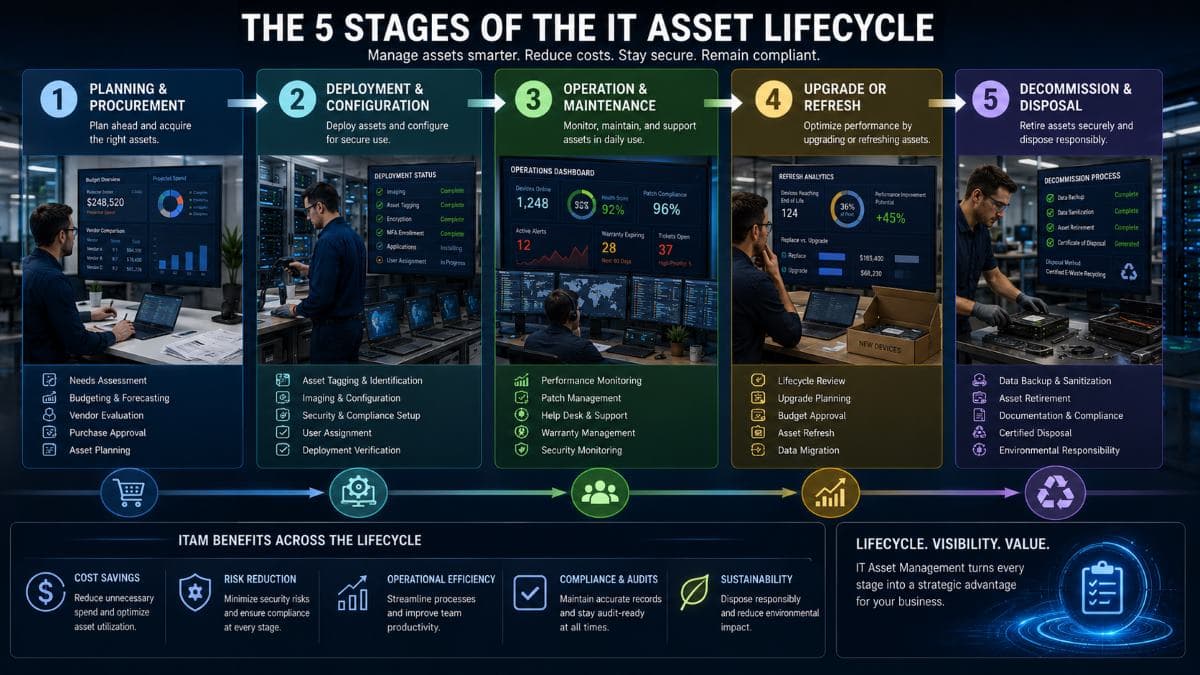
The 5 Stages of the IT Asset Lifecycle
Understanding the IT asset lifecycle helps you extract the maximum value from every technology purchase. This cycle repeats for every single device and software license in your organization.
Stage 1: Planning and Procurement
Everything begins before the purchase is even made. This stage involves assessing the actual needs of your employees and creating a budget. You must define an approval workflow to prevent unauthorized spending. Vendor selection and technology standardization happen here. Deciding whether to buy or lease equipment is also a critical Step 1 decision. Common mistakes during this stage include making emergency purchases without a plan and failing to standardize hardware models, which makes future support much harder.
Stage 2: Deployment and Configuration
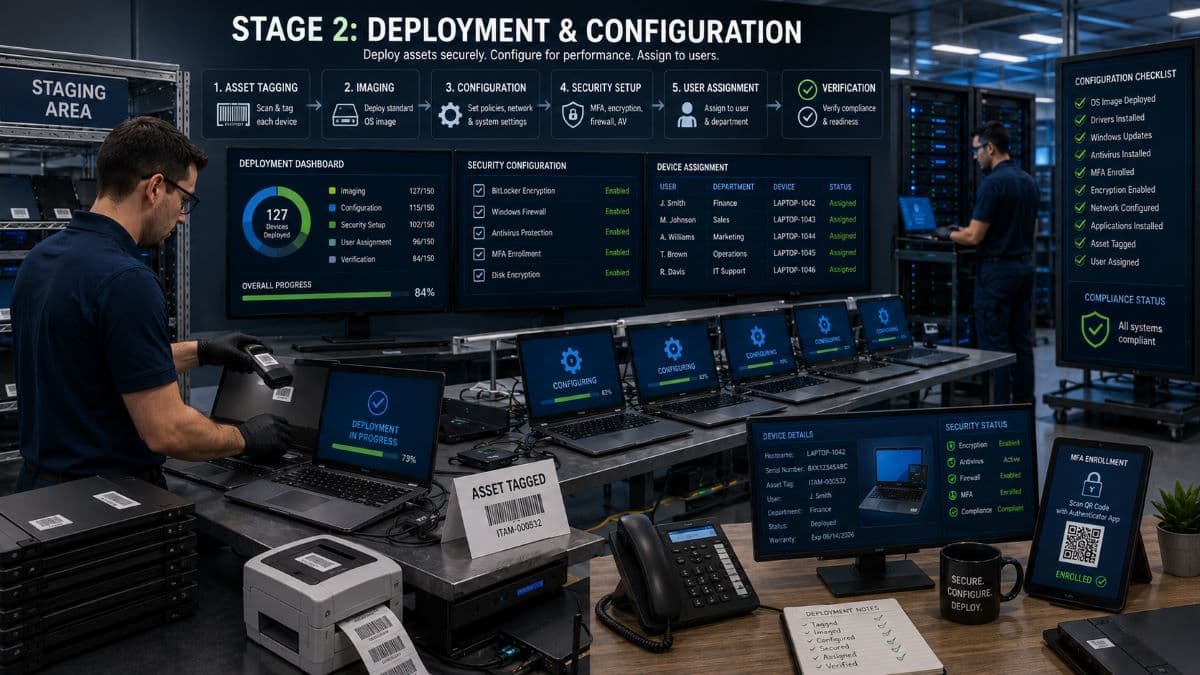
Once the asset arrives, it must be properly introduced to your environment. This involves physical asset tagging and registering the device in your ITAM system. The IT team handles imaging and configuration to match company standards. The device is then formally assigned to a specific user. Critical security baselines must be established before deployment, including MFA enrollment, hard drive encryption, and antivirus installation. Common mistakes include undocumented deployments and handing devices to staff with massive security gaps.
Stage 3: Operation and Maintenance
This is the longest stage of the lifecycle. While the asset is in active use, your IT team must manage ongoing maintenance. This includes patch management, performance monitoring, and providing user support. Warranty management ensures repairs are covered by the vendor when applicable. For software, this phase involves checking license compliance and conducting regular internal audits. Common mistakes during the operation stage include skipping critical security patches and ignoring available warranty claims.
Stage 4: Upgrade or Refresh
Technology eventually slows down and becomes a liability. In this stage, you evaluate whether to upgrade a device or replace it entirely. Typical refresh cycles follow a predictable timeline. Laptops generally last 3 to 4 years. Desktops perform well for 4 to 5 years. Servers have a lifespan of 5 to 7 years. Network equipment lasts 5 to 8 years, and mobile devices usually need replacement every 2 to 3 years. Proper refresh planning completely prevents the chaos of emergency replacements.
Stage 5: Decommission and Disposal
When an asset reaches its end of life, you cannot simply throw it in the trash. Proper data sanitization following the NIST 800-88 standard is mandatory. The asset must be formally retired from your inventory database. You should use environmentally responsible e-waste disposal methods. Healthcare organizations must follow extremely strict HIPAA disposal rules. You should always obtain and store certificates of destruction from your disposal vendor. Common mistakes include improperly wiped hard drives and having zero disposal records during an audit.
Hardware Asset Management Best Practices
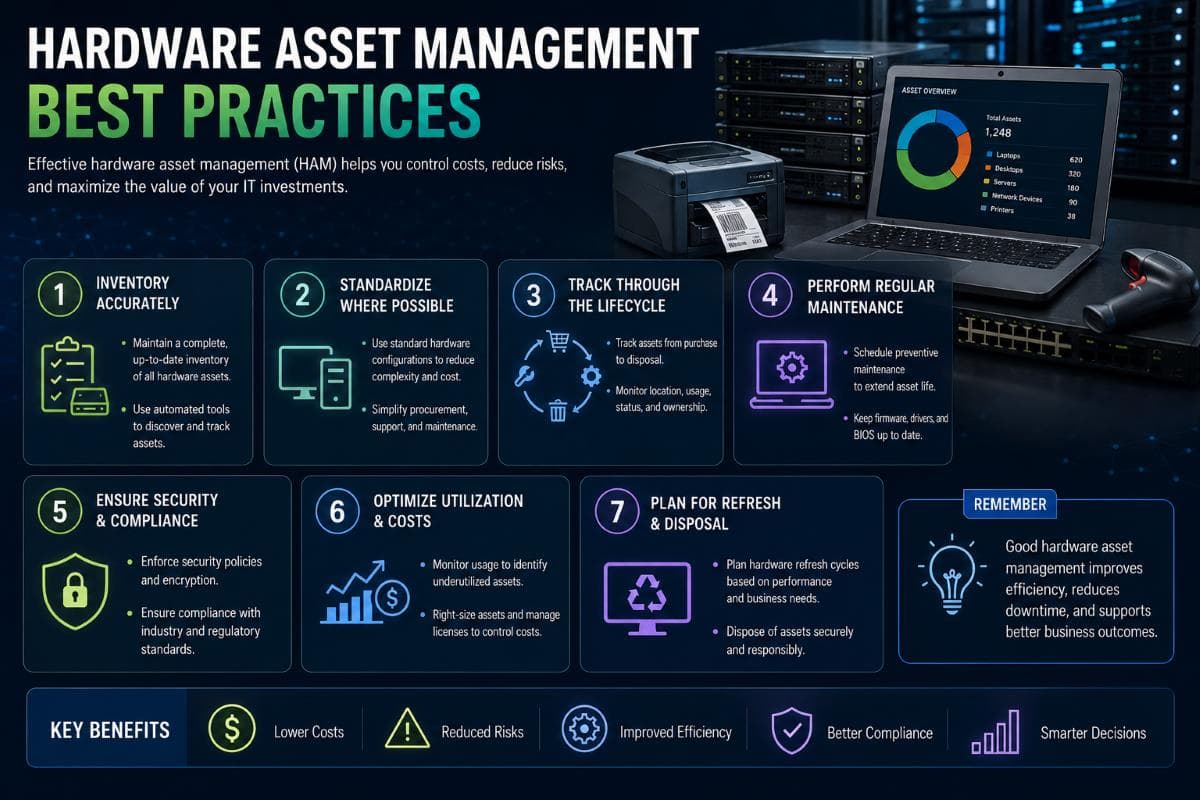
Physical hardware requires dedicated processes to prevent theft, loss, and premature failure. Implementing these best practices gives you total control over your physical environment.
Asset Tagging and Identification
Every piece of hardware needs a unique physical identifier. Physical asset tags with permanent adhesive deter theft and make identification simple. You must establish a logical asset numbering system. Barcodes are highly cost-effective and easy to scan with mobile phones during audits. RFID tags cost more but allow you to scan an entire room of equipment in seconds without needing a direct line of sight.
Centralized Inventory Database
You need a single source of truth for all hardware data. Keeping information scattered across different departments guarantees failure. Your centralized database must track specific information for every item. This includes the Asset ID, serial number, and exact model. You must log the assigned user and the physical location of the device. Record the purchase date, warranty expiration, and any associated software licenses. Finally, track the maintenance history and the eventual disposal date.
Regular Physical Audits
Databases eventually drift from reality due to human error. You must conduct regular physical audits to verify your records. An annual audit is the bare minimum for any business. However, a quarterly audit is strongly preferred for high-turnover environments or expensive mobile equipment. Your IT team needs a strict reconciliation process to investigate any missing items discovered during these audits.
Warranty and Vendor Management
Warranties represent prepaid insurance for your technology. Track warranty expiration dates meticulously in your system. Maintain updated vendor contact information and support contract numbers alongside the asset record. Setting up a renewal calendar prevents essential support contracts from expiring unnoticed, leaving your business vulnerable during an outage.
Mobile Device and BYOD Considerations
Mobile phones and tablets are the most frequently lost IT assets. You must integrate Mobile Device Management (MDM) tools into your IT Asset Management strategy. If you allow employees to use their own phones, you need clear personal device policies (BYOD). Ensure your IT team has remote wipe capabilities enabled for all mobile devices touching company data so you can erase them immediately if they are lost or stolen.
Software Asset Management (SAM) Best Practices
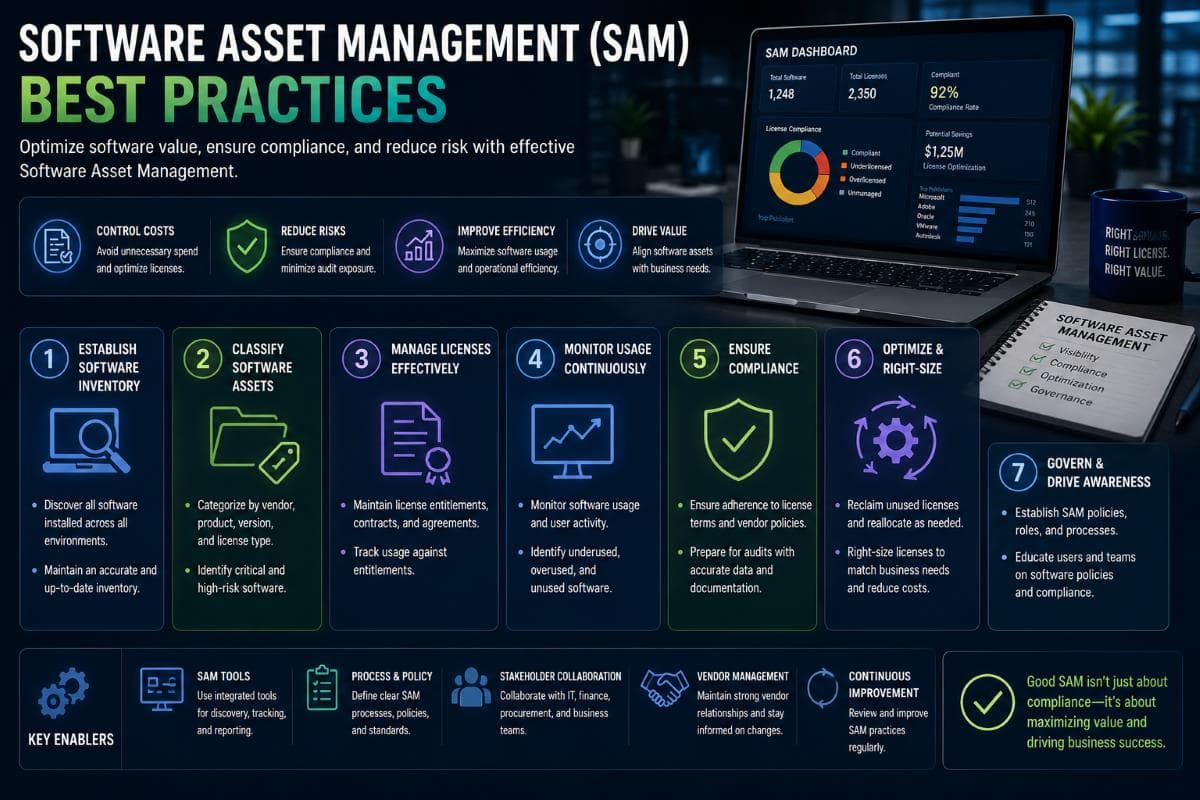
Managing physical devices is only half the battle. Software licensing is complex, expensive, and heavily audited by major vendors like Microsoft and Adobe.
License Tracking
Software vendors use highly confusing licensing models. You must clearly document whether you are paying for per-user licenses or per-device licenses. Keep track of which software utilizes perpetual licenses (pay once) versus subscription models (pay monthly). You also need to distinguish between concurrent licenses (limited number of active users at one time) and named user licenses (tied to a specific employee identity).
SaaS Subscription Management
Cloud software is often the biggest area of financial waste for small businesses. Track every single subscription, note the internal business owner, and set alerts for renewal dates. Identify duplicate tools across different departments. For example, your marketing team might pay for Zoom while sales pays for Microsoft Teams. Consolidating these tools and negotiating at renewal times saves thousands of dollars annually.
License Compliance
Failing a vendor software audit carries heavy financial penalties. You must avoid under-licensing to eliminate audit risk. Conversely, you must avoid over-licensing to stop financial waste. Maintain pristine documentation of all software purchases, vendor agreements, and current deployment numbers so you are always prepared for an unexpected software audit.
Shadow IT Detection
Shadow IT occurs when employees purchase technology without the IT department knowing. This usually involves staff buying software with corporate credit cards or signing up for unauthorized free SaaS subscriptions. This creates massive security vulnerabilities and severe compliance risks because IT cannot protect data in systems they do not know exist.
Common Software Waste Sources
Certain patterns of waste appear in almost every mid-sized business. Companies frequently purchase expensive Adobe Creative Cloud licenses for non-creative staff who only need to edit PDFs. Businesses often pay for premium software tiers when the basic version would suffice. Old vendor relationships continue billing long after the software was abandoned. The most common waste is keeping subscription accounts active for departed employees.
Choosing the Right ITAM Tools
You cannot manage modern IT infrastructure with pen and paper. Selecting the right platform dictates how successful your asset management strategy will be.
Built-in vs Dedicated ITAM Tools
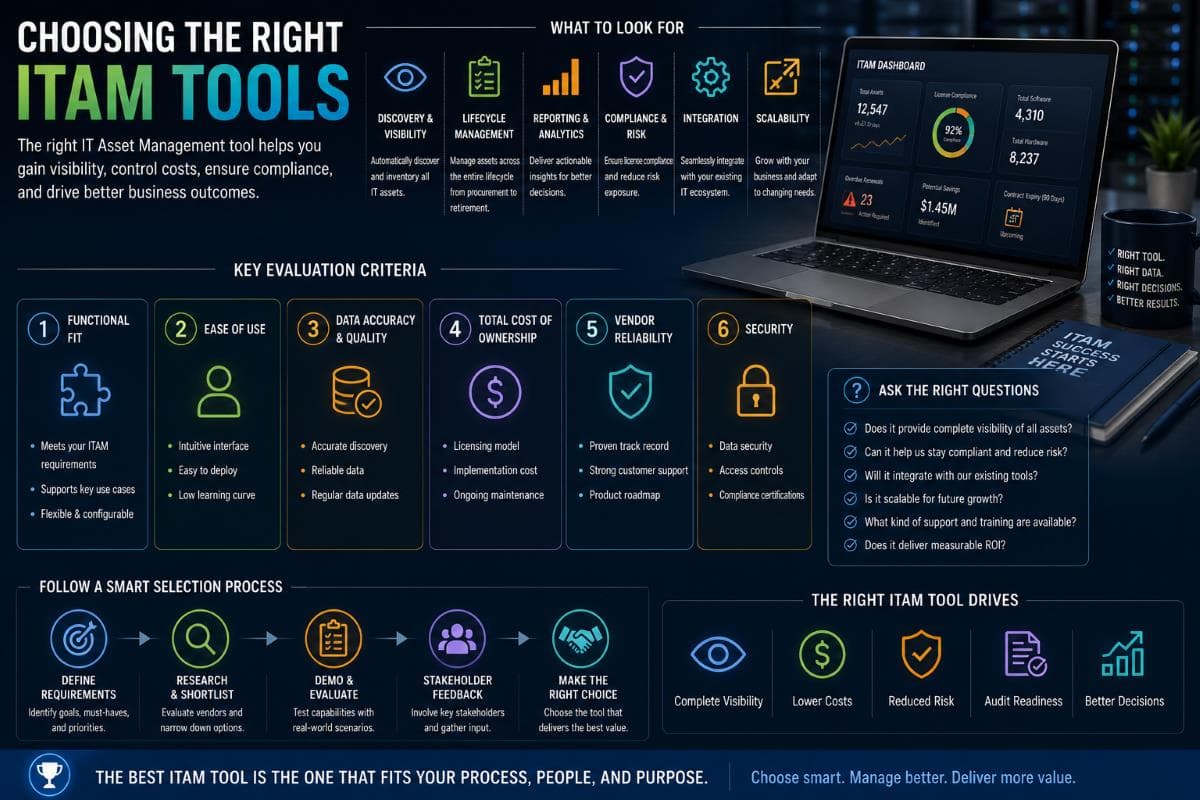
Most small businesses start tracking assets on spreadsheets. While free, they fail quickly as the business grows. Built-in operating system tools like Microsoft Intune offer basic tracking for Windows environments. Remote Monitoring and Management (RMM) platforms used by IT providers, such as NinjaOne, Datto, or ConnectWise, include excellent ITAM features. Dedicated ITAM platforms like Lansweeper, AssetSonar, or Snipe-IT offer deeper lifecycle tracking. Enterprise ITAM solutions like ServiceNow or Ivanti exist, but they are generally too complex for small businesses.
What to Look for in ITAM Software
A good tool should eliminate manual data entry. Look for automatic discovery features that scan your network to find connected devices. Integration with directory services like Active Directory or Azure AD is essential for mapping devices to specific users. The system must include robust software license tracking and detailed reporting capabilities. Strong mobile device support is also non-negotiable. Finally, carefully evaluate the pricing model to see if they charge per device, per user, or per tracked asset.
Typical SMB Pricing
Spreadsheets appear free but are highly expensive when you factor in wasted staff time and costly human errors. Snipe-IT provides a free open-source option if you have the technical skills to host it. Lansweeper typically starts around $1 to $3 per asset annually. AssetSonar utilizes a similar pricing structure. RMM tools with built-in ITAM usually cost between $3 and $7 per device monthly. Enterprise platforms like ServiceNow often require $25,000 or more just for small initial deployments.
When Spreadsheets Stop Working
Spreadsheets are a temporary fix. You must abandon them once your company surpasses 25 devices. Spreadsheets completely break down when you operate across multiple physical locations. If your industry has strict compliance requirements, auditors will not accept an easily manipulated Excel file. Frequent staff changes and a mix of different device types make manual spreadsheet tracking mathematically impossible to maintain accurately.
IT Asset Management Requirements for Compliance
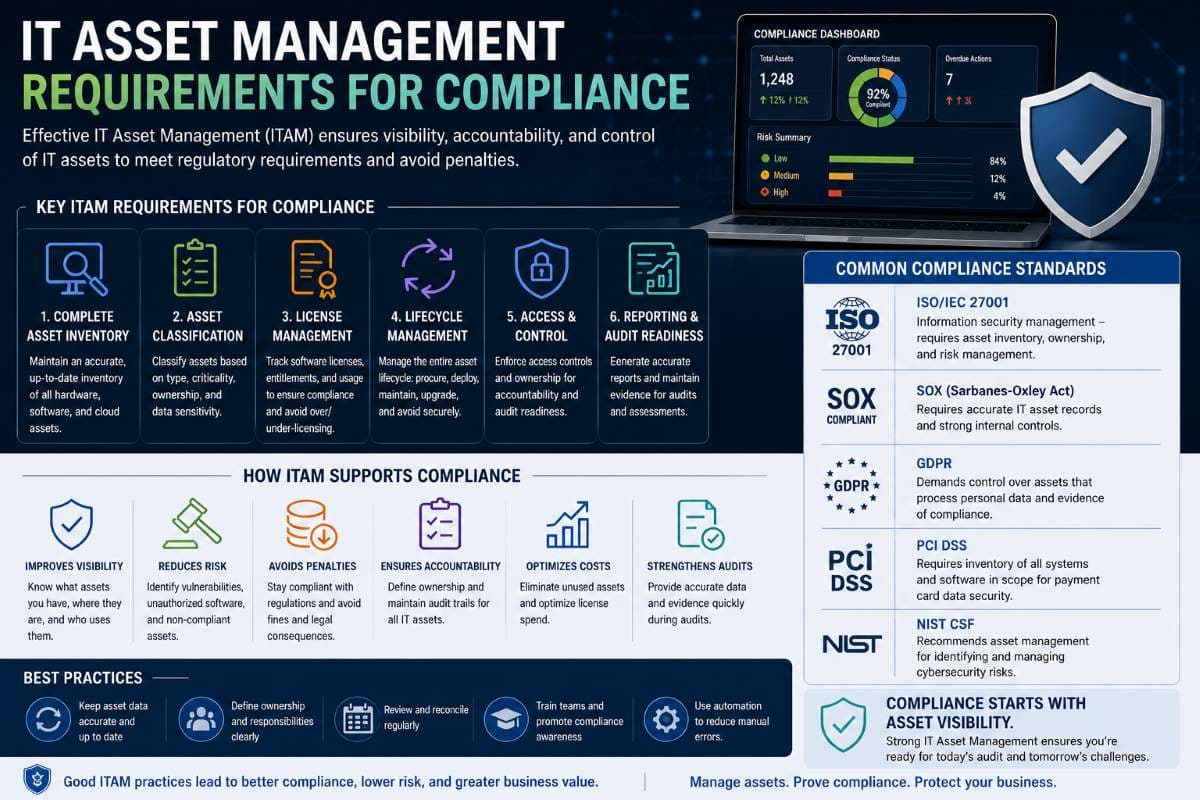
For specific industries, IT Asset Management is the foundation of legal operation. In our experience working with medical practices and financial service firms across Los Angeles, poor asset tracking is the number one cause of failed compliance audits.
HIPAA and ITAM
The healthcare sector faces immense regulatory pressure. HIPAA Security Rule 45 CFR 164.310(d) governs Device and Media Controls. It legally requires covered entities to maintain a strict inventory of all hardware containing Protected Health Information (PHI). It requires documented disposal procedures for retiring those devices securely. The law also requires strict accountability, meaning you must track exactly which employee has which device at all times. Common HIPAA ITAM failures include lost mobile phones, improper hard drive disposal, and having no centralized inventory.
Discover more about meeting these strict requirements through our Compliance and Risk Management Services.
PCI DSS and ITAM
If your business processes credit cards, you fall under Payment Card Industry Data Security Standard (PCI DSS) regulations. PCI DSS 4.0 explicitly requires a highly detailed hardware inventory for any system inside the cardholder data environment. A comprehensive software inventory is also mandatory. You must provide documentation proving you run regular updates on all listed assets.
SOC 2 and ITAM
Technology companies seeking enterprise clients usually need SOC 2 certification. Requirement CC6.1 mandates strict logical and physical access controls. Requirement CC6.4 focuses heavily on the security of physical assets. Auditors will demand detailed asset inventory documentation to verify you actually control the environment you claim to protect.
California Privacy Laws
Data protection begins with knowing your assets. Businesses operating in California must navigate the California Privacy Rights Act (CPRA). The law mandates reasonable security obligations to protect consumer data. Furthermore, data mapping requirements mean you must know exactly where specific consumer data lives. You cannot map your data without an accurate inventory of the physical servers, laptops, and cloud assets storing it.
Disposal Compliance
Compliance does not end when you unplug a computer. The NIST 800-88 standard dictates the exact methods required for permanent data sanitization. When you dispose of a hard drive, you must receive and store a formal certificate of destruction documentation. Failing to prove proper destruction is a direct violation of HIPAA disposal requirements.
7 Common IT Asset Management Mistakes to Avoid
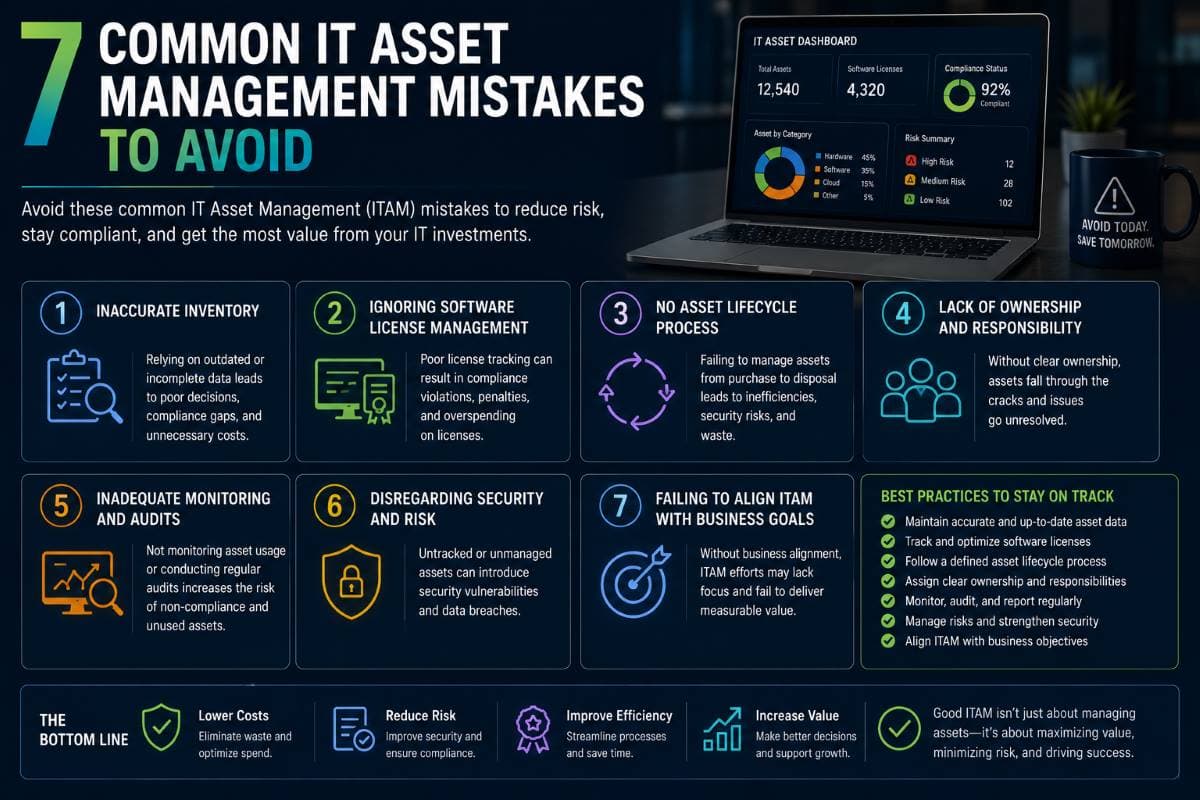
Even companies with good intentions make critical errors when implementing ITAM. Avoid these seven common pitfalls:
- Relying on spreadsheets past 25 devices: Manual entry leads to duplicate records, forgotten updates, and severe data decay.
- Not tracking software licenses alongside hardware: Focusing only on physical laptops while ignoring $20,000 in unused SaaS subscriptions wastes valuable budget.
- Ignoring mobile devices and BYOD: Phones process sensitive corporate data daily but are the most frequently lost and least tracked assets.
- No formal disposal process: Handing old computers to an unverified local recycler without wiping the drives invites massive data breaches.
- Failing to update inventory after staff changes: Onboarding and offboarding must trigger immediate updates to the ITAM database to maintain accuracy.
- Keeping equipment past its useful life to "save money": A five-year-old laptop costs more in lost productivity and IT support desk tickets than the price of a new machine.
- Treating ITAM as a one-time project, not an ongoing discipline: Inventory is not a project with an end date; it is a permanent operational process.
How to Implement ITAM in Your Business
Starting from scratch feels overwhelming. Following this structured 8-step process transforms a chaotic environment into a fully managed ecosystem.
- Inventory What You Have: This is the painful first step. You must physically walk the office, check network logs, and review accounting purchase records to find every device and software subscription currently in use.
- Choose Your ITAM System: Select a software platform that fits your budget and technical expertise. Ensure the tool integrates well with your existing IT infrastructure.
- Establish Tagging and Naming Conventions: Create a logical standard for naming devices on your network. Order physical asset tags and stick them to every piece of hardware.
- Document Current Assets in the System: Input all the data gathered in Step 1 into your new software platform. Fill out warranty dates, serial numbers, and assigned users meticulously.
- Build Lifecycle Policies: Write formal rules regarding how often laptops are replaced, who approves new software purchases, and exactly how hard drives are destroyed.
- Integrate with Existing Systems: Connect your ITAM software to your Active Directory, your MDM platform, and your IT helpdesk system to automate data updates.
- Train Staff and Establish Ongoing Processes: Ensure your HR department notifies IT immediately when someone is hired or fired so the asset database updates in real time.
- Audit Regularly: Schedule physical checks every few months to compare what is on desks with what is documented in your database.
When to Work with a Managed IT Provider for ITAM
Managing technology lifecycles requires immense discipline. Many business owners eventually realize their internal teams lack the time or tools to handle it properly.
Signs You Need Professional ITAM Help
You need expert assistance if you simply do not know how many devices you currently own. It is a major red flag if employees take company laptops home when they leave the company and you do not notice for weeks. If your monthly SaaS spending has grown much faster than your actual headcount, you have an optimization problem. Facing a strict compliance audit like HIPAA or SOC 2 without proper documentation requires immediate intervention. Finally, if your current "inventory" is just an Excel spreadsheet that has not been updated in six months, your data is already useless.
What GlobeVM Provides
GlobeVM Digital Services takes the burden of IT Asset Management entirely off your shoulders. We provide comprehensive asset discovery and inventory mapping across your entire network. Our team handles full lifecycle management from procurement and configuration to secure decommissioning. We specialize in compliance-aligned ITAM specifically tailored for medical practices and businesses navigating HIPAA regulations in the Los Angeles area. Furthermore, we provide license optimization to stop your business from paying for unused software.
Stop guessing what technology you own. Take control of your network, secure your data, and reduce your IT budget waste today.
Frequently Asked Questions
IT Asset Management (ITAM) focuses on tracking the lifecycle, costs, and compliance of technology items. IT Service Management (ITSM) focuses on delivering and supporting IT services to users, like helpdesk ticketing. ITAM is the database of what you have; ITSM is how you support it.
Hardware Asset Management tracks physical devices like laptops, servers, and phones, focusing on physical location and depreciation. Software Asset Management tracks digital licenses, SaaS subscriptions, and compliance contracts, focusing on preventing overspending and surviving vendor audits.
A comprehensive physical audit should occur at least once annually. However, highly regulated industries or businesses with high employee turnover should conduct quarterly audits. Software license audits should be run every six months to optimize cloud spending and verify vendor compliance.
A standard business laptop has a highly productive lifecycle of 3 to 4 years. Pushing a laptop past four years drastically increases security vulnerabilities, hardware failure rates, and hidden costs related to lost employee productivity and increased IT support tickets.
Yes. While a 5-person company might survive briefly on spreadsheets, any business over 25 employees or subject to compliance laws needs dedicated software. Automated ITAM tools eliminate costly human errors, track warranties, and provide proof of inventory during regulatory audits.
Conclusion
Effective IT Asset Management is not just an administrative chore; it is a critical business strategy that protects your budget, secures your network, and keeps you compliant with federal regulations. From the moment you purchase a laptop to the day you securely destroy its hard drive, tracking the entire IT asset lifecycle prevents expensive emergency hardware replacements and eliminates massive SaaS software waste.
Whether you are trying to meet HIPAA requirements or simply want to stop paying for unused licenses, the first step is always getting a clear, accurate inventory of your network.
If your Los Angeles-based business is struggling to track devices, manage warranties, or maintain compliance, GlobeVM is here to help. Contact us today to discover how our managed IT services can optimize your technology investments.
Comments
0 Comments