

Businesses running Microsoft 365 quite often have a genuinely capable security tool sitting inside their subscription that nobody has properly turned on yet. Microsoft 365 Defender is included, to varying degrees, across several Microsoft 365 plans, and a meaningful share of small businesses are paying for capability they have never actually configured.
This guide explains what Microsoft 365 Defender actually protects, why its real value comes from connecting signals across email, identity, and devices rather than watching any one of them alone, and where businesses commonly leave real gaps open despite already owning the tool that would close them.
One Correlated View, Not Four Separate Tools
The defining idea behind Microsoft 365 Defender is correlation. Rather than running separate, disconnected tools for email security, identity protection, device security, and cloud app monitoring, it connects signals from all four areas into one unified picture of an attack as it unfolds.
This matters because real attacks rarely stay confined to one system. A phishing email leads to a compromised account, which leads to unusual activity on a device, which leads to an attempt to access sensitive files. A tool watching only email misses the later stages; a tool watching only devices misses the entry point. Correlation catches the whole chain.
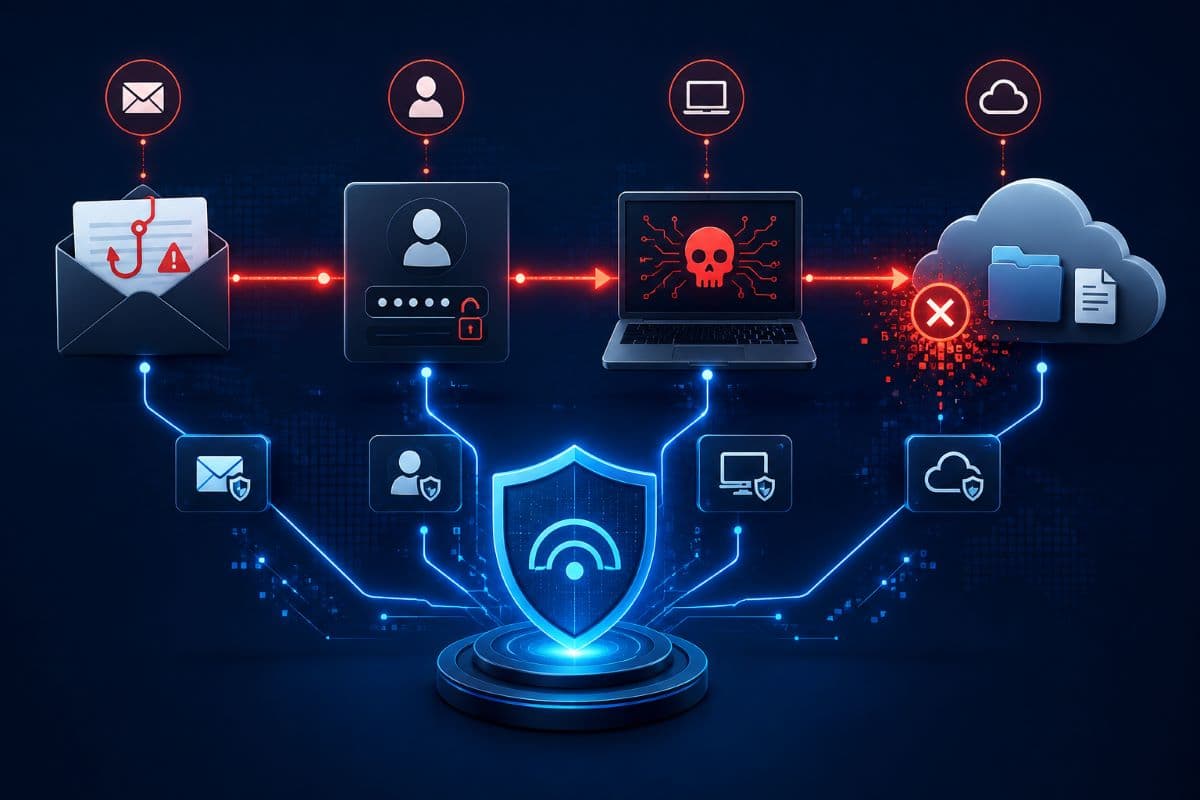
Why Point Products Miss What Correlation Catches
A business running separate, unconnected security tools for each area is effectively asking four different systems to each notice a piece of the same attack independently, with no single view stitching the pieces together. Security teams at larger organizations have staff dedicated to manually connecting these dots; a small business rarely has that capacity without managed IT services filling the gap.
Correlated detection does that connecting automatically, surfacing the full attack story rather than four disconnected alerts that look unrelated in isolation.
What It Actually Covers
Email protection scans incoming messages for phishing, malicious attachments, and suspicious links, extending beyond basic spam filtering into behavioral analysis of what a genuine attack attempt looks like. Identity protection watches sign-in patterns and flags activity that looks like a compromised account, an impossible travel pattern, an unusual sign-in location, a sudden change in behavior.
Endpoint protection covers the devices themselves, detecting malicious activity and unusual processes on company laptops and phones. Cloud app protection extends visibility into the other cloud applications a business connects to its Microsoft environment, an area many businesses do not realize is covered at all and one that matters directly for compliance and risk management in regulated fields.
This Is Different From the Endpoint Defender on Windows Devices
It is worth being precise about a common point of confusion: the device-level Defender built into Windows, which handles local threat detection on an individual machine, is a different layer from Microsoft 365 Defender, which correlates signals across email, identity, and cloud services at the organization level. A business can have one without the other properly configured, and both deserve independent attention rather than assuming one covers the other.
How This Fits With Third-Party Security Tools
Businesses that already run separate security tools alongside Microsoft 365 sometimes worry about overlap or conflict with Defender's built-in capability. In most cases these tools can coexist, though a business should confirm specifically how alerts and responses are coordinated between systems, rather than running two detection layers that never communicate with each other.
Avoiding Alert Fatigue From Duplicate Tools
Running multiple overlapping security tools without clear coordination tends to produce duplicate alerts for the same underlying event, which trains staff to tune out notifications generally, a genuinely dangerous outcome for a security program. Consolidating around one primary detection and response tool, with others serving clearly defined, non-overlapping roles, avoids this problem.
What This Does Not Replace
Microsoft 365 Defender is genuinely capable, and it is not a complete security program on its own. It does not replace employee security training, since a well-crafted social engineering attempt can still succeed regardless of how good the underlying detection is. It does not replace a documented incident response plan, since detecting a problem and knowing exactly what to do about it are two different capabilities.
And depending on which plan a business is licensed for, some of the more advanced correlation and investigation features may not be included at all, which is worth confirming directly rather than assuming.
Where Businesses Commonly Leave Gaps Open
A recurring pattern: businesses activate the basic email filtering that comes on by default and never touch the rest of what the license actually includes. Advanced phishing protection settings, automated investigation and response capabilities, and cross-signal correlation often sit unconfigured, quietly unused, on licenses businesses are already paying for.
This is not a criticism of the businesses; Microsoft's own configuration interface is not always intuitive, and the value of settings a business has never seen is hard to advocate for. It is simply a gap worth closing, since the marginal cost of configuring what is already licensed is far lower than buying additional security tools.
The specific settings most often left at default involve impersonation protection, which watches for messages pretending to come from your own executives or domain, and safe attachment handling, which opens attachments in an isolated environment before delivery rather than relying on signature matching alone.
Both are meaningful protections against the exact attack pattern that costs small businesses the most, and both are commonly sitting unconfigured on licenses that already include them.
Reporting Should Reach Leadership, Not Just IT
Regular, plain-language reporting on what Defender has caught and blocked helps business leadership understand the actual value of the licensing they are paying for, beyond an abstract sense that security tools exist somewhere in the background. This reporting also creates a useful record for insurance and compliance conversations that may arise later.
A Practical Starting Checklist
- Confirm exactly which Microsoft 365 Defender capabilities your specific license tier actually includes.
- Enable advanced phishing and impersonation protection, not just the basic default filtering.
- Turn on cross-signal correlation if your license includes it, rather than leaving each area siloed.
- Review alerts on a real schedule, since detection without review provides limited protective value.
- Pair this with, not instead of, employee training and a documented incident response plan.
Licensing Reality Changes What You Actually Get
Microsoft has structured Defender capability across several different licensing tiers, and the exact feature set attached to each tier has shifted over time as Microsoft has updated its offerings. A business should confirm current tier contents directly rather than relying on older documentation or general assumptions about what comes included.
Some businesses discover, on close inspection, that they are licensed for considerably more capability than they realized; others discover they need to upgrade a specific license to access a feature they assumed was already included.
Configuration Is Where the Real Value Actually Comes From
A licensed but unconfigured security tool provides very little of its intended protection, which makes proper setup as important as the purchase decision itself. This is exactly the kind of ongoing configuration work that belongs inside real cybersecurity solutions, where existing licenses get configured to their actual potential rather than left at default settings.

How Alerts Actually Reach Your Team
A correlated detection system is only useful if the alerts it generates actually reach someone who reviews and acts on them. Businesses sometimes configure the detection layer thoroughly while leaving the notification and response process informal, which means a genuine detection can sit unreviewed for days.
Defining exactly who receives alerts, how quickly they are expected to review them, and what the escalation path looks like for a serious finding turns a technically capable tool into an actually functioning security process.
A workable arrangement for a small business is narrower than it sounds: one named person receives high-severity alerts directly, checks them within a defined window during business hours, and has a specific escalation contact for anything they cannot resolve themselves. Lower-severity findings go into a weekly review rather than interrupting anyone.
What matters is that both paths are written down and someone has actually agreed to them, since an alert routed to a shared inbox nobody owns is functionally the same as no alert at all.
Automated Response Can Reduce the Burden Considerably
Depending on license tier, some automated investigation and response capability may be available, allowing certain routine threats to be contained automatically rather than waiting for manual review. For a small business without dedicated security staff, this automation closes a real gap between detection and actual containment.
A review of your broader security posture is a natural companion to make sure nothing overlaps or conflicts with what Defender already covers.
Pairing this with ongoing managed support ensures alerts actually get reviewed and acted on consistently.
A Quick Self-Check Worth Running This Week
A business can get a rough read on where it stands without any outside help: sign into the security portal, check whether advanced phishing protection is switched on beyond basic filtering, check whether any cross-signal alerts have fired in the past month, and check whether anyone is actually assigned to review them. A business finding these settings untouched or alerts unreviewed has a concrete, specific starting point grounded in its own actual environment.
Getting a Baseline Before Making Changes
Before adjusting any Defender settings, capturing a baseline of current alerts and configuration provides a useful reference point for measuring whether changes actually improved detection or simply generated more noise. This baseline also becomes useful documentation of the starting point when discussing the improvement with leadership or an insurer later.
A Note on Third-Party Integrations
Many businesses connect additional cloud applications to their Microsoft 365 environment for various business functions, and each connected application is a potential blind spot if it falls outside what Defender's cloud app protection actually monitors. Periodically reviewing which third-party applications have access to the environment, and confirming they fall within the coverage a business assumes exists, closes a gap that tends to grow quietly over time as more apps get connected.
How This Connects to Compliance Reporting
Regulated businesses often need to demonstrate ongoing security monitoring as part of their compliance obligations, and Defender's activity logs and alert history can serve as genuine, real evidence for this purpose rather than a general claim that monitoring happens. Exporting and retaining this reporting on a regular schedule turns routine security operations into audit-ready documentation with essentially no additional work.
Retention Settings Deserve a Deliberate Decision
How long alert and activity history is retained is itself a configuration choice, and businesses in regulated industries should confirm their retention settings actually match what their specific compliance framework expects, rather than accepting whatever default period the license happens to apply. A retention period that is too short can leave a business unable to produce records an auditor or regulator later requests.
Stop Paying for Capability You Have Never Turned On
Microsoft 365 Defender connects signals across email, identity, devices, and cloud apps into one correlated picture, which is precisely the kind of visibility a small business cannot easily build on its own. The gap for most businesses is not the tool itself; it is the configuration between what the license includes and what actually gets turned on.
For businesses in the region, a partner providing IT support in Simi Valley can review exactly what your Microsoft 365 license already includes and configure the protection you are already paying for.
Companies across the Valley can get the same locally through IT services in the San Fernando Valley, from a first license audit to full activation of your existing Defender capability.
Frequently Asked Questions
Windows Defender is the device-level protection built into individual Windows machines, handling local threat detection on that specific computer. Microsoft 365 Defender operates at the organization level, correlating signals across email, identity, devices, and cloud applications into one unified picture of an attack as it unfolds. A business can have one properly configured without the other, and both deserve independent attention.
It depends on your current license tier. Some level of Defender capability is included across several Microsoft 365 plans, but the more advanced correlation, investigation, and automated response features are often tied to specific higher tiers. Confirming exactly what your current license includes, rather than assuming, is the necessary first step before deciding whether an upgrade is worthwhile.
No. It is genuinely capable at detecting many attacks, but a well-crafted social engineering attempt can still succeed regardless of the underlying detection technology. Detection tools and employee training address different parts of the same problem, and a business needs both working together rather than treating either as a complete solution on its own.
Because the basic email filtering comes on by default while the more advanced capabilities, phishing protection settings, automated response, cross-signal correlation, require deliberate configuration that many businesses never get around to. This is not usually carelessness; the interface is not always intuitive, and it is easy to assume default settings represent full protection when they typically do not.
If you are not certain which Microsoft 365 Defender capabilities your current license actually includes or how much of it is properly configured, GlobeVM can review your license and turn on what you are already paying for.
Comments
0 Comments