
Every business has a downtime tolerance. The owner may not have written it down, the IT provider may never have asked, but it exists, and it is one of the most consequential numbers in the business. How long can systems be offline before customers leave, contracts break, revenue stops, or recovery becomes impossible? How much recent data can the business afford to lose forever if something goes wrong tonight? Those two questions have technical names: Recovery Time Objective and Recovery Point Objective, or RTO and RPO. They are the metrics that turn disaster recovery from a vague intention into a measurable plan. They drive what your backup strategy actually has to look like, what it will cost, and whether you can survive a serious incident at all. This guide explains exactly what RTO and RPO mean, how to calculate the right values for your business, the common mistakes that make the numbers meaningless, and how to align technology spending with the downtime your business can actually tolerate.
What RTO and RPO Mean
RTO and RPO are the two foundational metrics of disaster recovery planning. They look similar at first glance, both expressed in units of time, but they measure different things and answer different questions.

Recovery Time Objective (RTO)
RTO is the maximum acceptable amount of time a system, application, or business process can be down after a failure before the consequences become unacceptable. It answers the question, "How long can we afford to be offline?" If your RTO for a critical system is four hours, that means you have committed to having it back up and running within four hours of failure, regardless of what caused it. RTO drives the speed of your recovery process, the technology you invest in to support it, and the cost of that technology.
Recovery Point Objective (RPO)
RPO is the maximum acceptable amount of data loss measured in time. It answers the question, "How much recent data can we afford to lose?" If your RPO for a critical database is one hour, you have committed to backups frequent enough that you would never lose more than one hour of data, even in a worst-case failure. RPO drives the frequency of your backups and the replication strategy behind them.
The Easiest Way to Keep Them Straight
Many people confuse the two on first encounter. The cleanest mental shortcut is this: RTO looks forward from the moment of failure to when systems must be back. RPO looks backward from the moment of failure to the last point your data is safe. RTO is about downtime. RPO is about data loss. A system can have a short RTO and a long RPO, or the reverse, depending on what the business actually needs.
A Quick Example
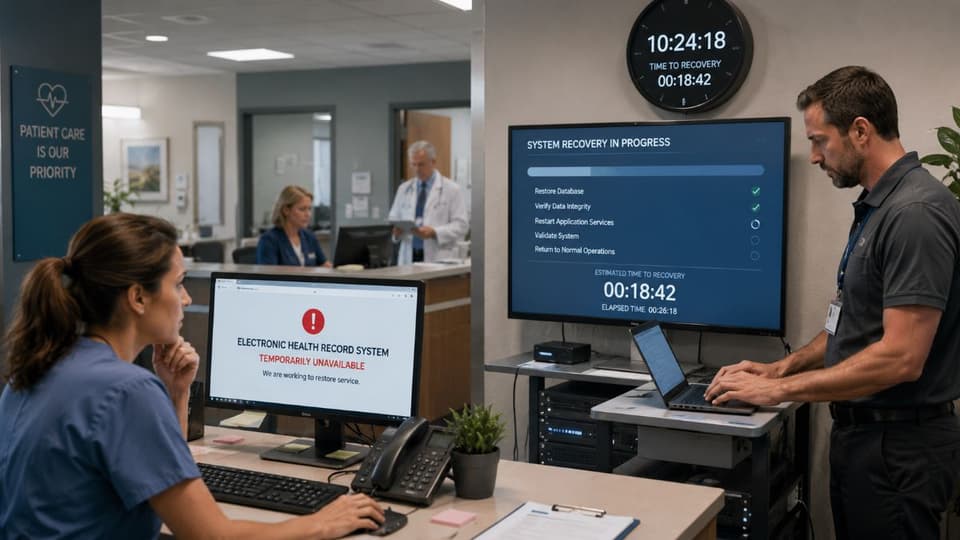
A small medical practice's electronic health record system crashes at 2 p.m. on a Tuesday. The practice has an RTO of two hours and an RPO of fifteen minutes. What does that mean in practice? The RTO commitment means the system must be back online by 4 p.m., or the recovery has failed against its own target. The RPO commitment means that when the system comes back, the data it contains can be no older than 1:45 p.m., which requires backup or replication at least every fifteen minutes. If the most recent backup was at noon, the practice has just lost two hours of patient updates and has missed its RPO by a wide margin, regardless of how fast it restored the system.
The example shows why both metrics matter. Restoring quickly with stale data is a failure. Restoring fresh data slowly is also a failure. Meeting both is what successful disaster recovery looks like.
How to Calculate RTO for Your Business
Calculating RTO is a business question first and a technology question second. The temptation is to ask IT what they can deliver and adopt that as the target, but this gets the analysis backwards. The right approach is to determine what the business actually needs, then size the technology to meet it.

Step One: Identify Your Critical Systems
Not every system needs the same RTO. A point-of-sale terminal that processes live customer payments has a vastly different tolerance from an HR portal that staff log into occasionally. Start by listing the systems and applications your business runs, and rank them by criticality. The top tier is the systems whose loss directly stops revenue, breaches obligations, or threatens safety. The middle tier is important but tolerable. The bottom tier is inconvenient but survivable.
Step Two: Measure the Cost of Downtime
For each critical system, estimate the cost of having it unavailable, per hour. The components include lost revenue, idle staff costs, contractual penalties, customer goodwill, and any regulatory consequences. For a busy retailer, the cost of a point-of-sale outage is enormous. For an internal collaboration tool, the cost is much lower. The cost-per-hour curve is rarely linear; many systems have a tolerable threshold beyond which the damage accelerates sharply.
Step Three: Set the RTO Based on Tolerance, Not Capability
Your RTO for each system is the longest outage you can tolerate before the cost becomes unacceptable. This is a business decision based on the numbers in step two, not a technology question. Once the targets are set, technology investments are sized to meet them, rather than the other way around.
Step Four: Verify Your Technology Can Actually Hit It
This is where the math meets reality. If the business says it cannot tolerate more than two hours of downtime on a critical system, but the current backup strategy would take six hours to restore, there is a gap. That gap is either closed with investment in faster recovery technology, or the target is renegotiated based on what is feasible. Pretending the target is met when it is not is the most damaging form of planning.
How to Calculate RPO for Your Business
RPO follows a similar process, applied to data rather than time-to-restore.
Step One: Identify Data Sensitivity by System
Some data is updated constantly and recent updates are precious. Transaction systems, patient records, manufacturing telemetry. Other data changes rarely. A static product catalog or an internal documentation site can tolerate a much longer RPO without harm.
Step Two: Determine Tolerable Data Loss
For each system, ask what would happen if the most recent data, going back some period, were permanently lost. For some systems, even fifteen minutes of lost data has real cost. For others, a day's worth is annoying but recoverable. The answer becomes the RPO target for that system.
Step Three: Set Backup Frequency to Match
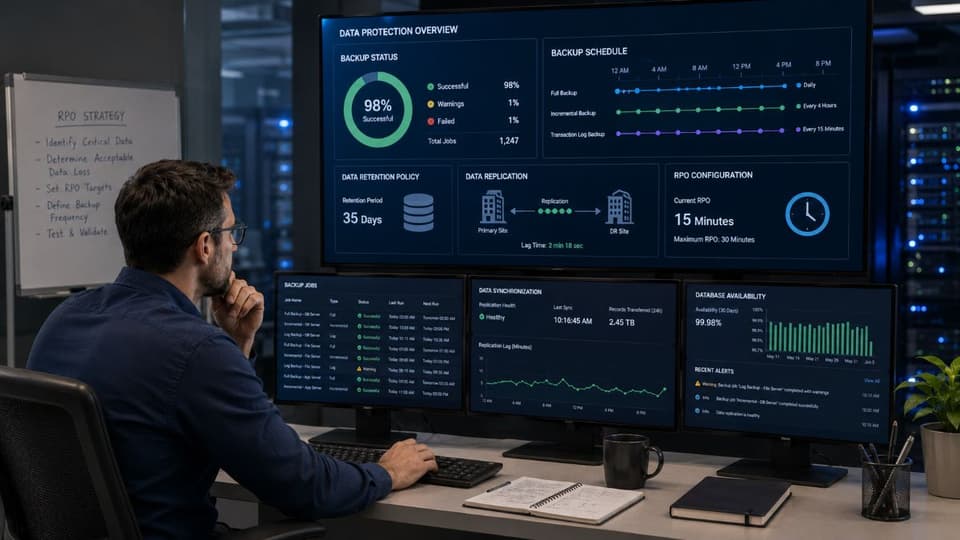
The RPO determines how often the system must be backed up or replicated. An RPO of fifteen minutes requires continuous or near-continuous replication. An RPO of twenty-four hours can be met with daily backups. The cost rises sharply as RPO shrinks, because real-time replication is fundamentally more expensive than nightly backups.
Step Four: Confirm the Backups Are Real
This is the step most often skipped, and it is the one that turns plans into capabilities. A backup that has never been tested for recoverability is not a backup, it is a hope. Backups should be verified regularly, and full restores should be tested at least annually. The combination of a defined RPO and tested data backup and disaster recovery is what gives the metric real meaning.
Realistic RTO and RPO Ranges by System Type
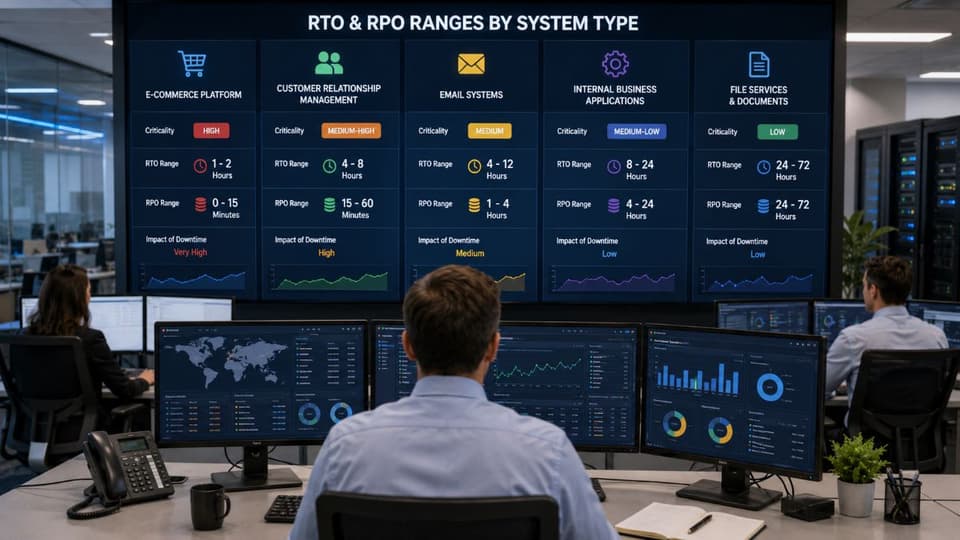
While every business is different, certain rough patterns hold across small and mid-sized organizations. These are illustrative starting points, not prescriptions.
Mission-critical revenue systems such as point-of-sale, e-commerce platforms, and primary line-of-business applications typically need an RTO of minutes to a few hours and an RPO of minutes. Anything longer in either direction creates direct revenue loss.
Important operational systems such as email, file servers, and customer relationship platforms commonly need an RTO of a few hours to a business day and an RPO of fifteen minutes to an hour. They are essential but not instantly catastrophic.
Internal support systems such as HR portals, internal wikis, and analytics tools can often tolerate an RTO of a day or more and an RPO of several hours to a day. The cost of stricter targets here usually outweighs the benefit.
Compliance and archival systems have specific requirements driven by regulation, which can be tighter than business need alone would suggest. Healthcare, financial, and legal data carry obligations that may dictate stricter RPOs than the business would otherwise choose.
How RTO and RPO Drive Technology Cost
This is the unavoidable trade-off. Tighter targets cost dramatically more. A backup strategy that produces an RPO of twenty-four hours can be built with simple nightly backups to offsite storage. Shrinking the RPO to one hour requires more frequent backups or continuous data protection. Shrinking it to minutes requires real-time replication, which is meaningfully more expensive. Similarly, an RTO of a full business day can be met with restore-from-backup. An RTO of one hour usually requires standby infrastructure ready to take over. An RTO of minutes requires hot failover, which costs roughly the same as running a second environment.
The honest implication is that the goal is not the tightest possible RTO and RPO. The goal is the right RTO and RPO for each system, where the cost of the technology to meet them is justified by the business cost of failing to. A business that uniformly buys hot failover for everything is wasting money on systems that did not need it. A business that uniformly uses cheap nightly backups for everything is gambling with the systems that needed faster protection. Differentiated targets, tied to differentiated business value, are how the technology spend is rightsized. Layered cybersecurity solutions belong in this same picture, because the incidents these metrics are sized to recover from are increasingly cyber rather than environmental.

Common Mistakes That Make RTO and RPO Meaningless
The patterns that cause real damage are familiar. Knowing them is the fastest way to find your own gaps.
The most common is setting targets aspirationally and never testing. A plan that promises a two-hour RTO without a single tested restore is a number on paper, not a capability. The second is applying the same RTO and RPO to every system, which either overspends on the unimportant or underprotects the critical. The third is failing to update the targets as the business changes. The system that was non-critical three years ago may be central to operations today. A fourth is treating RTO as the time to begin recovery, not the time to complete it. The customer experiencing the outage does not care when work started; they care when the system came back. Finally, many businesses set RTOs and RPOs without considering the cost of the underlying technology, which produces commitments the business cannot actually fund, and then quietly abandons.

Tying It All Together
RTO and RPO are not technical jargon for IT to argue about. They are business decisions expressed in time. They tell the business how much downtime it can survive and how much data it can lose, and they tell the technology team what to build to honor those limits. The work of setting them correctly is the foundation of any honest disaster recovery plan, and disaster recovery is the technical layer of the broader continuity strategy a business needs to operate through disruption. Our companion guide on business continuity vs disaster recovery covers the wider context these metrics fit into.
For most small businesses, getting RTO and RPO right requires both a business conversation that leadership has to lead and a technical capability that an experienced partner has to deliver. Ongoing managed IT services are where that technical capability lives day to day, keeping backups current, infrastructure recoverable, and the recovery objectives genuinely achievable rather than only stated.
If you are not confident the RTO and RPO your business has committed to are actually achievable with your current setup, a focused review with a knowledgeable local partner is the most direct way to find the gap between your targets and what your technology can really deliver.