

Ask a small business owner who can log into the practice management system and you will get a confident answer. Ask them to prove it, by exporting the actual user list, and the answer changes: a bookkeeper who left in 2024, the vendor who set up the server and never left, two accounts nobody recognizes, and a shared login that six people know the password to.
None of this is negligence. Access accumulates quietly because adding it is a one minute favor and removing it is nobody's job. An access review is the small recurring habit that fixes it, and it is the cheapest security control most businesses have never run.
What an Access Review Involves
An access review is a periodic check that the list of people who can reach a system matches the list of people who should. That is the whole idea. It is not a tool you buy or a project you run; it is an hour or two on the calendar, a set of exported user lists, and someone willing to ask uncomfortable questions about names nobody recognizes.
The reason it matters is that most damaging incidents involve legitimate credentials rather than a broken lock. An account that still works after its owner left, or a vendor account with more power than the job required, is exactly the kind of access an attacker prefers, because using it looks like normal activity to everything watching.
Where This Sits Next to Everything Else You Do
Businesses often assume their existing controls already cover this, and they cover pieces. Offboarding handles departures, at least the ones that follow the process. Multi-factor authentication protects the front door of the accounts you know about.
Neither answers the specific question here, which is not whether an account is protected but whether it should exist at all. Locking the door well does nothing about the keys handed out over three years, which is also why this work is distinct from managing the powerful accounts covered in our guide to the accounts with the most power.
The Five Places Access Hides
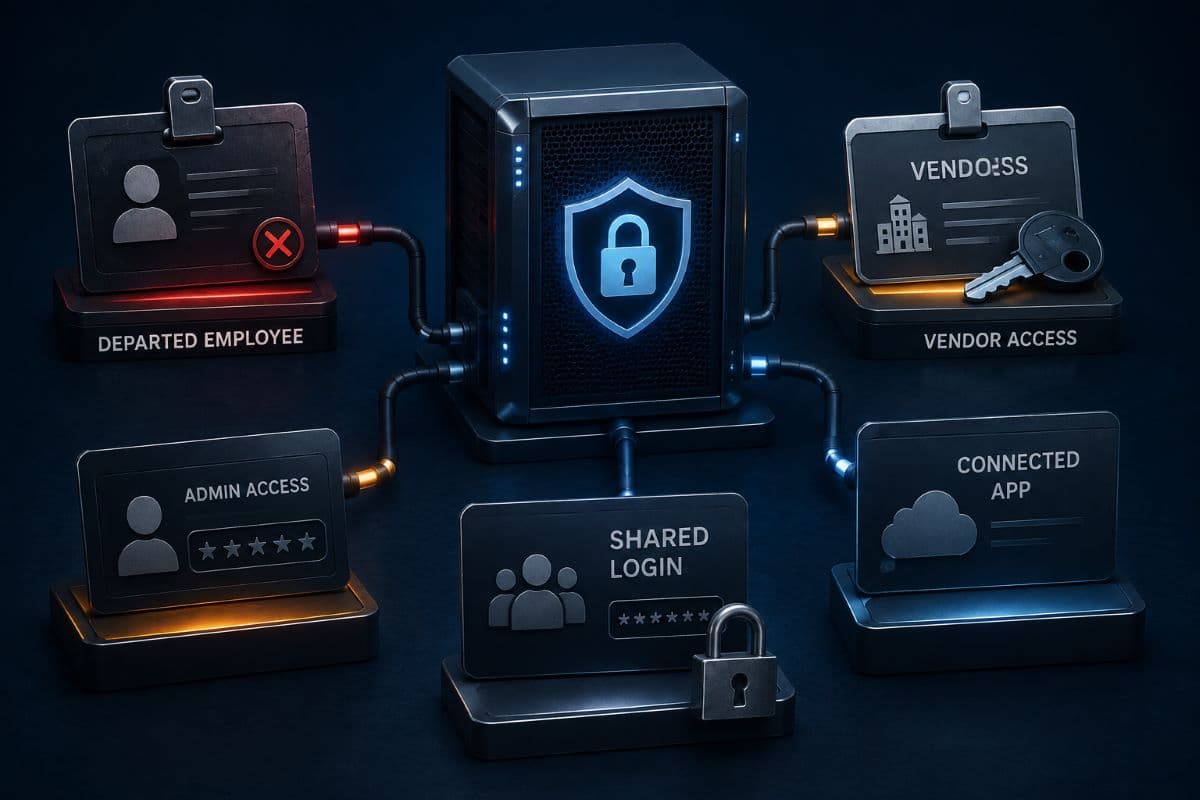
In practice, almost everything a review finds falls into one of five categories. Knowing them in advance makes the first pass much faster, because you are looking for known patterns instead of reading names one by one.
- Departed people: the email account was disabled, but the accounting software, the imaging system, the payroll portal, and the shipping account were never touched.
- People who changed roles: five years of accumulated access from three previous jobs at your company, none of it removed when the job changed.
- Vendors and contractors: the accounts created for a project in 2022 that outlived it without anyone noticing, often with administrator rights.
- Shared and generic logins: the front desk account, the scanner account, the one everyone uses for the ordering site, with a password that has not changed since the last three staff turnovers.
- Connected applications: third-party tools someone authorized against your Microsoft 365 or your practice software, which keep their access whether or not anyone still uses them.
That last category is the one businesses never think to check, because no one experiences it as granting access. Someone clicked accept on a permission screen for a scheduling tool eighteen months ago, and that tool can still read the mailbox, which is the same blind spot our article on shadow IT describes from the software adoption side.
How to Run Your First One in an Afternoon
The first review is the long one because you are also building the list of systems. After that it is closer to an hour.
- List the systems that matter, starting with anything holding client, patient, or financial data, plus email, file storage, banking, and payroll. Ten is usually enough to start.
- Export the users from each, which most systems allow from an admin screen, and put them side by side in one sheet.
- Compare against a current staff list from whoever runs payroll, because that list is the one that is actually accurate.
- Flag every account that is not a current employee, including vendors, former staff, generic logins, and anything unidentifiable.
- Question every administrator, since the honest number of people who need full rights in any small business is small.
- Disable first, delete later, so a mistake is reversible, with a note to remove properly after thirty days.
- Write down what you found and what you changed, because that record is the deliverable, not the cleanup.
Two ground rules keep the exercise honest. Nobody gets to answer "leave it, just in case," since that phrase is how the problem was built. And the review has to include the owner's own accounts, because the person with the most access is usually the one no one audits.
What to Check Inside Microsoft 365
Most small businesses can cover a large share of their exposure in one console. Look at active users against your staff list, then at guest accounts, which accumulate from years of shared files and rarely get removed, then at who holds administrator roles.
Then check three things people forget: enterprise applications and the permissions they were granted, mailboxes with forwarding rules pointing somewhere outside the business, and shared mailboxes that several people can open. Those three answer questions an auditor or an insurer will eventually ask, and they are also where quiet compromise lives.
A Note on the Automated Tool
Microsoft does offer an automated access review feature that emails managers to confirm whether people still need their access. It requires Entra ID P2 or an Entra ID Governance license, which most small businesses on Microsoft 365 Business Premium do not have, since that plan includes the P1 tier.
This is worth stating plainly because vendors rarely do: for a twenty person office, the manual export and compare method costs nothing and works fine. Buy the automation when the number of systems and people makes the manual pass genuinely painful, not because a feature list implies you need it.
The Accounts With No Owner
Every environment has a few logins that no human owns: the account the backup software runs as, the login the copier uses to scan to email, the credential in a script somebody wrote years ago. These are the most dangerous entries on any list, because they usually have broad rights, passwords that never change, and no person who would notice misuse.
You cannot simply delete them, since something will break, which is why they survive review after review. The workable approach is to name an owner for each one, document what it is for, and put its credential in the company password manager rather than in someone's memory or a text file on a desktop.
Vendors Deserve Their Own Pass
Outside access has a habit of outliving its purpose, and vendor accounts should be checked against a simple question: is this company still doing work for us, and does this level of access match what they do? A software vendor that needed administrator rights during setup rarely needs them permanently, and standing remote access is worth converting into access granted when required.
This is the operational half of the vendor question, while the security vetting side is covered in our guide to assessing the vendors you rely on. Both matter, and the review is where the paperwork meets reality.
What to Do With What You Find
The first review turns up more than expected, and reacting well matters as much as finding it. Sort the findings into three piles before touching anything, because they need different handling and different levels of care.
Clear removals are accounts belonging to people who have left, vendors whose work ended, and duplicates. These go first, disabled rather than deleted, with a note to remove them properly in thirty days. Reductions are accounts that should exist with less power, usually administrator rights that were granted for one task years ago and never rolled back.
The Third Pile Is the Interesting One
Then there are the accounts no one can identify, and the instinct to leave them alone is exactly wrong. Track each one to a purpose or an owner, and if neither can be established after asking around, disable it and see what breaks in a controlled way rather than leaving an unexplained login active indefinitely.
Record what you decided about each finding, since the next review starts from that record and the questionnaire answer comes from it too. A review that produces cleanup without documentation has to be repeated from scratch every time.
How Often, and What Triggers an Extra One
Twice a year is the sustainable rhythm for most small businesses. It is frequent enough that nothing rots for long and rare enough that it stays on the calendar rather than becoming a resented chore.
Certain events deserve an immediate check regardless of the schedule: any departure, particularly an unhappy one, a role change, the end of a vendor engagement, a merger or acquisition, and any security incident. Departures are the highest value trigger, so this belongs alongside the rest of your employee offboarding routine rather than as a separate initiative with no owner.
The Paperwork Is Half the Value
The cleanup protects the business. The record proves it. A dated summary showing which systems were reviewed, what was found, what was removed, and who signed off answers a question that keeps appearing in client security questionnaires, cyber insurance applications, and compliance assessments.
Practices that keep those summaries answer in one line and move on. Practices that do not end up writing a paragraph explaining their intentions, which reviewers read exactly the way you would expect. The evidence habit described in our article on responding to security questionnaires applies directly here.
Start With the List You Are Most Afraid Of
If an afternoon feels like too much to schedule, start with one system, the one holding your most sensitive data, and export its user list this week. The first access review almost always finds something, and the finding is rarely dramatic; it is a name from three years ago that still works, which is dramatic enough when you consider what it would cost to explain.
Businesses in the region can have this run as part of routine management by a provider offering IT support in Simi Valley, with the exports, the comparison, and the record handled on a schedule. The point is that it happens twice a year without anyone having to remember.
Offices in the Conejo Valley get the same treatment through IT services in Westlake Village, permission cleanup included. Expect the first pass to be the uncomfortable one; every review after it is quick.
What matters is that access stops accumulating unwatched, which is the whole job of proper access control. Everything else in this article is just the routine that keeps it true.
Frequently Asked Questions
It is a periodic check that the people who can log into each of your systems are the people who should be able to. You export the user list from each important system, compare it against a current staff list, and remove anything that does not belong: departed employees, finished vendors, unused generic logins, and accounts nobody can identify. It needs no special software for a small business, and the written record of what you found is as valuable as the cleanup itself.
Twice a year works for most, with extra checks triggered by specific events: any departure, especially an unhappy one, a role change, the end of a vendor engagement, a merger, or a security incident. Departures matter most, because that is where access most commonly survives its purpose. A predictable rhythm beats an ambitious schedule no one keeps, and each review after the first takes far less time because the system list already exists.
Usually not. Email is the account everyone remembers, and it is often the only one that gets touched. The accounting software, the practice or case management system, the payroll portal, the shipping account, the bank, and any tool the person signed up for individually all keep working unless someone closes them. That gap between disabling email and actually removing access is what a review is designed to find.
Those need a different treatment rather than deletion, because removing them breaks something. Give each one a named human owner, document what it does and what it needs access to, store its credential in the company password manager instead of a person's memory, and confirm during each review that it still exists for a reason. They deserve attention because they usually hold broad rights, rarely change passwords, and have no one who would notice misuse.
No. Microsoft offers an automated review feature, but it requires Entra ID P2 or an Entra ID Governance license, which most small businesses on Business Premium do not have because that plan includes the P1 tier. Exporting user lists from each system and comparing them in a spreadsheet costs nothing and works well at small scale. Consider the automation when the number of systems and people makes manual review genuinely painful, not because a product page suggests it.
When no one in the business can produce a current list of who reaches your most sensitive system, GlobeVM runs the first access review, cleans up what it finds, and puts the twice-yearly rhythm on a schedule that holds.
Comments
0 Comments