

Businesses put real effort into onboarding: the accounts get created, the laptop gets ordered, the welcome email goes out. Departures get the opposite treatment. Someone leaves, HR collects the badge, and the digital side, the accounts, the devices, the passwords that person knew, gets handled "when we get to it," which often means partially or never. That gap is one of the most common and most preventable security exposures in small business, because employee offboarding is not an administrative chore; it is the controlled removal of access from someone who no longer works for you. This article explains why it matters, why even good businesses get it wrong, and the practical IT checklist that closes the door properly every time.
Why Offboarding Is a Security Problem
Think about what a typical employee can reach on their last day: company email, shared files, the accounting or practice management system, a dozen cloud apps, saved passwords in a browser, maybe remote access to the network. Offboarding is the process of taking all of that back. When it is skipped or done halfway, the business is left with live access in the hands of someone who has no ongoing duty to the company, and with orphaned accounts that nobody watches. Neither problem announces itself; both sit quietly until something goes wrong.

The Accounts Nobody Closed
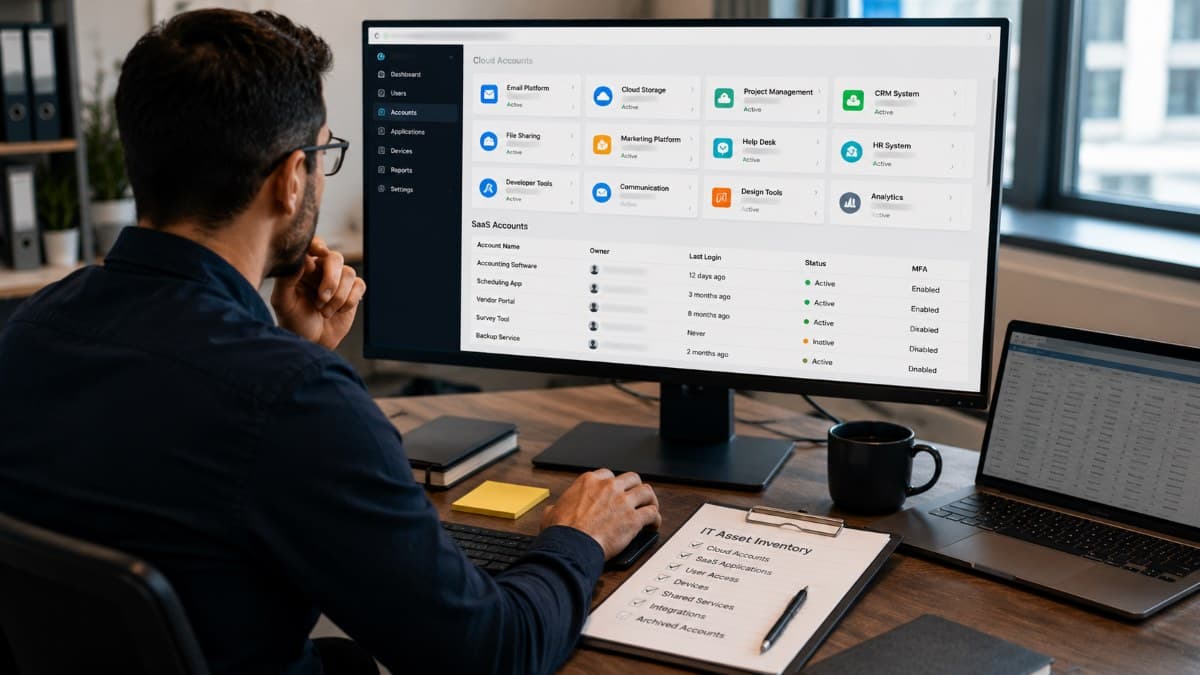
The most common failure is the forgotten account. Modern businesses run on far more services than anyone remembers signing up for: the main email platform, yes, but also the file sharing tool, the scheduling app, the marketing platform, the vendor portal someone set up two years ago. When a person leaves, the accounts everyone remembers get disabled and the rest live on, still accepting that person's password, invisible precisely because nobody is using them. Months later they are still there, unmonitored doors into company data. This is one of the quiet arguments for real IT asset management: you cannot revoke access you never tracked, and an accurate inventory of systems and accounts is what makes complete offboarding possible at all.
What Can Actually Go Wrong
It is worth being concrete, because "security risk" sounds theoretical until it has a shape. A departing salesperson syncs the client list to a personal account on the way out and it surfaces at a competitor. A former employee, angry about how things ended, still has working credentials weeks later and uses them, and everything they do looks legitimate to your systems because it is a valid login. An orphaned account with a weak, never-rotated password gets compromised a year after the departure, and the intruder inherits whatever that account could reach. None of these require sophistication; they require only that access outlived employment. That is the whole risk in one sentence.
Why Good Businesses Still Get This Wrong
Offboarding failures are rarely about negligence; they are about ownership and timing. The departure is an HR event, but the access lives in IT systems, and in many small businesses those are different people, or the same overloaded person wearing both hats. HR knows someone is leaving; nobody has the job of translating that into a systematic revocation across every service the person touched. Add the emotional awkwardness of a departure day, the goodbye cake, the handover conversations, and the access cleanup gets postponed to a calmer moment that never arrives. The fix is not more diligence in the moment; it is a standing checklist and a clear trigger, so the process runs the same way whether the departure is happy, sad, or sudden.
One blind spot deserves its own mention: offboarding is not only for employees. Contractors, temps, interns, bookkeepers, marketing agencies, and former IT providers accumulate the same kinds of access, often with fewer records, and their departures rarely trigger any process at all because there is no HR event to anchor one. Treat every relationship that received access as one that must eventually give it back, and put external parties through the same checklist as staff when the engagement ends. Some of the most damaging lingering-access cases involve outside parties precisely because nobody considered them part of the process.
The Employee Offboarding Security Checklist
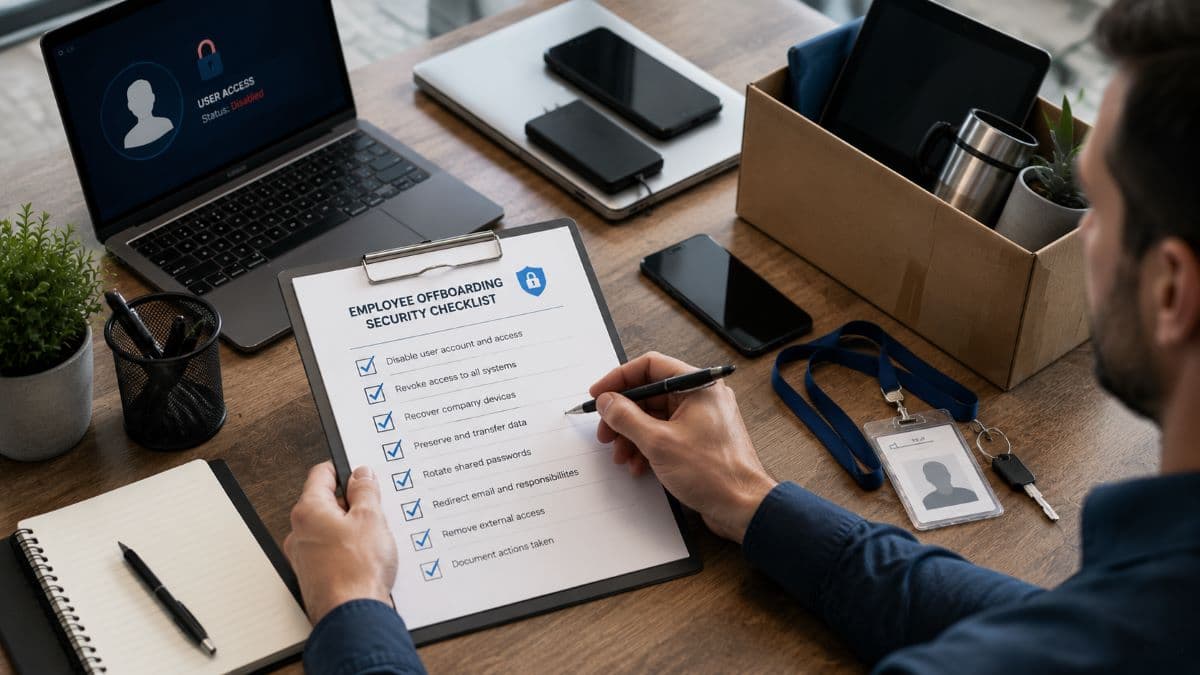
Here is the core of good employee offboarding, condensed into the actions that matter. Every departure, regardless of role or circumstances, should walk through this list:
- Disable the central identity first: the main login that gates email and connected apps.
- Revoke access service by service, using your inventory of apps and systems.
- Recover company devices and remotely remove company data from personal ones.
- Preserve the person's data, email and files, before anything is deleted.
- Rotate shared and service passwords the person knew or could have known.
- Redirect email and responsibilities so clients and vendors reach a live person.
- Remove external access: vendor portals, bank users, building systems, integrations.
- Document what was done and when, for audits, insurance, and your own certainty.
The order is deliberate, and a few of these steps deserve explanation because they are where businesses most often stumble.

Identity First, Then Everything Else
Start with the account that opens the most doors. In most businesses that is the Microsoft 365 or Google Workspace identity, because email is both a trove of information and the reset key to nearly every other service. Disabling it, ending its active sessions, and unregistering the person's multi-factor devices closes the biggest door in one motion, and it buys time for the longer tail of individual apps. Then work through the inventory service by service, including the unglamorous ones: the accounting platform, remote access, the website admin, cloud storage shares, and any app where the person signed in directly rather than through the central account. Doing this in one place is the everyday value of centralized access control.
Devices Back, Data Preserved
Company laptops, phones, and tablets should come back on or before the last day, and management tooling should confirm they are locked or wiped rather than trusting that they will be. For personal devices that carried company email or files, remotely removing the work data is the step most small businesses skip because they never set up the ability to do it. Before any account or device is wiped, preserve the data: the mailbox, the files, the records the business may need for continuity, disputes, or legal obligations. Deletion is easy and permanent; do it only after preservation, and when old hardware eventually goes out the door, do that properly too, through secure IT asset disposal rather than a drawer or a dumpster.
Shared Passwords and Service Logins
Here is the step almost everyone misses: the passwords the person knew that were not theirs. The shared social media login, the Wi-Fi password, the credentials for the label printer service, the admin password taped inside a drawer, the vendor account the whole team uses. Disabling the person's own accounts does nothing about these, and they are the kind of access a former employee retains without anyone realizing it. Every shared credential the departing person could have known gets rotated. The longer-term fix is centralizing this in a proper system, covered in our guide to phishing-resistant MFA. Then "what did they know" becomes a report instead of a guess.
Email Without Sharing a Password
Clients will keep writing to the departed person's address, so plan for it: convert the mailbox to a shared or delegated one that a manager can access, set a professional auto-reply naming the new contact, and forward what needs forwarding. What you should not do is keep the account alive with a known password so someone can "check it," which keeps a live login in circulation and muddies every audit trail. Delegation gives the business continuity without keeping the door open.
Timing Matters More Than People Think
For a friendly, planned departure, the sequence can be humane and orderly: preserve and hand over during the notice period, then revoke access at the agreed moment on the last day, not three weeks after. The mistake in friendly departures is not hostility; it is drift, where everyone likes the person and the cleanup quietly never finishes. Put the revocation on the calendar the day the resignation lands, and treat it as a standard step rather than a statement of distrust. Consistency is also fairness: when every departure follows the same checklist, no individual is singled out.

When the Departure Is Not Friendly
Terminations change the timing, not the list. When a departure is involuntary or contentious, access removal happens at the same hour as the conversation, not after it. The window between "you no longer work here" and "your login no longer works" is precisely when bad decisions get made. That requires a little coordination between whoever runs the conversation and whoever controls the systems, ideally with the technical side staged in advance and executed on a signal. It feels cold to prepare; it is far colder to explain to clients why a terminated employee still had their data.
Offboarding Is Easier When Onboarding Was Done Properly
Most of what makes a departure messy was decided on the person's first day. If accounts were created ad hoc, if the new hire inherited whatever access their predecessor had, and if nobody wrote down which systems they were added to, then offboarding becomes an archaeology project. Three habits at the start remove most of that work later.
Give every person their own named account, never a shared login, so activity can be traced to an individual and removed in one action. Grant only the access the role needs rather than copying a previous employee's permissions, because over-provisioning starts on day one and nobody ever audits it afterwards. And record what was issued: which accounts, which devices, which vendor portals, which physical keys. That record is the offboarding checklist, written in advance while the information is easy to gather.
Tie the HR trigger to the IT action
The single change that fixes most offboarding failures is connecting the two systems that already exist. The moment HR records a hire or a departure, an IT task should open automatically with a due date and an owner. Where the two run separately, people fall through the gap, and the gap is exactly where the forgotten accounts live. Identity platforms make this easier by letting one action disable a person everywhere at once, but even a shared checklist with dated sign-off is a large improvement over memory.
Make It a Process, Not a Scramble
Everything above works only if it happens every time, which means offboarding needs what every reliable process has: a written checklist, a named owner, and an automatic trigger from HR to IT the moment a departure is known. Pair it with a periodic sweep, quarterly is fine for most small businesses, that reviews all active accounts against the current employee list and catches anything that slipped through. Businesses that work with an IT provider can make this fully routine; a good managed IT services arrangement treats onboarding and offboarding as standard, documented workflows, executed the same day they are requested, with the evidence kept. The measure of success is boredom: a departure should be an ordinary ticket, not an incident.
The trigger itself should carry what IT needs to act without a scavenger hunt. That means the person's name and role, the effective date and time, whether the departure is voluntary, the devices they hold, and any data that must be preserved or handed to a specific colleague. Five minutes of structure at the start saves days of loose ends afterward, and it turns a judgment call into a repeatable procedure that any team member can execute correctly.
Close the Door Properly
People leaving is a normal part of running a business; leaving their access behind does not have to be. Treat employee offboarding as a security control with a checklist and an owner, lead with the central identity, remember the shared passwords everyone forgets, preserve before you delete, and match the timing to the circumstances. Do that consistently and the departing employee problem, one of the most common ways small businesses get hurt, simply stops applying to you.
For companies in the Los Angeles area, a provider offering managed IT services in Los Angeles can build offboarding into your standard IT operations so it runs correctly without anyone having to remember it.
Businesses in the Valley can get the same discipline locally through managed IT and cybersecurity for San Fernando Valley businesses, from the access inventory to the day-of execution.
Frequently Asked Questions
In IT terms, employee offboarding is the controlled removal of a departing person's access to company systems and data, together with the recovery of devices and the preservation of the information the business needs to keep. It covers disabling accounts, revoking access across every application, rotating shared passwords the person knew, removing company data from personal devices, redirecting email, and documenting each step. Done well, it ensures that employment ending and access ending happen at the same time.
The central identity, which in most businesses is the Microsoft 365 or Google Workspace account. It gates email, connected apps, and password resets for many other services, so disabling it, ending active sessions, and unregistering the person's multi-factor devices closes the largest exposure in one step. From there, work through your inventory of applications service by service, including systems with their own separate logins such as accounting platforms, remote access, and vendor portals, which the central account does not control.
It depends on the circumstances, but never later than the last day. For planned, friendly departures, schedule revocation for an agreed moment on the final day, after data handover is complete, and resist the drift that lets cleanup slide for weeks. For involuntary or contentious departures, access should be removed at the same hour as the termination conversation, with the technical steps staged in advance, because the gap between the conversation and the revocation is when damage happens.
They must be rotated, and this is the step most businesses miss. Disabling someone's personal accounts does nothing about the Wi-Fi password, shared social media logins, team vendor accounts, or admin credentials they were exposed to during their employment. Every shared credential the person could have known should be changed as part of offboarding. The longer-term fix is managing shared credentials in a proper password management system, which turns "what did they know" into a report you can act on.
Create a uniquely named account for the person rather than a shared login, grant only the access the role needs instead of copying a predecessor, and write down what was issued: accounts, devices, vendor portals, physical keys. That record becomes the offboarding checklist. Tying the HR system to an IT task, so a hire or a departure automatically opens work with an owner and a due date, prevents most missed revocations.
If you are not certain that every former employee's access is really gone, GlobeVM can audit your accounts, build your employee offboarding checklist, and run it as part of your day-to-day IT, so every departure closes cleanly.
Comments
0 Comments