Somewhere in your practice, someone is about to start a telehealth visit, and the question hanging over that call is one every covered practice eventually asks: is Zoom HIPAA compliant? The short answer is that Zoom can be used in compliance with HIPAA, but it is not compliant out of the box, and the free version never qualifies. Compliance depends on three things existing at the same time: an eligible paid plan, a signed Business Associate Agreement, and an account configured and used to protect patient information.
Is Zoom HIPAA Compliant? What Your Practice Must Have in Place

By George
3 October 2026

That three-part answer applies to far more than Zoom, which is why this guide covers the reasoning and not just the verdict. By the end you will know exactly what has to be in place before a patient joins a video call, how Google Meet and Microsoft Teams compare, what changed when the pandemic-era grace period ended, and where recordings quietly become your biggest exposure.
Is Zoom HIPAA Compliant? The Short Answer
Zoom offers a Business Associate Agreement (BAA) to healthcare customers on eligible paid plans, including its healthcare-specific offering and qualifying business-tier accounts. With that BAA executed and the account's HIPAA configuration enabled, Zoom can lawfully transmit protected health information. Without it, the same software with the same encryption is off-limits for patient conversations, because the compliance lives in the contract and the configuration, not in the product. Three details matter before anyone relies on that summary. The BAA is not automatic with purchase; it has to be executed. Free, basic, and standard individual accounts have no BAA path at all. And plan names and eligibility shift over time, so the current terms should be confirmed with Zoom directly before your practice signs anything.
Why "Is This Software HIPAA Compliant?" Is the Wrong Question
No video platform, or any software, is HIPAA compliant as a product. The U.S. Department of Health and Human Services certifies no application, and HIPAA obligations attach to how a covered entity uses a tool, not to the tool itself. Two practices can run identical Zoom accounts where one is compliant and the other is committing a violation per appointment, separated only by paperwork and settings.
What the BAA actually does
When a vendor transmits or stores patient information on your behalf, HIPAA treats that vendor as a business associate, and the law requires a written agreement defining the vendor's obligations before any protected health information (PHI) touches its systems. That is the BAA. It is the mechanism that extends your compliance obligations onto the vendor, and it is why the same platform is lawful with the agreement and unlawful without it. The rules behind this sit in the HIPAA Security Rule and the Privacy Rule, and they apply to a solo therapist exactly as they apply to a hospital system.
The three-legged test for any communication tool
Every tool your practice considers, video, phone, chat, fax, or email, passes or fails the same test: Does the vendor offer a BAA at your service tier? Has your practice actually executed it? And is the account configured so patient information stays inside the covered boundary? Miss any leg and the stool falls over, no matter how strong the encryption underneath it is.

What Zoom Requires Before a Patient Joins a Call
The plan and the paperwork
Eligibility starts with being on a paid plan Zoom includes in its healthcare BAA program. From there, the agreement must be executed with Zoom, and the account's HIPAA-enabled configuration turned on. That configuration is not cosmetic: it restricts or disables certain features so patient information does not land where the agreement cannot follow it, and newer additions such as AI meeting assistants are among the features affected. Review exactly what changes with your account before the first clinical session, and treat any feature outside the BAA's scope as off-limits for patient sessions until confirmed otherwise.
The settings that carry the weight
With the paperwork in place, configuration does the daily work of compliance. The settings that matter most in practice:
- Waiting rooms on every clinical meeting, so the host controls exactly who enters
- Passcodes and authentication, so a leaked link alone cannot admit a stranger
- Encryption defaults left intact; Zoom encrypts meeting traffic in transit with strong modern ciphers, and nothing should be configured downward from there
- Screen sharing restricted to the host, so a chart opened for one patient is never visible to the wrong one
- Recording governed deliberately, disabled by default and enabled only under a policy, because a recording is stored PHI the moment it exists
- Chat and file transfer reviewed, since links, attachments, and messages inside a session are part of the session

The habits no setting can replace
Configuration cannot verify that the person on camera is the patient, cannot move a clinician out of an open waiting area, and cannot stop a staff member from putting a patient's full name in a calendar invitation title that syncs to a personal phone. Identity verification, private space, and clean scheduling hygiene are training matters, and they belong in the same conversation as the settings.
The Telehealth Grace Period Is Over
Many practices formed their video habits in 2020, when federal regulators announced they would not penalize good-faith telehealth over everyday apps during the public health emergency. That enforcement discretion ended when the emergency did, on May 11, 2023, with a transition period that closed on August 9, 2023. Since then, the ordinary rules apply in full: a video platform carrying patient sessions needs a BAA, and consumer tools that will not sign one are out of bounds for planned care. A practice still running visits the way it did in 2020 is not grandfathered; it is exposed, and has been for years.
How Google Meet, Teams, and the Alternatives Compare
Google Meet
Meet can be used compliantly, and the mechanics run through Google Workspace rather than the app itself. Google offers a HIPAA Business Associate Addendum that a Workspace administrator reviews and accepts in the admin console, and Meet sits on Google's list of covered services alongside Gmail, Drive, and Calendar. Two boundaries matter: personal Gmail accounts are never covered, and third-party add-ons fall outside the agreement even inside a covered account. As with Zoom, the addendum plus deliberate configuration makes the difference, not the product name.
Microsoft Teams
Microsoft takes a different route to the same place: BAA terms are built into its standard data protection agreement for commercial Microsoft 365 customers, covering Teams along with Exchange Online, SharePoint, and OneDrive. For a practice already running commercial Microsoft 365, Teams is often the shortest path to covered video, provided the tenant is configured for it, guest access is controlled, and consumer Microsoft accounts stay out of clinical use.
Phone-system platforms and purpose-built telehealth tools
Business communication platforms in the VoIP world, RingCentral among them, offer BAAs on qualifying business plans, which matters for practices that want video, voice, and messaging under one covered roof; our guide to the cloud phone system decision covers that category in depth. There is also a class of purpose-built telehealth platforms designed around HIPAA from the start, with BAAs, virtual waiting rooms, and consent flows as the default rather than the add-on. For a practice whose video needs are purely clinical, that category deserves a look before defaulting to a general-purpose tool.
FaceTime and consumer apps
Apple does not make a BAA available for FaceTime, which keeps it, along with consumer messaging apps generally, out of bounds for planned telehealth. The pandemic-era tolerance that once covered these tools is the exact discretion that ended in 2023. An unplanned emergency is its own situation; a scheduled Tuesday follow-up on FaceTime is a compliance decision someone made by not making it.
Recordings and Transcripts: Where Video Compliance Quietly Fails
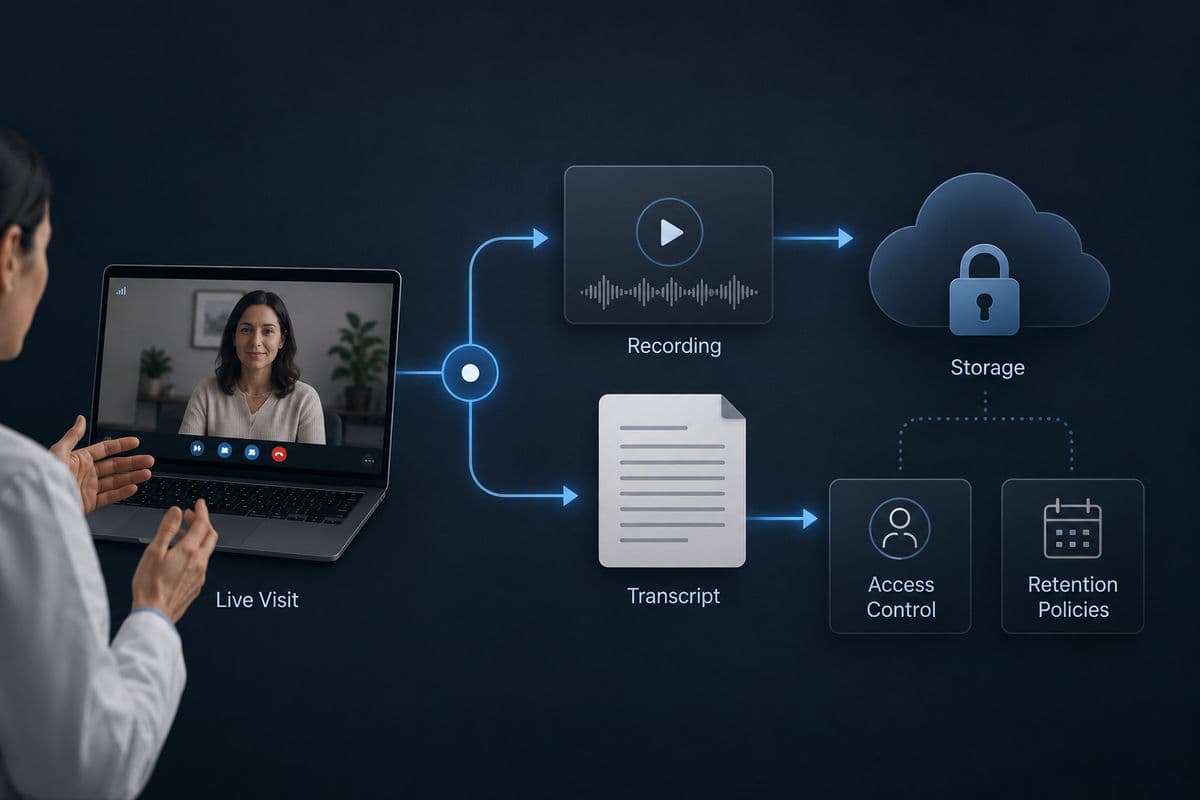
A live call is PHI in motion; a recording is PHI at rest, and it inherits every storage obligation your practice carries. The moment a session is recorded, there is now a file whose location, access list, retention period, and eventual destruction all have to be governed. Cloud recordings must land only in storage covered by an agreement, access must be limited to people with a reason, and transcripts and AI-generated summaries are the same PHI in a different format, a detail that newer meeting features make easy to miss. This is the same discipline that applies to everything else your practice keeps in the cloud, and our breakdown of where patient data lives in the cloud covers the storage side in full. The practical rule is simple: record nothing clinical by default, and when there is a documented reason to record, know where the file goes before the session starts, not after.
A Practical Pre-Flight Check for Your Practice
Before the next telehealth session, a covered practice should be able to answer yes to each of these, in order:
- The video platform's BAA is signed and stored where you can produce it
- The account tier actually matches what the agreement covers
- HIPAA-relevant settings, waiting rooms, passcodes, restricted sharing, governed recording, are enforced account-wide, not left to each host
- Staff who run sessions have been trained on identity verification and private-space habits
- Recording and transcript storage has a defined, covered home with a retention rule
- The arrangement appears in your written risk analysis, alongside the rest of your program
If any answer is no, that item is the to-do list, and it belongs inside the broader HIPAA compliance checklist your practice maintains rather than in a separate video-only silo, because auditors and incidents do not respect silos either.
What Happens When It Goes Wrong
Running patient sessions on a non-covered account is not a gray area; it is an unauthorized disclosure risk with every call, and if patient information is exposed, the practice inherits its breach notification obligations on top of the original problem. The point of getting the paperwork and configuration right is not fear of fines; it is that the fix costs an afternoon and the failure costs patient trust. Most practices we assess are one signed agreement and a settings review away from being genuinely covered, which makes this one of the cheapest compliance wins available. This is also exactly the kind of gap a focused review catches. Our HIPAA compliance services exist because the distance between "we think we're fine" and "we can prove it" is usually a short, specific list, and we walk it with practices delivering IT and cybersecurity for healthcare practices from Thousand Oaks to downtown Los Angeles every week.
Frequently Asked Questions
No. Zoom does not offer a Business Associate Agreement on free or basic accounts, and without a signed BAA the platform cannot lawfully carry protected health information, regardless of which security settings are enabled. Any patient session on a free account is a compliance failure, even a single call.
No, the BAA is one leg of three. It defines the vendor's obligations, but your practice remains responsible for configuring the account, training the people who use it, and folding the arrangement into your written risk analysis. A signed agreement over a misconfigured account is paperwork guarding an open door.
Meet can be used compliantly when your organization runs paid Google Workspace, an administrator has accepted Google's HIPAA Business Associate Addendum in the admin console, and the covered services are configured properly. Personal Gmail accounts are never covered, and third-party add-ons fall outside the agreement even on a covered account.
Teams can be used compliantly under commercial Microsoft 365, where BAA terms are included through Microsoft's standard data protection agreement and cover Teams alongside Exchange, SharePoint, and OneDrive. The practice still owns tenant configuration, guest-access control, and keeping consumer Microsoft accounts out of clinical use.
So, is Zoom HIPAA compliant? It can be, for your practice, the day the eligible plan, the executed BAA, and the enforced configuration all exist together, and not one day before. If you would like certainty instead of assumption, book a telehealth compliance review with GlobeVM and we will hand you the short list that closes the gap.
Comments
0 Comments