

Most businesses know whether their network is up. Far fewer know what is moving across it, which means problems announce themselves through employee complaints rather than through anything the business noticed first.
This guide covers network traffic monitoring for a small business: what it shows that basic uptime checks do not, and the security and capacity signals hiding in ordinary traffic patterns. It also covers the privacy questions worth settling before monitoring employee activity at any depth.
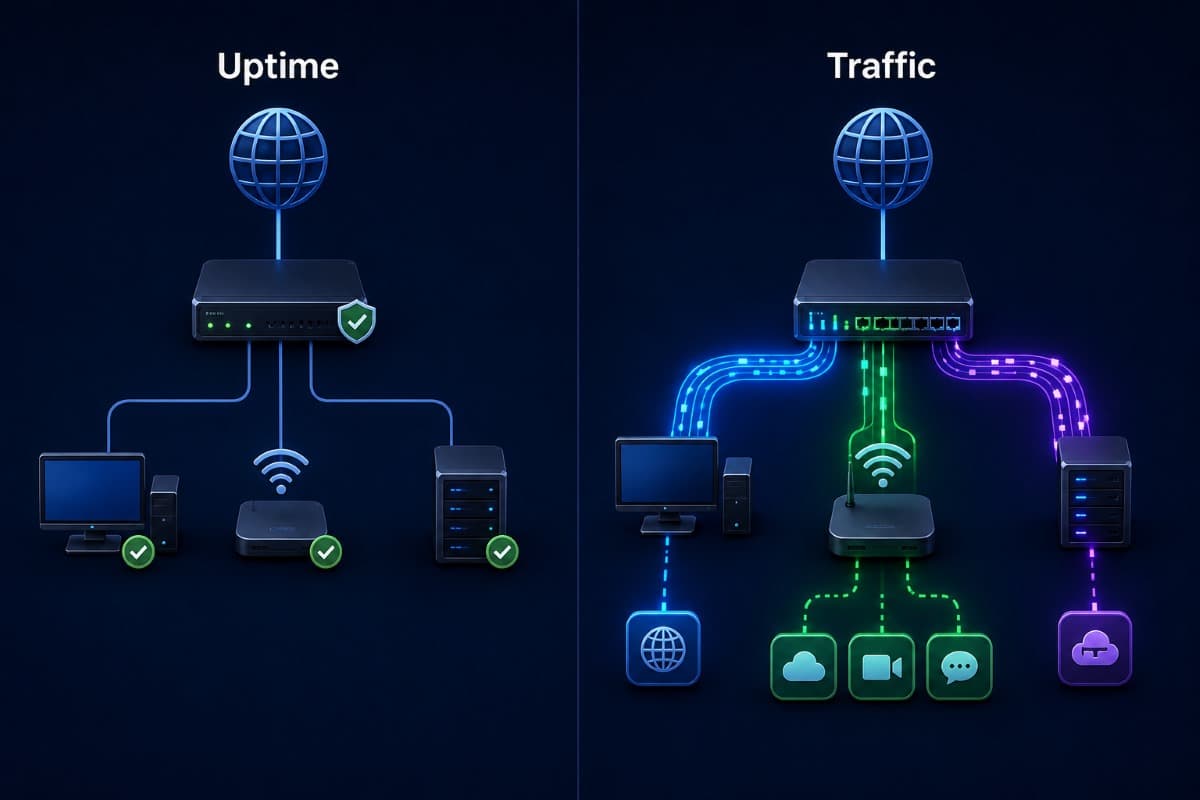
Uptime Monitoring and Traffic Monitoring Are Different Things
Basic monitoring answers a binary question: is this device or connection responding? That is useful, and also the shallowest possible view of a network's actual health.
Traffic monitoring answers more interesting questions: what is consuming bandwidth, which applications are being used, where traffic is going, and whether any of those patterns look different from normal. A network can be fully up and still be performing terribly, and only the second kind of monitoring notices.
The Gap This Fills in Most Small Businesses
The typical small business discovers network problems when someone says the internet feels slow, which is both the latest possible moment and the least specific information available. Traffic monitoring moves that discovery earlier and makes it concrete, replacing a vague complaint with a specific answer about what changed. This is the same visibility principle behind ongoing network management, applied to the traffic layer rather than just device status.
What Traffic Patterns Actually Reveal
Bandwidth consumption by application shows where capacity goes, which is frequently different from where a business assumes it goes. A cloud backup running during business hours, a single large file sync, or a streaming habit in a break room can each explain a slowdown nobody could otherwise diagnose.
Traffic destination patterns show where data is going, which matters for both performance and security. And traffic timing shows whether activity matches business hours, since data moving steadily at three in the morning deserves an explanation.
Baselines Are What Make Anomalies Visible
None of these signals mean anything without knowing what normal looks like for your specific business. Collecting those signals in one place is the discipline covered in our guide to telemetry and visibility. A monitoring approach that establishes a baseline over several weeks makes anomalies visible, while a system installed today and expected to flag problems tomorrow mostly produces noise.
Cloud Applications Changed What Traffic Looks Like
A decade ago most business traffic stayed inside the building, moving between desktops and a local server. Today a large share leaves the network entirely, heading to cloud applications, and that shift changed both what normal looks like and where problems originate.
This matters practically because a slowdown is now as likely to be caused by something outside the business as inside it. Traffic monitoring helps separate those cases, distinguishing a local network problem from a saturated internet connection from a cloud provider having a bad day.
Guest and Personal Devices Are Part of the Picture
Every phone that joins the office network is generating traffic, and in many small offices the combined total is larger than anyone would guess. A separate guest network keeps that activity from competing with business traffic and makes the monitoring picture cleaner, since business and personal usage stop being mixed together in the same numbers.
The Security Signals Hiding in Ordinary Traffic
Traffic monitoring is not primarily a security tool, and it surfaces security-relevant signals as a side benefit. Unusual outbound data volume can indicate data leaving the business in ways nobody authorized. Connections to unfamiliar destinations, particularly persistent ones, can indicate compromised devices communicating with an attacker's infrastructure.
Traffic from a device that should not be generating any, or activity at hours nobody works, both deserve investigation. These are the kinds of patterns that dedicated threat detection tooling is built to catch automatically, but even basic traffic visibility surfaces the most obvious cases.

Capacity Planning Stops Being Guesswork
Businesses deciding whether to upgrade an internet connection usually make that call based on complaints and intuition. Traffic data replaces that with a real answer: how close to capacity the connection runs during peak periods, which is also the input for sizing a business internet connection, how often it saturates, and which activity drives those peaks.
This frequently reveals that the real fix is not a bigger connection but a scheduling change, moving backups outside business hours, or a configuration adjustment that prioritizes important traffic over background activity.
It Also Justifies Spending When the Case Is Real
The reverse case matters too. A business that has outgrown its connection benefits from being able to show that concretely rather than arguing from anecdote, which makes the budget conversation shorter and better grounded.
Employee Privacy Deserves a Deliberate Decision
Traffic monitoring can range from aggregate bandwidth statistics that identify no individual to detailed logs of which employee visited which site. These are meaningfully different things, and a business should decide deliberately where on that range it wants to operate rather than accepting whatever depth a tool defaults to.
Most small businesses need the aggregate view for performance and capacity purposes and do not need individual browsing histories. Collecting more detail than the business uses creates a data set that carries its own privacy obligations and employee trust implications without delivering corresponding value.
Tell Employees What Is Monitored
Whatever depth a business chooses, stating it plainly in a written policy is both the fair approach and the one that avoids a much worse conversation later. Employees who understand what is monitored and why generally accept it; employees who discover monitoring they were never told about reasonably feel differently.
Troubleshooting Becomes Faster and Less Speculative
Without traffic data, diagnosing a network complaint involves a sequence of educated guesses: restart things, check a few devices, ask whether it happens consistently. With traffic data, the same complaint starts from a recorded observation about what changed and when.
This shortens resolution and, just as usefully, reduces the number of unnecessary changes made while guessing. Businesses frequently discover that a problem they had blamed on their internet connection for months was a single misbehaving device or a scheduled job nobody knew about.
It Also Settles Vendor Disputes
When a business believes its internet provider is underdelivering, traffic and performance data turns that conversation from an argument into an evidence-based support case. Providers respond differently to a customer who can show specific measurements than to one describing a general impression of slowness.
Comparing Monitoring Depth
Monitoring is not one thing you either have or lack. It comes in layers, and most small businesses need only the first three. The table below is the short version of what each layer answers and what it costs you in complexity.
Wired and Wireless Traffic Tell Different Stories
Wireless performance problems and internet connection problems produce similar complaints from employees but have entirely different causes and fixes. Monitoring that distinguishes traffic across the wireless network from traffic crossing the internet connection separates these two cases immediately.
This distinction matters practically because the fixes are unrelated: a wireless coverage problem needs access point work, while a saturated connection needs capacity or scheduling changes. Businesses without this visibility frequently spend money on the wrong one.
Physical Layout Affects What the Data Means
An office where some desks sit far from the nearest access point will show performance patterns that look like a network problem but are a coverage problem. Interpreting traffic data usefully means knowing something about the physical space it describes, which is a reason to have someone familiar with the office involved rather than reading numbers in isolation.
Companies across the Valley can get the same locally through IT support across the San Fernando Valley, from establishing a baseline to the alert tuning that keeps the signal useful.
What to Monitor Without Drowning in Noise
A monitoring setup that alerts on everything trains people to ignore alerts, which is worse than no monitoring at all. The useful configuration is narrow and specific: alert on sustained saturation of the internet connection, on unusual outbound data volume, on traffic to destinations flagged as suspicious, and on activity outside expected hours.
Everything else belongs in a periodic review rather than a real-time alert, since most traffic insight is useful monthly and annoying hourly.
What Good Looks Like After Six Months
A business running this well after half a year has three specific things. A documented sense of what normal traffic looks like across a typical week, a short list of alerts that fire rarely and mean something when they do, and at least one problem it caught and fixed before anyone complained.
It also has a capacity conversation grounded in measurements rather than impressions, which usually means either a confident decision to upgrade or a confident decision not to. Both outcomes are more valuable than the uncertainty that preceded them.
Alert Tuning Is an Ongoing Adjustment
The initial alert thresholds will be wrong in one direction or another, and correcting them over the first few months is normal rather than a sign the setup failed. An alert that fires constantly needs its threshold raised; an incident that passed unnoticed needs a new alert added.
Retention Is Its Own Decision
Traffic data accumulates quickly, and how long a business keeps it is a deliberate choice with both storage cost and privacy implications. Detailed per-connection logs kept indefinitely become both an expense and a data set the business is responsible for protecting.
Most small businesses are well served keeping detailed data for a short window, long enough to investigate a recent problem, while retaining aggregate summaries longer for trend and capacity purposes. That combination supports both troubleshooting and planning without accumulating detail nobody will ever review.
Reviewing the Data Beats Watching It
Traffic monitoring produces a live view, and there is a temptation to treat that view as something to watch. For a small business, that is neither realistic nor useful, since the value comes from periodic review and targeted alerts rather than continuous attention.
A monthly review looking at capacity trends, unusual patterns, and whether alerts fired appropriately delivers most of the practical benefit. Anything requiring real-time attention should be an alert, not something a person is expected to notice by looking.
Doing This Without Adding a Full-Time Job
Traffic monitoring produces data continuously, and data nobody reviews delivers nothing. For most small businesses without dedicated network staff, this discipline works best folded into an existing management relationship rather than standing up as a separate internal responsibility, which is exactly what ongoing remote monitoring and management is structured to provide.
Start Smaller Than You Think You Should
A business new to this benefits from monitoring the internet connection and a handful of key devices first rather than instrumenting everything at once. A narrow setup that someone reviews produces more value than a complete one that overwhelms whoever inherits it.
Expanding coverage once the initial data proves useful is straightforward, and it happens with a clearer sense of what is worth watching in your specific environment.
Know What Your Network Is Actually Doing
A business that only knows whether its network is up is operating with the least possible information about something it depends on constantly. Network traffic monitoring replaces vague complaints with specific answers, turns capacity decisions into evidence-based ones, and surfaces security signals that no uptime check would ever catch.
For businesses in the region, a partner providing IT support for Simi Valley businesses can set up monitoring at the right depth and review what it produces.
Frequently Asked Questions
Uptime monitoring answers a binary question about whether a device or connection is responding. Traffic monitoring answers what is moving across the network: which applications consume bandwidth, where data is going, and whether patterns look different from normal. A network can be fully up and performing terribly, and only traffic monitoring notices that situation.
As a genuine side benefit, yes, though it is not primarily a security tool. Unusual outbound data volume can indicate data leaving without authorization, persistent connections to unfamiliar destinations can indicate a compromised device, and activity at hours nobody works deserves investigation. Dedicated threat detection tooling catches these more systematically, but basic traffic visibility surfaces the most obvious cases.
Most small businesses need aggregate bandwidth and performance data that identifies no individual, and do not need detailed individual browsing histories. Collecting more detail than the business uses creates privacy obligations and employee trust problems without delivering corresponding value. Whatever depth is chosen should be stated plainly in a written policy rather than discovered by employees later.
By keeping real-time alerts narrow and specific: sustained connection saturation, unusual outbound data volume, traffic to flagged destinations, and activity outside expected hours. Everything else belongs in a periodic review rather than an immediate alert, since most traffic insight is genuinely useful monthly and genuinely annoying hourly. A setup that alerts on everything trains people to ignore alerts entirely.
If your business learns about network problems from employee complaints rather than from anything you measured, GlobeVM can set up network traffic monitoring at the right depth and review what it finds.
Comments
0 Comments