
Sooner or later every office has the meeting: the internet "feels slow," someone suggests calling the provider for a faster plan, and the business buys a bigger number that changes nothing, because the number was never the problem. Internet speed is the most misunderstood purchase in small-business technology, sold as a single figure when it is actually four or five different properties, only one of which is on the bill. This guide untangles it in plain language: what the advertised number does and does not describe, what actually consumes a modern office's connection, how to read the symptoms your team already reports, and a sizing method that fits the business you are, without pretending there is one magic number for everyone.
Why "What Speed Do We Need" Is the Wrong First Question
The advertised figure on an internet plan describes download throughput, how fast data can arrive, under ideal conditions, and a modern office's complaints usually live everywhere except there. Four distinctions do most of the explanatory work. Download versus upload: many business plans, especially cable, are asymmetric, with upload a small fraction of download, and yet upload is what video calls, cloud backups, file sync, and sending anything all depend on, which is why an office can have a fast plan and miserable meetings. Throughput versus responsiveness: latency and jitter, how long data takes to make the trip and how consistent that timing is, decide whether calls sound human and screens share smoothly, and no amount of raw capacity fixes a jittery path. The circuit versus the Wi-Fi: a large share of "slow internet" never leaves the building, because the bottleneck is an aging access point or a dead zone, and upgrading the plan cannot fix the hallway. And dedicated versus shared: most affordable plans are shared capacity with speeds described as "up to," meaning the neighborhood's afternoon habits are part of your infrastructure, while dedicated circuits cost more precisely because the number is yours alone. Hold those four distinctions and the rest of this article, and most provider conversations, become straightforward.
What Actually Consumes a Business Connection
Office bandwidth has changed shape in a decade, and the new shape is upload-heavy and sensitivity-heavy. Video meetings are the headline consumer: each participant is a steady two-way stream, and ten simultaneous calls is a different office than two, with the upload side doing work the plan may barely have. Cloud backup and file sync run in the background and are almost pure upload; a poorly scheduled backup job can quietly flatten an afternoon. Voice-over-internet phones consume surprisingly little raw capacity but are the most sensitive traffic in the building, since a phone call cannot buffer, which is why call quality is the canary for connection health, a relationship we unpack in our guide to the modern cloud phone system. Ordinary cloud applications, email, and browsing are individually light but numerous, guest and personal devices ride along uninvited, and streaming in the break room is real. The freeloader layer deserves one honest sentence of its own: every phone in every pocket joins the Wi-Fi on day one and never leaves, doubling or tripling the device count an owner would guess, and a separate guest network, standard on business-grade equipment, keeps that crowd from competing with the work and away from the systems that matter. The composition matters more than the total: an office of quiet browsers and an office of all-day video calls can have the same headcount and completely different needs, which is why sizing starts with what the business does, not how many desks it has.
Read the Symptoms Before Calling the Provider
Your team has already diagnosed the connection; they just phrased it as complaints. The translation table:
Two lessons hide in that table. First, at least half the rows are not solved by buying a bigger number, which is why the reflexive plan upgrade so often disappoints. Second, every row is easier to act on with data than with adjectives, which is the argument for measuring before spending: a week of simple usage logging answers questions that years of "it feels slow" never will. Run the free speed test twice while you are at it, once wired at the router and once on Wi-Fi at the complaining desk, because the gap between those two numbers is the fastest diagnosis in this whole article.
A Sizing Method Instead of a Magic Number
Any article promising the one right figure for a ten-person office is guessing, because the honest answer depends on composition, so here is the method instead. Inventory the load: count the people, then weight them by what they actually do, all-day video callers and cloud-heavy roles at the top, and list the background consumers, backup windows, sync, phones, cameras, guests. Find the concurrency peak: the question is never total daily traffic but the worst simultaneous fifteen minutes, typically mid-morning when the calls, the sync, and the coffee-break streaming overlap. Size the upload first, because it is the constraint that actually binds a modern office, and treat the download figure as the easy half it usually is.
Then add honest headroom, room for growth and bad days, because a connection run near its ceiling behaves badly long before it is technically full, and capacity you almost never touch is what keeps the busy Tuesday boring. Worked qualitatively, the exercise looks like this: a ten-person firm where four people live on video calls, phones run over the internet, and a cloud backup covers every machine is, for sizing purposes, a heavy-upload office of perhaps twice its headcount, and it should shop like one; the same ten people doing quiet desk work with an evening backup window are a light office shopping for reliability more than size. Finally, re-run the exercise when the business changes shape, more people, more video, a new cloud system, rather than when the complaints start, since by then the exercise is being performed as an argument. Write the result down, one page, dated, so next year's version is a comparison instead of a memory.
Upload Is the Business Number
If one idea from this guide changes your next provider conversation, let it be this: ask about upload first. The consumer-shaped habit of comparing plans by the big download figure made sense when offices mostly received; a cloud-era office mostly sends, calls, backs up, and syncs, and the asymmetric plan that looks generous on paper is often starving exactly those functions. Symmetric connections, typically fiber, price the two directions equally and exist precisely because businesses noticed; where fiber is not available, the practical move is buying the highest-upload tier offered and scheduling the heavy senders, backup above all, outside working hours. The habit generalizes: once a business reads plans upload-first, the marketing numbers stop being confusing, because the big figure was never the one doing the day's work.
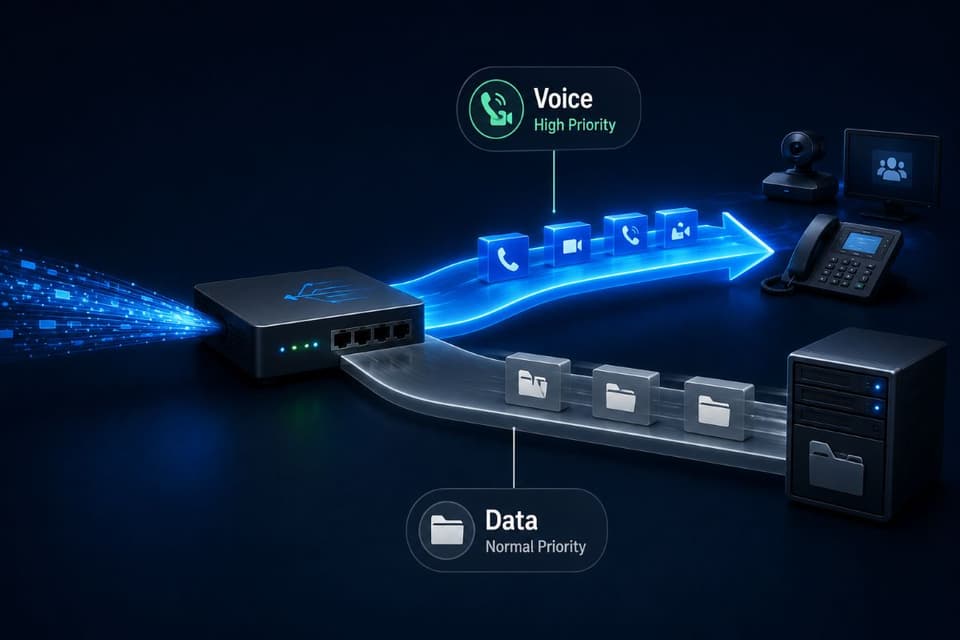
Quality: Making the Important Traffic Go First
Capacity decides how much fits; configuration decides what wins when things collide, and the difference shows up first in voice. Business networks can prioritize traffic so a phone call's small, urgent packets go ahead of a file download's large, patient ones, which is the unglamorous reason two offices with identical plans can have opposite call quality, and it matters most for businesses running phones, meetings, and collaboration over the same line, the whole converged stack we describe in our guide to unified communications. Prioritization is a one-time configuration on capable equipment, not a subscription, and asking "is our voice traffic prioritized" is a fair test of whoever manages your network; the answer should be a confident yes with a sentence of detail, not a pause.
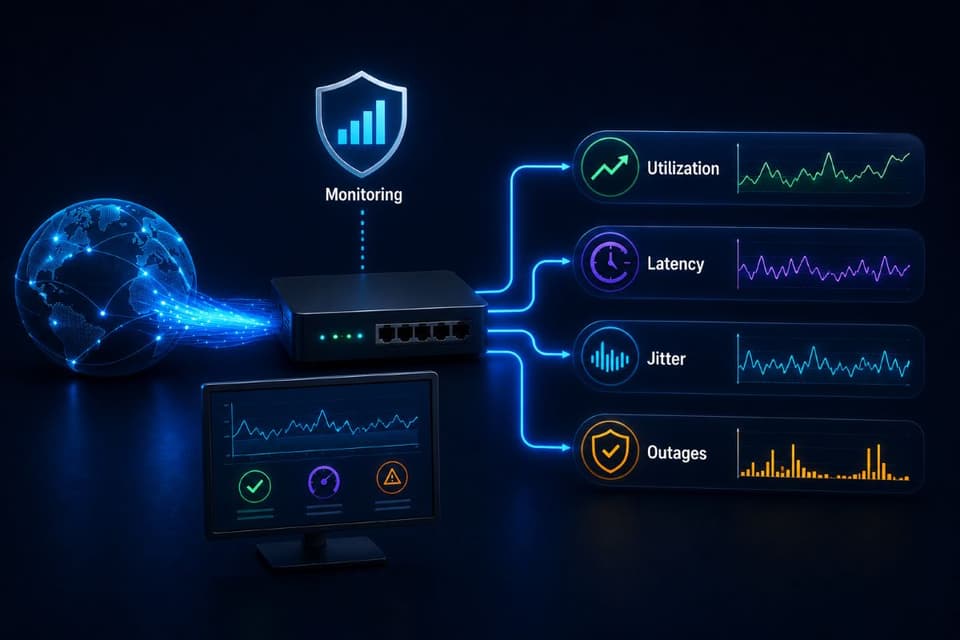
Know Before the Complaints Do
The businesses that never have the "internet feels slow" meeting are not lucky; they are measured. Continuous monitoring of the connection, utilization against capacity, latency and jitter trends, outage logging, turns the circuit from a mystery into a chart, catches the creep of growing usage months before it becomes a complaint, and settles provider disputes with data instead of adjectives, which is exactly the kind of quiet instrumentation that remote monitoring and management exists to provide.
Monitoring also answers the question this article has deliberately saved for last: whether the connection deserves a backup. For an office where the internet now carries the phones, the files, and the work itself, the cost of an outage hour, the arithmetic we walk through in the true cost of IT downtime, usually dwarfs the modest price of a secondary circuit or cellular failover, and the sizing exercise above should quietly include that second line in its answer.
Buy the Connection Your Business Actually Is
The provider's number was never wrong; it was just answering a smaller question than the one your office was asking. Internet speed, understood properly, is a bundle, download and upload, latency and jitter, circuit and Wi-Fi, shared and dedicated, and the fix for a struggling office is rarely "more" and usually "the right shape": upload sized for the calls and the backups, voice prioritized, Wi-Fi actually reaching the back rooms, headroom for the worst fifteen minutes, and a monitor watching the whole thing so nobody diagnoses by adjective again. Run the inventory, read the symptom table against your own complaints, and walk into the next provider conversation knowing which number you are actually there to buy. And if the audit shows the number you already have was fine all along, the money saved on the upgrade will happily fund the access point the back office has needed for two years.
For businesses in the region, a partner providing IT services in Ventura County can measure the connection, right-shape the plan, and configure the prioritization that keeps calls clean.
Companies across the Valley can get the same locally through IT support in the San Fernando Valley, from the usage audit to the monitoring that ends the mystery for good.
If your office still diagnoses its connection by adjective, GlobeVM can measure it properly, size the internet speed and shape your business actually needs, and set up the monitoring that makes the next provider conversation short.