
Server virtualization is the process of dividing a single physical server into multiple isolated virtual servers, each running its own operating system and applications. Whether you are an IT professional evaluating new hypervisor platforms or a business decision-maker looking to reduce data center costs, understanding how this technology works is essential. This guide covers the core mechanics of virtualization, compares two leading platforms in KVM and Microsoft Hyper-V, highlights real world benefits, explores alternative solutions, and provides a clear implementation roadmap for your infrastructure. Reviewed September 2026; the product and licensing facts below were checked against current vendor documentation.
What Is Server Virtualization?
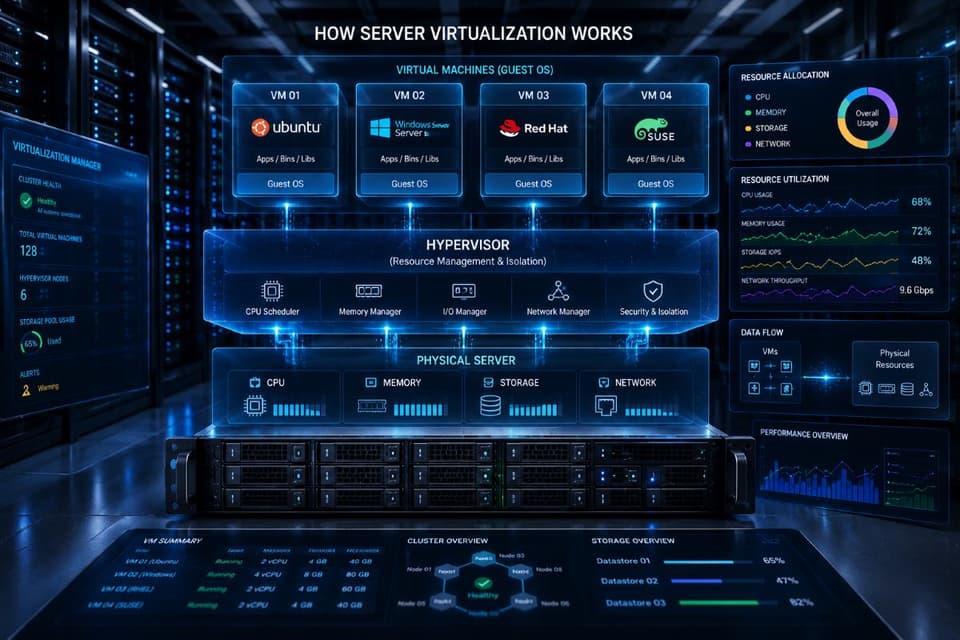
Server virtualization is the process of dividing a single physical server into multiple isolated virtual servers, each running its own operating system and applications. This is done using software called a hypervisor, which allocates the physical server's resources (CPU, RAM, storage, network) across the virtual machines.
How Server Virtualization Works
At its core, server virtualization abstracts physical hardware. Instead of installing a single operating system directly onto a server motherboard, you install a virtualization layer. This hypervisor takes the physical resources of the host machine and creates pools of virtual resources. When you create a virtual machine (VM), the hypervisor assigns it a specific amount of virtual CPU, memory, and disk space. To the guest operating system installed on that VM, these virtual components look and act exactly like physical hardware. Each VM acts like a separate computer, unaware of the other VMs sharing the same physical chassis.
Type 1 vs Type 2 Hypervisors
Understanding the difference between hypervisor types is the first step in planning your infrastructure.
Type 1 hypervisors, also known as bare metal hypervisors, run directly on the physical hardware of the host machine. They do not require a separate underlying operating system. Because they interact directly with the hardware, they offer superior performance, stability, and security. Common examples include VMware ESXi, Microsoft Hyper-V, and KVM.
Type 2 hypervisors, also known as hosted hypervisors, run as an application on top of a traditional operating system like Windows or Linux. Because the host operating system sits between the hypervisor and the hardware, performance is lower. These are best for individual use. Examples include VMware Workstation and Oracle VirtualBox.
For business servers, Type 1 hypervisors are the standard.
Common Use Cases for Server Virtualization
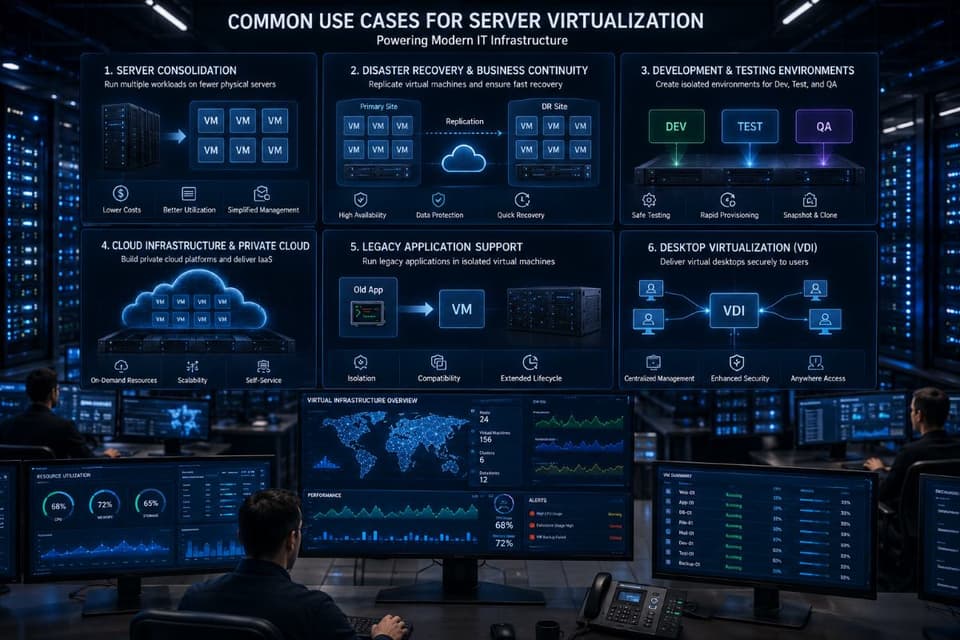
Businesses implement virtualization for several distinct reasons:
- Server consolidation: Combining multiple underutilized physical servers into a single high capacity host machine.
- Development and testing environments: Quickly spinning up isolated systems to test new software without buying new hardware.
- Disaster recovery: Replicating virtual machines to offsite locations for rapid restoration after an outage.
- Legacy application support: Running older operating systems that require specific environments on modern, supported hardware.
- Multi-tenant hosting: Allowing managed service providers or cloud vendors to securely host multiple clients on shared infrastructure.
Key Benefits of Server Virtualization for Businesses
Moving from a traditional physical deployment to a virtualized environment, and having managed IT services keep it healthy afterward, provides measurable advantages for both technical operations and the financial bottom line.
Cost Savings
The most immediate benefit of server virtualization is hardware consolidation. Instead of purchasing ten physical servers for ten different applications, you can run all ten VMs on a single powerful physical server. This lowers initial hardware capital expenditures. Furthermore, running fewer physical machines leads to significantly lower power consumption and reduced data center cooling costs. A smaller hardware footprint also means less physical space is required.
Better Resource Utilization
A single-purpose physical server typically leaves most of its processing power and memory idle. A hypervisor solves this problem by running multiple workloads simultaneously. By sharing resources intelligently, several VMs can keep a host busy in a way a single-purpose server never is, so you are actually using the hardware you purchased.
Faster Deployment
Provisioning a physical server requires ordering hardware, waiting for shipping, racking the unit, wiring cables, and manually installing an operating system. This process takes days or weeks. With virtualization, an administrator can deploy a new server in minutes. Using VM templates and cloning features, you can spin up fully configured servers almost instantly to meet changing business demands.
Improved Disaster Recovery
Virtual machines exist as a collection of files on a storage array. This makes them easy to back up, move, and copy. Administrators can take VM snapshots to capture the exact state of a system before applying updates. If an update causes an error, rolling back takes seconds. Additionally, live migration features allow IT teams to move running VMs between physical hosts without any downtime. If a physical host experiences a hardware failure, backup and restore advantages allow VMs to be powered on quickly on secondary hardware.
Scalability and Flexibility
Business needs change quickly. Virtualization provides the flexibility to add CPU cores, increase RAM, or expand storage volumes on the fly. You can move workloads between hosts dynamically to balance performance.
What Is KVM (Kernel-based Virtual Machine)?
When evaluating hypervisor platforms, KVM stands out as the premier open source option. It powers some of the largest cloud environments in the world.
KVM Overview
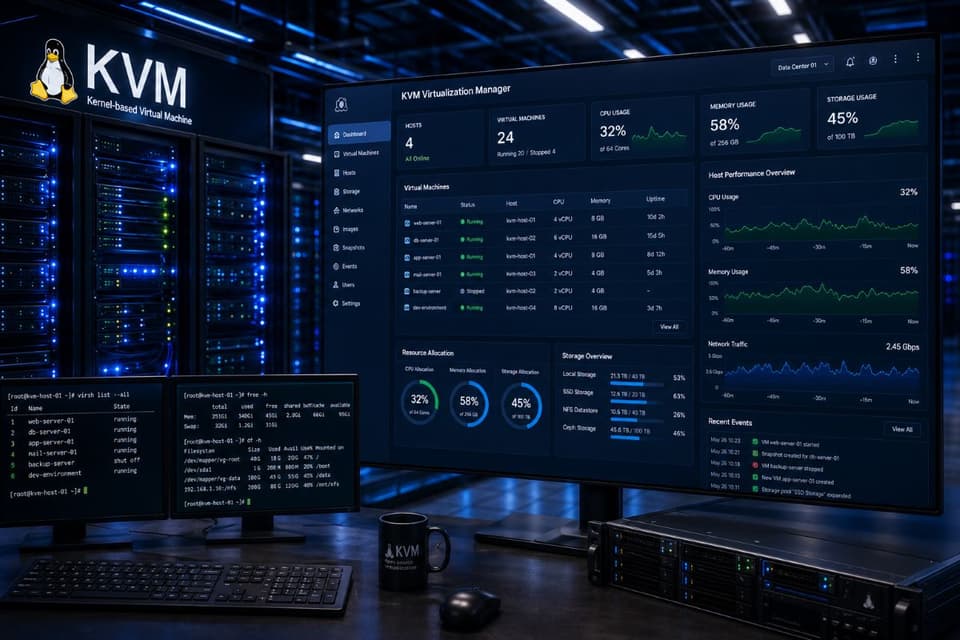
KVM is an open source Type 1 hypervisor that is built directly into the Linux kernel. Originally developed by an Israeli technology company called Qumranet, KVM was acquired by Red Hat in 2008. Because it has been built into the mainline Linux kernel since 2007, any modern Linux distribution can function as a production-grade hypervisor simply by enabling the feature.
How KVM Works
Unlike platforms that add an entirely separate operating system layer, KVM essentially turns the Linux kernel itself into a bare metal hypervisor. It utilizes hardware virtualization extensions built into modern processors (specifically Intel VT-x and AMD-V) to run guest operating systems at near native speeds. KVM handles the CPU and memory management, while it works closely with QEMU for hardware emulation (such as virtual disks and network interfaces). System administrators typically use libvirt as the management API to interact with KVM, which allows a variety of front end tools to control the virtual machines.
KVM Strengths
KVM offers several powerful advantages. The primary benefit is that it is open source and free to use. Because it is part of Linux, it features strong integration with the broader Linux ecosystem. It delivers exceptionally high performance, which is exactly why major public cloud providers like AWS and Google Cloud use KVM based hypervisors to run their infrastructures at scale. It benefits from a highly active global community of developers. Furthermore, it supports a wide variety of guest operating systems, including both Linux and Windows environments.
KVM Limitations
Despite its power, KVM is not perfect for every organization. It comes with a noticeably steeper learning curve than some commercial alternatives. Management requires more command line expertise and a solid foundation in Linux administration. If you choose a purely open source deployment, there is limited commercial support unless you purchase a subscription from a vendor like Red Hat or SUSE. Additionally, the native management tools are less mature and unified than what you will find in the VMware ecosystem. Finally, while it runs Windows guests well, performance for heavily optimized Windows environments can sometimes trail slightly behind Microsoft platforms.
When to Choose KVM
KVM is the ideal choice for Linux heavy infrastructure environments. It appeals heavily to cost conscious organizations that want to avoid licensing fees. Teams that already possess strong internal Linux expertise will find it natural to use. It is also the preferred foundation for custom, cloud native deployments on cloud infrastructure you control.
What Is Microsoft Hyper-V?
For organizations deeply invested in the Microsoft ecosystem, Hyper-V is the logical choice for server virtualization.
Hyper-V Overview
Microsoft Hyper-V is a proprietary Type 1 hypervisor developed by Microsoft. It was first released as a feature within Windows Server 2008 and has improved substantially in subsequent versions. The free standalone product, Hyper-V Server, ended with the 2019 release, which stays in extended support until January 2029; there is no Hyper-V Server 2022 or 2025. Today Hyper-V is deployed as a role inside Windows Server, including Windows Server 2025. It is also uniquely available as a feature on Windows 10 and Windows 11 Pro and Enterprise editions for local client virtualization.
How Hyper-V Works
Hyper-V utilizes a microkernel hypervisor architecture. When the Hyper-V role is installed, the base Windows operating system actually becomes a virtual machine running on top of the hypervisor. This base OS is known as the parent partition (or host), and it holds the physical device drivers. The virtual machines you create are known as child partitions. The host and VMs communicate through a highly optimized data channel called Integration Services. Virtual switches are used to manage complex networking rules between the host, the child partitions, and the external network.
Hyper-V Strengths
The biggest advantage of Hyper-V is its excellent Windows guest performance. It features tight integration with the entire Windows Server ecosystem. Because it integrates flawlessly with Active Directory, identity and access management are simplified. It includes advanced features like Shared Nothing Live Migration, which allows administrators to move running VMs between hosts even without expensive shared storage arrays. Large environments can be managed centrally using System Center Virtual Machine Manager (SCVMM). It also allows for extensive automation using PowerShell. Finally, because the hypervisor role is built directly into Windows Server, there is no separate software license required to run the hypervisor itself.
Hyper-V Limitations
Hyper-V is very Windows centric. While Linux guest operating systems are fully supported and work well, they receive slightly less optimization than native Windows guests. To get the full set of features and unlimited virtualization rights, you typically need Windows Server Datacenter licenses, which cost considerably more than Standard. In the broader industry, it is less popular in cloud native Linux environments. Furthermore, its advanced management tools require a supporting Windows infrastructure to run properly.
When to Choose Hyper-V
Hyper-V is the clear winner for Microsoft heavy environments. If you already pay for Windows Server Datacenter licensing, you essentially have unlimited virtualization rights included. Organizations with strict Active Directory integration needs or teams already trained primarily on Windows administration will adopt it quickly. It is generally easier to manage for small and medium businesses (SMBs) that have limited internal Linux expertise.
KVM vs Hyper-V: Head-to-Head Comparison
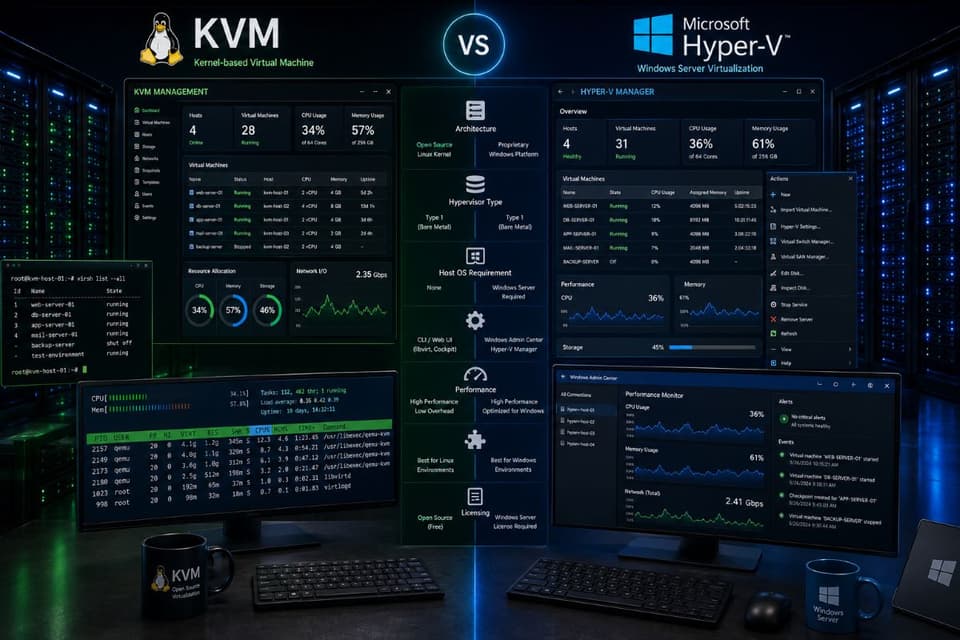
Choosing between these two platforms comes down to aligning technical capabilities with business resources. Below is a direct comparison of their core features.
| KVM | Microsoft Hyper-V | |
|---|---|---|
| Hypervisor type and cost | Type 1, built into the Linux kernel; no license fee, optional paid support | Type 1 role in Windows Server; no separate hypervisor fee, but Windows Server licensing applies |
| Home ecosystem | Linux, open source, public clouds (AWS, Google Cloud) | Windows Server, Active Directory, System Center |
| Guest performance | Excellent for Linux; very good for Windows | Excellent for Windows; good for supported Linux guests |
| Management tools | libvirt, virt-manager, Cockpit, or Proxmox VE on top; command line heavy | Hyper-V Manager, Windows Admin Center, PowerShell, SCVMM for large estates |
| Live migration and clustering | Yes, through libvirt/clustering stacks or Proxmox | Yes, including Shared Nothing Live Migration and Failover Clustering |
| Skills needed | Linux administration | Windows Server administration |
| Commercial support | Red Hat, SUSE, Canonical, Proxmox subscriptions | Microsoft and its partners |
| Best fit for a small business | Linux-heavy shops, cost-driven teams with Linux skills | Windows-heavy shops with an existing Windows admin |
Performance Comparison
When run on modern server hardware, both KVM and Hyper-V deliver outstanding, near native performance. The performance delta between the two is negligible for standard business applications. KVM is slightly better optimized for high density Linux workloads and database operations. Hyper-V offers slightly better optimizations for Windows based applications like Microsoft SQL Server or Exchange. Real world performance almost always comes down to how well the storage arrays and virtual networks are configured, rather than the hypervisor software itself.
Cost Comparison
Evaluating cost requires looking beyond the software sticker price. KVM has no software licensing cost. You only pay if you optionally engage a commercial support contract. Hyper-V offers a free standalone version, but most businesses deploy it as a role on Windows Server. This means you must purchase Windows Server licenses, which can be expensive depending on core counts. However, the total cost of ownership depends on your existing infrastructure. Hiring a specialized Linux engineer to manage a free KVM cluster will often cost more than buying Windows Server licenses for an existing Microsoft administrator to manage.
Which Should You Choose?
The honest answer depends on your existing technology stack and team skills. If you are a dedicated Windows shop using Active Directory and Exchange, choose Hyper-V. If you operate a Linux shop or want to build a custom cloud native application platform, choose KVM. If you have no strong preference and are a small business looking for ease of use, Hyper-V is usually much easier to manage for teams without dedicated Linux engineers.
How Do KVM and Hyper-V Compare to VMware and Other Platforms?
While KVM and Hyper-V are dominant players, they are not the only options on the market. Knowing the alternatives helps put your final decision in context.
VMware vSphere
VMware vSphere (using the ESXi hypervisor) has long been the gold standard and industry leader for enterprise virtualization. It features the most mature ecosystem, the largest third party integration support, and arguably the best centralized management tools via vCenter. However, it is also the most expensive option. After Broadcom completed its acquisition of VMware in late 2023, VMware moved to subscription-only licensing in 2024 and withdrew the free ESXi edition, which is why many businesses have been evaluating KVM, Proxmox, and Hyper-V as cost effective alternatives. Our comparison of cloud desktops covers the separate question of whether some of those workloads should leave the building entirely.
Proxmox VE
Proxmox Virtual Environment is an open source platform built directly on top of KVM and Debian Linux. It provides a polished, web based graphical interface that makes managing KVM clusters simple. It includes built in backup tools and software defined storage capabilities out of the box. Proxmox is widely used by SMBs, homelabs, and cost conscious data centers that want KVM performance with VMware style ease of use. It offers optional paid support tiers for businesses.
XenServer
XenServer, sold for a few years under the Citrix Hypervisor name before returning to the XenServer brand with version 8, is a commercial Xen-based platform optimized for virtual desktop infrastructure (VDI) deployments and licensed per CPU socket. While it functions as a general purpose hypervisor, it is generally considered a niche product best suited for organizations heavily invested in Citrix Virtual Apps and Desktops.
Quick Decision Matrix
- Need the most mature tooling and have the budget for subscriptions: VMware vSphere.
- Running a purely Windows environment with a mid range budget: Microsoft Hyper-V.
- Want open source flexibility and have strong Linux skills: Pure KVM.
- Want open source cost benefits with a graphical interface: Proxmox VE.
How to Implement Server Virtualization in Your Business
Deploying a virtualized infrastructure requires careful planning. Moving too fast can result in performance bottlenecks or critical security gaps. Follow these exact steps for a successful rollout.
Step 1: Audit Your Current Infrastructure
Document every physical server you currently operate. Record its CPU usage, daily RAM consumption, storage IOPS, and network bandwidth. Understanding what you currently use is the only way to provision new hardware correctly.
Step 2: Identify Workloads to Virtualize
Not everything should move at once. Identify low risk servers like print servers or domain controllers as your first targets. Leave heavy database servers or legacy applications that require direct hardware access for the final phases of the project.
Step 3: Choose Your Hypervisor Platform
Review the KVM vs Hyper-V comparison matrix and select the platform that aligns with your IT staff capabilities and licensing budget.
Step 4: Plan Hardware Requirements
Purchasing the right host hardware is critical.
- CPU: Ensure processors support modern virtualization extensions (Intel VT-x or AMD-V). Look for high core counts rather than pure clock speed.
- RAM: You need significantly more RAM than your physical servers currently use combined, plus overhead for the hypervisor. RAM is usually the first bottleneck in a virtual environment.
- Storage: SSD arrays are highly recommended. Use RAID configurations for redundancy. Storage speed dictates VM responsiveness.
- Network: Provision multiple physical Network Interface Cards (NICs) to separate management traffic, storage traffic, and VM data traffic.
Step 5: Plan for High Availability and Backup
Configure host clusters so that if one physical machine dies, VMs automatically reboot on a surviving host. Ensure you have a VM aware backup solution in place before migrating your first production workload.
Step 6: Migrate Workloads in Phases
Use Physical to Virtual (P2V) conversion tools to migrate your systems. Start with non critical test machines. Verify network connectivity and application performance before moving on to production servers.
Step 7: Train Your Team or Engage an MSP
Ensure your internal staff knows how to provision new VMs, monitor storage capacity, and restore backups. If this is outside their skill set, partner with a trusted managed services provider to handle ongoing maintenance.

6 Common Server Virtualization Mistakes to Avoid
Virtualization solves many problems, but poor execution creates new ones. Avoid these specific implementation errors.
- Under-provisioning hardware (especially RAM): Administrators often underestimate how much memory multiple operating systems require. When a host runs out of RAM, it begins paging to disk, which destroys overall cluster performance.
- Not planning for backup and disaster recovery: Traditional file backups are not enough. You must use software capable of capturing complete virtual machine images and state snapshots to ensure quick recovery times.
- Ignoring storage I/O bottlenecks: Placing twenty VMs on a slow spinning hard drive array will cause severe latency. Multiple machines competing for disk read and write operations require high speed SSD storage arrays.
- Putting all VMs on one host (single point of failure): Consolidating all your servers onto one large physical machine is dangerous. If that motherboard fails, your entire business goes offline. Always plan for at least a two node cluster for basic high availability.
- Skipping VM template standardization: Building every new VM manually leads to configuration drift and security vulnerabilities. Create secure, updated templates and clone them when new servers are required.
- Forgetting about VM sprawl over time: Because it takes minutes to create a new VM, administrators often spin them up for temporary projects and forget to delete them. This wastes expensive storage and compute resources over time.
In our experience migrating workloads across vCenters, one major challenge is handling vTPM and encrypted VMs. When we recently completed a cross-vCenter migration involving encrypted workloads, we saw firsthand what happens when standard migration tools fail to account for virtual Trusted Platform Modules. Migrating encrypted workloads requires careful key management and platform expertise. Relying on basic export tools in these scenarios will result in unbootable machines.
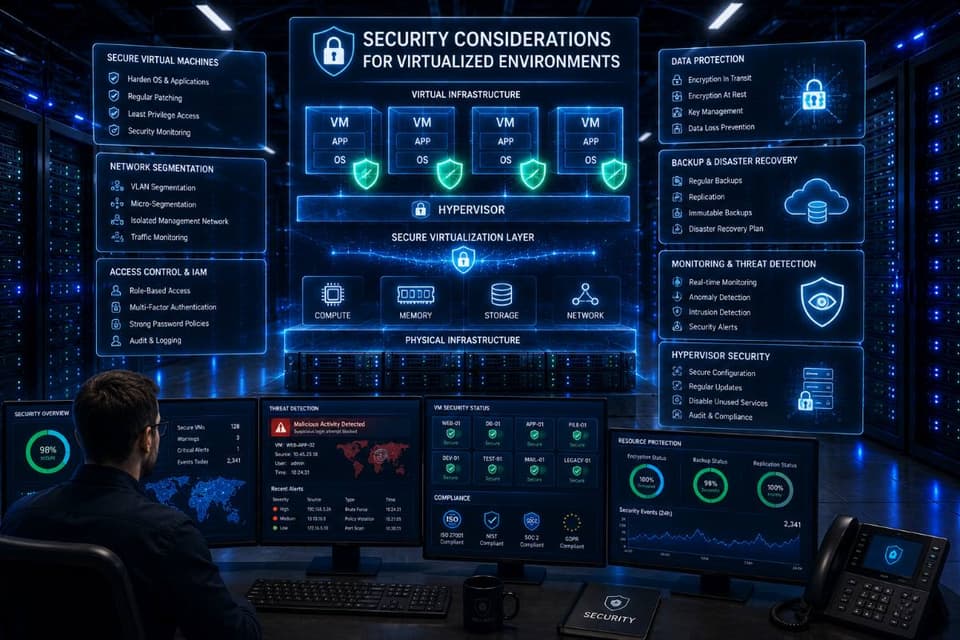
Security Considerations for Virtualized Environments
Consolidating infrastructure introduces unique security dynamics. Securing a virtual environment requires a different approach than traditional physical servers, and layered cybersecurity solutions have to be extended into it deliberately.
Hypervisor Security
The hypervisor is the foundation of your environment. If an attacker compromises the bare metal hypervisor, they instantly gain access to every virtual machine running on that host. Securing the management interfaces and keeping the hypervisor firmware strictly patched is your first line of defense.
VM Isolation and Network Segmentation
While the hypervisor theoretically isolates VMs from one another, misconfigured virtual switches can expose internal traffic. You must implement strict network segmentation using VLANs to ensure that a compromised web server VM cannot laterally attack an internal database VM on the same physical host.
Patch Management Across VMs
Having fewer physical boxes does not mean you have fewer operating systems to manage. Every guest VM still requires dedicated OS patching, endpoint detection, and antivirus management.
Backup Encryption
Because VMs exist as portable files on a storage volume, a malicious actor who gains access to your storage array could simply copy your entire server infrastructure to a USB drive. Implementing encryption at rest for your backup datastores is essential to prevent data theft, and it belongs in the same plan as tested backup and disaster recovery for the virtual machines themselves.
Compliance Implications
For organizations subject to regulatory standards like HIPAA, virtualization requires specific audit controls. Medical offices must ensure electronic Protected Health Information (ePHI) is encrypted both in transit across virtual switches and at rest on shared storage arrays. Our compliance and risk management services cover how those controls are documented and evidenced.
When to Work with a Managed IT Provider for Virtualization
Virtualization reduces hardware clutter, but it vastly increases software complexity. Knowing when to handle it internally versus when to outsource is a critical business decision.
Signs You Need Professional Help
If your internal IT team has no prior virtualization expertise, attempting a primary data center migration is risky. Mission critical workloads require zero downtime architecture that demands specialized knowledge to configure. Furthermore, if you face strict compliance requirements (such as HIPAA or PCI DSS), the networking configurations must be flawless. Planning a large scale migration from physical hardware to virtual clusters, or handling complex cross-platform migrations between VMware and Hyper-V, are clear indicators that external expertise is required.
What GlobeVM Brings
At GlobeVM, we have extensive hands on experience designing, deploying, and supporting VMware vSphere, Microsoft Hyper-V, and KVM environments. We specialize in complex infrastructure projects, including high risk cross-vCenter migrations with encrypted workloads that standard tools cannot handle safely. As a Los Angeles managed IT services provider, we are available for detailed on site hardware planning and execution. We ensure your virtual infrastructure is fast, secure, and fully compliant with industry regulations.
If you are ready to modernize your data center, talk to GlobeVM about planning the virtualization project end to end, from sizing the hosts to the first tested restore.