

Open the website of almost any IT company in Los Angeles and you will see the same promise near the top: 24/7 IT support. It sounds reassuring, and it is meant to. The trouble is that the phrase covers a wide range of very different service levels, and most business owners only discover which version they actually bought at the worst possible moment, a point-of-sale terminal that is dead at seven in the morning, an account lockout on a Saturday, or a server that goes quiet the night before a deadline. This guide explains what 24/7 IT support really means, where the fine print tends to hide, and how to tell genuine around-the-clock coverage from a number that rings to a voicemail box after six o'clock.
What 24/7 IT Support Actually Promises, and What It Often Does Not
The first thing to understand is that 24/7 is frequently a headline rather than a firm commitment that everything in your agreement runs at all hours. Many managed IT contracts cover full service only during business hours, often defined as roughly eight in the morning to six in the evening on weekdays, at the base monthly price. After-hours help is real, but it is sometimes billed at a higher rate, limited to the most severe emergencies, or handled on a slower track. A response target of four hours means very little if the clock quietly pauses overnight and restarts when the office opens. The promise only matters if your written agreement states clearly which services apply around the clock and which do not.

The Two Different Things People Call 24/7
Part of the confusion comes from the word being used for two separate capabilities that are easy to mix up. Knowing the difference lets you ask a provider exactly what their around-the-clock claim includes, instead of taking a single number at face value.

A 24/7 Help Desk
A help desk that runs 24/7 means real people are available to take your call or ticket and start working an issue at any hour. This is what most owners picture when they imagine after-hours support: a locked-out employee, a laptop that will not connect, or a business application that fails before a morning deadline, and someone who actually answers. A real help desk is not an after-hours voicemail box or an automated message promising a callback on Monday. When you evaluate a provider's help desk and IT support, the question to ask is whether a person handles your issue at two in the morning or whether you simply leave a recording.
24/7 Monitoring
Monitoring is a different function. It means tools watch your systems, servers, network, and backups continuously and raise an alert when something looks wrong, often with an on-call engineer paged for serious events. Monitoring can catch a failing hard drive or a backup that did not complete before anyone on your staff notices, which is valuable, but it is not the same as support. Watching is not the same as helping. The strongest setups connect the two, so an alert from remote monitoring automatically becomes an owned ticket that someone is responsible for resolving rather than a notification nobody acts on until morning.
Response Time and Resolution Time Are Not the Same
Two numbers decide how a 24/7 promise plays out in practice, and good agreements state both. Response time is how quickly the provider acknowledges your issue and begins working it. Resolution time is how long until service is actually restored. An agreement that promises only a fast response can deliver a quick reply followed by a long outage, which helps no one. Most providers sort issues by severity, so a complete outage that stops the business is treated with far more urgency than a single user with a minor problem. It is reasonable to expect critical incidents to be acknowledged within minutes while routine requests may take a business day or more, but the specifics belong in writing. For a fuller look at how these commitments are structured, our guide to what an SLA should include breaks down the terms in detail.

The Questions That Separate Real Coverage From a Voicemail Box
Once you know the distinctions above, a short set of direct questions will tell you what a provider's 24/7 claim is worth. Ask who is actually on call after hours, because there is a real difference between named engineers on a rotation and an outsourced answering service that only takes a message. Ask how escalation works when the first responder cannot solve the problem, and how an issue moves from frontline help toward senior engineers. This is also where it helps to understand tier 1 to tier 3 support, since the path a ticket travels determines how fast a hard problem reaches someone who can fix it. Ask which of your systems the after-hours coverage actually applies to, and get the exclusions in writing, watching for broad carve-outs like third-party failures that could quietly cover almost anything.
Does After-Hours Coverage Match When You Actually Operate?
The right amount of coverage depends on when your business runs and what an outage costs you. A medical practice that sees patients and a law firm facing filing deadlines cannot treat a weekend system failure as a minor inconvenience, and a financial firm handling time-sensitive transactions has little tolerance for downtime at any hour. A retail shop or restaurant open on evenings and weekends needs support precisely when many base-level contracts go quiet. The point is to match the coverage to your real operating hours rather than paying for round-the-clock service you will never use or, worse, assuming you have it when the contract says otherwise. A provider experienced with managed IT services in Los Angeles should be able to shape coverage around the rhythms of your specific business.

On-Site and Remote in a 24/7 Model
Most around-the-clock support is delivered remotely, because the majority of issues can be diagnosed and fixed without anyone traveling. That is efficient and usually the fastest path. Some problems, though, need a person physically present: failed hardware, a network outage that will not respond to remote tools, or a situation that calls for hands on the equipment. Many providers offer on-site help as a scheduled dispatch or a paid add-on rather than part of the base plan, so if having someone come to your office matters, the agreement should spell out the dispatch expectations and the area covered. For businesses in the west San Fernando Valley, a local provider offering Woodland Hills managed IT can reach you in person far faster than one based across the region.

What Strong 24/7 Operations Look Like Behind the Scenes
It helps to know what good around-the-clock support looks like from the inside, so you can recognize it when you see it. At a capable provider, the monitoring tools do not just send alerts into a void; they feed directly into a ticketing system where every alert becomes a tracked item with an owner, a priority, and a clear next step. Engineers work from documented procedures for the common failures, so a backup that does not complete or a server that goes offline at midnight triggers a known response rather than improvisation by whoever happens to be awake. When one shift ends and another begins, open issues are handed off with notes rather than dropped, which is why an incident that starts at eleven at night does not have to restart from zero when a new engineer logs on.
The other mark of a strong operation is that it works to reduce the number of after-hours emergencies in the first place. Continuous monitoring and routine maintenance catch a filling disk, an expiring certificate, or a struggling update before it becomes a two in the morning outage. A provider that simply waits for things to break and then responds quickly is better than one that does not answer at all, but the higher standard is a provider whose proactive work means your phone rings at odd hours far less often. Measured that way, the quietest after-hours support is often the best after-hours support.

How 24/7 Support Connects to Downtime, Insurance, and Continuity
The reason any of this matters is what happens when systems are down. Every hour of an outage carries a cost in lost work, lost revenue, and frustrated clients, and the value of 24/7 IT support is that it shortens those hours instead of letting them stretch through a night or a weekend. Our breakdown of what downtime actually costs puts real structure around that figure for a small business. There is also an insurance dimension that many owners overlook: cyber insurance carriers increasingly want documented evidence that your IT provider runs specific protections on a defined schedule, and the written service terms behind your support are part of that evidence. Strong after-hours coverage is also a core piece of staying open through disruption, which is why it sits close to broader around-the-clock IT services built for business continuity.
24/7 Support Versus the Old Break-Fix Habit
It helps to contrast genuine 24/7 support with the break-fix model many small businesses grew up on, where you call someone only after something breaks and pay by the hour to fix it. Under break-fix there is no standing promise about how fast anyone responds, no continuous monitoring, and no verification that your backups are working, because the provider earns money when things go wrong rather than when they keep running. A managed arrangement puts those promises in writing and shifts the incentive toward prevention, which is the practical reason most growing businesses move away from calling for help only once the damage is already done.
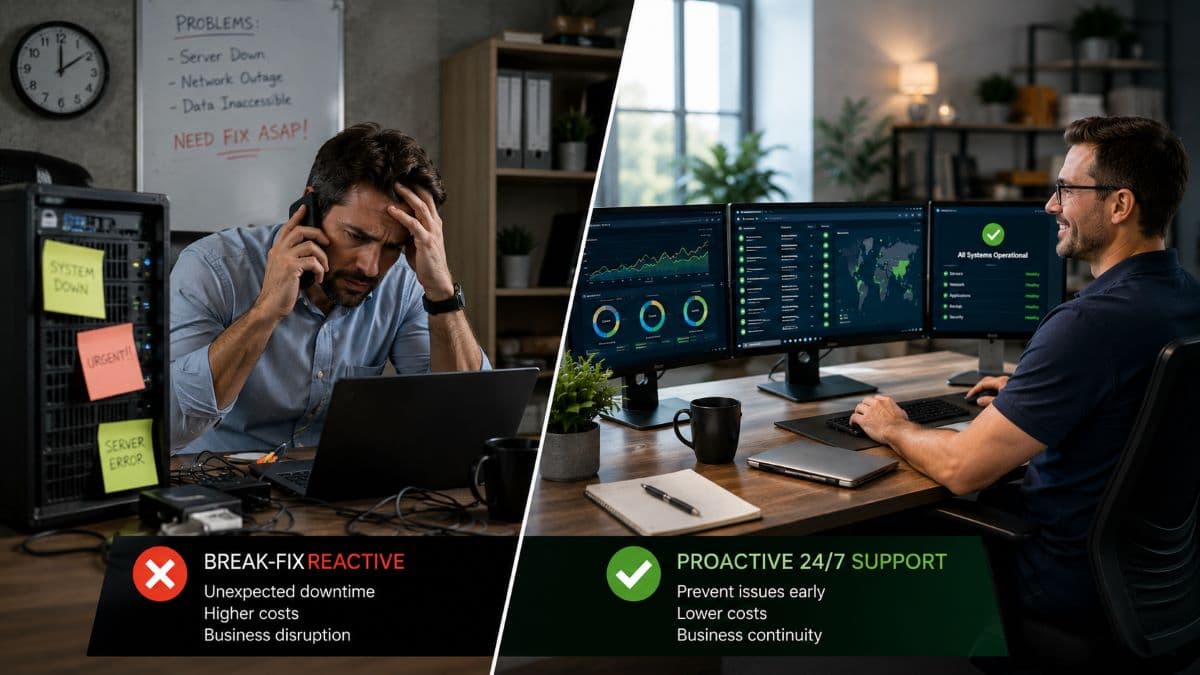
How to Verify a 24/7 Claim Before You Sign
All of this turns into a simple checklist you can apply before signing anything. Ask for the service terms in writing and confirm they state which services run around the clock, not just that support exists. Read the after-hours section specifically, including how response and resolution targets apply at night and on weekends. Get the exclusions and any extra after-hours charges in plain language. Ask what happens when the provider misses a target, since written agreements often include service credits as a remedy and a promise with no consequence is only an aspiration. Ask how performance is reported, with a monthly summary as the minimum and a live dashboard as a sign of a confident provider. And if you can, test the after-hours line before you commit, because the simplest way to learn whether someone answers at midnight is to call.

An Honest Word on Cost
It would be easy to read all of this as an argument that every business needs the most extensive coverage available. That is not true. Round-the-clock support carries a real cost, and for a low-risk business that operates only during weekday hours and could tolerate a system being down overnight, paying for full 24/7 coverage may be money better spent elsewhere. The honest goal is to match your support to your actual risk and operating hours. A practice that depends on its systems every evening should invest in real after-hours coverage, while a nine-to-five office with modest exposure might reasonably choose a lighter plan. The worst outcome is not choosing less coverage on purpose; it is believing you have 24/7 IT support when the contract quietly says you do not.
Frequently Asked Questions
It should, but not every plan delivers that. Some agreements route after-hours calls to a live help desk, while others send them to a voicemail box or an answering service that only takes a message. The only way to know is to read what the agreement promises for after-hours coverage and, ideally, to test the line before you sign. If a real person handling urgent issues at night matters to your business, confirm it in writing rather than assuming.
No. Monitoring means tools watch your systems and generate alerts around the clock, often with an engineer paged for serious events. Support means people are available to take your requests and resolve issues. A provider can monitor continuously while still limiting live support to business hours. The best arrangements link the two, so an alert becomes a ticket that someone owns and works, rather than a notification that waits until morning.
Not necessarily. If your business runs on weekday hours and an overnight outage would be an inconvenience rather than a crisis, a lighter plan may serve you well and cost less. The calculation changes if you operate evenings or weekends, handle time-sensitive work, or cannot afford downtime, as is common in healthcare, legal, and financial settings. Match the coverage to your real hours and the cost of being down.
It should state clearly which services apply around the clock, how response and resolution targets work at night and on weekends, what is excluded, and any additional after-hours charges. It should also describe how issues escalate to senior engineers and what remedy applies if the provider misses a target. Vague language is the warning sign; specifics about hours, priorities, and consequences are what make a 24/7 promise real.
If you want to know exactly what your current 24/7 IT support covers, or what a plan matched to your hours and risk should look like, GlobeVM can review your setup and lay out clear options.
Comments
0 Comments