
When a business signs with a managed IT provider, most of the attention goes to the monthly price and the list of services. The part that determines whether you get what you paid for sits a few pages deeper in the MSP contract, in the service level agreement. Knowing how to read an MSP SLA is one of the most useful skills a business owner can have, because the SLA is where promises become measurable obligations. A strong one tells you exactly what your provider will do, how fast, and what happens when they fall short. A weak one reads like marketing and protects no one but the provider. This guide walks through every part of an SLA in plain language, shows you the loopholes that quietly undermine accountability, and gives you a practical checklist to use before you sign.
What a service level agreement is, and what it is not
A service level agreement is the section of a managed IT contract that defines measurable performance standards. It states the services covered, the speed at which the provider will respond and resolve issues, the availability targets for your systems, how performance is measured and reported, and the remedy if those standards are missed. In short, it is the scoreboard. Everything else in the relationship is judged against it.
It is just as important to understand what an SLA is not. It is not the full legal contract. It is not a collection of comforting phrases like "white-glove support" or "24/7 peace of mind." Those lines feel reassuring, but they are not measurable, and an unmeasurable promise cannot be enforced. If a section of the agreement cannot be checked with a number or a clear yes-or-no, treat it as marketing rather than commitment.
SLA versus the master services agreement
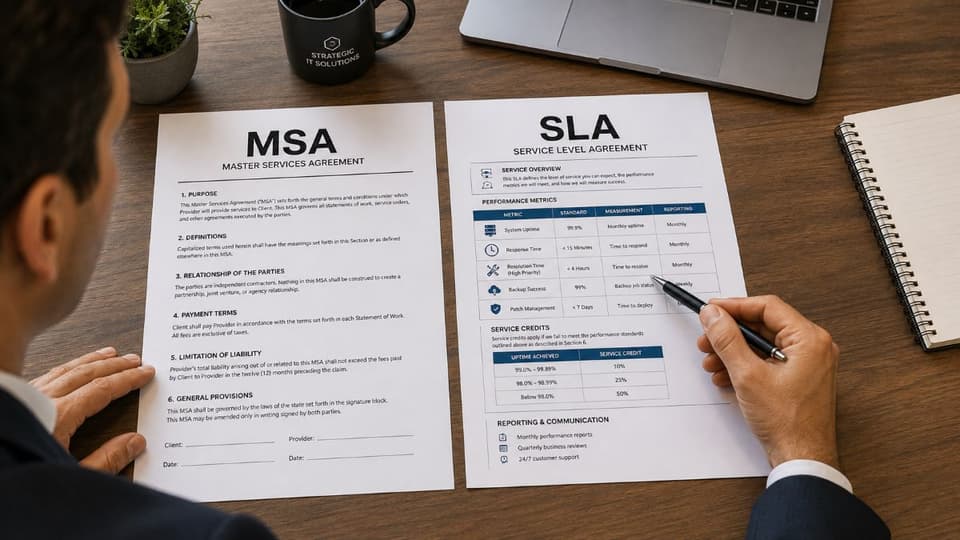
Most managed IT engagements are governed by two documents working together. The master services agreement, or MSA, is the legal framework. It covers pricing, including which of the managed IT pricing models you are on, contract term, liability, confidentiality, and termination rights. The SLA is the operational layer that sits inside or alongside it and defines day-to-day performance. When you evaluate a provider, read both. A reasonable price in the MSA means little if the SLA gives the provider room to underperform without consequence. The two documents should be reviewed as one decision, not two.
| Master services agreement (MSA) | Service level agreement (SLA) | |
|---|---|---|
| What it is | The legal framework for the whole relationship | The operational scoreboard for day-to-day service |
| What it covers | Pricing model, contract term, renewal, liability, confidentiality, termination rights | Scope, response and resolution targets, uptime, priority levels, reporting, credits |
| How often it changes | Rarely; usually signed once for the term | Reviewed at renewal or when services change |
| What to check first | Term length, renewal and notice terms, liability caps, termination rights | Both response and resolution targets, the uptime definition, credit and termination triggers |
Term length, auto-renewal, and notice periods
MSP contracts commonly run for one to three years, and many renew automatically unless you give written notice within a window before the term ends, often 30 to 90 days. That window is the most missed date in managed IT relationships, because it arrives months before anyone is thinking about renewal. Put the notice deadline in the calendar the day you sign. Ask for the renewal term in writing too, since some contracts renew for the full original length rather than month to month. If pricing can change at renewal, the contract should say how much notice you get and what cap applies.

The core components of a strong SLA
Before judging whether an SLA is good or weak, you need to know what a complete one contains. A well-built service level agreement covers the following areas, and a gap in any of them is worth questioning.
- Scope of services. A precise list of what is included, and just as importantly, what is excluded.
- Performance metrics and targets. Response time, resolution time, and uptime, each tied to a specific number.
- Priority or severity levels. Definitions that classify how serious an issue is and what response it triggers.
- Coverage hours. The exact hours support is guaranteed, and how after-hours issues are handled.
- Monitoring and reporting. How performance is tracked and how often you receive proof of it.
- Penalties and remedies. What you receive when the provider misses its own targets.
- Security and compliance commitments. Patching, monitoring, and incident response timelines.
- Exit and transition terms. What happens to your data and access when the relationship ends.
Scope of services: where unexpected costs hide
The scope section defines the boundary of the relationship. The most common source of friction in a managed IT contract is not poor service, it is disagreement over whether a particular task was ever included. Watch for "all-inclusive" packages that never define their limits, because vague inclusion almost always favors the provider. A clear scope names the systems, devices, and services covered, and lists what falls outside the agreement and would be billed separately, such as major projects, hardware purchases, or third-party software support. Before you sign, ask the provider to walk you through three recent client requests they would consider out of scope. Their answer tells you how the boundary works in practice.
How to evaluate the metrics that matter
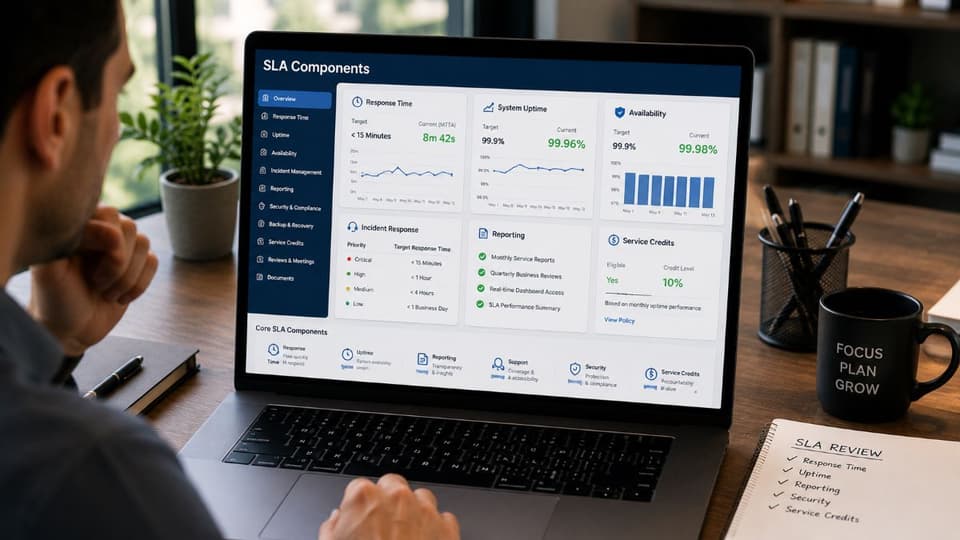
The numbers in an SLA are where most evaluation mistakes happen, because the terms sound similar but mean very different things. This is the part of service level agreements in managed IT contracts that deserves the closest reading.

Response time is not resolution time
These two metrics are routinely confused, and the confusion usually costs the customer. Response time is how long it takes for the provider to acknowledge your issue and begin working on it. Resolution time is how long it takes to fix the problem, and the difference is worth understanding in detail, which our guide to response time versus resolution time covers with a worked example. A provider can promise a fast response while saying nothing at all about resolution, which means they are technically meeting their SLA while your systems stay down.
A strong SLA commits to both. If a contract lists response targets but omits resolution targets entirely, that is a deliberate gap, not an oversight. Ask directly: what is your committed resolution window for a critical issue, and what happens if you miss it. A provider running a mature helpdesk and IT support operation will be able to answer that without hesitation.

Uptime guarantees and what the percentages mean
Uptime is usually expressed as a percentage, and the difference between figures that look close is larger than it appears. The table shows the allowable downtime behind common numbers.
| Uptime guarantee | Allowed downtime per year | Allowed downtime per month |
|---|---|---|
| 99% | About 3.65 days | About 7.3 hours |
| 99.9% | About 8.76 hours | About 43 minutes |
| 99.99% | About 52.6 minutes | About 4.4 minutes |
The gap between 99% and 99.9% is the difference between several days offline and a single afternoon. When you see an uptime number, ask two questions. First, what exactly does it cover, network, servers, cloud infrastructure, or only helpdesk availability. Second, what is the compensation if the provider falls below it. If either answer is unclear, you do not have a real uptime guarantee, you have a marketing figure. availability commitments are backed by remote monitoring and management that detects problems before they become outages, rather than waiting for you to report them.
Priority levels and severity definitions
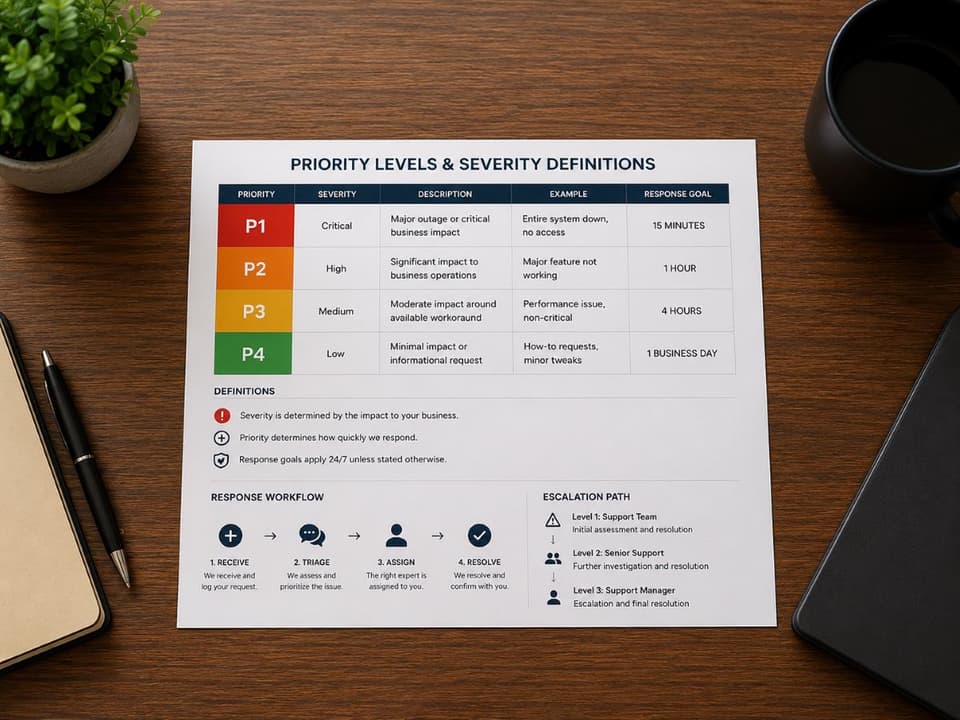
An SLA almost always sorts issues into priority levels, often labeled Priority 1 through Priority 4 or Critical through Low. Faster targets apply to higher priorities. The catch is that the provider usually writes the definitions, and their idea of "critical" may not match yours. A single workstation failing might be Priority 3 to them and a full stop for the employee who uses it. Read these definitions carefully and confirm that the scenarios most damaging to your business are classified at the priority level you expect. If they are not, negotiate the definitions before you sign, because changing them afterward is far harder.
The fine print: loopholes that quietly weaken an SLA
A document can list strong-looking targets and still fail to protect you, because the qualifying language elsewhere erodes them. These are the most common loopholes, explained plainly so you can spot them.
- The automated acknowledgement loophole. Response time is measured from when a ticket opens. Some providers satisfy a fast response SLA with an automatic confirmation email, not a human looking at the problem. Insist the contract define response as a qualified person reviewing the issue and confirming its scope.
- Maintenance window exclusions. Scheduled maintenance is usually excluded from uptime calculations. If a provider reserves a large maintenance window each month, their uptime promise is measured only against the remaining hours. Push for a cap on maintenance time and a requirement for advance notice.
- Business-hours-only coverage. A contract may advertise strong response times that apply only during standard business hours. If your business depends on systems running in the evening or overnight, confirm whether the targets hold then, or whether you need round-the-clock support.
- Force majeure overreach. Force majeure clauses excuse the provider during events outside their control. Some are written so broadly that ordinary problems get classified as uncontrollable. If a provider's own cloud platform fails, that is an architecture choice they made, and the clause should not let them disown it.
- Credits only "upon request." If you must notice the miss yourself and formally claim a credit within a short window, most credits will quietly go unclaimed. Strong agreements apply credits automatically based on the provider's own reporting.
- Narrow notice requirements. An SLA may require you to report issues through one specific channel before the clock starts ticking. Miss the channel and the response timer never starts. Make sure any such requirement is reasonable and clearly understood by your team.
None of these clauses are necessarily signs of a dishonest provider. Some are standard. The point is to read them, understand their effect, and negotiate the ones that leave you exposed.
Reading the penalties and service credits section
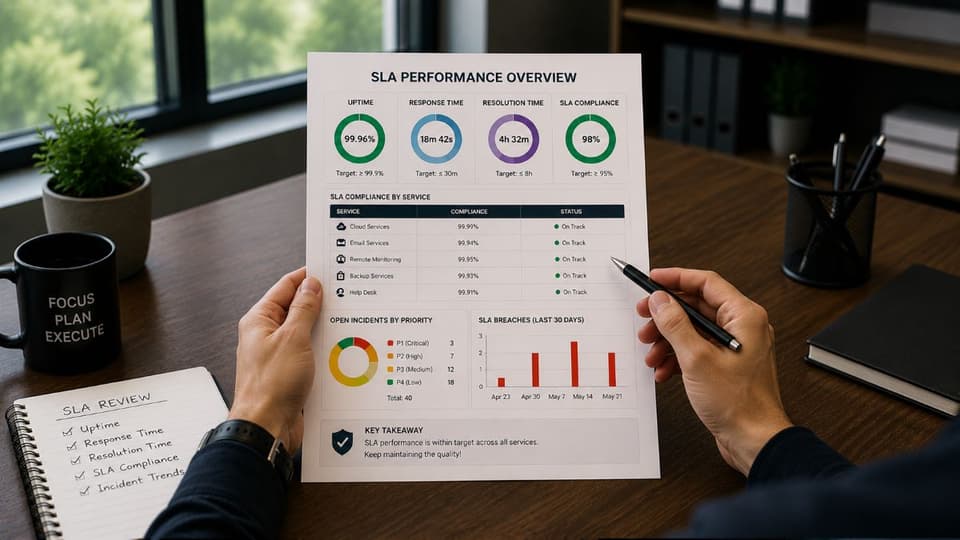
The remedy section answers a blunt question: what do you get when the provider fails. The most common remedy is a service credit, a partial refund of your monthly fee. Credits are useful, but they deserve a realistic look.
First, credits are usually capped, often at a small percentage of the monthly fee. A capped credit rarely comes close to covering the real cost of an outage to your business, so a credit should be seen as a signal that something went wrong, not as compensation. Second, check the base the credit is calculated on. A credit figured against the full contract value is more meaningful than one figured against a narrow slice of it.
Third, and most important, look at whether repeated failures trigger anything stronger than a credit. The clause that protects you is a right to terminate without penalty if the provider misses targets repeatedly over a defined period. A provider confident in its delivery will agree to that. One that resists is telling you something useful. The real value of the penalty section is not the money, it is the pressure it puts on the provider to perform.
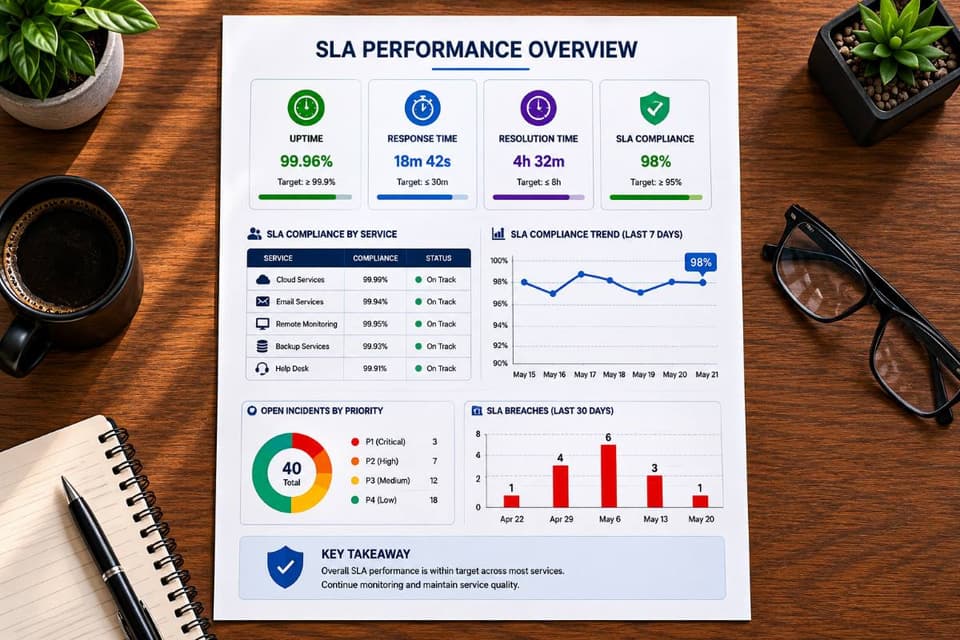
Security, compliance, and backup clauses inside the SLA
Modern managed IT is inseparable from security, so the SLA should commit to security work with the same specificity it applies to helpdesk tickets. Look for defined timelines for patching, continuous threat monitoring, and incident response, meaning a stated window for how quickly the provider will react to a security alert. Vague language such as "we keep systems secure" is not measurable and not enforceable. Mature cybersecurity solutions belong in the agreement as scheduled, trackable activity rather than a discretionary extra.
The same applies to data protection. Your SLA should define how often backups run, where they are stored, and how recovery is tested, because a backup that is never test-restored is only a hope. Reliable data backup and disaster recovery commitments should specify recovery objectives, not just mention that backups exist.
For regulated businesses in healthcare, legal, or finance, the SLA carries additional weight. Frameworks such as HIPAA and PCI DSS require documented controls and proof that safeguards work. Your agreement should state clearly which compliance obligations the provider supports and how. Strong compliance and risk management commitments written into the SLA give you something to stand behind if your controls are ever examined.
Exit and transition: the clause most businesses skip
The healthiest time to plan for the end of a relationship is at the beginning, while you still have bargaining power. A complete SLA includes exit and transition terms covering documentation handoff, return of administrator access and credentials, and a clean transfer of your data in a usable format. This matters for a simple reason. A provider who makes it difficult to leave feels less pressure to keep performing. A provider willing to commit in writing to a smooth transition is signaling confidence in its own service. Read this section before you sign, not when you are already unhappy; if you are already there, our guide to leaving a bad MSP contract walks through the order of operations.
An MSP contract checklist to use before you sign
Strip away the legal language and the evaluation comes down to a clear set of checks. Work through these before signing any managed IT agreement.
- Scope is specific. The agreement names what is included and what is excluded, with no vague "all-inclusive" language.
- Both response and resolution times are committed. Not response alone.
- Uptime is defined and covered. The percentage states what it applies to and what credit applies if it is missed.
- Priority definitions match your reality. Your worst-case scenarios are classified at the urgency level you expect.
- Coverage hours fit your business. After-hours and weekend support is addressed if you need it.
- Loopholes are checked. Automated acknowledgement, maintenance windows, and force majeure language are read and understood.
- Credits are automatic and repeated failures have teeth. Persistent underperformance allows termination without penalty.
- Security and backup commitments are measurable. Patching, monitoring, incident response, and recovery objectives carry real timelines.
- Reporting is regular and honest. You receive monthly performance data, not numbers only when you ask.
- Exit terms are in writing. Documentation, access, and data return are defined before you begin.
If a provider is willing to walk through each of these items openly, that transparency is itself a strong indicator of how the relationship will run. A provider who deflects or rushes past the SLA is showing you their priorities. This level of clarity should be the baseline you expect from any managed IT services agreement, whether the engagement is fully outsourced or a co-managed IT arrangement alongside your internal staff.
If you are evaluating an MSP contract and want a clear read on whether its SLA protects your business, talk to GlobeVM. As part of managed IT services in Los Angeles, we review MSP contracts with you and explain where the SLA is strong and where it leaves you exposed.