

A client calls to ask about the invoice you sent this morning, with the new bank details. You did not send it. The message came from your domain, with your name in the From field, and nothing in it was forged in a way an ordinary person would notice.
Sending mail that appears to come from a domain is trivially easy unless the domain owner has published records that say who is allowed to do it. Those records are email authentication, they cost nothing, and a surprising number of small businesses have never set them up correctly.
The Three Records, in Plain Language
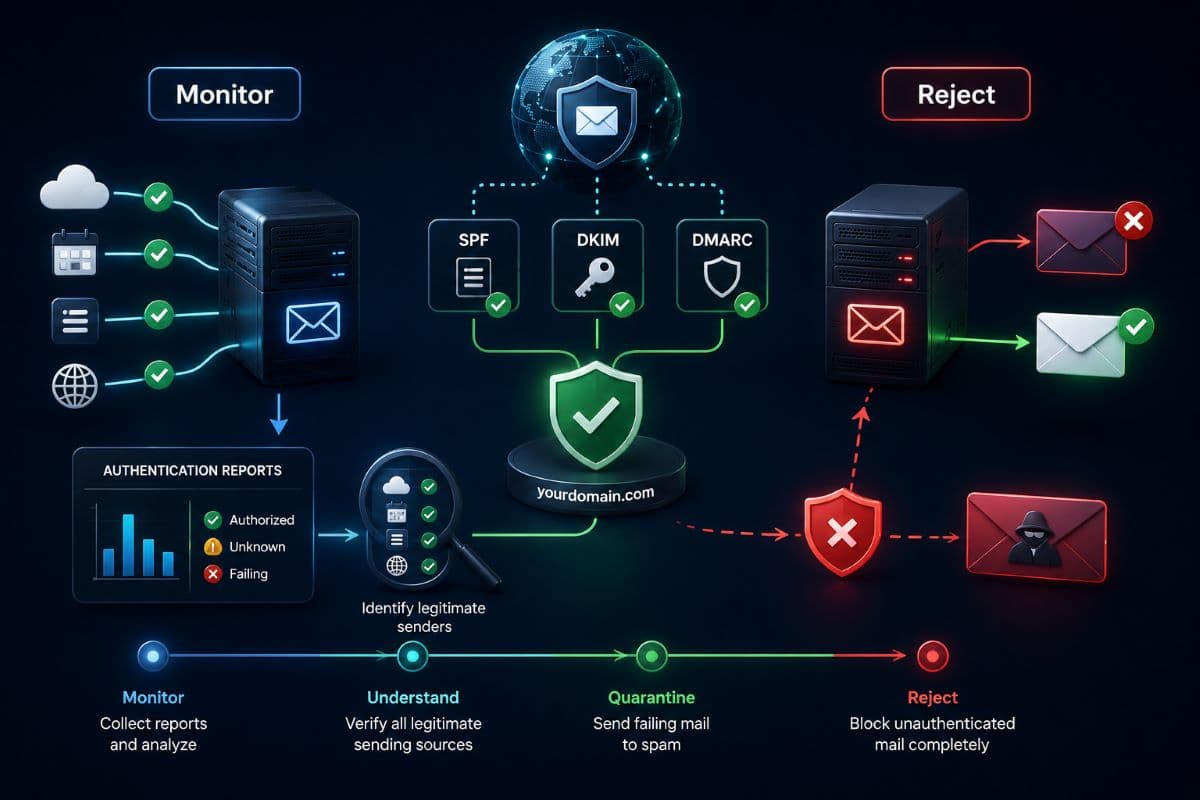
All three live in your domain's DNS, which is the public directory that tells the internet how to handle your domain. Together they answer three different questions that a receiving mail server asks about every message claiming to be from you.
Put simply, SPF and DKIM are the evidence and DMARC is the instruction. Businesses that publish the first two and skip the third have proof nobody acts on, which is the most common configuration we find and the reason spoofed mail keeps arriving in clients' inboxes.
Why This Is Not Only About Spam
Two very different problems get solved here, and small businesses usually only think about one. The first is deliverability, meaning whether your legitimate mail arrives, which matters to appointment reminders, invoices, and proposals.
The second is impersonation, meaning whether a criminal can send convincing mail as you to your own clients. That second one carries the reputational damage, because the person who loses money is your customer and the domain in the header is yours. It is the delivery mechanism behind most of the payment fraud described in our guide to preventing business email compromise.
The Rules Changed, and They Are Being Enforced
This used to be optional in practice. It is not anymore, because the major mailbox providers made authentication a condition of delivery rather than a recommendation.
Google and Yahoo announced requirements in late 2023 and began enforcing them in February 2024 for senders above 5,000 messages per day to their users, requiring SPF, DKIM, and a DMARC record, along with one-click unsubscribe on bulk mail and a spam complaint rate kept below 0.3 percent. Microsoft followed with its own enforcement for high-volume senders starting on May 5, 2025, and stated plainly that noncompliant mail would be rejected rather than delivered to a junk folder.
Enforcement Has Been Tightening
The direction since then has been one way. From November 2025, Gmail moved from temporary deferrals to permanent rejections for noncompliant traffic, meaning the message does not land in spam; it does not land at all.
Small businesses often assume the volume thresholds excuse them, and that assumption is where the trouble starts. The thresholds apply to bulk senders, while the underlying expectation that a sending domain authenticates itself now applies broadly, and any mail your business sends through a marketing platform, a reminder service, or an invoicing tool can push you into that territory without anyone deciding to become a bulk sender.
Your Sending Sources Are More Numerous Than You Think
Before touching DNS, list everything that sends mail using your domain. A typical practice or firm has more than the two people expect: the mail platform itself, the practice or case management system, an appointment reminder service, an accounting or invoicing tool, a marketing platform, a form on the website, and sometimes a copier that scans to email.
Each one needs to be authorized, or its mail starts failing once you enforce anything. Missing this inventory is the single reason authentication projects break things, and it is the reason the work belongs with whoever manages your Microsoft 365 environment rather than being done one record at a time by different vendors.
How to Do This Without Breaking Your Mail
The order matters here more than the speed. Enforcing a policy before the evidence is in place is how a business stops its own invoices from being delivered, and the recovery is far more disruptive than the setup.
- Inventory every sending source, including the ones nobody remembers, and confirm which are still in use.
- Publish SPF listing those sources, keeping within the protocol's lookup limits rather than adding entries indefinitely.
- Enable DKIM signing on every platform that sends for you, using current key lengths rather than whatever a decade old setup produced.
- Publish DMARC at monitoring only, which asks receivers to report rather than to act, so nothing changes yet.
- Read the reports for several weeks, since they reveal both the legitimate senders you forgot and any impersonation already happening.
- Move to quarantine, sending failures to spam, once the reports are clean.
- Move to reject, which is the only setting that actually stops spoofed mail reaching your clients.
Most businesses stop at step four and call it done, which produces a domain that is monitored rather than protected. The last two steps are where the protection lives, and getting there usually takes weeks rather than months.
The Reports Are the Point
DMARC reporting is the part that surprises owners. Within days of publishing a monitoring policy, a business starts receiving data showing every source sending mail as its domain, which routinely turns up a former marketing platform no one cancelled, a vendor sending on your behalf without permission, and sometimes a stream of outright impersonation aimed at clients.
The raw reports are unreadable by design, so a small business either uses a reporting service or has its provider interpret them. Either way, this is the only mechanism that tells you what is happening with your own domain, which pairs directly with the registrar and DNS controls covered in our guide to domain security.
What This Does Not Cover
Being honest about the limits matters, because authentication gets sold as a cure for phishing and it is not one. Four gaps stay open no matter how strictly you enforce.
- Lookalike domains are unaffected, since a criminal registering a domain one character different from yours is authenticating their own domain perfectly.
- Compromised accounts pass every check, because mail sent from a real mailbox by someone using stolen credentials is genuinely from you.
- Inbound protection is a separate job, since these records govern mail claiming to be from your domain rather than the phishing arriving in your inbox.
- Display name spoofing in a free mailbox still works on phones, where recipients see a name and not an address.
The inbound half of the problem belongs with filtering and the tenant settings described in our article on phishing protection in Microsoft 365. Authentication and filtering are two halves of the same posture, and neither substitutes for the other.
What It Costs and How Long It Takes
The records themselves are free, since they are DNS entries rather than products. What costs something is the inventory work, the reporting, and the judgment about when enforcement is safe.
For a small business with a handful of sending platforms, the whole sequence typically runs a few weeks: an hour or two to inventory and publish, then the monitoring period that cannot be rushed because it exists to catch the sender no one remembered. Businesses that try to compress the monitoring window are the ones that break something, since the forgotten platform only reveals itself when it sends its monthly batch.
The One Ongoing Task
After enforcement, this becomes a maintenance item rather than a project. The maintenance is specific: every time the business adds a platform that sends mail, that platform has to be authorized before its first send.
A new marketing tool, a new appointment system, a new invoicing service, or a change of practice software each require a record update, and skipping it produces mail that silently fails. Tie the check to the same moment you approve any new software, and the records stay correct without anyone maintaining a calendar reminder.
Who Should Own This
The trouble with email authentication is that it falls between departments. The marketing platform vendor assumes IT handles DNS, IT assumes marketing knows which platforms send mail, the web developer who holds the DNS login left two years ago, and the records end up half configured by three different people over five years.
Name one owner, put the DNS credentials somewhere the business controls, and review the records when anything changes about how the business sends mail. That ownership question sits naturally with a provider running your email security, since the same team already knows every platform touching your mail flow.
Check Yours This Week
You do not need a project to find out where you stand. Free public tools will show whether your domain publishes SPF, DKIM, and DMARC records and what policy each is set to, and the answer takes about a minute to obtain.
If the DMARC record is missing, or present but set to monitoring only after years of being there, you have found the gap. Businesses in the region can have the inventory, the records, and the reporting handled by a provider offering IT support in Thousand Oaks, usually within a couple of weeks including the monitoring period.
Across the county, IT services in Ventura County cover the same ground, including the report review that decides when enforcement is safe to switch on. Two outcomes are worth the effort: a domain no one else can send from, and mail that lands where you meant it to.
Frequently Asked Questions
SPF publishes which servers are allowed to send mail for your domain. DKIM adds a cryptographic signature proving a message really came from your domain and was not altered on the way. DMARC tells receiving servers what to do when those checks fail, and asks them to send you reports about mail claiming to be from you. SPF and DKIM are the evidence and DMARC is the instruction, which is why publishing the first two without the third leaves proof that not one person acts on.
The formal thresholds published by Google, Yahoo, and Microsoft apply to senders above 5,000 messages a day to their users, so most small offices are below them. The broader expectation that a sending domain authenticates itself now applies generally, and mail sent through marketing platforms, reminder services, or invoicing tools can push a small business into higher volume territory without a deliberate decision. More importantly, without DMARC set to reject, anyone can send convincing mail as your domain to your own clients.
Two things, gradually. Your legitimate mail becomes less reliable, since providers have moved from tolerating unauthenticated mail to deferring it and then rejecting it outright, with Gmail moving to permanent rejections for noncompliant traffic from November 2025 and Microsoft stating that failing mail is rejected rather than filtered to junk. Meanwhile your domain remains available to anyone who wants to impersonate you to your clients, which is how invoice fraud gets its credibility.
It can if the steps are done out of order, which is why the sequence matters. Publish SPF and DKIM for every legitimate sending source first, then set DMARC to monitoring only so nothing is blocked, read the reports for several weeks to catch senders you forgot, and only then move to quarantine and finally to reject. Businesses that jump straight to enforcement discover their own invoices and reminders failing, usually on the busiest day of the month.
It stops one specific and damaging kind: mail sent using your exact domain. It does nothing about lookalike domains registered one character away from yours, nothing about mail sent from a genuinely compromised account of your own, and nothing about the phishing arriving in your inbox, which is a separate job handled by filtering. Treat it as closing one door properly rather than as protection against phishing in general.
Free public checking tools will report whether your domain publishes SPF, DKIM, and DMARC records and what policy each carries, and the check takes about a minute. The two common findings are no DMARC record at all, or a record that has sat at monitoring only for years because no one reviewed the reports. Both are fixable in weeks, and neither requires new software.
Most owners have never seen a report showing who sends mail as their domain, and GlobeVM will inventory your senders, publish the records correctly, and take email authentication all the way to enforcement without interrupting the mail you send.
Comments
0 Comments