

A dispute is brewing. The partner does the right thing and issues a hold notice, telling everyone to preserve anything related to the matter, and the firm feels covered because the notice went out. Then someone asks a question nobody can answer: does anything on our systems delete by itself, and did it delete anything last night?
That gap between issuing a legal hold and being able to prove the data survived is where small firms get into trouble. The duty is a legal question your counsel owns, and this article is about the other half: whether your systems can actually do what the notice promised.
What a Hold Requires From Your Systems
Strip away the terminology and preservation asks three things of your technology. Data relevant to the matter must stop being deleted, whether by a person, a policy, or a routine that runs quietly at night. It must remain in a state you can search and produce later. And you must be able to show what you preserved, when the preservation started, and what it covered. Reviewed September 2026; the Microsoft 365 licensing details below were checked against Microsoft's current documentation.
Notice that instructing staff not to delete things satisfies none of those on its own. People forget, people leave, and automated retention runs regardless of what anyone was told, which is why a hold notice without a system change is a promise the firm cannot keep.
The Trigger Is Earlier Than Most People Assume
The obligation to preserve generally begins when litigation is reasonably anticipated, which is often well before anything is filed. A demand letter, a threat made in a meeting, or an internal complaint can start the clock, and courts look at when the party knew, not when the paperwork arrived.
The federal rules also provide consequences when electronically stored information that should have been preserved is lost because a party failed to take reasonable steps, with the most serious measures reserved for cases involving intent to deprive another party of the information. Your counsel decides when the duty attaches and how broad it is. Your job is to be ready to act the same day they say so.
The Systems That Delete Things Without Being Asked
Most firms are surprised by how much automatic deletion is running in a modern environment. The common sources are worth listing, because each one needs a deliberate decision when a hold lands.
- Retention policies in Microsoft 365 that delete mail, files, or chats after a set period, often configured years ago and forgotten.
- Chat history settings in Teams or other messaging tools, which are frequently set to purge on a rolling basis.
- Mailbox rules individual staff created to auto-archive or auto-delete, invisible to everyone but the user.
- Voicemail and phone systems that keep recordings for a fixed window and then discard them.
- Departing employee accounts, where the usual offboarding routine removes exactly the mailbox a hold needs.
- Document management and practice systems with their own purge settings, separate from anything the IT provider manages.
Every one of these is sensible under normal conditions, which is the point. A hold does not mean disabling all of it forever; it means suspending it for the people and content in scope, and being able to say precisely what was suspended and when, which is where a written schedule and a data retention policy earns its keep.
How Preservation Works in Microsoft 365
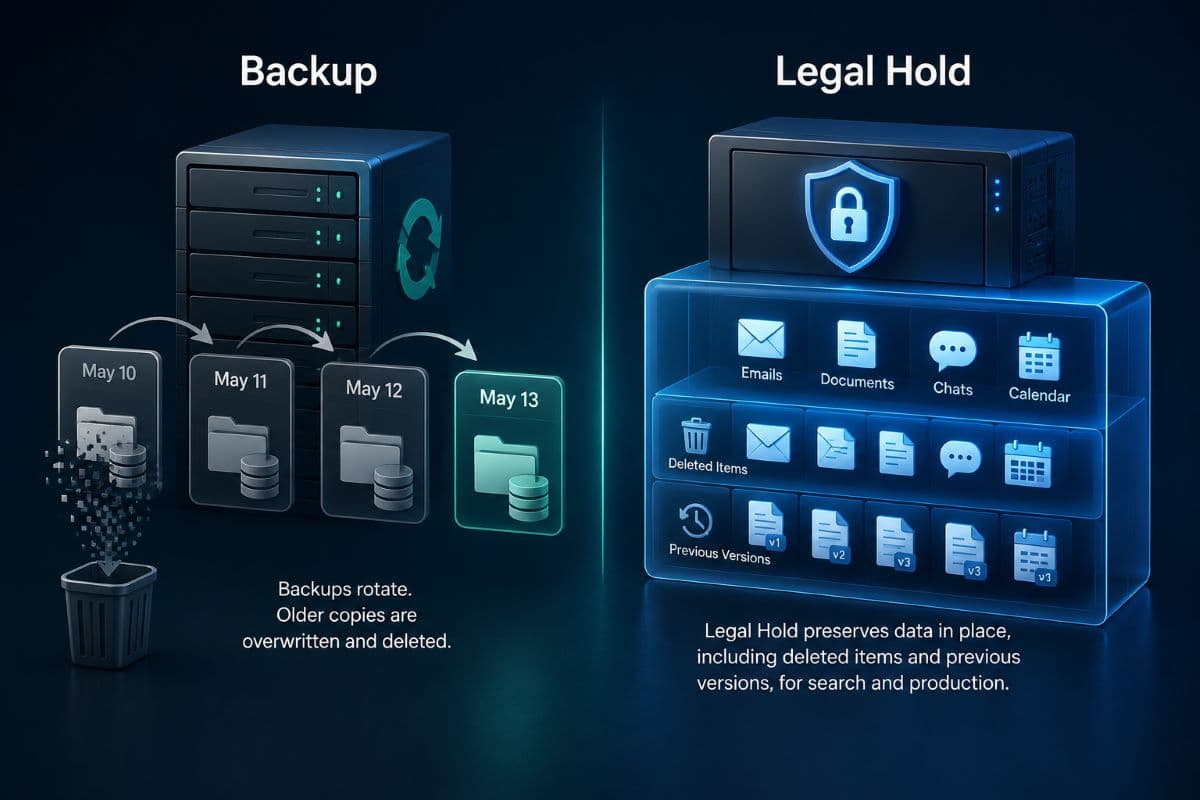
For small firms there is a practical advantage: the platform most of them already run can preserve properly. A hold placed on a mailbox or a site preserves content in place: the user keeps working normally, and edited or deleted items are retained in a hidden location where they can be searched and produced later.
That in place model is why preservation does not have to disrupt anyone's work, and why it is far more defensible than asking people to save copies to a folder. Searching and exporting what was preserved is a separate step, handled through the platform's discovery tools when counsel asks for the material.
The Licensing Trap Few Firms Find in Time
One licensing detail catches firms at the worst possible moment. Placing a mailbox on litigation hold requires an Exchange Online Plan 2 license, which is included in the enterprise plans such as Microsoft 365 E3 and E5. The Business tier plans that most small firms buy, including Business Premium, include Plan 1 instead.
Microsoft's documentation states that a Plan 1 mailbox needs a separate Exchange Online Archiving license to be placed on hold, or a move up to Plan 2. This is not a problem if you discover it during a quiet week and fix it deliberately, and it is a serious problem if you discover it on the day a hold has to be in place, and that is why every firm should confirm what its own mailboxes can do before it needs to know. That confirmation sits naturally with the rest of your managed Microsoft 365 review.
Do Not Reclaim the License of Someone Under Hold
The related trap is the routine cost-saving move. When a person leaves, firms unassign the license to reuse it, which disables the mailbox, and a disabled mailbox is not a place a hold can live.
If a departing person's mail is in scope, the license question has to be settled before the account is touched, and the standard shared mailbox conversion needs checking too, because a shared mailbox that is on hold still requires licensing. Make this an explicit branch in your offboarding process rather than a discovery, and connect it to the checklist described in our guide to employee offboarding.
What Else Counts as Evidence
Preservation is not only email. Depending on the matter, relevant material may live in chat threads, shared files and their version histories, calendar entries, call recordings, texts on personal phones, messages in tools nobody officially approved, and paper that never made it into a system.
The two that most often go unpreserved are text messages on personal devices and content in unapproved applications, because neither sits anywhere the firm controls. There is no clean technical answer to either; there is a policy answer, which is deciding in advance which channels the firm permits for business communication so that preservation is possible at all, and the file handling side of that decision is covered in our guide to secure file sharing for law firms.
Backups Are Not a Hold
Firms often assume their backup covers preservation. It does not, for three reasons worth understanding rather than accepting on faith.
Backups typically rotate, so yesterday's copy overwrites the one from a month ago on a schedule that keeps running. They are built for restoring systems, not for searching and producing specific material, so extracting one custodian's messages from them is slow and expensive. And restoring from a backup can itself alter what you are trying to preserve. Backups remain essential for recovery, and the immutability discussed in our article on immutable backups serves a different purpose than a hold.
The People Side of a Hold
Technical preservation is only half the obligation. The people holding the information have to know what is expected of them, and they have to be reminded that the obligation continues.
A workable notice says what the matter concerns in plain language, what categories of material to preserve, that automatic deletion has been suspended for the relevant accounts, and that no one should delete or edit anything within scope while the hold is active. Ask recipients to acknowledge it, because an unacknowledged notice is difficult to rely on later.
Reminders Are Not Optional
Holds routinely run for years, and staff who acknowledged a notice in March have forgotten it by November. A short reminder on a schedule, plus a notice to anyone who joins the matter afterward, keeps the obligation live rather than historical.
Departures deserve special attention, since the person leaving may be a custodian and the standard offboarding routine works against you here. Build a check into that process: before any account is closed or reassigned, confirm whether the person is subject to an active hold.
The Record That Makes a Legal Hold Defensible
Everything above can be done correctly and still fail if no one wrote it down. A defensible hold has a paper trail with a small number of specific elements.
Record when the duty was identified and by whom, who received the notice and when they acknowledged it, which custodians and systems were in scope, what technical steps were taken and on what date, and what changed as the matter developed. Firms that keep this end up answering a challenge with a document. Firms that do not end up reconstructing events from memory months later, in front of an opponent who is looking for exactly that weakness.
Holds Also Have to End
The overlooked half of the process is release. Matters resolve, and the holds placed for them commonly stay in effect forever because no one tracks them, which turns into a firm preserving everything indefinitely and a storage and privacy problem nobody chose.
Keep a simple register of active holds with the matter, the scope, the date placed, and the person responsible for releasing it. Review it once a quarter, release what counsel confirms is finished, and note the release in the same record. The discipline is small; the alternative is a system whose retention rules stopped meaning anything years ago.
What to Do Before You Need Any of This
A firm can be ready in a couple of hours, and the readiness is worth far more than the speed of the eventual response. Confirm what your licenses actually permit, write down every automatic deletion running in your environment, agree which channels are approved for firm business, decide who executes a hold technically and who signs off, and draft the notice template now rather than at eight in the morning during a crisis.
Firms in the region can have that readiness check run alongside the rest of their legal IT support so the answer exists before anyone asks the question. The alternative is discovering the gap in the one week when discovering it is most expensive.
Practices across the city can run it through managed IT services in Los Angeles, covering both the license audit and the retention inventory. Neither task takes long once a name is attached to it.
Firms further west can arrange it through IT support in Thousand Oaks, including the offboarding change that keeps a departing custodian's mailbox intact. Aim for one outcome: when counsel says preserve, the systems already can.
Frequently Asked Questions
Generally when litigation is reasonably anticipated, which is often earlier than a filing: a demand letter, an explicit threat, or an internal complaint can be enough. Your counsel makes that determination, and it is not an IT judgment. What matters technically is that the systems can act the same day, because automatic deletion continues running while the question is being debated, and the federal rules provide consequences when information that should have been preserved is lost because reasonable steps were not taken.
No, on its own it does not. Instructions do not stop retention policies, chat purge settings, individual auto-delete rules, or voicemail systems from running on schedule, and they do not survive someone leaving the firm. A defensible hold pairs the notice with technical preservation applied to the relevant accounts and locations, plus a record of what was suspended and when. The notice is necessary and it is not sufficient.
Check before you need to know. Litigation hold requires an Exchange Online Plan 2 license, which the enterprise plans such as E3 and E5 include, while the Business tier plans commonly bought by small firms include Plan 1. Microsoft's documentation states that a Plan 1 mailbox requires a separate Exchange Online Archiving license to be placed on hold, or an upgrade to Plan 2. Confirming this during a quiet week costs nothing; discovering it during a live matter is a bad day.
It has to be handled deliberately, because the usual cost-saving step causes the damage. Unassigning the license disables the mailbox, and a disabled mailbox is not somewhere a hold can be maintained. If that person's material is in scope, settle the licensing before touching the account, and check the arrangement if you convert to a shared mailbox, since a shared mailbox under hold still requires licensing. Build this branch into offboarding rather than improvising it.
Not usefully, because backups rotate on a schedule and the copy you need may be overwritten while the matter is still developing. They are designed for restoring systems rather than searching and producing specific custodians' material, which makes extraction slow and costly. Restoring can also alter what you were trying to preserve. Keep backups for recovery and use proper in place preservation for holds; they solve different problems.
Technically you often cannot, which is why this is a policy question decided in advance. Firms that permit business communication on personal messaging apps and personal phones create material they cannot reliably preserve or produce. The workable approach is to define which channels are approved for firm business, provide firm controlled options for those needs, and address the rest with counsel when a matter arises rather than assuming it does not exist.
Firms that cannot say today whether their mailboxes can even be placed on hold should start there, and can talk to GlobeVM about the audit: we check the licensing, inventories every automatic deletion running in the environment, and sets up the process so a legal hold takes minutes rather than a week.
Comments
0 Comments