

A bookkeeper downloads what looks like a familiar invoicing tool from a search result. Nothing appears to happen, the file does not open, and she goes back to work and forgets it. Two weeks later the firm's email is sending wire change requests to clients, from her real account, from a session that never asked anyone for a password or a code. This is infostealer malware at work, and it is the quiet mechanism behind a large share of small business account takeovers.
The part that matters for owners is not the malware itself. It is what the malware takes, because stealing a live session is not the same thing as stealing a password, and most security advice still only addresses the second one.
What an Infostealer Takes
An infostealer is malware with a narrow, commercial job. It does not encrypt anything, it does not announce itself, and it usually finishes its work within seconds of landing. It empties the browser and then leaves.
What it takes is more than the saved password list, though it takes that too. It collects autofill data, stored payment details, cryptocurrency wallet files, and, most importantly, the session cookies and authentication tokens that keep everyone signed in to Microsoft 365, the bank, the practice management portal, and everything else nobody logs into twice a day because the browser remembers them.
Why Stolen Sessions Bypass Multi-Factor Authentication
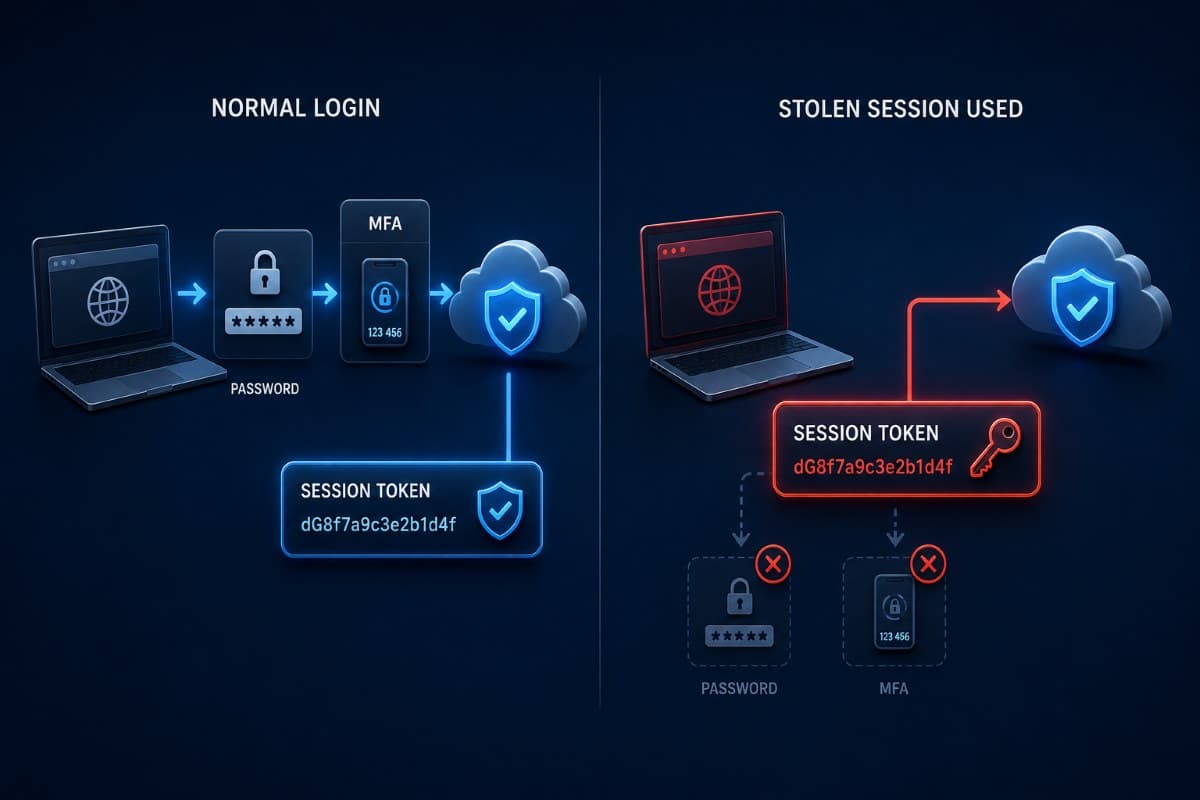
Here is the mechanism in plain terms. When you sign in and complete a code or an approval, the service issues your browser a token that says this person already proved who they are. Every later click reads that token instead of asking again, which is the entire reason you are not challenged fifty times a day.
If an attacker copies that token onto their own machine, the service sees a session that has already passed authentication. No password is needed, no code is generated, and no approval prompt appears on the phone, because from the service's point of view nobody is signing in. This is why a business can have multi-factor authentication switched on everywhere and still lose an account, and why "we have MFA" is an incomplete answer to this specific threat.
Where the Malware Comes From
The delivery routes are unglamorous and mostly involve someone deliberately installing something. Cracked or free versions of paid software, a download that arrived through a search advertisement rather than the vendor's own site, a browser extension with more permissions than its function requires, a fake update prompt, or an attachment from a compromised contact.
Notice how many of those happen on a personal device or after hours, which is exactly why this threat crosses the line between home computers and business accounts. The credentials are corporate even when the machine is not, an issue our guide to BYOD security risks covers from the policy side.
How Common This Is
Numbers here are worth quoting carefully, because the accurate version is more interesting than the scary one. In the Verizon 2026 Data Breach Investigations Report, which covers incidents from November 2024 through October 2025, exploiting an unpatched vulnerability became the single most common way attackers first got in, at 31 percent of breaches, while credential abuse as a first step fell to 13 percent.
Read only that and you would conclude stolen credentials stopped mattering. The same report says otherwise: counted anywhere in the attack, rather than only at the front door, credential abuse appears in 39 percent of breaches, which is more than any other technique. Attackers changed where they break in, not what they reach for once inside.
The Link to Ransomware Is the Part to Take Seriously
The same report found ransomware present in 48 percent of breaches, and drew a line small businesses should know about: 73 percent of ransomware victims had an associated infostealer infection or credential leak in the year before the attack. Half of those events happened within 95 days of the ransomware itself.
That turns a stealer infection from an embarrassment into an early warning. An infection today is frequently the reconnaissance phase of something worse in about three months, which is why the correct reaction is a full response rather than a password reset and a shrug. Watching for your own domain's credentials appearing in stealer dumps is exactly what dark web monitoring is for, and it is one of the few controls that gives a business advance notice.
Why Antivirus Alone Keeps Missing It
Infostealers are built to be forgettable. They run once, take what they came for, and often delete themselves, which leaves very little for a scanner that works by recognizing known bad files to find later.
They also mutate constantly, arrive inside legitimate looking installers, and increasingly avoid doing suspicious work on the victim's machine at all. One recent family sends the encrypted browser data to the attacker's own servers for processing rather than unpacking it locally, precisely because local unpacking is what security tools watch for.
What Does Catch It
Behavior based detection changes the odds, because even a quiet stealer has to do recognizable things: touch the browser's credential storage, read files it has no business reading, and send data outbound to somewhere unusual. That pattern is visible to modern endpoint tooling in a way the file itself is not, which is the practical case for EDR security over classic antivirus.
Detection only helps if somebody sees the alert, though. A stealer infection generates one alert on one machine at an inconvenient hour, and that is why this threat rewards businesses with monitored endpoint security and punishes those relying on an employee noticing a red icon.
The Response Playbook, in Order
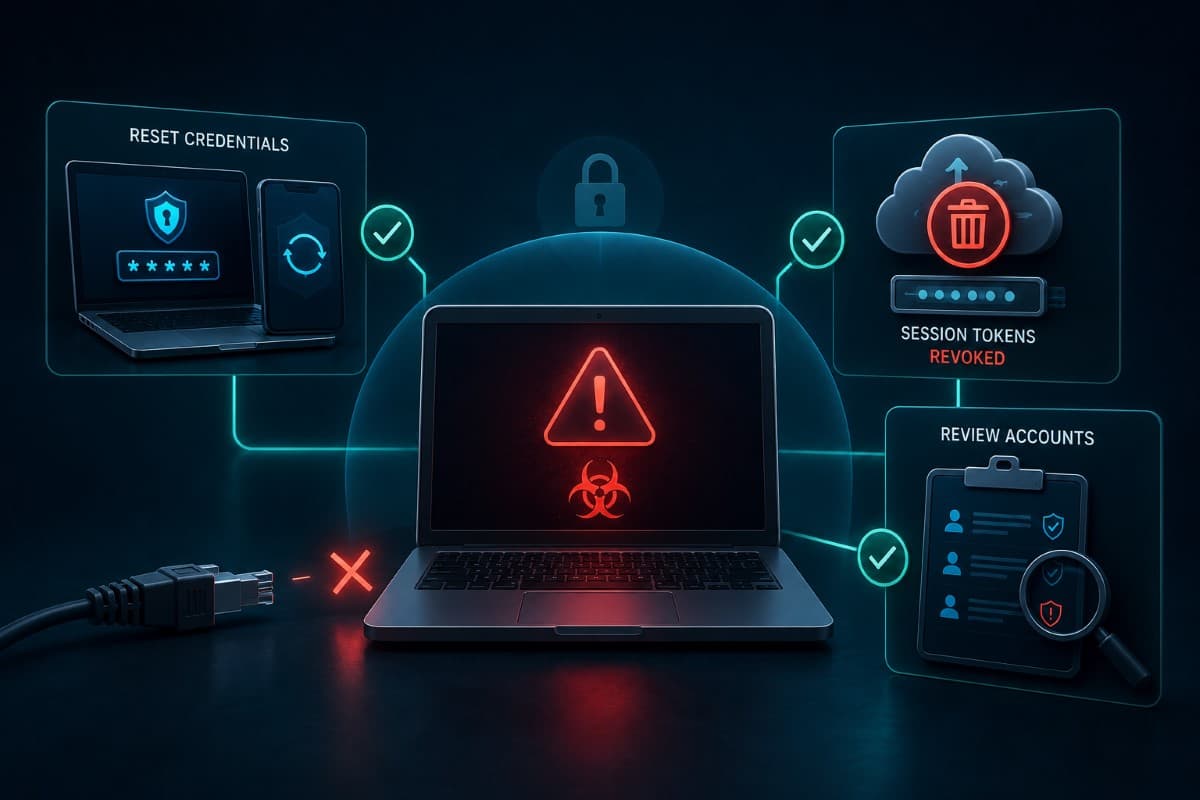
Assume a machine is infected: the finance laptop shows a strange installer in the downloads folder, or your monitoring flags credential access. The order below matters, because doing step four before step two accomplishes almost nothing.
- Isolate the device from the network, and do not let anyone keep working on it while you decide.
- Reset the passwords for every account that was signed in or saved in that browser, including personal ones, from a different clean device.
- Revoke the sessions, which is the step nearly everyone misses, because a password reset alone can leave a stolen session alive.
- Review the authentication methods on each account and remove any phone number, app, or key you do not recognize.
- Check email for quiet changes: new forwarding rules, new inbox rules that move messages to unused folders, and unfamiliar connected applications.
- Rebuild the machine rather than cleaning it, since a stealer that ran with the user's rights is not something to negotiate with.
- Look for the second act, meaning sign-in logs from unusual locations, mailbox access, file downloads, and anything touching payment details.
Step three deserves a paragraph of its own because the details trip up otherwise competent teams. In Microsoft Entra ID, revoking sessions invalidates the refresh tokens that let a session renew itself, but an access token already issued can remain valid until it expires, one hour by default, unless the application supports continuous access evaluation, which brings revocation closer to real time. Practically, that means you revoke, then verify, rather than assuming the door shut the moment you clicked.
Treat It as an Incident, Not a Cleanup
Because of the link to what follows, a stealer infection at a medical, legal, or financial practice deserves the same discipline as any other security event: a written timeline, a record of which accounts were exposed, and a decision documented about whether client or patient data was reachable from those accounts. The sequence for handling a bigger event is covered in our guide to ransomware incident response, and the early steps overlap almost entirely.
What Reduces the Risk
Prevention here is a stack of ordinary controls, none of which is exotic. All of them are things a small business can have running this quarter.
- Stop passwords living in the browser: a dedicated password manager keeps the vault out of the exact place stealers empty first.
- Control what gets installed: standard user accounts, plus a rule that software arrives from vendor sites rather than search advertisements.
- Prune browser extensions, since permissions granted years ago to a forgotten tool are read access to everything you do.
- Shorten session life for sensitive roles, so a stolen token has less time to be useful.
- Watch for exposure, so credentials appearing in stealer logs reach you before they reach a buyer.
- Keep personal machines out of business accounts, or bring them under management if they must be used.
Two of those deserve emphasis for regulated offices. Conditional access rules that limit sign in to managed devices meaningfully reduce the value of a stolen token, and they belong with the rest of your Microsoft 365 tenant settings rather than with the endpoint work. Passkeys and other phishing resistant methods are also worth adopting, with one honest caveat: they defeat credential phishing, but they do not protect a session already established on an infected machine.
The Habit That Costs Nothing
Tell your team the actual rule in one sentence: if you download something and nothing seems to happen, say so immediately. Silence after a download is the single most reportable event in this whole category, and the businesses that recover cleanly are almost always the ones where somebody spoke up the same day rather than three weeks later when the wire request went out. Continuous monitoring closes the rest of the gap, which is what watching for threats around the clock is built to do.
The Short Version
Infostealer malware is not a sophisticated threat, and that is exactly why it works so well against small businesses. It is cheap, widely available, aimed at the browser rather than the network, and it takes the one thing that makes multi-factor authentication irrelevant. The defenses are equally ordinary: keep credentials out of the browser, watch endpoints with something that sees behavior, know when your credentials surface in a dump, and respond to an infection as though something worse is scheduled for three months from now, because the data says it often is.
Businesses in the region can get this monitored and handled through a provider offering IT services in Ventura County, including the response steps most teams get out of order. The point is not to have a plan on paper, but to have someone who has run these steps before.
In the Conejo Valley, IT support in Westlake Village covers exposure monitoring through to the rebuild after an infection. Either service starts from the same question: which machines are actually being watched today.
Frequently Asked Questions
It does not break the authentication; it copies the result of it. After you sign in and pass your second factor, the service gives your browser a session token that means this person already proved who they are. Stealers take that token along with saved passwords, and an attacker who replays it appears to the service as an already authenticated user, so no password prompt and no code request ever appears. That is why enabling multi-factor authentication, while still essential, does not by itself close this route.
Infostealers are designed to be short lived and unremarkable. They frequently run once, take browser data in seconds, and delete themselves, leaving little for signature based scanning to find afterward. Variants mutate constantly, hide inside installers that look legitimate, and some now send encrypted browser data to attacker controlled servers for processing rather than unpacking it on the device, specifically to avoid the local behavior that security tools watch. Behavior based endpoint detection catches far more of this than traditional antivirus, provided someone is monitoring the alerts.
No, and this is the most common mistake. A password reset does not automatically end sessions that are already active, so a stolen token can keep working. Reset passwords from a clean device, then explicitly revoke sessions, then review the multi-factor methods registered on the account and remove anything unfamiliar. Check for new mail forwarding rules and connected applications as well, and rebuild the infected machine rather than cleaning it, because a stealer ran with that user's full rights.
Yes, and it is one of the most common paths. What the malware collects is whatever the browser holds, so a personal laptop used to check work email or a shared family computer with the practice portal saved in it exposes business credentials and sessions just as effectively as a company machine. Either keep personal devices out of business accounts, or bring them under management with the same protection and monitoring your own machines get.
Often you do not, until something visible happens weeks later, which is why detection and monitoring matter more here than awareness alone. The practical signals are a download where nothing appeared to happen, endpoint alerts about credential access, sign-ins from unfamiliar locations, mail rules no one created, and your domain's credentials showing up in stealer log dumps, which is precisely what exposure monitoring is designed to surface before an attacker acts on them.
Not knowing whether anyone would notice an infection on an office laptop this week is the problem worth solving, and GlobeVM puts monitored endpoint protection and credential exposure alerts in place and walks your team through the infostealer malware response before you need it.
Comments
0 Comments