
You already know the relationship is not working. Tickets sit too long, the strategic advice never arrives, and the security questions get vague answers. Deciding to leave is not the difficult part. The difficult part is the quiet fear that the switch itself will break something, that email will go dark for a morning, that you will lose access to your own systems, or that you will discover halfway through that nobody holds a current backup. That fear is exactly what keeps businesses paying for IT support they have already outgrown.
What should it cost? Our managed IT services pricing guide lists published 2026 price ranges, what is usually included and a free cost estimator.
This guide is built to remove that fear. Learning how to exit a bad MSP contract is, in practice, a project, and like any project it succeeds or fails on planning rather than luck. Done well, your team should barely register that the handover happened. Done badly, you can lose data, lose a day of productivity, and hand your old provider leverage you did not know it had. The entire difference sits in the preparation, and that preparation starts well before you send a single email.
Why Leaving a Bad MSP Feels Riskier Than It Should
The reason switching providers feels dangerous is that a managed service provider does not just fix your computers. Over the years it accumulates control of the systems that run your business, and that control rarely sits where you assume. There are three separate forms of lock-in at work, and understanding all three is what turns a stressful exit into a managed one.
The first is contractual. Your agreement may contain an automatic renewal clause, a long notice period, or an early termination fee that makes leaving expensive at the wrong moment. The second is technical, and it is the one that genuinely traps companies. Your provider may hold the administrator credentials to your Microsoft 365 environment, own the licensing those services run on, control your domain and DNS records, and run monitoring agents on every device. None of that is visible from your desk until you try to take it back. The third form of lock-in is knowledge. A provider that has managed your network for five years knows things about it that exist in nobody's documentation, and when that provider stops cooperating, that undocumented knowledge walks out the door alongside it.
A good exit plan addresses all three. It clears the contractual obstacles on schedule, reclaims technical ownership before the relationship cools, and forces every piece of undocumented knowledge into writing while the old provider still has a reason to share it.

Read Your MSP Contract Before You Do Anything Else
Before you talk to anyone, internal or external, find your signed agreement and read every clause that governs how it ends. Most business owners signed this document years ago, skimmed it once, and have not looked at it since. It now decides your timeline and your costs, so it deserves a careful afternoon.
Start with the term and renewal language. A fixed term contract ends on a defined date. An evergreen contract, by contrast, renews itself automatically and continues indefinitely until somebody actively stops it. Evergreen agreements are extremely common in managed services, and they are the single most frequent reason companies stay locked in for an extra year. The clause you are hunting for sits next to the renewal language and sets the notice period, usually thirty, sixty, or ninety days before the renewal date. Miss that window by a day and most providers will hold you to another full term, and most courts will let them.
Next, find the termination section and identify how the contract treats early exit. Some agreements charge a flat early termination fee. Others use liquidated damages, which means you owe a percentage, sometimes the full amount, of every payment you would have made through the end of the term. Those are very different numbers, and you need to know which one applies before you can budget for the exit. Finally, look for any language about data return, offboarding assistance, and what happens to software licensing when the agreement ends. A provider's willingness to put offboarding obligations in writing tells you a great deal about how the actual handover will go.

"For Cause" Versus "For Convenience": Two Very Different Exits
Almost every managed services contract allows two distinct ways out, and they carry very different price tags. Termination for convenience means you are leaving simply because you want to, and that is the path that triggers the early termination fee. It is clean, predictable, and entirely within your right, but you pay for it.
Termination for cause is the other path. If your provider has genuinely failed to deliver what the contract promises, through persistently missed service level targets, security commitments that were never met, or quarterly reviews that never happened, that failure may put the provider in breach. A documented breach can allow you to exit without the termination fee, because the provider, not you, broke the agreement. The critical word there is documented. General dissatisfaction is not cause, and neither is finding a cheaper option. You need a written record: ticket response times measured against the promised service levels, emails chasing reviews that never occurred, evidence of security work that was contracted and not delivered. If you believe you have a genuine breach, this is the point to involve an attorney who specializes in technology contracts. The cost of that advice is usually small against a liquidated damages clause, and a lawyer can often negotiate a release that neither side actually wants to litigate.

The Honest Math: What Leaving Will Actually Cost
Working out how to exit a bad MSP contract starts with being clear-eyed about the real cost, because the monthly fee you are unhappy about is rarely the whole picture. Beyond any early termination fee or liquidated damages, a clean transition usually involves a short overlap where you pay both providers at once, a one-time onboarding or assessment fee from the new provider, and a real investment of your own staff's time during the handover. There may also be a small, well-contained amount of downtime during the final cutover, even when everything is planned correctly.
Here is the part most providers writing about this topic will not tell you. Sometimes the termination fee is genuinely enforceable, your contract is sound, and the smartest financial move is simply to budget for the fee and leave on schedule rather than spend more money fighting a clause you signed. And sometimes, honestly, switching is not the right answer at all. If your frustration comes from a few specific, fixable problems, a direct conversation with your current provider may resolve them faster and more cheaply than a full transition. Switching providers is the correct decision when the mismatch is structural, when the provider cannot scale to where your business is going, or cannot deliver the security and compliance work you now need. It is the wrong decision when it is really a communication problem in disguise. Be honest with yourself about which situation you are in before you spend a dollar leaving, and weigh any exit fee against the very real, recurring price of IT downtime and lost productivity a poor provider already costs you. The planner below turns those numbers into something concrete rather than leaving them as a vague worry.

Take Inventory of What You Actually Own Before You Give Notice
The most important work in any provider transition happens before you tell anyone you are leaving. While your current provider still has every reason to be helpful, you need to build a complete picture of the systems, accounts, and credentials that belong to your business. The moment you give notice, cooperation tends to cool, and anything you have not already secured becomes harder to retrieve.
Work through your environment methodically and write down where each piece of control actually sits. Start with the foundations of your online presence: the account at your domain registrar where your domain name is managed, and the DNS zone that points your website and email to the right place. Move to your productivity platform, whether that is Microsoft 365 management or Google Workspace, and confirm who holds the top-level administrator account. Account for your network hardware next, the firewall, routers, switches, and wireless controllers, each of which has its own administrative login. Then list every line-of-business application your company depends on, along with the admin account for each one. Do not forget the less visible items: the monitoring and management agent your provider installed on every workstation and server, the backup system and exactly where those backups are stored and how long they are kept, the password vault, the multifactor authentication setup, and the network diagrams and written procedures that describe how everything fits together. Finally, gather the practical records, hardware warranties, an asset list, and the history of past support tickets, which carries useful context for whoever takes over.
This inventory is not busywork. It is the leverage that protects you. A provider that knows you already hold your own administrator credentials and understand your own environment has every incentive to make the handover smooth. A provider that knows you are dependent on it has every incentive to take its time.

The Microsoft 365 Tenant Trap
One item on that inventory deserves its own warning, because it traps more businesses than any other. Your Microsoft 365 environment, known as your tenant, can be created and held in a way that leaves you without true ownership of it. Many providers set up the tenant themselves and sell you Microsoft licensing through a program called the Cloud Solution Provider model, which means the licenses your email and files run on are billed through, and partly controlled by, the provider.
There are two separate things to verify here, and most owners check neither until it is too late. The first is administrative access. You need at least one Global Administrator account that belongs to your business, secured with its own multifactor authentication that your provider does not control. Providers now typically reach client tenants through a Microsoft system called granular delegated admin privileges, which grants them time-limited, role-specific access that you, the customer, can review and revoke yourself from the Microsoft admin center. That is a healthy arrangement, but it only protects you if you also hold your own independent administrator account underneath it. The second thing to verify is the licensing. If your subscriptions are billed through your old provider's Cloud Solution Provider agreement, they do not simply move with you. Your new provider will need to transfer that licensing to its own agreement or move you to direct billing with Microsoft, and that has to be planned before the old relationship ends, not discovered afterward when subscriptions lapse and email stops.

Line Up the New Provider Before You Cancel the Old One
The single most common transition mistake is canceling the old contract before the new provider is signed and ready. That gap, even a short one, is where businesses lose email continuity and monitoring coverage. The correct order is always to select, vet, and sign your replacement first, and only then start the clock on leaving.
Vetting the new provider properly is its own task, and it is worth doing slowly. You are looking for a partner that can demonstrate it has handled transitions like yours before, that offers service levels in writing, and that treats security as a core discipline rather than an afterthought. Just as importantly, scrutinize the new contract before you sign it, so you do not recreate the trap you are currently escaping. Push for a reasonable initial term, a notice period you can realistically track, and clear language on data return and offboarding. If the new agreement contains a liquidated damages clause, ask for it to be replaced with a fair, capped early termination fee. A provider confident in its own service does not need to lock you in with punitive exit terms.
A capable new provider should also take ownership of the transition itself. Moving a client from another provider is routine work for a competent managed IT services firm, and yours should arrive with a written transition plan rather than expect you to project-manage the handover. How professionally a provider runs the onboarding is an honest preview of how it will run your account.

Build the Transition Plan: A Realistic Ninety-Day Timeline
With your replacement chosen and your inventory complete, the practical side of how to exit a bad MSP contract becomes a scheduling exercise. Ninety days is a comfortable window for most small and mid-sized businesses, and it maps neatly onto the common ninety-day notice period. The plan below is described in prose rather than as a checklist, because the sequence matters more than any single task.
The first two weeks belong to preparation and happen before you give notice. This is when you finish the asset inventory described above, complete your vetting, and sign the new provider. It is also when you confirm the exact date your notice must be delivered, working backward from your renewal date by the number of days your contract specifies.
Around day fifteen, deliver formal written notice to your current provider. Keep the letter factual and professional. State the termination date, reference the relevant contract clause, and offer a brief, courteous handover plan. You may be frustrated, but you still need this provider's cooperation for the next two months, and a hostile letter buys you nothing.
The longest stretch, roughly day twenty through day sixty, is the knowledge transfer and parallel preparation phase. Your new provider documents the environment, takes read access where appropriate, deploys its own monitoring, and independently verifies that your backups are real and current. Anything undocumented tends to surface here, which is exactly why this phase is given the most room.
The two weeks before cutover, around day sixty to seventy-five, are for final preparation. Credentials are staged for handover, the time-to-live values on your DNS records are lowered so changes propagate quickly, the licensing migration is scheduled, and you agree the final list of hardware to return and data to be delivered back.
The cutover itself should happen outside business hours, ideally over a weekend. This is when email routing and DNS changes go live, administrator credentials are rotated, the old provider's monitoring agents are removed, and its delegated access to your Microsoft environment is revoked. The final two weeks, through day ninety, are for stabilization: confirming the old provider's access is fully gone, settling the final invoice, and returning equipment.

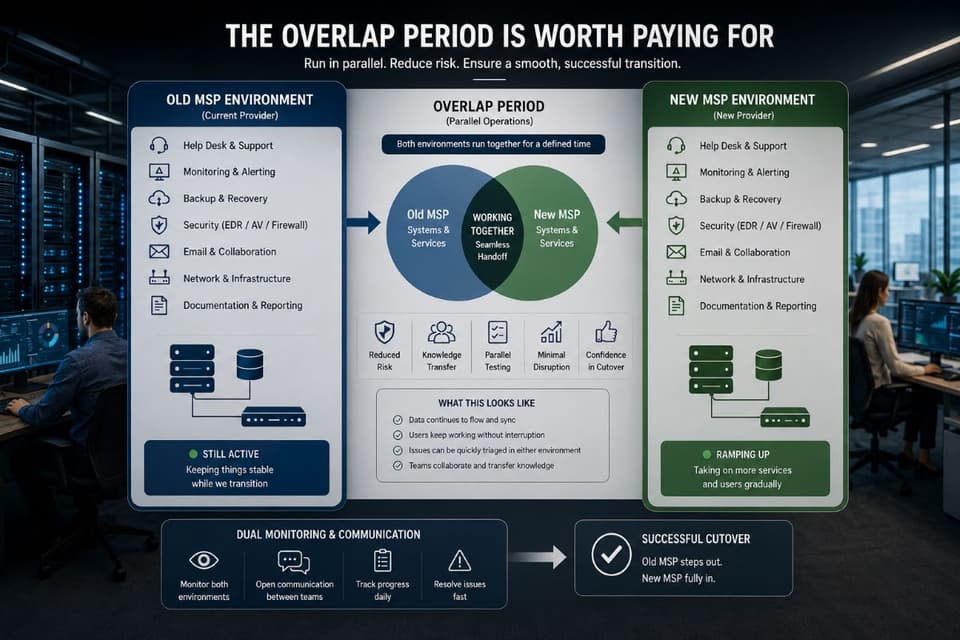
The Overlap Period Is Worth Paying For
Paying two providers at once feels wasteful, and the instinct is to cancel the old contract the moment the new one starts. Resist it. A short, deliberate overlap, where the outgoing provider is still contractually on the hook while the new one builds its understanding of your environment, is the cheapest insurance you can buy in this whole process. If something is missing, misconfigured, or undocumented, you want to find it while you still have two teams who can answer questions, not after the old one has been paid off and moved on. Measured against the cost of a failed cutover and a day of lost productivity, a few weeks of double billing is a rounding error. Treat the overlap as a planned line item, not a problem to minimize.
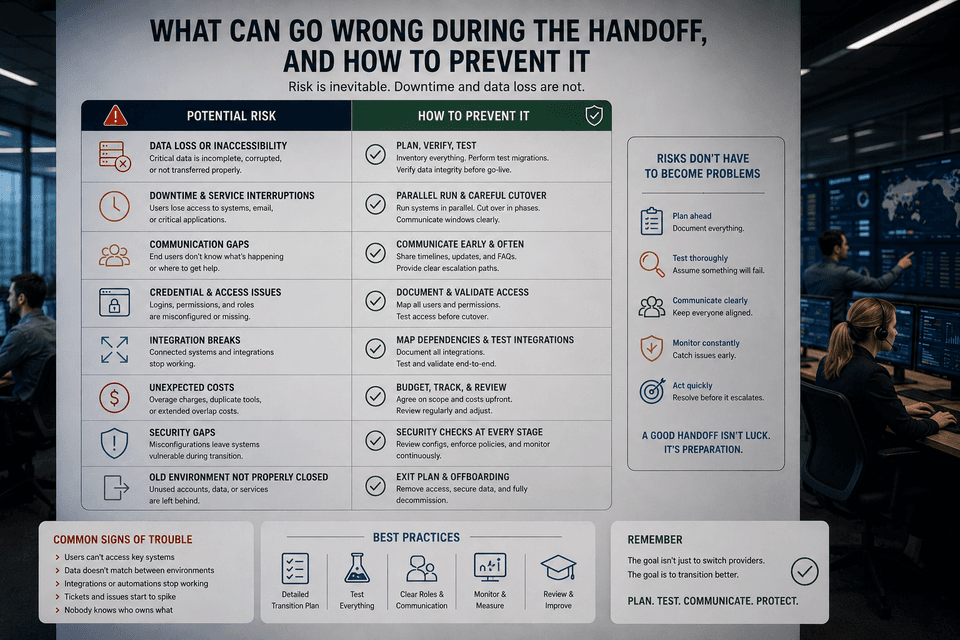
What Can Go Wrong During the Handoff, and How to Prevent It
Even a well-planned transition has predictable failure points, and naming them in advance is how you defuse them. The most visible risk is email. When mail routing moves from the old environment to the new one, a misstep can interrupt delivery, which is why the cutover happens out of hours, why DNS time-to-live values are lowered in advance so changes take effect in minutes rather than hours, and why mail flow is tested before anyone declares the move complete.
The most dangerous risk is a backup gap. Your new provider's backup system must be running and verified before the old provider's backups are switched off. Never allow a window where neither system is protecting your data. Insist on seeing a successful test restore from the new system, not merely a reassurance that backups are configured. This is also the moment to confirm your wider data backup and disaster recovery posture is genuinely in place rather than assumed.
Licensing is the quiet risk. If your Microsoft or other subscriptions are billed through the outgoing provider, they can lapse on the termination date unless the new licensing arrangement is already live. This has to be sequenced so that new licensing is active before old licensing ends. Account access is another concern: as credentials are rotated, it is easy to lock out an account before confirming the recovery method works, so verify recovery details before you change anything. Undocumented systems are the surprise risk, an old server quietly running a critical process, or a script nobody remembered, and the parallel run phase exists specifically to catch these before cutover.
Finally, there is the human risk that the outgoing provider becomes slow or unhelpful once notice is given. Keep every request in writing, keep your tone professional regardless of theirs, and refer back to the data return and offboarding obligations in your contract. If a provider refuses to release data or credentials it is contractually required to hand over, your written record becomes the basis for resolving it, through an attorney if it comes to that.
After the Switch: Close the Door Behind You
Completing the cutover is not the same as finishing the transition. The final stage is about confirming that the old provider no longer has any way into your environment and that the new arrangement is genuinely secure. Work through every credential the outgoing provider ever held and rotate it, every administrator password, every shared service account, every network device login. Confirm in the Microsoft admin center that the old provider's delegated access has been removed and that no unexpected administrator accounts remain. Check that the monitoring and management agents the old provider installed have actually been uninstalled from every device, because a forgotten agent is both a security gap and a loose end.
Ask the outgoing provider for written confirmation that it has deleted or returned your data in line with the contract, and keep that confirmation on file. This is also a natural moment to have your new provider run a security baseline of the environment, so you start the relationship with a clear, documented picture of where things stand rather than inheriting assumptions. If your business carries compliance obligations, fold that review into a proper assessment of your cybersecurity posture so nothing slipped during the move.
There is one last task, and it is the one that prevents this entire situation from repeating. Open your calendar and create a reminder tied to your new contract's notice deadline, set comfortably before the date itself. The reason so many businesses end up trapped in a provider relationship they have outgrown is simply that the renewal date arrived unnoticed and the window to act quietly closed. A single calendar entry, made the week you sign, means the next decision about your IT provider will be made deliberately by you, on your schedule, and not by default.
Knowing how to exit a bad MSP contract is never completely effortless, but it is entirely controllable. The businesses that move smoothly are not lucky. They read the contract early, reclaimed ownership of their own systems before giving notice, chose a capable replacement, and treated the handover as the structured project it is. Approached that way, leaving a provider that no longer serves you becomes one of the highest-return decisions a growing business can make, and your team should barely feel the ground move beneath them.
If your business is in the Westlake Village, Thousand Oaks, or wider Los Angeles area and the hardest part of leaving your current provider is simply not knowing where to start, that is exactly the conversation a transition-focused team is built for. A measured option many companies use is to begin with a co-managed IT arrangement, letting a new provider work alongside the incumbent and prove itself on real work before the full handover, which removes most of the risk from the decision. However you approach it, the goal stays the same: support, security, and strategy that match where your business is now, not where it was when you first signed.