

Ask most small business owners how well-managed their company laptops are, and they can usually give a fairly reasonable answer. Ask the same question about the company phones, and the answer gets vague fast, because mobile devices are consistently the most under-managed category of technology in a small business.
This guide explains what managed mobility services cover and why phones end up neglected even in businesses that manage everything else carefully. It also covers how to decide whether to handle this internally or bring in outside management.
Why Phones Get Left Behind
Laptops and desktops usually go through a business's normal IT process: ordered through the same channel, configured before handout, added to the asset inventory. Phones frequently skip this process entirely, purchased directly by an employee or through a separate carrier relationship the IT function was never looped into.
This origin story matters because many phones enter a business's environment without ever passing through the controls applied to every other device. That gap tends to persist for the life of the device rather than getting corrected later.
The Result Is a Device Category Nobody Fully Owns
In many small businesses, phones end up in an ownership gap. They are not quite IT's responsibility, since they came through a different purchasing path, and not quite the employee's, since the business pays for the plan and the data on the device is the business's. Nobody ends up with clear, complete accountability, and the device drifts along unmanaged as a result, outside whatever access control rules govern every other device in the business.
What Managed Mobility Services Include
The term covers more ground than device security alone. In summary:
Each piece is worth a closer look. It typically includes device lifecycle management, tracking what phones exist, their age, and when they need replacement, the same discipline applied to laptops but rarely applied to phones.
It includes carrier and plan management, consolidating and optimizing the actual phone service plans a business pays for, which is often a source of real, overlooked savings on its own. This covers matching plan tiers to actual data usage, catching lines still billing for departed employees, and consolidating separate accounts that accumulated as the business grew. It includes application deployment and management, ensuring the right business apps are installed and configured consistently rather than left to each employee's individual setup. And it includes the security layer most people think of first, device compliance, remote wipe capability, and consistent configuration.
Support Is Part of the Package Too
A frequently overlooked piece is ongoing help desk support for mobile devices, since a phone problem during a workday is as disruptive as a laptop problem. Employees without a clear support path either struggle alone or lose productive time on something a proper support process would resolve quickly, which is worth raising in any IT consulting conversation about coverage.
BYOD Versus Company-Owned: The Real Economics
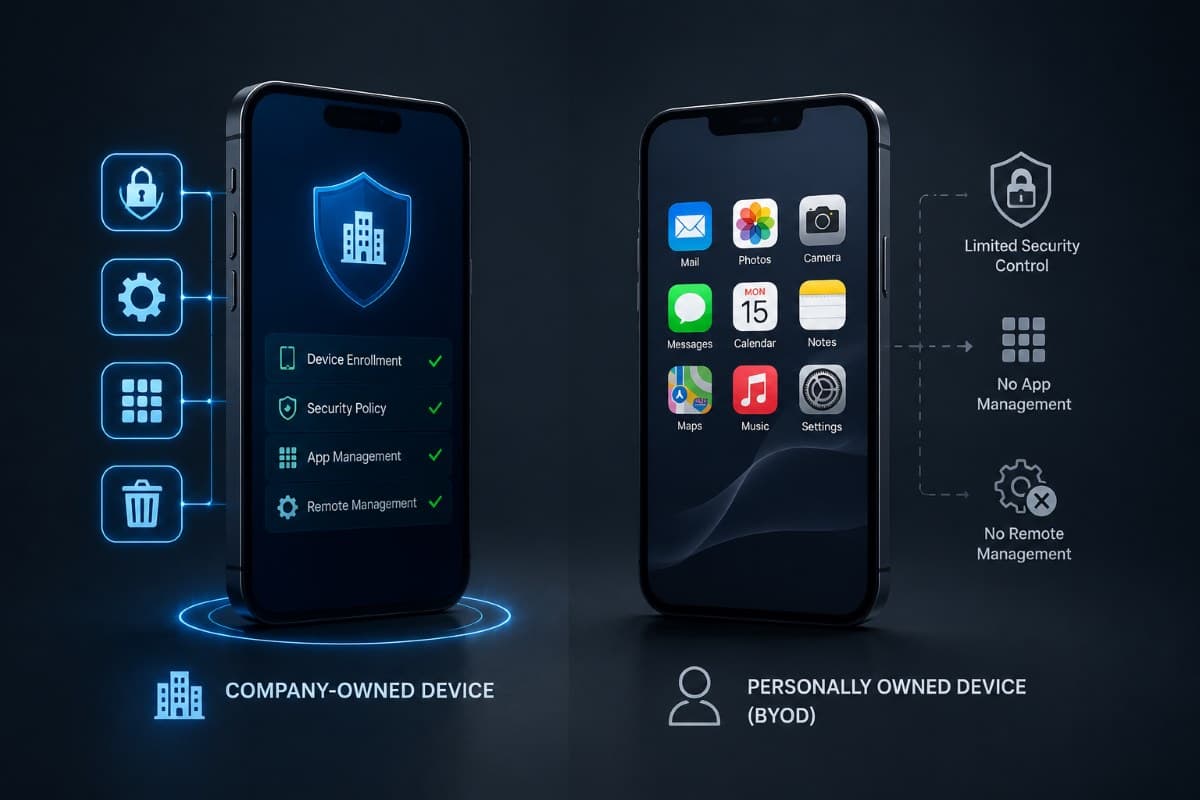
Businesses weighing whether employees should use personal phones for work or receive company-owned devices are weighing control against convenience. Company-owned devices are easier to manage consistently, since the business controls the device from purchase through retirement, but they carry a real upfront and ongoing cost.
Personal devices used for work, the bring-your-own-device model, avoid that direct cost but introduce a harder management problem: securing and managing a device the business does not own, purchased by an employee who may resist restrictions on their personal phone.
The economics look different depending on which way you go.
The security side of the personal-device model, and the control that answers each risk, is covered in our guide to BYOD security risks.
Many Businesses Land on a Hybrid Approach
A common practical resolution: company-owned devices for roles handling the most sensitive data, personal devices under a clear management policy for everyone else. This is not a compromise so much as a deliberate match between device ownership and actual data sensitivity, rather than a single blanket policy applied regardless of role.
Cost Visibility Is Often the Most Immediate Win
Beyond security, gaining visibility into what a business pays for mobile service across every line, every plan, and every device frequently surfaces savings opportunities that had been invisible inside a consolidated monthly bill. Duplicate lines, outdated plans, and devices still being paid for after an employee's departure are common findings in a first mobile audit.
The audit itself is straightforward: pull the current bill, list every active line, and match each one against a current employee and a known device. Lines that cannot be matched to both are the immediate finding, and they are frequently a meaningful share of the total in a business that has never done this.
The Offboarding Risk Mobile Devices Create
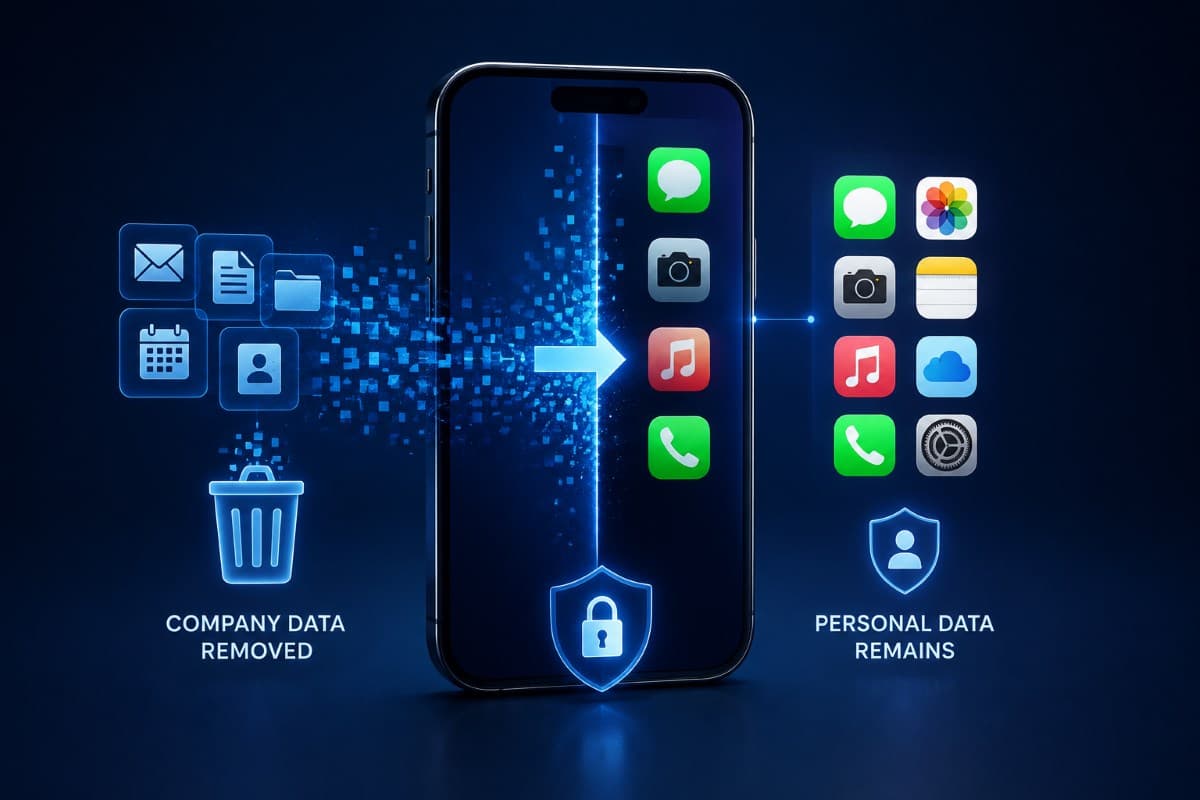
Mobile devices create a specific offboarding challenge that other equipment does not. An employee's personal phone likely holds company email, files, and app access that must be removed cleanly on departure without erasing the employee's own data and photos, which is both a technical and a relationship challenge on a BYOD device.
A business without a tested process for this discovers the gap precisely when it matters most, during an actual departure, rather than having it solved calmly in advance. Selective wipe capability, removing only company data and app access rather than the entire device, is the specific feature that makes this manageable on personal devices.
A workable mobile offboarding sequence is short. Revoke the company account access first, which stops new data reaching the device, then trigger the selective wipe to remove what is already there, then confirm the removal completed rather than assuming it did. Phones are one line in a full employee offboarding checklist, and usually the one that gets missed.
The confirmation step is the one most often skipped. It matters because a device that is switched off or out of coverage will not process the removal until it reconnects, which can be days later, or never if the person stops using it.
Tablets and Wearables Are Part of the Fleet Too
The mobile device category has expanded well beyond phones. Tablets used for point-of-sale, field service, or presentations, along with a growing range of wearable devices, deserve the same management discipline rather than existing as an even more overlooked sub-category. A business inventorying its mobile fleet should include every connected device, not just the phones employees carry daily.
Shared Devices Introduce Their Own Complexity
Tablets shared across a team, common in retail and field service settings, complicate the individual-accountability model that works well for personally assigned phones. These devices need their own management approach, often centered on the device itself rather than an individual user, with clear procedures for what happens between shifts or users.
Deciding Between Doing This Yourself and Managed Support
A very small business with few devices and straightforward needs may reasonably handle basic mobile management internally, using built-in tools without extensive outside support. For iPhone and iPad fleets, our guide to Apple MDM explains what the free tooling covers. As the device count grows, as BYOD complexity increases, or as the business enters a more regulated industry, the case for dedicated management support strengthens considerably.
The tell is usually the same one that applies to broader IT decisions. If managing mobile devices well requires more attention and specialized knowledge than anyone internally can sustain, that gap is the real case for outside help, regardless of device count.
A handful of phones managed loosely by whoever handles IT tasks works reasonably well at a very small scale. The same informal approach breaks down as a business grows past a certain device count, because the accumulated inconsistency compounds faster than most owners expect. Recognizing this transition point before it becomes an actual problem, rather than after, is where planning pays off.
International Travel Adds Another Layer
Employees traveling internationally with company phones introduce considerations most domestic-only mobile management never addresses: roaming costs, data security on unfamiliar networks, and sometimes country-specific restrictions on certain device features or applications entirely. A business with any international travel should confirm its mobile management approach accounts for this rather than assuming domestic policies translate cleanly.
Loaner Devices Solve Some of This Cleanly
Some businesses address international travel risk by issuing a separate, minimally configured loaner device for the trip rather than sending an employee's regular, fully loaded phone abroad. This limits exposure if the device is lost, stolen, or compromised while traveling, at the cost of the inconvenience of a second device during the trip.
Bringing Mobile Devices Into Regular IT Management
The fix for most small businesses is not a separate mobile-specific initiative but extending the same management discipline already applied to laptops and desktops to include phones. This belongs inside the same managed IT services relationship a business already has, rather than existing as an unmanaged category left outside normal IT oversight.
A Quick Self-Check Worth Running This Week
A business can get a rough sense of its mobile exposure without outside help, in four checks:
- Count every active phone line the business pays for.
- Compare that count against the current employee list.
- Note how many of those devices have ever been enrolled in a management tool.
- Ask whether anyone could name, right now, what happens to a phone when someone leaves.
Gaps in any of these answers point directly at where to start.
Companies in the Valley can run that first inventory with local help through IT support across the San Fernando Valley, through to a tested offboarding process.
Building a Mobile Device Policy
Beyond the technical management pieces, a written mobile device policy that employees read and acknowledge closes the gap between what a business intends and what happens in practice. This policy should plainly state what data can live on a device, what happens at offboarding, and what employees should expect regarding privacy on a personally owned device enrolled in company management.
Privacy Expectations Need to Be Explicit, Not Assumed
Employees using personal devices for work reasonably want to know what a business can and cannot see or control on their own phone. Leaving this ambiguous breeds distrust, even when the management scope is limited to company data alone. Stating plainly, in writing, exactly what management touches and what it does not, tends to reduce resistance to enrollment more than a vague reassurance ever does.
Stop Treating Phones as the Exception
Managed mobility services close a gap that exists in most small businesses almost by accident: phones entering the environment through a different path than every other device, and never quite catching up to the same standard. The fix is not complicated; it is extending the same discipline already applied everywhere else in the business to the device category most likely to be overlooked.
For businesses across the metro, a partner providing managed IT services in Los Angeles can bring your entire mobile fleet under the same management standard as the rest of your equipment.
Frequently Asked Questions
Managed mobility services include device lifecycle management, carrier and plan management to cut phone service costs, and consistent business app deployment. They also cover security compliance with remote wipe, and dedicated support for mobile-specific issues. It covers more than security alone, extending the same management discipline applied to laptops into the mobile device category.
Company phones tend to be less well managed because they frequently enter a business through a different path than other equipment, purchased directly by an employee or through a carrier relationship IT was never involved in. That means they skip the controls applied to every other device from the start. This creates an ownership gap where nobody has clear, complete accountability for the device.
Whether to use personal or company-owned phones depends on the trade-off a business is willing to make between cost and control. Company-owned devices are easier to manage consistently but cost more upfront; personal devices avoid that cost but introduce harder management challenges. Many businesses land on a hybrid approach, company-owned for roles handling the most sensitive data, managed personal devices for everyone else.
With proper management in place, a selective wipe removes only company email, files, and app access while leaving the employee's personal data and photos untouched. Without a tested process for this, businesses discover the gap during an actual departure, which is a worse time to solve it than having the process ready in advance.
If your company phones have never gone through the same managed mobility services process as your laptops, talk to GlobeVM. We can bring your entire mobile fleet up to the same standard as the rest of your equipment.
Comments
0 Comments