
Ask most small business owners who has access to what inside their systems, and the honest answer is usually a shrug: whoever needed something at some point got added, nobody has taken anything away since, and the org chart from three years ago bears little resemblance to who can actually reach the client database today.
Access control is the discipline that fixes this, and it is one of those foundational security concepts that gets referenced constantly and explained rarely. This guide walks through what access control actually decides, the three models businesses run into in practice, which one fits a small company, and how this foundational layer relates to the more specific, higher-stakes world of privileged account protection.
What Access Control Actually Decides
Before the models, the concept deserves a plain definition: access control is the set of rules and mechanisms that decide who can do what with which resource, applied consistently across every system that holds something worth protecting.
It sounds simple, and the simplicity hides a genuinely important split that most explanations skip: authentication and authorization are two different questions, answered by two different mechanisms, and confusing them is where a lot of small-business security goes wrong. Authentication answers who are you, proven through a password, a code, a fingerprint, some combination of factors.
Authorization answers what are you allowed to do now that we know who you are, and this is the actual job of access control. A business can have flawless authentication, everyone proves their identity perfectly, and still have terrible security if authorization is a free-for-all where any authenticated person can reach anything. The two work together, but they are not the same problem, and access control is specifically the authorization half.
The Three Models, in Plain Language
Nearly every access control system in practical use is a variation on three underlying models, and understanding the differences clarifies why most modern systems land on one of them by default.
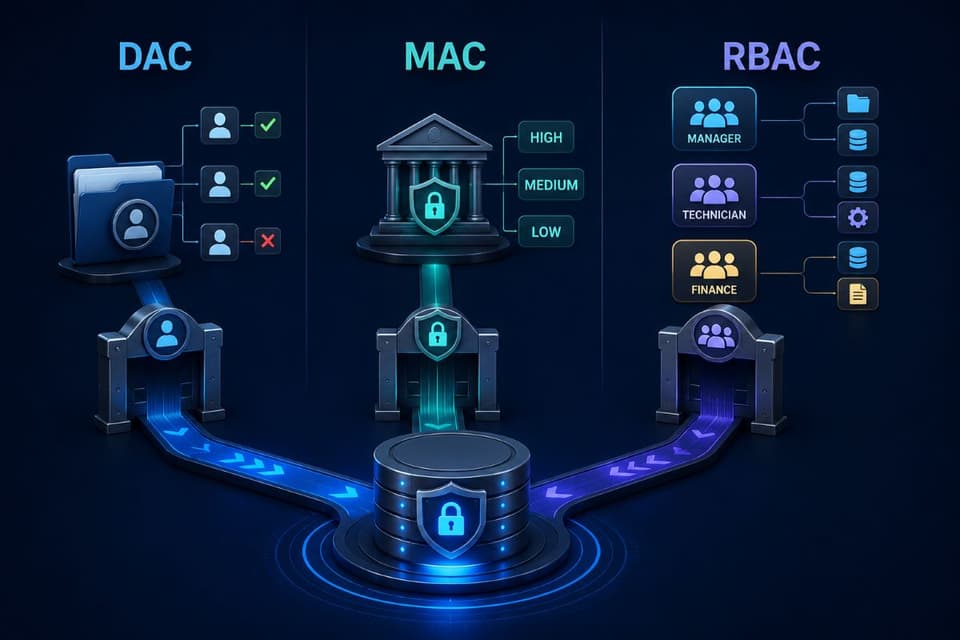
Discretionary Access Control: The Owner Decides
In discretionary access control, whoever creates or owns a resource decides who else can access it, and that decision can change at any time at the owner's discretion. This is the model behind a shared folder where the person who created it can add or remove anyone they choose, or a document where the author sets who can view or edit it.
The appeal is flexibility: decisions happen fast, close to the person with the context to make them. The weakness is the same flexibility: permissions sprawl in exactly the way described at the top of this article, because nothing forces anyone to periodically review or revoke access, and a business relying entirely on this model tends to discover, usually during an audit or an incident, that access decisions from years ago never got cleaned up.
Mandatory Access Control: The System Decides
At the opposite end, mandatory access control removes discretion entirely: a central policy, set by administrators and enforced by the system itself, determines access based on formal classification levels, and no individual user, not even the resource's creator, can override it.
This model is genuinely rigorous, the standard in government and military systems handling classified information, and genuinely heavy for a small business, requiring formal data classification and centralized policy administration that few companies under a few hundred employees have the structure to maintain.
Most small businesses will never implement mandatory access control in its strict form, though the underlying idea, that some decisions should not be left to individual discretion, shows up in lighter form in how the next model gets applied.
Role-Based Access Control: The Job Decides
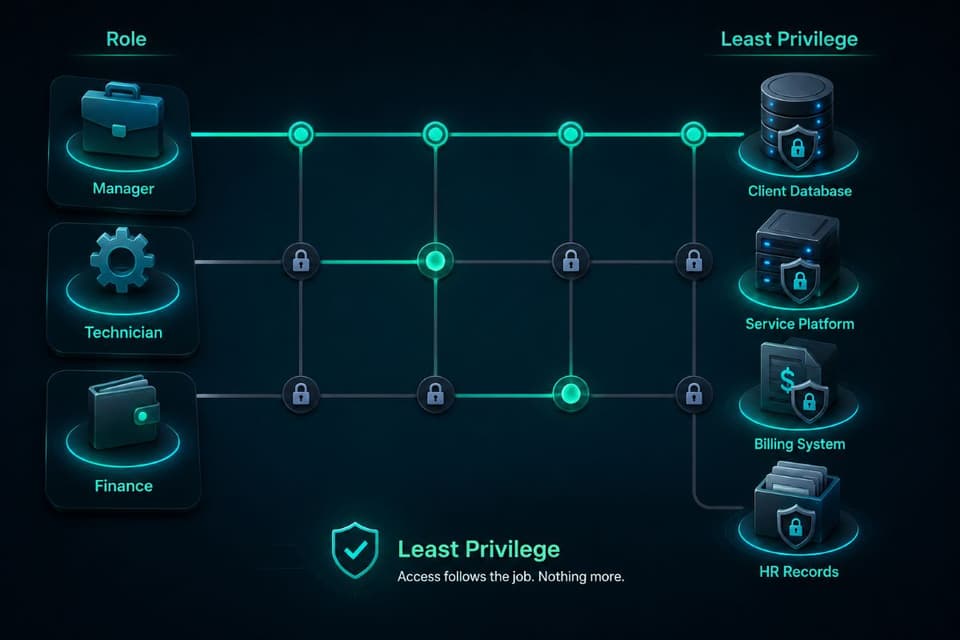
Role-based access control, almost always shortened to RBAC, assigns permissions to roles rather than individuals, and then assigns people to roles that match their actual job. An office manager role might include access to scheduling and billing systems; a technician role includes the service platform and client equipment records; an owner role includes everything.
When someone joins, they get the role that matches their job and inherit exactly the access that role carries, no more improvising required. When someone changes jobs or leaves, removing them from the role removes the access cleanly, all at once, rather than hunting through a dozen systems for individual permissions granted piecemeal over years.
This is the model that dominates modern business software, because it balances the two failure modes on either side: it avoids the sprawl of pure discretionary access while avoiding the administrative weight of mandatory access, and it maps naturally onto how a business already thinks about itself, in terms of jobs and responsibilities rather than individual permission grants.
Comparing the Three
Why Role-Based Access Control Wins for Most Small Businesses
The practical recommendation for nearly every small business follows directly from that table: build access around roles wherever your systems support it, and treat discretionary sharing as an exception for low-stakes situations rather than the default posture for anything that matters. The reasoning is not theoretical.
A business with clearly defined roles can answer, in seconds, who has access to sensitive client data and why, a question that regulators, cyber insurers, and auditors ask with increasing frequency and that a business running purely on discretionary permissions often cannot answer at all without a lengthy manual review.
Setting this up well starts with an honest inventory: what are the actual functional roles in the business, what does each genuinely need to do its job, and does current access match that, or does it reflect years of one-off grants that never got revisited. That gap, between what access exists and what access is actually needed, is usually larger than owners expect, and closing it is most of the real work.
The Principle That Ties All Three Together
Underneath whichever model a system uses sits a single governing idea worth stating on its own: the principle of least privilege, which holds that every person and every system should have the minimum access required to do its job, no more. This principle is not a fourth model; it is the standard every model should be judged against.
A role-based system with bloated, overly generous roles fails the principle just as thoroughly as an ungoverned discretionary free-for-all, because the actual measure of good access control was never which model you chose, it is how tightly access maps to genuine need.
Applied consistently, least privilege also shrinks the blast radius of every other security failure in your business: a phished employee whose access was already minimal can only expose what their role legitimately touches, not the entire company, which is why access control sits underneath so much of what makes the rest of a security program actually work rather than existing as a checkbox on its own.
How This Relates to Privileged Access Management
It is worth being explicit about a distinction that confuses many business owners: access control, as described in this article, is the general framework governing everyone's everyday permissions, while privileged access management is a specific, higher-stakes application of that same thinking to a narrower category, the administrator and other high-privilege accounts capable of the most damage if compromised.
Every business needs sound access control for its whole workforce; businesses with meaningful administrative access, servers, cloud infrastructure, financial systems, need privileged access management specifically layered on top for that smaller, higher-risk set of accounts. Think of access control as the foundation and privileged access management as the reinforced section of that foundation built where the load is heaviest.
Three Practical First Steps
For a business ready to move from ad hoc permissions toward real access control, three steps produce most of the value without requiring a large project. First, inventory what actually exists today, every system, who can reach it, and how that access was granted, which alone routinely surfaces access nobody remembers approving.
Second, define the real functional roles in the business and what each genuinely needs, resisting the temptation to just recreate the current messy state as a role. Third, put a review rhythm in place, even a simple quarterly check, since access control set up perfectly once and never revisited drifts back toward sprawl within a year as people join, change jobs, and leave.
None of this requires exotic tooling for most small businesses; it requires an inventory, a set of role definitions, and a calendar reminder, which is squarely the kind of ongoing discipline that fits naturally inside ordinary managed IT services rather than a one-time project.
A Simple Test for Whether Access Control Is Working
A business does not need a formal audit to get a rough read on its own access control health; one honest question does most of the work. Pick any current employee at random and ask what they can access and why. If the answer comes quickly and maps cleanly to their actual job, the system is probably in reasonable shape.
If the answer requires checking several systems individually, involves access nobody can explain, or turns up something the person clearly should not still have from a role they left months ago, that gap is the real starting point, not a theoretical one.
Running this test on a handful of employees, not just the newest hires but people who have been in the business for years and changed roles at least once, tends to surface exactly the kind of drift this article describes, and a provider offering access control services should be able to walk through this exact exercise with you as a first conversation, not a sales pitch.
Access Should Follow the Job, Not the History
Access control answers a question every business needs a real answer to: who can reach what, and why. Most small businesses drift into a messy, discretionary version of the answer by accident, one permission grant at a time, until nobody can say with confidence who has access to what anymore.
Role-based access control, governed by the principle of least privilege and reviewed on a real rhythm, replaces that drift with a system that matches access to actual job needs and can answer an auditor's question in seconds instead of days. Do the inventory, define the roles, put the review on the calendar, and access stops being a historical accident and starts being a deliberate decision.
For businesses in the Conejo Valley, a partner providing IT services in Thousand Oaks can run the access inventory and set up role-based access control that holds up over time.
Companies to the northeast can get the same locally through IT support in Santa Clarita, from the first role definition to the quarterly review that keeps it accurate.
If nobody in your business can currently say with confidence who has access to what and why, GlobeVM can run the inventory and set up role-based access control that actually holds up over time.