

Opening a dental practice means making a hundred decisions in six months, and the technology decisions are the ones that get punished longest when they are made last. The dentist who plans dental practice IT setup alongside the buildout gets network cable inside the walls before drywall, imaging that talks to the practice management system on day one, and a first patient whose x-rays simply appear on the operatory screen. The dentist who leaves IT for the final month gets exposed conduit, a scrambled go-live week, and a front desk improvising on a personal laptop. This checklist exists to put you in the first group.
What follows is the setup sequence in the order the buildout actually demands it, the systems a new practice has to choose from scratch, the compliance work that must exist before the first appointment rather than after. And the go-live week plan that separates a calm opening from a chaotic one.
Start With the Walls: IT Decisions That Belong in Construction
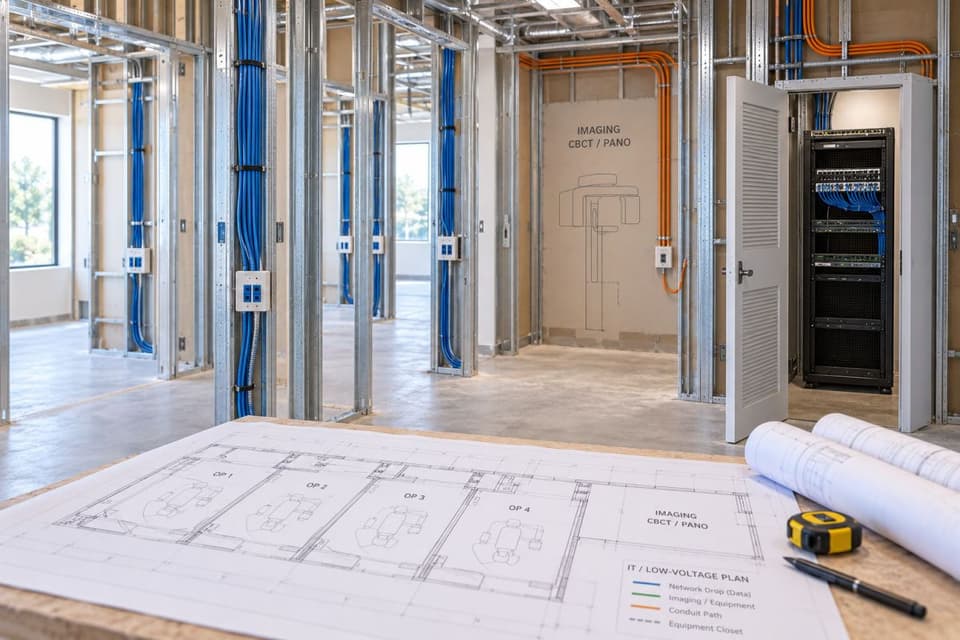
The most expensive IT mistakes in a new practice are the ones sealed behind drywall. While the space is still open, three decisions need to be final. First, low-voltage cabling: every operatory needs network drops for the workstation, the imaging sensor or camera, and spare capacity for the equipment you will add in year three, because pulling one extra cable today costs almost nothing and opening a finished wall costs a remodel.
Second, the location of the equipment closet: a ventilated, lockable space for the network gear and any on-site server, positioned away from the compressor room's heat and vibration. Third, conduit paths to the panoramic or CBCT area, since large imaging equipment has vendor-specified connection requirements that are far easier to honor in framing than in finish work. A provider experienced in network management should walk the space with your contractor before the drywall date, cabling plan in hand, because that one meeting prevents most of the stories dentists tell each other about openings gone wrong.
Choosing the Core Systems
Three choices define the practice's daily rhythm for the next decade: the practice management platform, the imaging stack, and the connectivity underneath both. They are worth choosing in that order, deliberately, because every later frustration in a dental office traces back to one of these three being chosen by default.
Practice management first, everything else second
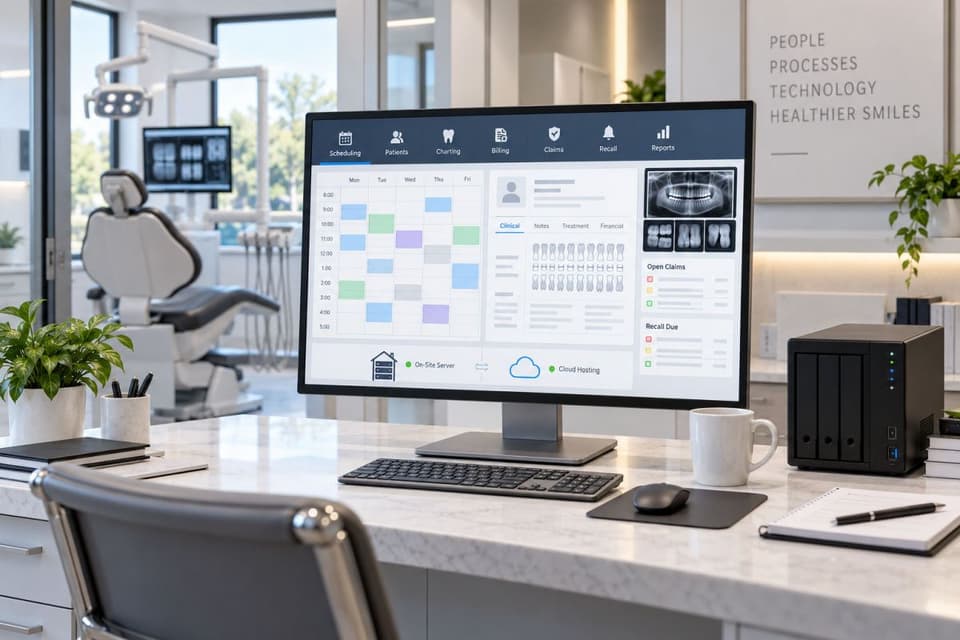
The practice management system is the operational heart, scheduling, charting, billing, insurance claims, and recall all live there, and nearly every other technology choice has to be compatible with it. Choose it early, because the decision drives your imaging integration, your hardware specifications, and whether your server lives in the closet or in the cloud. Cloud-hosted platforms trade the on-site server for a subscription and make reliable internet non-negotiable; traditional server-based platforms keep data in the building and make backup discipline non-negotiable. Neither answer is wrong, but the choice should be deliberate, made with a demo schedule and reference calls to practices your size, not inherited from whatever the equipment dealer bundles.
Imaging that actually integrates
Sensors, intraoral cameras, and panoramic units each come with vendor software, and the difference between a smooth operatory and a frustrating one is whether those images land inside the patient chart automatically. Before purchasing, confirm in writing that your imaging hardware integrates with your chosen practice management platform, and have one party, your IT provider, own the integration work rather than letting the equipment dealer and the software vendor point at each other. This is also where IT support built for dental practices earns its keep, because a generalist learns these vendor relationships on your schedule and a dental-literate provider already has the phone numbers.
Workstations and mounts that survive clinical life
Operatory computers live a harder life than office machines: disinfectant wipes, gloved hands, and zero tolerance for a reboot mid-procedure. Specify wipeable keyboards and sealed peripherals, mounts positioned during cabinet design so screens sit where the clinician actually looks, and business-grade machines rather than consumer hardware, since the price difference is one recovered afternoon. Keep one spare workstation imaged and shelved; the day a machine dies with a full schedule, the fix becomes a ten-minute swap instead of a canceled column.
The supporting cast: phones, internet, and Wi-Fi
A new practice needs business internet with enough upload capacity for claims, cloud backups, and image transfers, plus a modest secondary connection, because a practice that cannot verify insurance or send claims is losing money in real time even if the drills still spin. Phones today mean a cloud voice system that integrates with your schedule where possible.
Confirm early how your claims clearinghouse connects to the practice management platform, since enrollment paperwork has its own lead time. Wi-Fi should be built as two separated networks from the first day: a clinical network for workstations and equipment, and a guest network for patient phones in the waiting room, with no path between them. That separation costs nothing during setup and buys real protection forever after.
Your Equipment Dealer and Your IT Provider Are Two Different Jobs
New practices routinely assume the equipment dealer handles the technology, and dealers routinely assume the opposite, which is how openings end up with a panoramic unit installed and nothing for it to talk to. Draw the line early and in writing: the dealer sells, installs, and services the clinical modality; the IT provider owns the network, the workstations, the integration into the chart, and the security around all of it. Then schedule one joint installation day where both are on site together, because the problems that take weeks over email get solved in an afternoon when the sensor technician and the network engineer are standing at the same operatory.
HIPAA From Day One, Not Day Ninety
A new practice does not get a compliance grace period; the obligations in the HIPAA Security Rule attach the moment the first patient record exists. Three items belong on the pre-opening checklist. Complete a security risk analysis of the new environment, which is straightforward when the environment is new and documented. Collect signed Business Associate Agreements from every vendor that will touch patient information, the practice management vendor, the imaging cloud, the answering service, the billing partner, before those services carry a single record.
And set up communication channels correctly from the start: HIPAA compliant email, and patient texting through a covered platform rather than a personal phone. Practices that open with day-one HIPAA compliance built into the setup spend a fraction of what retrofitting costs, because retrofits happen under pressure and setups happen on a schedule.
Backup, Access, and the Boring Essentials
Before opening day, the unglamorous layer must exist. Backups run automatically, cover the practice management data and the imaging volumes that grow faster than anyone budgets, and get verified with an actual test restore before the first patient, because an untested backup is a hope, not a plan. Decide retention while deciding backup: how long images and records must be kept is a compliance question with state-specific answers, and the storage plan should be sized for it from the start rather than discovered at capacity.
Every staff member has an individual login with access matched to their role, no shared front-desk account, ever, since shared logins make patient record activity untraceable and fail the first audit question. Multi-factor authentication is on for email and any remote access. Workstations lock automatically. And the password to everything lives in a managed vault the owner can reach, not in a binder, a text thread, or one office manager's memory.
The Timeline That Makes It Calm
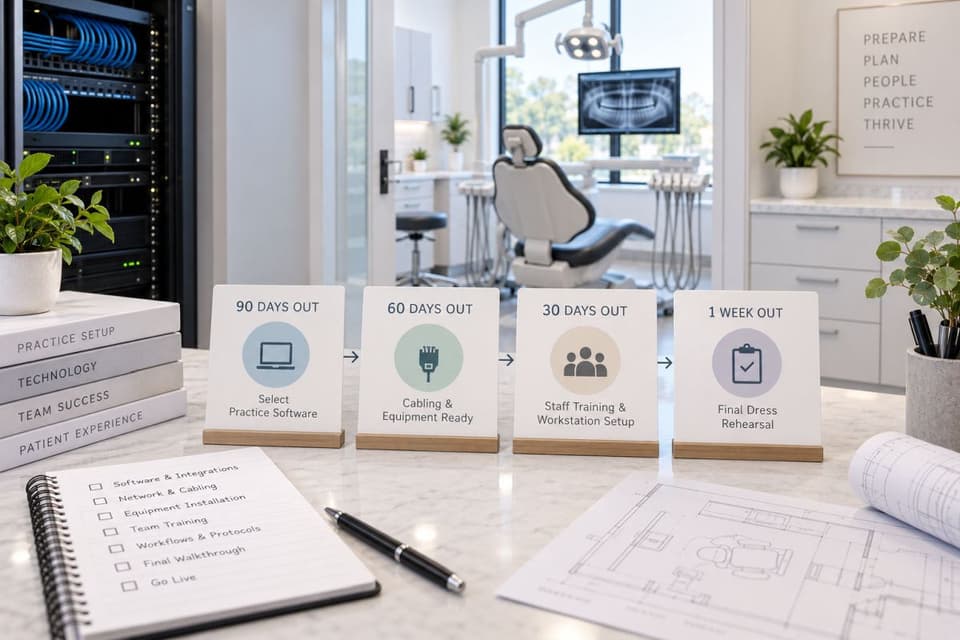
Working backward from opening day, the sequence looks like this. Ninety days out: practice management platform chosen, imaging equipment ordered with integration confirmed, internet service ordered since business circuits have lead times, and the cabling plan finalized with the contractor. Sixty days out: cabling installed during buildout, equipment closet ready, phone system configured, and BAAs collected as each vendor contract is signed. Thirty days out: staff scheduled for hands-on practice management training before opening week rather than during it, workstations imaged and mounted, practice management configured with your fee schedules and templates, imaging integration tested with real captures, backups running, and staff accounts created.
One week out: a full dress rehearsal, schedule a fake patient, capture an image, chart it, run a claim, take a payment on the actual terminal, print and scan whatever the front desk will print and scan, and fix whatever stumbles while stumbling is free. Invite your IT provider to be on site or on call for the first two mornings, because the questions that surface with real patients are small, urgent, and best answered in minutes. Practices across the San Fernando Valley open every month, and the calm ones, from Woodland Hills startups to Tarzana acquisitions, are reliably the ones that rehearsed.
Acquisitions: A Different First Month
Buying an existing practice flips the problem: technology exists, and the question is what shape it is in. The pre-close IT checklist is short but firm: inventory the hardware and its age, confirm the practice management license actually transfers and what the vendor charges for the change, and verify where patient data lives and how it will be migrated or retained. Ask specifically about imaging archives in older vendor formats, since those migrations surprise everyone.
And change every password and remove every departed-staff account on day one, including the seller's remote access. The first month should also include the same risk analysis and BAA collection a startup does, because you inherited the obligations along with the charts, and the seller's compliance paperwork protects the seller, not you. What ongoing support should look like once the keys change hands is its own decision, and our guide to dental IT support covers that next chapter.
A calm opening day is the sum of decisions made in the framing stage, and this dental practice IT setup checklist is how those decisions get made on time, so if you are within six months of opening or acquiring, book a buildout IT walkthrough with GlobeVM and we will bring the cabling plan to your contractor meeting.